
Description
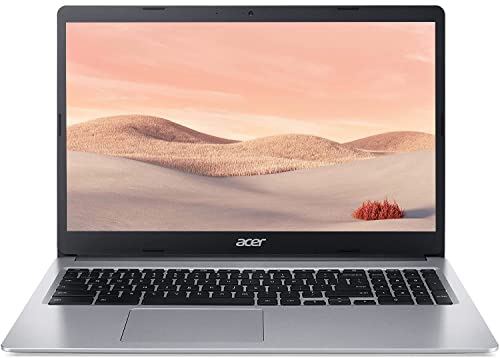
Acer 2022 15.6″ FHD IPS Touchscreen Chromebook, – Features & Prices in Saudi Arabia :
Acer 2022 15.6″ FHD IPS Touchscreen Chromebook, Intel Dual-Core Celeron N Processor Up to 2.50GHz, 4GB RAM, 32GB SSD, Numeric Keypad, Ultra-Fast WiFi, Chrome OS-(Renewed)
Product Dimensions
17.17 x 12.48 x 3.66 inches
Item Weight
5.04 pounds
ASIN
B0B2VDYX4J
Item model number
Acer 15.6″ Touch Chromebook
Batteries
1 Lithium Ion batteries required. (included)
Date First Available
May 31, 2022
Manufacturer
Acer
Test video – Acer 2022 15.6″ FHD IPS Touchscreen Chromebook, :
Product highlights :
Questions & Answers – Acer 2022 15.6″ FHD IPS Touchscreen Chromebook, :
Technical specifications – Acer 2022 15.6″ FHD IPS Touchscreen Chromebook, :
Brand
Acer
Model Name
Acer 15.6″ Touch Chromebook
Screen Size
15.6 Inches
Color
Silver
Hard Disk Size
32 GB
CPU Model
Celeron N
Ram Memory Installed Size
4 GB
Operating System
Chrome OS
Graphics Card Description
Integrated
Graphics Coprocessor
Intel
Purchase advice :
-
Warranty :
Check the duration of the warranty and also the faults and defects it covers. Is it complete or limited? and What is included in the warranty (parts, repairs or both)?
-
Shipping :
Is delivery offered? And how long does it take to get delivered (Delivery time)
-
Proof of purchase :
Does the shop give you an invoice ?
-
After-sales service :
Do they have an after-sales service to have information about the installation or operation (instructions for use). Also in case of problem, it is the seller who takes charge or you must contact the manufacturer or supplier yourself.
_____________________________
R. N (verified owner) –
Touch Screen is key – Just had troubles logging into gmail account nevertheless I found a way to login. Using it for work and makes the day much faster with the added touch screen feature.
F. S (verified owner) –
Speed – Touch screen
R. N (verified owner) –
Touch Screen is key – Just had troubles logging into gmail account nevertheless I found a way to login. Using it for work and makes the day much faster with the added touch screen feature.
H. S (verified owner) –
Not user friendly – has taken me a week of searching and still cannot find the most basic features found on other computers, like an all caps key.
J. L (verified owner) –
It works like it should. – It does everything that it’s supposed to do, the only issue I’ve had so far after about 3 days is that when using pandora, the speaker flickered a little. However, it fixed itself, so its ok. It’s lovely for a cheaper than normal laptop and you can’t even tell it was previously owned.
H. S (verified owner) –
Not user friendly – has taken me a week of searching and still cannot find the most basic features found on other computers, like an all caps key.
C. P (verified owner) –
Good condition – Great used touch screen laptop long battery life good screen quality perfect for traveling
J. L (verified owner) –
It works like it should. – It does everything that it’s supposed to do, the only issue I’ve had so far after about 3 days is that when using pandora, the speaker flickered a little. However, it fixed itself, so its ok. It’s lovely for a cheaper than normal laptop and you can’t even tell it was previously owned.
F. S (verified owner) –
Speed – Touch screen
S. O (verified owner) –
Impressive – Enjoying the laptop easy to use
C. P (verified owner) –
Good condition – Great used touch screen laptop long battery life good screen quality perfect for traveling
M. N (verified owner) –
Very good computer for the money. – It works beautifully, the touchscreen is such a great feature. We’re very satisfied. This laptop is replacing the old touchscreen laptop that was starting to go bad. I love how light weight it is too. Overall very happy.
M. N (verified owner) –
Very good computer for the money. – It works beautifully, the touchscreen is such a great feature. We’re very satisfied. This laptop is replacing the old touchscreen laptop that was starting to go bad. I love how light weight it is too. Overall very happy.
S. O (verified owner) –
Impressive – Enjoying the laptop easy to use
L. D (verified owner) –
Not blue tooth compatible with printers – Tried to add a printer just to find out Chromebook doesn’t support a printer through Bluetooth. You have to connect it with a cable.
L. D (verified owner) –
Not blue tooth compatible with printers – Tried to add a printer just to find out Chromebook doesn’t support a printer through Bluetooth. You have to connect it with a cable.