Apple Magic Mouse (Wireless, Rechargable) – White – Features & Prices in Saudi Arabia :
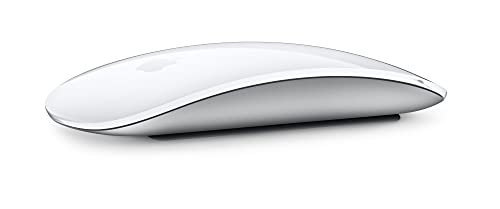
Apple Magic Mouse (Wireless, Rechargable) – White Multi-Touch Surface
Test video – Apple Magic Mouse (Wireless, Rechargable) – White :
Product highlights :
Magic Mouse is wireless and rechargeable, with an optimized foot design that lets it glide smoothly across your desk.
The Multi-Touch surface allows you to perform simple gestures such as swiping between web pages and scrolling through documents.
The incredibly long-lasting internal battery will power your Magic Mouse for about a month or more between charges.
It’s ready to go right out of the box and pairs automatically with your Mac, and it includes a woven USB-C to Lightning Cable that lets you pair and charge by connecting to a USB-C port on your Mac.
System Requirements: Bluetooth-enabled Mac with OS X 10.11 or later , iPad with iPadOS 13.4 or later
Questions & Answers – Apple Magic Mouse (Wireless, Rechargable) – White :
➕ What is the price of Apple Magic Mouse (Wireless, Rechargable) - White in Saudi Arabia ?
The price of Apple Magic Mouse (Wireless, Rechargable) – White in-store is 290 SAR VAT.
➕ When Apple Magic Mouse (Wireless, Rechargable) - White was released ?
The release date was .
➕ What is the price of Apple Magic Mouse (Wireless, Rechargable) - White cheap used ?
The price of Apple Magic Mouse (Wireless, Rechargable) – White used is 200 SAR VAT.
➕ What are the main characteristics of Apple Magic Mouse (Wireless, Rechargable) - White ?
Special specifications :
Magic Mouse is wireless and rechargeable, with an optimized foot design that lets it glide smoothly across your desk.
The Multi-Touch surface allows you to perform simple gestures such as swiping between web pages and scrolling through documents.
➕ Is it interesting to buy this product ?
The best people who can answer you are customers who have already bought and tested this product (See Customer Reviews). This product is rated 4.7 / 5 on Amazon.
➕ Where to buy Apple Magic Mouse (Wireless, Rechargable) - White in Saudi Arabia ?
Technical specifications – Apple Magic Mouse (Wireless, Rechargable) – White :
Brand
Apple
Color
White
Connectivity Technology
Bluetooth, USB
Special Feature
Wireless, Mac Compatible
Movement Detection Technology
Optical
Purchase advice :
Warranty :
Check the duration of the warranty and also the faults and defects it covers. Is it complete or limited? and What is included in the warranty (parts, repairs or both)?
Shipping :
Is delivery offered? And how long does it take to get delivered (Delivery time)
Proof of purchase :
Does the shop give you an invoice ?
After-sales service :
Do they have an after-sales service to have information about the installation or operation (instructions for use). Also in case of problem, it is the seller who takes charge or you must contact the manufacturer or supplier yourself.
_____________________________
16 reviews for Apple Magic Mouse (Wireless, Rechargable) – White
Rated 5 out of 5
M. I (verified owner)–
Responsive, light, and smooth – Short of it, this is an excellent product.
Rated 4 out of 5
P. H (verified owner)–
Great… With a design flaw – Love the functionality of the mouse. However, the placing the charger poses a bit of an issue. Some users of this device including myself occasionally use it until the last potential second however when wanting to charge it, you’re forced to flip it and then charge it as the charging port is on the bottom of the mouse which then means you’ll have to wait till it’s charged to amount of your liking until you can then continue to use it. I’d prefer that they redesign the product to allow charging while using it.
Rated 5 out of 5
F. D (verified owner)–
Fun – The magic mouse is really fun to use because of the gestures. To get the most out of a mac you are going to have to use their products I reckon.
Rated 5 out of 5
H. K (verified owner)–
Better than previously released – I had an old Magic Mouse that took batteries. It seemed like I had to recharge the batteries daily and became a hassle when I had to in the middle of doing something. This new Magic Mouse holds a great charge and is so much more reliable. It’s been two weeks since my last charge and I’m still at 70% battery! I would definitely recommend this 🙂
Rated 5 out of 5
D. Z (verified owner)–
Good for general business use – As someone who works in Human resources and is constantly clicking all day I have found this magic mouse to be my best friend. Others may disagree I know I did once I first got it but after a while I got used to it and figured out how to configure the mouse to my liking. The battery last a loooong time before it needs to be charged. My overall rating for this mouse 9/10
Rated 2 out of 5
K. P (verified owner)–
A Good Example of Form Over Function – I think this is possibly the worst designed product Apple has ever made, in my opinion. I see it as putting form well above function. It was like Apple decided to combine a mouse with a trackpad. In this case, the tracking is done by moving the trackpad around as opposed to using the pad to track. If I remember correctly, someone else on here referred to this mouse as an ergonomic disaster and I have to agree. The sides of this mouse are sharp and pinching with barely anything to grab on to. It appears the mouse was not designed with a consideration for where to put thumbs and any other fingers people might need to use to hold on to a mouse, or at least a spot where they can rest those fingers so they’re not in the way. What’s more, if my thumb drops as it is inclined to do due to gravity and because it is in pursuit of a stronger grip then my thumb gets pinched between the silver base and the white top part of the mouse that functions like a giant mouse button. It’s like my thumb is in the way of this mouse doing what it wants to do. On the opposite side, my little finger gets dragged and pushed around on the mousepad as it has no place to go.
Rated 5 out of 5
M. I (verified owner)–
Responsive, light, and smooth – Short of it, this is an excellent product.
Rated 4 out of 5
P. H (verified owner)–
Great… With a design flaw – Love the functionality of the mouse. However, the placing the charger poses a bit of an issue. Some users of this device including myself occasionally use it until the last potential second however when wanting to charge it, you’re forced to flip it and then charge it as the charging port is on the bottom of the mouse which then means you’ll have to wait till it’s charged to amount of your liking until you can then continue to use it. I’d prefer that they redesign the product to allow charging while using it.
Rated 4 out of 5
B. K (verified owner)–
This mouse has an invisible scroll wheel – I use the “Scroll Reverser” app with this mouse. THE MAGIC MOUSE HAS AN INVISIBLE SCROLL WHEEL! You touch it with your index finger to scroll up and down. I did not know about this at first, then someone online told me about it.
Rated 5 out of 5
D. Z (verified owner)–
Good for general business use – As someone who works in Human resources and is constantly clicking all day I have found this magic mouse to be my best friend. Others may disagree I know I did once I first got it but after a while I got used to it and figured out how to configure the mouse to my liking. The battery last a loooong time before it needs to be charged. My overall rating for this mouse 9/10
Rated 5 out of 5
H. B (verified owner)–
Best mouse, ever – I love this mouse for apple Mac or Ipad. The finger time side or up-down scroll is great. Also like the double light tap zoom. Quality and smoothness is not equaled by any other mouse that I have,used.
Rated 5 out of 5
F. D (verified owner)–
Fun – The magic mouse is really fun to use because of the gestures. To get the most out of a mac you are going to have to use their products I reckon.
Rated 4 out of 5
B. K (verified owner)–
This mouse has an invisible scroll wheel – I use the “Scroll Reverser” app with this mouse. THE MAGIC MOUSE HAS AN INVISIBLE SCROLL WHEEL! You touch it with your index finger to scroll up and down. I did not know about this at first, then someone online told me about it.
Rated 5 out of 5
H. B (verified owner)–
Best mouse, ever – I love this mouse for apple Mac or Ipad. The finger time side or up-down scroll is great. Also like the double light tap zoom. Quality and smoothness is not equaled by any other mouse that I have,used.
Rated 2 out of 5
K. P (verified owner)–
A Good Example of Form Over Function – I think this is possibly the worst designed product Apple has ever made, in my opinion. I see it as putting form well above function. It was like Apple decided to combine a mouse with a trackpad. In this case, the tracking is done by moving the trackpad around as opposed to using the pad to track. If I remember correctly, someone else on here referred to this mouse as an ergonomic disaster and I have to agree. The sides of this mouse are sharp and pinching with barely anything to grab on to. It appears the mouse was not designed with a consideration for where to put thumbs and any other fingers people might need to use to hold on to a mouse, or at least a spot where they can rest those fingers so they’re not in the way. What’s more, if my thumb drops as it is inclined to do due to gravity and because it is in pursuit of a stronger grip then my thumb gets pinched between the silver base and the white top part of the mouse that functions like a giant mouse button. It’s like my thumb is in the way of this mouse doing what it wants to do. On the opposite side, my little finger gets dragged and pushed around on the mousepad as it has no place to go.
Rated 5 out of 5
H. K (verified owner)–
Better than previously released – I had an old Magic Mouse that took batteries. It seemed like I had to recharge the batteries daily and became a hassle when I had to in the middle of doing something. This new Magic Mouse holds a great charge and is so much more reliable. It’s been two weeks since my last charge and I’m still at 70% battery! I would definitely recommend this 🙂


![[Apple MFi Certified] USB C to Lightning Cable 3Pack 10FT iPhone Fast Charger Cable Type C Charging Cord Compatible with iPhone 14 13 13 Pro Max 12 12 Pro Max 11 XS XR X 8 iPad](/wp-content/uploads/2023/05/41-cf4XO-0L-300x225.jpg)
![Lightning to HDMI Adapter [Apple MFi Certified]](/wp-content/uploads/2023/05/31HDLIfF27L-300x225.jpg)
M. I (verified owner) –
Responsive, light, and smooth – Short of it, this is an excellent product.
P. H (verified owner) –
Great… With a design flaw – Love the functionality of the mouse. However, the placing the charger poses a bit of an issue. Some users of this device including myself occasionally use it until the last potential second however when wanting to charge it, you’re forced to flip it and then charge it as the charging port is on the bottom of the mouse which then means you’ll have to wait till it’s charged to amount of your liking until you can then continue to use it. I’d prefer that they redesign the product to allow charging while using it.
F. D (verified owner) –
Fun – The magic mouse is really fun to use because of the gestures. To get the most out of a mac you are going to have to use their products I reckon.
H. K (verified owner) –
Better than previously released – I had an old Magic Mouse that took batteries. It seemed like I had to recharge the batteries daily and became a hassle when I had to in the middle of doing something. This new Magic Mouse holds a great charge and is so much more reliable. It’s been two weeks since my last charge and I’m still at 70% battery! I would definitely recommend this 🙂
D. Z (verified owner) –
Good for general business use – As someone who works in Human resources and is constantly clicking all day I have found this magic mouse to be my best friend. Others may disagree I know I did once I first got it but after a while I got used to it and figured out how to configure the mouse to my liking. The battery last a loooong time before it needs to be charged. My overall rating for this mouse 9/10
K. P (verified owner) –
A Good Example of Form Over Function – I think this is possibly the worst designed product Apple has ever made, in my opinion. I see it as putting form well above function. It was like Apple decided to combine a mouse with a trackpad. In this case, the tracking is done by moving the trackpad around as opposed to using the pad to track. If I remember correctly, someone else on here referred to this mouse as an ergonomic disaster and I have to agree. The sides of this mouse are sharp and pinching with barely anything to grab on to. It appears the mouse was not designed with a consideration for where to put thumbs and any other fingers people might need to use to hold on to a mouse, or at least a spot where they can rest those fingers so they’re not in the way. What’s more, if my thumb drops as it is inclined to do due to gravity and because it is in pursuit of a stronger grip then my thumb gets pinched between the silver base and the white top part of the mouse that functions like a giant mouse button. It’s like my thumb is in the way of this mouse doing what it wants to do. On the opposite side, my little finger gets dragged and pushed around on the mousepad as it has no place to go.
M. I (verified owner) –
Responsive, light, and smooth – Short of it, this is an excellent product.
P. H (verified owner) –
Great… With a design flaw – Love the functionality of the mouse. However, the placing the charger poses a bit of an issue. Some users of this device including myself occasionally use it until the last potential second however when wanting to charge it, you’re forced to flip it and then charge it as the charging port is on the bottom of the mouse which then means you’ll have to wait till it’s charged to amount of your liking until you can then continue to use it. I’d prefer that they redesign the product to allow charging while using it.
B. K (verified owner) –
This mouse has an invisible scroll wheel – I use the “Scroll Reverser” app with this mouse. THE MAGIC MOUSE HAS AN INVISIBLE SCROLL WHEEL! You touch it with your index finger to scroll up and down. I did not know about this at first, then someone online told me about it.
D. Z (verified owner) –
Good for general business use – As someone who works in Human resources and is constantly clicking all day I have found this magic mouse to be my best friend. Others may disagree I know I did once I first got it but after a while I got used to it and figured out how to configure the mouse to my liking. The battery last a loooong time before it needs to be charged. My overall rating for this mouse 9/10
H. B (verified owner) –
Best mouse, ever – I love this mouse for apple Mac or Ipad. The finger time side or up-down scroll is great. Also like the double light tap zoom. Quality and smoothness is not equaled by any other mouse that I have,used.
F. D (verified owner) –
Fun – The magic mouse is really fun to use because of the gestures. To get the most out of a mac you are going to have to use their products I reckon.
B. K (verified owner) –
This mouse has an invisible scroll wheel – I use the “Scroll Reverser” app with this mouse. THE MAGIC MOUSE HAS AN INVISIBLE SCROLL WHEEL! You touch it with your index finger to scroll up and down. I did not know about this at first, then someone online told me about it.
H. B (verified owner) –
Best mouse, ever – I love this mouse for apple Mac or Ipad. The finger time side or up-down scroll is great. Also like the double light tap zoom. Quality and smoothness is not equaled by any other mouse that I have,used.
K. P (verified owner) –
A Good Example of Form Over Function – I think this is possibly the worst designed product Apple has ever made, in my opinion. I see it as putting form well above function. It was like Apple decided to combine a mouse with a trackpad. In this case, the tracking is done by moving the trackpad around as opposed to using the pad to track. If I remember correctly, someone else on here referred to this mouse as an ergonomic disaster and I have to agree. The sides of this mouse are sharp and pinching with barely anything to grab on to. It appears the mouse was not designed with a consideration for where to put thumbs and any other fingers people might need to use to hold on to a mouse, or at least a spot where they can rest those fingers so they’re not in the way. What’s more, if my thumb drops as it is inclined to do due to gravity and because it is in pursuit of a stronger grip then my thumb gets pinched between the silver base and the white top part of the mouse that functions like a giant mouse button. It’s like my thumb is in the way of this mouse doing what it wants to do. On the opposite side, my little finger gets dragged and pushed around on the mousepad as it has no place to go.
H. K (verified owner) –
Better than previously released – I had an old Magic Mouse that took batteries. It seemed like I had to recharge the batteries daily and became a hassle when I had to in the middle of doing something. This new Magic Mouse holds a great charge and is so much more reliable. It’s been two weeks since my last charge and I’m still at 70% battery! I would definitely recommend this 🙂