
Description
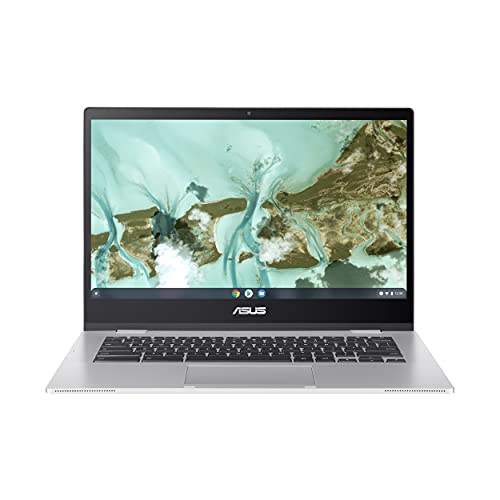
ASUS Chromebook CX1, 14″ Full HD NanoEdge – Features & Prices in Saudi Arabia :
ASUS Chromebook CX1, 14″ Full HD NanoEdge Display, Intel Celeron N3350 Processor, 64GB eMMC, 4GB RAM, Chrome OS, Transparent Silver, CX1400CNA-AS44FV
Standing screen display size
14 Inches
Screen Resolution
1920 x 1080 pixels
Max Screen Resolution
1920 x 1080 Pixels
Processor
1.1 GHz celeron_n3350
RAM
4 GB LPDDR4
Hard Drive
64 GB
Graphics Coprocessor
Intel HD Graphics 500
Chipset Brand
Intel
Card Description
Integrated
Graphics Card Ram Size
4 GB
Wireless Type
Bluetooth, 802.11ac
Number of USB 3.0 Ports
4
Average Battery Life (in hours)
12 Hours
Optical Drive Type
No Optical Drive
Power Source
Battery Powered
Voltage
15 Volts
Batteries
1 Lithium Ion batteries required. (included)
Test video – ASUS Chromebook CX1, 14″ Full HD NanoEdge :
Product highlights :
Questions & Answers – ASUS Chromebook CX1, 14″ Full HD NanoEdge :
Technical specifications – ASUS Chromebook CX1, 14″ Full HD NanoEdge :
Brand
ASUS
Series
Asus Chromebook CX1
Screen Size
14 Inches
Color
Transparent Silver
Hard Disk Size
64 GB
CPU Model
Celeron N3350
Ram Memory Installed Size
4 GB
Operating System
Chrome OS
Card Description
Integrated
Graphics Coprocessor
Intel HD Graphics 500
Purchase advice :
-
Warranty :
Check the duration of the warranty and also the faults and defects it covers. Is it complete or limited? and What is included in the warranty (parts, repairs or both)?
-
Shipping :
Is delivery offered? And how long does it take to get delivered (Delivery time)
-
Proof of purchase :
Does the shop give you an invoice ?
-
After-sales service :
Do they have an after-sales service to have information about the installation or operation (instructions for use). Also in case of problem, it is the seller who takes charge or you must contact the manufacturer or supplier yourself.
_____________________________
L. D (verified owner) –
Does not work with with Gmail – I’ve had other ASUS chromebooks that I have really liked. This one, however, is always crashing when I try to use gmail on it. No other sites have an issue. It’s a major pain that I can’t use my email on this device, as it’s my primary reason for purchasing it. It’s very strange, and I’ve tried all I know to fix it. Unfortunately, this problem developed after my return window (or at least got worse so that I really noticed it). Otherwise, it’s been a fine machine.
N. P (verified owner) –
I hope all of them are not like this – You can’t have numerous tabs open (10-15+) without the computer acting ridiculously slow. You have to constantly restart it or it will act ridiculously slow. It is a ridiculously slow computer. I wish I had used it more when I had first gotten it so I could have seen the flaws in time return it, but now it’s too late.
T. A (verified owner) –
The Jury is Still Out – after a couple weeks it would not turn on until I opened the screen to the full 180 degrees and then it came back to life. I could not duplicate the problem so I am keeping a close eye on it and the warranty time frame. Registering it gave me a year of warranty so that is nice.
A. S (verified owner) –
I like it – I like it so far. Time will tell. This is my first laptop. I purchased a wireless mouse because it’s easier for me at 70 yrs old.
S. R (verified owner) –
WONT UPDATE!!!! BOOOOOOO!~!! – This old model wont update for new website security.
N. O (verified owner) –
this unit is nit touch screen. – i hope found out that it is not a touch sceen.
K. B (verified owner) –
too much trouble – had tomsend it back. could mot make it work
E. F (verified owner) –
No problem recommended. – I got this for my wife and she really likes the way a Chromebook start right up with out waiting. It is not a touch screen, but she doesn’t need that. It is not powerful. Sometimes it can be a little bit pokey. Overall though, the performance is adequate and gives no problems.
N. O (verified owner) –
this unit is nit touch screen. – i hope found out that it is not a touch sceen.
S. R (verified owner) –
WONT UPDATE!!!! BOOOOOOO!~!! – This old model wont update for new website security.
E. F (verified owner) –
No problem recommended. – I got this for my wife and she really likes the way a Chromebook start right up with out waiting. It is not a touch screen, but she doesn’t need that. It is not powerful. Sometimes it can be a little bit pokey. Overall though, the performance is adequate and gives no problems.
N. P (verified owner) –
I hope all of them are not like this – You can’t have numerous tabs open (10-15+) without the computer acting ridiculously slow. You have to constantly restart it or it will act ridiculously slow. It is a ridiculously slow computer. I wish I had used it more when I had first gotten it so I could have seen the flaws in time return it, but now it’s too late.
K. B (verified owner) –
too much trouble – had tomsend it back. could mot make it work
A. S (verified owner) –
I like it – I like it so far. Time will tell. This is my first laptop. I purchased a wireless mouse because it’s easier for me at 70 yrs old.
T. A (verified owner) –
The Jury is Still Out – after a couple weeks it would not turn on until I opened the screen to the full 180 degrees and then it came back to life. I could not duplicate the problem so I am keeping a close eye on it and the warranty time frame. Registering it gave me a year of warranty so that is nice.
L. D (verified owner) –
Does not work with with Gmail – I’ve had other ASUS chromebooks that I have really liked. This one, however, is always crashing when I try to use gmail on it. No other sites have an issue. It’s a major pain that I can’t use my email on this device, as it’s my primary reason for purchasing it. It’s very strange, and I’ve tried all I know to fix it. Unfortunately, this problem developed after my return window (or at least got worse so that I really noticed it). Otherwise, it’s been a fine machine.