
Description
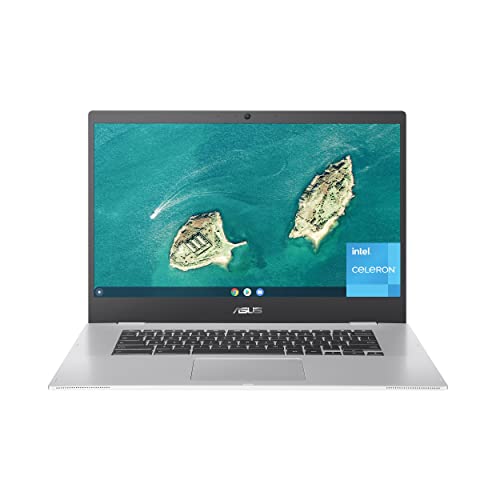
ASUS Chromebook CX1, 15.6″ Full HD NanoEdge – Features & Prices in Saudi Arabia :
ASUS Chromebook CX1, 15.6″ Full HD NanoEdge Display, Intel Celeron N3350 Processor, 64GB eMMC Storage, 8GB RAM, Chrome OS, Transparent Silver, CX1500CNA-AS84F
Standing screen display size
15.6 Inches
Max Screen Resolution
1920 x 1080 Pixels
Processor
2.4 celeron
RAM
8 GB LPDDR4
Hard Drive
64 GB Emmc
Chipset Brand
Intel
Card Description
Integrated
Wireless Type
Bluetooth
Number of USB 3.0 Ports
4
Average Battery Life (in hours)
11 Hours
Computer Memory Type
DDR4 SDRAM
Flash Memory Size
64 GB
Hard Drive Interface
USB 3.2
Optical Drive Type
No Drive
Power Source
Battery Powered
Voltage
15 Volts
Batteries
1 Lithium Ion batteries required. (included)
Test video – ASUS Chromebook CX1, 15.6″ Full HD NanoEdge :
Product highlights :
Questions & Answers – ASUS Chromebook CX1, 15.6″ Full HD NanoEdge :
Technical specifications – ASUS Chromebook CX1, 15.6″ Full HD NanoEdge :
Brand
ASUS
Series
ASUS Chromebook CX1
Screen Size
15.6 Inches
Color
Silver
Hard Disk Size
64 GB
CPU Model
Celeron
Ram Memory Installed Size
8 GB
Operating System
Chrome OS
Card Description
Integrated
CPU Speed
2.4
Purchase advice :
-
Warranty :
Check the duration of the warranty and also the faults and defects it covers. Is it complete or limited? and What is included in the warranty (parts, repairs or both)?
-
Shipping :
Is delivery offered? And how long does it take to get delivered (Delivery time)
-
Proof of purchase :
Does the shop give you an invoice ?
-
After-sales service :
Do they have an after-sales service to have information about the installation or operation (instructions for use). Also in case of problem, it is the seller who takes charge or you must contact the manufacturer or supplier yourself.
_____________________________

K. A (verified owner) –
Good value – I’ve never had a Chromebook so I was a little surprised at the reduced features like no Delete or Caps Lock keys. This is a small sacrifice for the amount of money I saved compared to the Mac I originally intended to buy.
E. I (verified owner) –
Large display, but Color and Speakers just ok – I love my new laptop, but the colors displayed on screen are just ok…not very vibrant, average for my own use, and can be fixed a bit tilting the screen at a better angle. I was online shopping and some of the clothing looked very light and images were not very saturated…I wouldn’t recommend this for anyone using this laptop for design etc. Good for basic home use, work use, student use. Beautiful background themes to choose from, excellent Google product use, and I easily installed a wireless bluetooth mouse. The screen is nice and large, especially at this price point of around $200. I bought this on Prime Day and I’m happy with my purchase. I can run Google with many tabs open without any problem. I do wish the speakers were a bit better. I listen to music on my phone or Alexa instead because the speakers are small and located in an odd place….right on the front outer rim of the laptop on either side of where it opens. I used it to watch a movie on my bed and had the volume at max and still had a little trouble hearing everything. The bedding also sometimes blocked the speakers because of their location. Basic volume on regular Zoom meetings, YouTube etc. would be fine. I recommend this laptop for normal basic use…it works fast, beautifully designed and has lots of ports which is very convenient. Another thing I wanted to mention is that it wouldn’t turn on at first even after charging for hours. I had googled many troubleshooting ideas and nothing seemed to work. Finally after cursing it and almost giving up, it magically made a “bling” sound and came on. Make sure to charge it from a wall outlet; not an extension cord or power strip. I think it was still in shipping mode, so I had to google what keys to hold down to make it boot up for the first time. There are just those few things, otherwise I love the laptop for my needs, and would recommend Asus products. Touchpad is very quick and responsive. It is not a touch screen monitor…I’m thinking people are confusing touch screen with touch pad. Keyboard is comfortable and battery has been long-running.
B. B (verified owner) –
Anus Chromebook 15.6″ screan – I’m happy I purchased this laptop. It is great quality for the price. I was hesitant at first because it was so affordable but the reviews of other purchasers convinced me. I am happy I did, it is a great laptop.
K. H (verified owner) –
Its OK. – The issue is that it is difficult at best to repurpose as the OS gets to the end of life and the machine is near impossible to load a light version of Linux to keep it operable. Almost every part is hard soldered to the MB. It is what it is, My last Chrome book was not updatable, and attempting to repurpose the old machine with Linux failed and killed the SSD failed and was hard soldered to the MB. At that point it was E-Wast! This machine is no different. At least a micro SD chip can be used to expand the storage. Most Chrome books no longer have that option and I see the day when all machines will not have that option. Again, it is what it is.
K. S (verified owner) –
It works great – Low cost
S. O (verified owner) –
Screen resolution is too low for videos – The display resolution is low and doesn’t support watching movies or videos
E. I (verified owner) –
Large display, but Color and Speakers just ok – I love my new laptop, but the colors displayed on screen are just ok…not very vibrant, average for my own use, and can be fixed a bit tilting the screen at a better angle. I was online shopping and some of the clothing looked very light and images were not very saturated…I wouldn’t recommend this for anyone using this laptop for design etc. Good for basic home use, work use, student use. Beautiful background themes to choose from, excellent Google product use, and I easily installed a wireless bluetooth mouse. The screen is nice and large, especially at this price point of around $200. I bought this on Prime Day and I’m happy with my purchase. I can run Google with many tabs open without any problem. I do wish the speakers were a bit better. I listen to music on my phone or Alexa instead because the speakers are small and located in an odd place….right on the front outer rim of the laptop on either side of where it opens. I used it to watch a movie on my bed and had the volume at max and still had a little trouble hearing everything. The bedding also sometimes blocked the speakers because of their location. Basic volume on regular Zoom meetings, YouTube etc. would be fine. I recommend this laptop for normal basic use…it works fast, beautifully designed and has lots of ports which is very convenient. Another thing I wanted to mention is that it wouldn’t turn on at first even after charging for hours. I had googled many troubleshooting ideas and nothing seemed to work. Finally after cursing it and almost giving up, it magically made a “bling” sound and came on. Make sure to charge it from a wall outlet; not an extension cord or power strip. I think it was still in shipping mode, so I had to google what keys to hold down to make it boot up for the first time. There are just those few things, otherwise I love the laptop for my needs, and would recommend Asus products. Touchpad is very quick and responsive. It is not a touch screen monitor…I’m thinking people are confusing touch screen with touch pad. Keyboard is comfortable and battery has been long-running.
S. O (verified owner) –
Screen resolution is too low for videos – The display resolution is low and doesn’t support watching movies or videos
B. S (verified owner) –
Good value – You get a lot for the price. No rm specific complaint but I don’t really like the feel of it. Kinda of clunky feeling .
K. H (verified owner) –
Its OK. – The issue is that it is difficult at best to repurpose as the OS gets to the end of life and the machine is near impossible to load a light version of Linux to keep it operable. Almost every part is hard soldered to the MB. It is what it is, My last Chrome book was not updatable, and attempting to repurpose the old machine with Linux failed and killed the SSD failed and was hard soldered to the MB. At that point it was E-Wast! This machine is no different. At least a micro SD chip can be used to expand the storage. Most Chrome books no longer have that option and I see the day when all machines will not have that option. Again, it is what it is.
O. H (verified owner) –
It’s nice and basic. – I bought this product to replace an older Chromebook. It has a beautiful display, easy keyboard to type with, and the mouse works smoothly. It does what I need it to do without being splashy about it.
K. A (verified owner) –
Good value – I’ve never had a Chromebook so I was a little surprised at the reduced features like no Delete or Caps Lock keys. This is a small sacrifice for the amount of money I saved compared to the Mac I originally intended to buy.
O. H (verified owner) –
It’s nice and basic. – I bought this product to replace an older Chromebook. It has a beautiful display, easy keyboard to type with, and the mouse works smoothly. It does what I need it to do without being splashy about it.
K. S (verified owner) –
It works great – Low cost
B. B (verified owner) –
Anus Chromebook 15.6″ screan – I’m happy I purchased this laptop. It is great quality for the price. I was hesitant at first because it was so affordable but the reviews of other purchasers convinced me. I am happy I did, it is a great laptop.
B. S (verified owner) –
Good value – You get a lot for the price. No rm specific complaint but I don’t really like the feel of it. Kinda of clunky feeling .