
Description
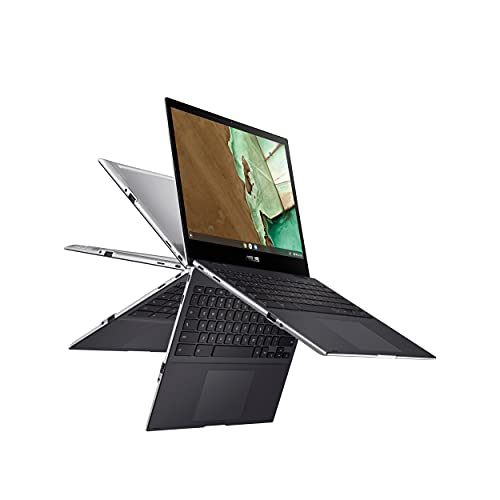
ASUS Chromebook Flip CM3, 12″ Touchscreen HD – Features & Prices in Saudi Arabia :
ASUS Chromebook Flip CM3, 12″ Touchscreen HD NanoEdge Display, MediaTek 8183 Processor, Arm Mali-G72 MP3 GPU, 32GB Storage, 4GB RAM, Wi-Fi 5, Chrome OS, Aluminum, Mineral Gray, CM3200FVA-DS42T
Standing screen display size
12 Inches
Screen Resolution
1366 x 912
Processor
mediatek_mt8183
RAM
4 GB LPDDR4X
Memory Speed
2400 MHz
Hard Drive
32 GB Emmc
Chipset Brand
MediaTek
Card Description
Integrated
Wireless Type
Bluetooth, 802.11ac
Number of USB 2.0 Ports
2
Computer Memory Type
DDR4 SDRAM
Flash Memory Size
32 GB
Hard Drive Interface
USB
Optical Drive Type
No Optical Drive
Power Source
Battery Powered
Batteries
1 Lithium Ion batteries required. (included)
Test video – ASUS Chromebook Flip CM3, 12″ Touchscreen HD :
Product highlights :
Questions & Answers – ASUS Chromebook Flip CM3, 12″ Touchscreen HD :
Technical specifications – ASUS Chromebook Flip CM3, 12″ Touchscreen HD :
Brand
ASUS
Series
ASUS Chromebook
Screen Size
12 Inches
Color
Mineral Gray
Hard Disk Size
32 GB
CPU Model
MediaTek MT8183
Ram Memory Installed Size
4 GB
Operating System
Chrome OS
Card Description
Integrated
Hard Disk Description
Emmc
Purchase advice :
-
Warranty :
Check the duration of the warranty and also the faults and defects it covers. Is it complete or limited? and What is included in the warranty (parts, repairs or both)?
-
Shipping :
Is delivery offered? And how long does it take to get delivered (Delivery time)
-
Proof of purchase :
Does the shop give you an invoice ?
-
After-sales service :
Do they have an after-sales service to have information about the installation or operation (instructions for use). Also in case of problem, it is the seller who takes charge or you must contact the manufacturer or supplier yourself.
_____________________________

E. F (verified owner) –
Very solid little machine – This was one in a series of attempts to replace my beloved Transformer, bl;own out by Hawaiian electric. I can’t say it did that entirely, but it is a nice, portable little machine. It is slower than I had aniticipated, given all I have heard about how light Chrome is, but I actually think Google is as much to blame here. Asus makes great computers. This is perfect if you need something light. It is much better than a phone for reading, streaming… I am tempted to call it a ntebook. I actuallly have one of Asus’s original netbooks. It is 20+ years old and still works.
N. K (verified owner) –
Great quality – Touch screen works great! I bought it for my husband’s birthday, to help him run his business. Originally just so he could do his quotes on it. But it ended up being able to do everything he needed to go paperless.
N. K (verified owner) –
Great quality – Touch screen works great! I bought it for my husband’s birthday, to help him run his business. Originally just so he could do his quotes on it. But it ended up being able to do everything he needed to go paperless.
R. R (verified owner) –
Overall great Chromebook but 4 gig memory kind of sucks – Long story short great Chromebook. Excellent performance, build quality, touchscreen, weight, keyboard except only 4 gig of memory for $400 (got the higher end model) is what keeps it from getting 5 stars. Its super snappy now but is also running 32bit ARM according to Chrome. I have a feeling in just a few years the 4 gig of memory is going to be very limiting especially when transition to 64bit. It says its supported to 2029 which is awesome but hard to see it able to run Chrome in 2029 if current trends hold, but we will see.
R. R (verified owner) –
Overall great Chromebook but 4 gig memory kind of sucks – Long story short great Chromebook. Excellent performance, build quality, touchscreen, weight, keyboard except only 4 gig of memory for $400 (got the higher end model) is what keeps it from getting 5 stars. Its super snappy now but is also running 32bit ARM according to Chrome. I have a feeling in just a few years the 4 gig of memory is going to be very limiting especially when transition to 64bit. It says its supported to 2029 which is awesome but hard to see it able to run Chrome in 2029 if current trends hold, but we will see.
N. I (verified owner) –
The trackpad is really bad. It gets stuck when I click it. – The trackpad for this computer was so bad, that we had to return the computer. The keyboard was also pretty crappy. I mean, I know that it’s a cheap computer, but the trackpad basically made it unusable. Your mileage may vary.
C. B (verified owner) –
I should of stayed with acer – First of all all chromebooks look the same. It started out ok but all of a sudden it would stop streaming movies and loading pictures on some websites. Twitter and amazon to name two are very slow and what is really funny my internet provider just doubled my speed. Never had a problem with my acer which I gave away. Just junk. I never write reviews unless it is really really bad
D. K (verified owner) –
Perfect for elementary school students. – The computers were perfect for our 8 & 10 year olds for their school computers. We didn’t have any issues with any of the apps they were using. I can’t really comment on the gaming rating so I gave it an overall 3 star score.
T. H (verified owner) –
Jury is still out. – Overall it seems ok or better. Have yet to get to the crux of a number of surprising ‘incompatible application’ notifications for apps I’ve used for years on my other Chromebook. Hoping it’s just a matter of operator learning curve & all will work out. Otherwise I’ll view it as a seriously deficient product.
C. B (verified owner) –
I should of stayed with acer – First of all all chromebooks look the same. It started out ok but all of a sudden it would stop streaming movies and loading pictures on some websites. Twitter and amazon to name two are very slow and what is really funny my internet provider just doubled my speed. Never had a problem with my acer which I gave away. Just junk. I never write reviews unless it is really really bad
T. H (verified owner) –
Jury is still out. – Overall it seems ok or better. Have yet to get to the crux of a number of surprising ‘incompatible application’ notifications for apps I’ve used for years on my other Chromebook. Hoping it’s just a matter of operator learning curve & all will work out. Otherwise I’ll view it as a seriously deficient product.
N. I (verified owner) –
The trackpad is really bad. It gets stuck when I click it. – The trackpad for this computer was so bad, that we had to return the computer. The keyboard was also pretty crappy. I mean, I know that it’s a cheap computer, but the trackpad basically made it unusable. Your mileage may vary.
E. F (verified owner) –
Very solid little machine – This was one in a series of attempts to replace my beloved Transformer, bl;own out by Hawaiian electric. I can’t say it did that entirely, but it is a nice, portable little machine. It is slower than I had aniticipated, given all I have heard about how light Chrome is, but I actually think Google is as much to blame here. Asus makes great computers. This is perfect if you need something light. It is much better than a phone for reading, streaming… I am tempted to call it a ntebook. I actuallly have one of Asus’s original netbooks. It is 20+ years old and still works.
D. K (verified owner) –
Perfect for elementary school students. – The computers were perfect for our 8 & 10 year olds for their school computers. We didn’t have any issues with any of the apps they were using. I can’t really comment on the gaming rating so I gave it an overall 3 star score.
H. B (verified owner) –
Quality chromebook – Product as described. Great looking screen.
H. B (verified owner) –
Quality chromebook – Product as described. Great looking screen.