
Description
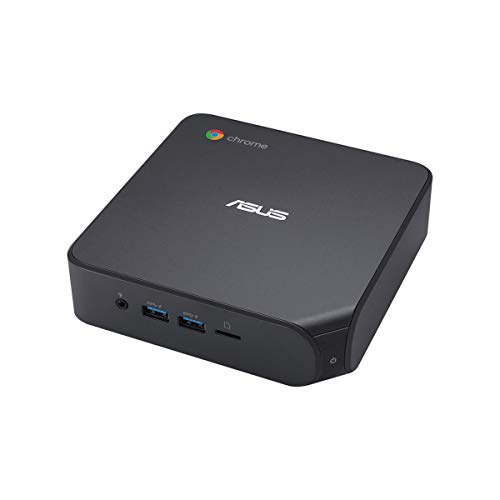
ASUS Chromebox 4 with Intel® Core™ i3-10110U, – Features & Prices in Saudi Arabia :
ASUS Chromebox 4 with Intel® Core™ i3-10110U, 8GB RAM, M.2 128GB SSD storage, Power / DisplayPort Over Type C, Dual HDMI, Gigabit LAN, WiFi 6, MicroSD Card Reader, VESA Mount, Chrome OS
Standing screen display size
1
Processor
2.1 GHz core_i3_10110u
RAM
8 GB DDR4
Memory Speed
2666 MHz
Hard Drive
128 GB SSD
Chipset Brand
Intel
Card Description
Integrated
Graphics Card Ram Size
8 GB
Wireless Type
Bluetooth, 802.11ax
Number of USB 2.0 Ports
2
Number of USB 3.0 Ports
4
Computer Memory Type
SODIMM
Flash Memory Size
32 GB
Hard Drive Interface
PCIE x 4
Hard Drive Rotational Speed
7200 RPM
Batteries
1 Lithium Ion batteries required. (included)
Test video – ASUS Chromebox 4 with Intel® Core™ i3-10110U, :
Product highlights :
Questions & Answers – ASUS Chromebox 4 with Intel® Core™ i3-10110U, :
Technical specifications – ASUS Chromebox 4 with Intel® Core™ i3-10110U, :
Specific Uses For Product
Multimedia, Personal, Business
Brand
ASUS
Personal computer design type
Mini PC
Operating System
Chrome OS
Memory Storage Capacity
128 GB
Screen Size
1
Ram Memory Installed Size
8 GB
Series
CHROMEBOX4-G3023UN
Included Components
CHROMEBOX4-G3023UN, VESA MOUNT, POWER CORD
CPU Model
Core i3-10110U
Purchase advice :
-
Warranty :
Check the duration of the warranty and also the faults and defects it covers. Is it complete or limited? and What is included in the warranty (parts, repairs or both)?
-
Shipping :
Is delivery offered? And how long does it take to get delivered (Delivery time)
-
Proof of purchase :
Does the shop give you an invoice ?
-
After-sales service :
Do they have an after-sales service to have information about the installation or operation (instructions for use). Also in case of problem, it is the seller who takes charge or you must contact the manufacturer or supplier yourself.
_____________________________
A. S (verified owner) –
Nice size but Chrome box is not for me – Asus chromebox 4 is a nice size, plenty of usb and hdmi ports. Once I started using the chromebox it shut down several times during usage. Had trouble getting it to come back on. Wasn’t easy to add my brother wireless printer and bluetooth mouse. It seems that chromebook or box you can’t use a external cd/dvd player. Not compatible. Chrome OS is nothing but internet usage. Not many apps that you can add. I returned the chromebox and went back to my 8 year old Lenovo desktop windows computer.
D. O (verified owner) –
Worked good for 5 months – This Chromebox worked great for five mobths. Then when turning the unit on, the monitor would turn on for about three seconds then would go into a power saving state. I called Asus and they had me do a soft reset and a powerwash. That worked for one re-start. The tech hung up and it all was good until the next time. This time it would not power on. I called tech support and they said they would email a shipping label within 24 to 48 hours stating I needed to pay for the shipping label for the fixed unit to be sent back to me. Expected time for the whole process to take place is three weeks according to tech support.
G. I (verified owner) –
Awesome ChromeOS pc – Using ChromeOS since 2015, purchased this ASUS CHROMEBOX4 for replace another Chromebox. Awsosme performances with Google Stadia and Nvidia GeForce Now. The pc can install Linux and Android 11 too. 8 gb of ram are enough even for more than 50 tabs opened at the same time. 128 gb of ssd are definitely ok. Google Drive subscription for automated backup is reccomended. The Intel I3 dual core with hyper threading (4 core total) runs fine even 4k streaming.
A. K (verified owner) –
More than enough power to handle anything in Chrome OS – The Amazon device description covers most everything about this computer. It is fast and more than capable of handling almost anything Chrome OS can throw at it without a hiccup. It will drive a large FHD screen with no problem and 4K seems to work just fine as well. The same caveats apply to this device as to any other Chrome OS device, it does NOT run Apple or Microsoft apps natively. Apple has a work around called iCloud.com that allows you to run all their basic apps (Mail, Photos, Notes, Numbers, Find My, etc.) but not things like Final Cut or Logic Pro. Microsoft has made a good chunk of its software available on the cloud was well. That said, this machine was designed for the Google software ecosystem including their Android Apps and that’s where it is happiest. If that works for you, this is an excellent machine for the money.
F. D (verified owner) –
Awesome Chromebox – I’ve been using Chromebooks for about 10 years. This is my first Chromebox, and it is awesome. Great specs and very fast, this Chromebox exceeds all my expectations.
A. S (verified owner) –
Nice size but Chrome box is not for me – Asus chromebox 4 is a nice size, plenty of usb and hdmi ports. Once I started using the chromebox it shut down several times during usage. Had trouble getting it to come back on. Wasn’t easy to add my brother wireless printer and bluetooth mouse. It seems that chromebook or box you can’t use a external cd/dvd player. Not compatible. Chrome OS is nothing but internet usage. Not many apps that you can add. I returned the chromebox and went back to my 8 year old Lenovo desktop windows computer.
M. G (verified owner) –
Update software.. – Ok, so initially it said the Chrome Box was beyond update period. So, I started the return process and ordered another box. Then about 20 days into it, I realized that the software was current. So, if this happens be patient.
F. D (verified owner) –
Awesome Chromebox – I’ve been using Chromebooks for about 10 years. This is my first Chromebox, and it is awesome. Great specs and very fast, this Chromebox exceeds all my expectations.
G. I (verified owner) –
Awesome ChromeOS pc – Using ChromeOS since 2015, purchased this ASUS CHROMEBOX4 for replace another Chromebox. Awsosme performances with Google Stadia and Nvidia GeForce Now. The pc can install Linux and Android 11 too. 8 gb of ram are enough even for more than 50 tabs opened at the same time. 128 gb of ssd are definitely ok. Google Drive subscription for automated backup is reccomended. The Intel I3 dual core with hyper threading (4 core total) runs fine even 4k streaming.
K. B (verified owner) –
It does NOT have an I7 or 16 gigs of RAM – It comes with an I3 and 8 gigs – having said that it performs great with those specs. I have it hooked up to dual 24″ ViewSonic monitors and Logitech KB and mouse. Reboots for updates take less than a minute. It has replaced my Windows 10 laptop and I do not regret it. There are a few things to get used to that are different, but worth it in my opinion
M. G (verified owner) –
Update software.. – Ok, so initially it said the Chrome Box was beyond update period. So, I started the return process and ordered another box. Then about 20 days into it, I realized that the software was current. So, if this happens be patient.
A. K (verified owner) –
More than enough power to handle anything in Chrome OS – The Amazon device description covers most everything about this computer. It is fast and more than capable of handling almost anything Chrome OS can throw at it without a hiccup. It will drive a large FHD screen with no problem and 4K seems to work just fine as well. The same caveats apply to this device as to any other Chrome OS device, it does NOT run Apple or Microsoft apps natively. Apple has a work around called iCloud.com that allows you to run all their basic apps (Mail, Photos, Notes, Numbers, Find My, etc.) but not things like Final Cut or Logic Pro. Microsoft has made a good chunk of its software available on the cloud was well. That said, this machine was designed for the Google software ecosystem including their Android Apps and that’s where it is happiest. If that works for you, this is an excellent machine for the money.
K. B (verified owner) –
It does NOT have an I7 or 16 gigs of RAM – It comes with an I3 and 8 gigs – having said that it performs great with those specs. I have it hooked up to dual 24″ ViewSonic monitors and Logitech KB and mouse. Reboots for updates take less than a minute. It has replaced my Windows 10 laptop and I do not regret it. There are a few things to get used to that are different, but worth it in my opinion
M. I (verified owner) –
Intelligent! Genius! – This Asus Chromebox 4 is Intelligent and genius because of its design and performance. Up and productive in less than a minute. The technology in this product makes it enjoyable, safe, and efficient to use. Incredibly fast and high quality performance. No extra dollars spent on anti virus software, its included in the purchase. Tech support for over 6 years after release date at no cost. This ASUS can handle up to 3 screens at 4k quality. On top of all the above, the added bonus is its so quiet and uses little electricity!
D. O (verified owner) –
Worked good for 5 months – This Chromebox worked great for five mobths. Then when turning the unit on, the monitor would turn on for about three seconds then would go into a power saving state. I called Asus and they had me do a soft reset and a powerwash. That worked for one re-start. The tech hung up and it all was good until the next time. This time it would not power on. I called tech support and they said they would email a shipping label within 24 to 48 hours stating I needed to pay for the shipping label for the fixed unit to be sent back to me. Expected time for the whole process to take place is three weeks according to tech support.
M. I (verified owner) –
Intelligent! Genius! – This Asus Chromebox 4 is Intelligent and genius because of its design and performance. Up and productive in less than a minute. The technology in this product makes it enjoyable, safe, and efficient to use. Incredibly fast and high quality performance. No extra dollars spent on anti virus software, its included in the purchase. Tech support for over 6 years after release date at no cost. This ASUS can handle up to 3 screens at 4k quality. On top of all the above, the added bonus is its so quiet and uses little electricity!