
Description
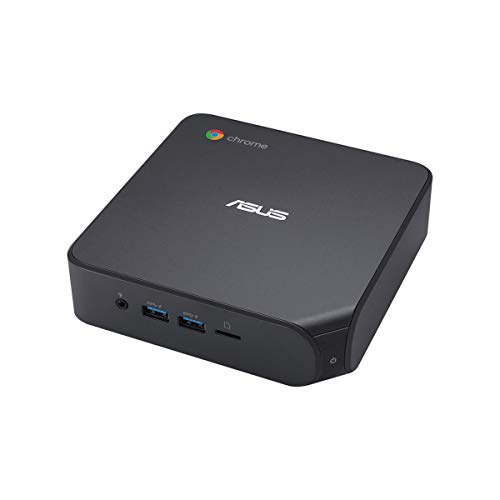
ASUS Chromebox4 with Intel Core i7-10510U, 16GB – Features & Prices in Saudi Arabia :
ASUS Chromebox4 with Intel Core i7-10510U, 16GB RAM, M.2 PCIE 256GB SSD Storage, Power/DisplayPort Over Type C, Dual HDMI, Gigabit LAN, WiFi 6, MicroSD Card Reader, VESA Mount, Chrome OS
Processor
1.8 GHz core_i7_10710u
RAM
16 GB DDR4
Memory Speed
2666 MHz
Hard Drive
512 GB SSD
Chipset Brand
Intel
Card Description
Integrated
Wireless Type
Bluetooth, 802.11ax
Number of USB 2.0 Ports
2
Number of USB 3.0 Ports
4
Processor Brand
Intel
Processor Count
1
Computer Memory Type
SODIMM
Hard Drive Interface
PCIE x 4
Batteries
Lithium Ion batteries required. (included)
Test video – ASUS Chromebox4 with Intel Core i7-10510U, 16GB :
Product highlights :
Questions & Answers – ASUS Chromebox4 with Intel Core i7-10510U, 16GB :
Technical specifications – ASUS Chromebox4 with Intel Core i7-10510U, 16GB :
Specific Uses For Product
Multimedia, Personal, Business
Brand
ASUS
Operating System
Chrome OS
Memory Storage Capacity
256 GB
Ram Memory Installed Size
16 GB
Series
CHROMEBOX4-G7068UN
Included Components
POWER CORD, VESA MOUNT
CPU Model
Core i7-10710U
Color
Black
CPU Manufacturer
Intel
Purchase advice :
-
Warranty :
Check the duration of the warranty and also the faults and defects it covers. Is it complete or limited? and What is included in the warranty (parts, repairs or both)?
-
Shipping :
Is delivery offered? And how long does it take to get delivered (Delivery time)
-
Proof of purchase :
Does the shop give you an invoice ?
-
After-sales service :
Do they have an after-sales service to have information about the installation or operation (instructions for use). Also in case of problem, it is the seller who takes charge or you must contact the manufacturer or supplier yourself.
_____________________________
G. F (verified owner) –
Desktop based Chromebox that can handle Videoconferencing and work at
O. M (verified owner) –
I thought this thing would be screaming fast. I expected too much. – This is a nice Chrome device; however, I question whether an i7 processor adds noticeable performance for a ChromeOS device. I don’t see the difference in performance between this and an i5 Chromebook with 8MB of ram that we have. It is noticeably faster than a Chromebook with a Celeron processor.
E. A (verified owner) –
UPDATE: USB Peripheral problem solved – TERRIBLE customer support from Amazon and Asus – Our entire deep tech nonprofit team across several US states uses Chromeboxes, and when we travel for work we use Chromebooks. They are powerful and economical. We use both Acer and HP. This is our first Asus Chrome product. We were SO excited for this ASUS Chromebox 4 and have been waiting for months for it to come out so we can try it. This one can handle 3 monitors! And we love multiple monitors. So we bought one to try out. Here’s our report:
F. C (verified owner) –
Powerful Chromebox – This is my primary desktop computer. I regularly have 40 to 75 active Chrome tabs open at one time. Quiet, small, uncompromising.
F. N (verified owner) –
Fast, works fine. – I like the new Chrome Box. Works well. Word of caution, the HDMI connector is the new type meaning you may need as I did, new cables. Check the exact wording for the cable, I don’t remember it.
E. A (verified owner) –
UPDATE: USB Peripheral problem solved – TERRIBLE customer support from Amazon and Asus – Our entire deep tech nonprofit team across several US states uses Chromeboxes, and when we travel for work we use Chromebooks. They are powerful and economical. We use both Acer and HP. This is our first Asus Chrome product. We were SO excited for this ASUS Chromebox 4 and have been waiting for months for it to come out so we can try it. This one can handle 3 monitors! And we love multiple monitors. So we bought one to try out. Here’s our report:
F. K (verified owner) –
If your company uses Google Workspace, you’ll get better performance than a MacBook Pro! – I’ve worked from home since 2014, and my strategy has always been to buy an expensive Mac to handle tasks efficiently. Recently I was frustrated about speed with lots of tabs open, and someone mentioned to me that if most of the things I do are just chrome tabs, then I’d probably get better performance with a less powerful Chromebook. After a little research I found out that I could get a MORE powerful chromebox, and three months later it is still blazing fast.
O. M (verified owner) –
I thought this thing would be screaming fast. I expected too much. – This is a nice Chrome device; however, I question whether an i7 processor adds noticeable performance for a ChromeOS device. I don’t see the difference in performance between this and an i5 Chromebook with 8MB of ram that we have. It is noticeably faster than a Chromebook with a Celeron processor.
J. A (verified owner) –
These are excellent for desktop replacement when moving to all cloud SaaS software. – Works better than expected and an incredible move to reduce cost for small business. 100% SaaS model now. No regrets.
F. K (verified owner) –
If your company uses Google Workspace, you’ll get better performance than a MacBook Pro! – I’ve worked from home since 2014, and my strategy has always been to buy an expensive Mac to handle tasks efficiently. Recently I was frustrated about speed with lots of tabs open, and someone mentioned to me that if most of the things I do are just chrome tabs, then I’d probably get better performance with a less powerful Chromebook. After a little research I found out that I could get a MORE powerful chromebox, and three months later it is still blazing fast.
J. A (verified owner) –
These are excellent for desktop replacement when moving to all cloud SaaS software. – Works better than expected and an incredible move to reduce cost for small business. 100% SaaS model now. No regrets.
I. I (verified owner) –
Good addition to my living room TV – Very good device for playing contents on web that smart tv can’t play.
F. C (verified owner) –
Powerful Chromebox – This is my primary desktop computer. I regularly have 40 to 75 active Chrome tabs open at one time. Quiet, small, uncompromising.
F. N (verified owner) –
Fast, works fine. – I like the new Chrome Box. Works well. Word of caution, the HDMI connector is the new type meaning you may need as I did, new cables. Check the exact wording for the cable, I don’t remember it.
G. F (verified owner) –
Desktop based Chromebox that can handle Videoconferencing and work at
I. I (verified owner) –
Good addition to my living room TV – Very good device for playing contents on web that smart tv can’t play.