
Description
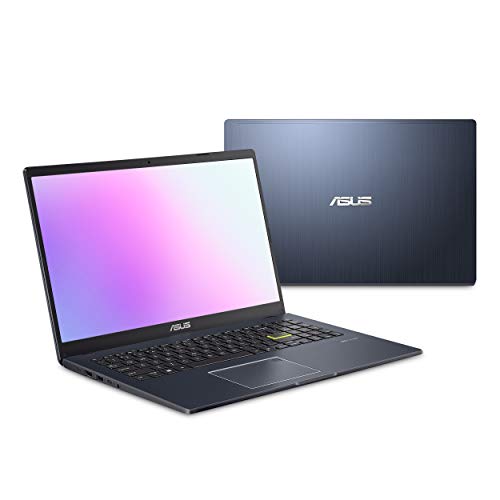
ASUS Laptop L510 Ultra Thin Laptop, 15.6” – Features & Prices in Saudi Arabia :
ASUS Laptop L510 Ultra Thin Laptop, 15.6” FHD Display, Intel Celeron N4020 Processor, 4GB RAM, 128GB Storage, Windows 10 Home in S Mode, 1 Year Microsoft 365, Star Black, L510MA-DS04
Standing screen display size
15.6
Max Screen Resolution
1920 x 1080
Processor
1.1 GHz celeron_n4020
RAM
4 GB DDR4
Memory Speed
2.8 GHz
Hard Drive
128 GB Emmc
Graphics Coprocessor
Intel UHD Graphics 600
Chipset Brand
Intel
Card Description
Integrated
Wireless Type
802.11n, 802.11ac
Number of USB 2.0 Ports
2
Flash Memory Size
128
Hard Drive Interface
ESATA
Optical Drive Type
No Optical Drive
Power Source
Battery Powered
Batteries
1 Lithium Metal batteries required. (included)
Test video – ASUS Laptop L510 Ultra Thin Laptop, 15.6” :
Product highlights :
Questions & Answers – ASUS Laptop L510 Ultra Thin Laptop, 15.6” :
Technical specifications – ASUS Laptop L510 Ultra Thin Laptop, 15.6” :
Brand
ASUS
Series
L510MA-DS04
Screen Size
15.6
Color
Black
Hard Disk Size
128 GB
CPU Model
Celeron N4020
Ram Memory Installed Size
4 GB
Operating System
Windows 11 Home
Card Description
Integrated
Graphics Coprocessor
Intel UHD Graphics 600
Purchase advice :
-
Warranty :
Check the duration of the warranty and also the faults and defects it covers. Is it complete or limited? and What is included in the warranty (parts, repairs or both)?
-
Shipping :
Is delivery offered? And how long does it take to get delivered (Delivery time)
-
Proof of purchase :
Does the shop give you an invoice ?
-
After-sales service :
Do they have an after-sales service to have information about the installation or operation (instructions for use). Also in case of problem, it is the seller who takes charge or you must contact the manufacturer or supplier yourself.
_____________________________

M. J (verified owner) –
Good hardware, bad bloatware – Overall, this is a pretty decent and simple laptop and serves the purpose for which we bought them. Despite the lower end system specs, the hardware does perform nicely. Not blazing fast but not slow, either. The screen quality is what you’d expect in this price range. The full keyboard layout is great and the weight and design of it is pretty solid. It comes in Windows S mode which only allows you to install apps from the microsoft store which makes it secure for less than tech savy users who just want to mess around on the web safely. You need to take it out of S mode and convert it to Windows 10 Home to install any apps not available in the store. That said, the bloatware is unforgivable. It comes preinstalled with McAfee. If you know anything about McAfee, they are essentially a virus posing as an anti-virus program. Once preinstalled, you’re never getting rid of it. Not with the Windows Apps & Programs uninstaller or the “Removal Tool” from McAfee themselves. You run either, it just keeps coming back. If you try to delete the registry keys, you can’t because they have running process that protects it from deletion. And if you are wise enough to figure out how to delete it from safe mode (like you would with a virus), it hijacks the Windows shutdown process to add it back in (like a virus). The only way to really get rid of it is to completely format and reinstall Windows. The problem there is you need ASUS’s drivers afterward for the proprietary keyboard and touch pad. Which of course ASUS does not offer on the product support page. ASUS also has their own bloatware called MyASUS which, also, you will not be able to fully remove. If you can live with the preinstalled apps and McAfee, then this laptop may suit your purposes. If you’re using it for work or business, you’ll be able to get it functioning enough to use but be warned, it takes some extra work to get McAfee into a state where it’s just there lurking while your real security software is in place.
S. B (verified owner) –
I WAS SHOCKED! – I already have a nice computer but I wanted to buy a play computer for my kid and I to watch videos and movies on but I seen some reviews that scared me but I went ahead anyways because of the price and I’m astonished at how well this computer is! It’s not slow, it’s great quality and we were able to watch 4K 2160p videos on it as well and I was legit blown away! For this price you can’t beat it, I’m already ordering another one haha!
S. N (verified owner) –
Asus laptop – Love this light weight product. I think the battery could last a little longer but otherwise a great product.
G. A (verified owner) –
Very good computer. – Very good..need to purchase a back up storage.
G. A (verified owner) –
Very good computer. – Very good..need to purchase a back up storage.
I. N (verified owner) –
Great PC Value: Light, Sleek & Fast – I bought this Asus laptop because I bought a piece of design equipment that is run solely by software that requires Windows operating system. Since it will be dedicated to just this operation, I wanted an inexpensive but powerful laptop with a large clear screen. The 15.6″ screen is sharp, clear and visible from a distance and different angles without much distortion that you often find when viewing laptop screens from an angle. This Asus running Windows 10 Home (I converted it from Windows 10 S mode) runs my design program perfectly without any lag in speed or function. It’s lightweight, sleek, the keyboard is easy to type on and colors render quite nicely on the screen. While it may not be up to gaming (not a gamer here) it’s a perfect laptop for a student who needs basic computing needs and like me, someone who needs to run a windows-exclusive design program.
B. C (verified owner) –
Do not buy – Bought this one year and a half ago. Everything was good. A few months ago, it stopped charging. When I took out the charger it completely shuts off. For it to be on, the charger has to be plugged in. I am terribly, terribly disappointed in this product. The speakers are already failing as well.
C. I (verified owner) –
Nice computer at a great price! – Great value. Love the screen size. Very lightweight
M. J (verified owner) –
Good hardware, bad bloatware – Overall, this is a pretty decent and simple laptop and serves the purpose for which we bought them. Despite the lower end system specs, the hardware does perform nicely. Not blazing fast but not slow, either. The screen quality is what you’d expect in this price range. The full keyboard layout is great and the weight and design of it is pretty solid. It comes in Windows S mode which only allows you to install apps from the microsoft store which makes it secure for less than tech savy users who just want to mess around on the web safely. You need to take it out of S mode and convert it to Windows 10 Home to install any apps not available in the store. That said, the bloatware is unforgivable. It comes preinstalled with McAfee. If you know anything about McAfee, they are essentially a virus posing as an anti-virus program. Once preinstalled, you’re never getting rid of it. Not with the Windows Apps & Programs uninstaller or the “Removal Tool” from McAfee themselves. You run either, it just keeps coming back. If you try to delete the registry keys, you can’t because they have running process that protects it from deletion. And if you are wise enough to figure out how to delete it from safe mode (like you would with a virus), it hijacks the Windows shutdown process to add it back in (like a virus). The only way to really get rid of it is to completely format and reinstall Windows. The problem there is you need ASUS’s drivers afterward for the proprietary keyboard and touch pad. Which of course ASUS does not offer on the product support page. ASUS also has their own bloatware called MyASUS which, also, you will not be able to fully remove. If you can live with the preinstalled apps and McAfee, then this laptop may suit your purposes. If you’re using it for work or business, you’ll be able to get it functioning enough to use but be warned, it takes some extra work to get McAfee into a state where it’s just there lurking while your real security software is in place.
C. G (verified owner) –
Would buy again! – So far so good. Haven’t had very long so we’ll see how long it lasts.
S. N (verified owner) –
Asus laptop – Love this light weight product. I think the battery could last a little longer but otherwise a great product.
B. C (verified owner) –
Do not buy – Bought this one year and a half ago. Everything was good. A few months ago, it stopped charging. When I took out the charger it completely shuts off. For it to be on, the charger has to be plugged in. I am terribly, terribly disappointed in this product. The speakers are already failing as well.
I. N (verified owner) –
Great PC Value: Light, Sleek & Fast – I bought this Asus laptop because I bought a piece of design equipment that is run solely by software that requires Windows operating system. Since it will be dedicated to just this operation, I wanted an inexpensive but powerful laptop with a large clear screen. The 15.6″ screen is sharp, clear and visible from a distance and different angles without much distortion that you often find when viewing laptop screens from an angle. This Asus running Windows 10 Home (I converted it from Windows 10 S mode) runs my design program perfectly without any lag in speed or function. It’s lightweight, sleek, the keyboard is easy to type on and colors render quite nicely on the screen. While it may not be up to gaming (not a gamer here) it’s a perfect laptop for a student who needs basic computing needs and like me, someone who needs to run a windows-exclusive design program.
S. B (verified owner) –
I WAS SHOCKED! – I already have a nice computer but I wanted to buy a play computer for my kid and I to watch videos and movies on but I seen some reviews that scared me but I went ahead anyways because of the price and I’m astonished at how well this computer is! It’s not slow, it’s great quality and we were able to watch 4K 2160p videos on it as well and I was legit blown away! For this price you can’t beat it, I’m already ordering another one haha!
C. G (verified owner) –
Would buy again! – So far so good. Haven’t had very long so we’ll see how long it lasts.
C. I (verified owner) –
Nice computer at a great price! – Great value. Love the screen size. Very lightweight