
Description
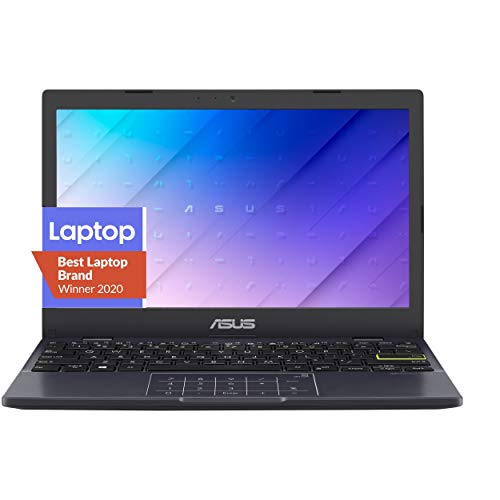
ASUS Vivobook Go 12 L210 11.6″ Ultra – Features & Prices in Saudi Arabia :
ASUS Vivobook Go 12 L210 11.6″ Ultra Thin Laptop, Intel Celeron N4020 Processor, 4GB RAM, 128GB eMMC Storage, Windows 11 Home in S Mode with One Year of Office 365 Personal, L210MA-DS04
Standing screen display size
11.6
Max Screen Resolution
1366 x 768 Pixels
Processor
2.8 GHz celeron
RAM
4 GB DDR4
Memory Speed
2.8 GHz
Hard Drive
128 GB Emmc
Chipset Brand
Intel
Card Description
Integrated
Number of USB 2.0 Ports
1
Number of USB 3.0 Ports
1
Flash Memory Size
128 GB
Hard Drive Interface
USB
Optical Drive Type
No Drive
Power Source
Battery Powered
Batteries
1 Lithium Ion batteries required. (included)
Test video – ASUS Vivobook Go 12 L210 11.6″ Ultra :
Product highlights :
Questions & Answers – ASUS Vivobook Go 12 L210 11.6″ Ultra :
Technical specifications – ASUS Vivobook Go 12 L210 11.6″ Ultra :
Brand
ASUS
Series
ASUS Vivobook Go 12
Screen Size
11.6
Color
Star Black
Hard Disk Size
128 GB
CPU Model
Celeron
Ram Memory Installed Size
4 GB
Operating System
Windows 11 S – 2022 Version
Card Description
Integrated
CPU Speed
2.8 GHz
Purchase advice :
-
Warranty :
Check the duration of the warranty and also the faults and defects it covers. Is it complete or limited? and What is included in the warranty (parts, repairs or both)?
-
Shipping :
Is delivery offered? And how long does it take to get delivered (Delivery time)
-
Proof of purchase :
Does the shop give you an invoice ?
-
After-sales service :
Do they have an after-sales service to have information about the installation or operation (instructions for use). Also in case of problem, it is the seller who takes charge or you must contact the manufacturer or supplier yourself.
_____________________________

T. S (verified owner) –
Very Slow – Screen pixels are very low and the processor is very slow. It would be a pain to use it if you’ve been Macs.
L. N (verified owner) –
USB-C and Charger Not Working Out of Box! – I realize this is a $200 laptop. But still, the basic hardware ought to work, especially a new-model machine fresh out of the box. First time using it I noticed though it was plugged it was not charging. Jiggling/moving the power cord causes it to erratically charge, then stop charging. I don’t know at this point if the issue is the cord or the port, but it is definitely hardware related. Next I tried plugging it into my docking station using the USB-C port. Windows makes the “connected hardware” sound, but there is zero video output to my monitors and the machine doesn’t charge. USB-C port appears DOA as far as I can tell. Really disappointed because I read good reviews, the machine feels solid, and I love the size. But if the basic features don’t work straight out of the box, what’s the point??
T. S (verified owner) –
Very Slow – Screen pixels are very low and the processor is very slow. It would be a pain to use it if you’ve been Macs.
F. L (verified owner) –
As shown – Very light weight
F. L (verified owner) –
As shown – Very light weight
L. N (verified owner) –
USB-C and Charger Not Working Out of Box! – I realize this is a $200 laptop. But still, the basic hardware ought to work, especially a new-model machine fresh out of the box. First time using it I noticed though it was plugged it was not charging. Jiggling/moving the power cord causes it to erratically charge, then stop charging. I don’t know at this point if the issue is the cord or the port, but it is definitely hardware related. Next I tried plugging it into my docking station using the USB-C port. Windows makes the “connected hardware” sound, but there is zero video output to my monitors and the machine doesn’t charge. USB-C port appears DOA as far as I can tell. Really disappointed because I read good reviews, the machine feels solid, and I love the size. But if the basic features don’t work straight out of the box, what’s the point??