Beelink 11th Gen 4 Cores Celeron N5105 – Features & Prices in Saudi Arabia :
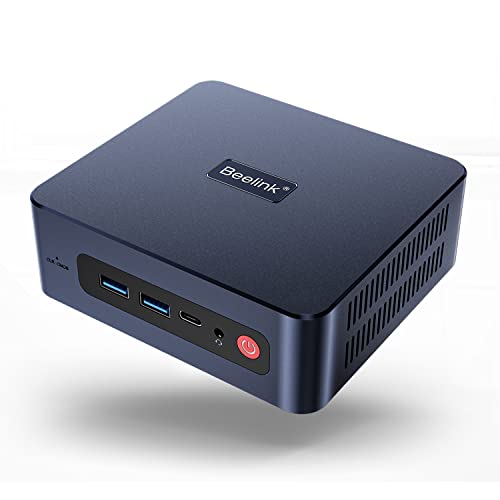
Beelink 11th Gen 4 Cores Celeron N5105 (Up to 2.9GHz) U59 Pro Mini PC, 8GB DDR4 500GB SSD Mini Desktop Computer, Small PC Supports Dual Gigabit Ethernet Nic, WiFi 5, Dual HDMI 4K, USB-C
Processor
2.9 GHz mobile_celeron
RAM
8 GB DDR4
Memory Speed
2933 MHz
Hard Drive
500 GB SSD
Graphics Coprocessor
Intel HD Graphics 5500
Chipset Brand
Intel
Card Description
Integrated
Wireless Type
802.11a/b/g/n/ac
Number of USB 3.0 Ports
4
Computer Memory Type
SODIMM
Hard Drive Interface
Serial ATA-300
Test video – Beelink 11th Gen 4 Cores Celeron N5105 :
Product highlights :
【11th Gen Quad Core Celeron N5105】— Built-in the latest 10 nm Jasper Lake N5105 processor clocked from 2GHz to 2.9 GHz with 4 MB of L3 cache and 10W ultra low power consumption, Beelink U59 pro mini pc features higher efficiency and significant performance improvement, bringing you smooth operation and stable multitasking experience. This mini computer is pre-installed with 11 Pro OS, also supporting the installation of Linux-based operating systems including Ubuntu.
【Upgraded Graphical Performanc】— The beelink U59 Pro has a higher integrated UHD Graphics with 24 execution units and the increasing burst frequency from 750 MHz to 800 MHz compared to the 16 execution units in Celeron N5095, which is enough for multimedia and light gaming use. Supports 4K ultra high definition display, this mini pc could be connected up to three independent monitors via two HDMI ports and a USB-C ports simultaneously, for dealing with multi-tasking efficiently.
【Support Expansion of Memory and Storage】— This mini pc is already configurated with 8GB dual channels DDR4 2933MHz and 500GB M.2 SATA3 2280 SSD, supporting memory expansion at max 16GB and storage expansion up to 2TB. Additionally, there is a 2.5 inch drive bay on the base for an optional storage up to 2TB. You will experience extremely fast speed for launching and loading applications and plenty of storage for all your files.
【Dual Gigabit Ethernet + WiFi5 + Bluetooth 4.0】 — This Beelink mini PC has dual RJ45 LAN ports with maximum theoretical downlink speed of 1000 Mb/s, providing you wide network usage like software router (OpenWRT/ ddWRT/ Tomato), firewall, NAT, Pfsense or network isolation etc. Also packed with WiFi 5 wireless connectivity and Bluetooth 4.0, this mini pc offers reliable transmission speed and allows you to connect your favorite Bluetooth devices with the mini computer.
【Additional Function & Compact Mini Size】 — Measuring only 4.88 x 4.45 x 1.65 inches and 295g, this small form factor PC could be your mobile entertainment buddy and placed anywhere as you wish. You could place it on the desk, install it on the back of the monitor and even take it for travel and business trip. Moreover, this mini desktop computer features other special functions, supporting PXE Boot, RTC, WOL and auto power on (get into BIOS interface settings).
➕ What is the price of Beelink 11th Gen 4 Cores Celeron N5105 in Saudi Arabia ?
The price of Beelink 11th Gen 4 Cores Celeron N5105 in-store is 920 SAR VAT.
➕ When Beelink 11th Gen 4 Cores Celeron N5105 was released ?
The release date was .
➕ What is the price of Beelink 11th Gen 4 Cores Celeron N5105 cheap used ?
The price of Beelink 11th Gen 4 Cores Celeron N5105 used is 640 SAR VAT.
➕ What are the main characteristics of Beelink 11th Gen 4 Cores Celeron N5105 ?
Special specifications :
【11th Gen Quad Core Celeron N5105】— Built-in the latest 10 nm Jasper Lake N5105 processor clocked from 2GHz to 2.9 GHz with 4 MB of L3 cache and 10W ultra low power consumption, Beelink U59 pro mini pc features higher efficiency and significant performance improvement, bringing you smooth operation and stable multitasking experience. This mini computer is pre-installed with 11 Pro OS, also supporting the installation of Linux-based operating systems including Ubuntu.
➕ Is it interesting to buy this product ?
The best people who can answer you are customers who have already bought and tested this product (See Customer Reviews). This product is rated 4.4 / 5 on Amazon.
➕ Where to buy Beelink 11th Gen 4 Cores Celeron N5105 in Saudi Arabia ?
Check the duration of the warranty and also the faults and defects it covers. Is it complete or limited? and What is included in the warranty (parts, repairs or both)?
Shipping :
Is delivery offered? And how long does it take to get delivered (Delivery time)
Proof of purchase :
Does the shop give you an invoice ?
After-sales service :
Do they have an after-sales service to have information about the installation or operation (instructions for use). Also in case of problem, it is the seller who takes charge or you must contact the manufacturer or supplier yourself.
_____________________________
8 reviews for Beelink 11th Gen 4 Cores Celeron N5105
Rated 2 out of 5
G. A (verified owner)–
Small In Size; Smaller in Performance – I picked up the Beelink U59 with a very simple objective: use it to play 4K 60 FPS HDR video, particularly on youtube and local files. TL;DR it can’t. Read on to find out what other limitations await you with the U59. I purchased the 8 GB version, and this version only comes with a single RAM module, which means no dual-channel. Dual-channel effectively doubles RAM bandwidth and is almost a must-have for ANY integrated GPU, let alone one as paltry and sluggish as any Intel GPU
Rated 5 out of 5
A. I (verified owner)–
Perfect for Astrophotography – I was going to get an ASIAIR for astrophotography but there is a huge wait on them. I got this instead and it was the wise thing to do because all the astrophotography software I use (NINA, PHD2, APT) are Windows-based. I got this instead and have just installed all of my stuff on it. 4 USB ports and 1 USB C is what I need and as an added bonus, it comes with Windows 11 Pro installed so I can access from my inside-computer. Perfect for those cold winter nights! This thing is small and light enough that I will attach it to the top of my telescope. Only minor issue I had was the window was stretched where I couldn’t see the Windows 11 taskbar at the bottom but after installing all of the Windows 11 updates, it is perfect now. I am using this with a 4k monitor. This is not for gaming–I can already tell that games will run very slowly on it but it is perfect for my use. I may even get one to replace my big and bulky work computer. Now I just need a clear night…
Rated 5 out of 5
A. I (verified owner)–
Perfect for Astrophotography – I was going to get an ASIAIR for astrophotography but there is a huge wait on them. I got this instead and it was the wise thing to do because all the astrophotography software I use (NINA, PHD2, APT) are Windows-based. I got this instead and have just installed all of my stuff on it. 4 USB ports and 1 USB C is what I need and as an added bonus, it comes with Windows 11 Pro installed so I can access from my inside-computer. Perfect for those cold winter nights! This thing is small and light enough that I will attach it to the top of my telescope. Only minor issue I had was the window was stretched where I couldn’t see the Windows 11 taskbar at the bottom but after installing all of the Windows 11 updates, it is perfect now. I am using this with a 4k monitor. This is not for gaming–I can already tell that games will run very slowly on it but it is perfect for my use. I may even get one to replace my big and bulky work computer. Now I just need a clear night…
Rated 5 out of 5
S. M (verified owner)–
Great space saving desktop. Easy access to upgradable components. – Wasn’t expecting much as only mini computers I have played with are Linux based (mainly pi). Opened up day one to see ability to upgrade and if I had anything to fit. Sadly only thing I had on hand as an upgrade was m2 solid but that had windows on it so left. Had easy access to it’s sshd, ddr4 ram slots ( which had 1x 8gb and an open slot), and a bay for a 2.5 hd? As for running it’s a little bit odd as it has windows 11 and I haven’t used yet. A few things did seem to run a little slower than my old full size desk top, but most ran as fast or faster. I do worry about the amount of heat it produces in such a small case, but had it run for hours ripping DVDs with no issues. Will eventually use the bracket to install to back of my monitor.
Rated 5 out of 5
S. M (verified owner)–
Great space saving desktop. Easy access to upgradable components. – Wasn’t expecting much as only mini computers I have played with are Linux based (mainly pi). Opened up day one to see ability to upgrade and if I had anything to fit. Sadly only thing I had on hand as an upgrade was m2 solid but that had windows on it so left. Had easy access to it’s sshd, ddr4 ram slots ( which had 1x 8gb and an open slot), and a bay for a 2.5 hd? As for running it’s a little bit odd as it has windows 11 and I haven’t used yet. A few things did seem to run a little slower than my old full size desk top, but most ran as fast or faster. I do worry about the amount of heat it produces in such a small case, but had it run for hours ripping DVDs with no issues. Will eventually use the bracket to install to back of my monitor.
Rated 5 out of 5
C. L (verified owner)–
Powerful and quiet for the money – I bought this to be always on, always showing my Synology NAS’s Surveillance Station security cam monitor web page in my bedroom. If I hear a noise at 3 AM, I’ll be able to turn on the monitor and check everything very quick. This Beelink U59 Pro will work great for that. I cannot hear it running even with my ear right next to it. As a test of it’s performance, I ran a 4K Youtube video on a 4K TV and the security cam page with 6 cameras on a 1080p monitor. The task manager’s numbers settled at about 80% for CPU and 50% for GPU. It’s not hard to overwhelm, but it’s not bad either. I didn’t DL Open Hardware Monitor to check temps the right way, but the top of the box was just barely a little warm to the touch – not enough for me to worry about since it was doing 4K and 2K at the same time. One thing to note – the Windows 11 Pro license is showing as “VOLUME_MAK”. I would’ve liked to have downgraded the license on this to Home and used that Pro on another machine, but I don’t think that will be possible. Technically the only legal way that would be possible is by a retail license (AFAIK), but that really should be expected on a device like this anyway. That’s not the maker’s fault. We’ll see how long it lasts, but so far it seems to be a great deal for a sub $200 PC.
Rated 2 out of 5
G. A (verified owner)–
Small In Size; Smaller in Performance – I picked up the Beelink U59 with a very simple objective: use it to play 4K 60 FPS HDR video, particularly on youtube and local files. TL;DR it can’t. Read on to find out what other limitations await you with the U59. I purchased the 8 GB version, and this version only comes with a single RAM module, which means no dual-channel. Dual-channel effectively doubles RAM bandwidth and is almost a must-have for ANY integrated GPU, let alone one as paltry and sluggish as any Intel GPU
Rated 5 out of 5
C. L (verified owner)–
Powerful and quiet for the money – I bought this to be always on, always showing my Synology NAS’s Surveillance Station security cam monitor web page in my bedroom. If I hear a noise at 3 AM, I’ll be able to turn on the monitor and check everything very quick. This Beelink U59 Pro will work great for that. I cannot hear it running even with my ear right next to it. As a test of it’s performance, I ran a 4K Youtube video on a 4K TV and the security cam page with 6 cameras on a 1080p monitor. The task manager’s numbers settled at about 80% for CPU and 50% for GPU. It’s not hard to overwhelm, but it’s not bad either. I didn’t DL Open Hardware Monitor to check temps the right way, but the top of the box was just barely a little warm to the touch – not enough for me to worry about since it was doing 4K and 2K at the same time. One thing to note – the Windows 11 Pro license is showing as “VOLUME_MAK”. I would’ve liked to have downgraded the license on this to Home and used that Pro on another machine, but I don’t think that will be possible. Technically the only legal way that would be possible is by a retail license (AFAIK), but that really should be expected on a device like this anyway. That’s not the maker’s fault. We’ll see how long it lasts, but so far it seems to be a great deal for a sub $200 PC.



G. A (verified owner) –
Small In Size; Smaller in Performance – I picked up the Beelink U59 with a very simple objective: use it to play 4K 60 FPS HDR video, particularly on youtube and local files. TL;DR it can’t. Read on to find out what other limitations await you with the U59. I purchased the 8 GB version, and this version only comes with a single RAM module, which means no dual-channel. Dual-channel effectively doubles RAM bandwidth and is almost a must-have for ANY integrated GPU, let alone one as paltry and sluggish as any Intel GPU
A. I (verified owner) –
Perfect for Astrophotography – I was going to get an ASIAIR for astrophotography but there is a huge wait on them. I got this instead and it was the wise thing to do because all the astrophotography software I use (NINA, PHD2, APT) are Windows-based. I got this instead and have just installed all of my stuff on it. 4 USB ports and 1 USB C is what I need and as an added bonus, it comes with Windows 11 Pro installed so I can access from my inside-computer. Perfect for those cold winter nights! This thing is small and light enough that I will attach it to the top of my telescope. Only minor issue I had was the window was stretched where I couldn’t see the Windows 11 taskbar at the bottom but after installing all of the Windows 11 updates, it is perfect now. I am using this with a 4k monitor. This is not for gaming–I can already tell that games will run very slowly on it but it is perfect for my use. I may even get one to replace my big and bulky work computer. Now I just need a clear night…
A. I (verified owner) –
Perfect for Astrophotography – I was going to get an ASIAIR for astrophotography but there is a huge wait on them. I got this instead and it was the wise thing to do because all the astrophotography software I use (NINA, PHD2, APT) are Windows-based. I got this instead and have just installed all of my stuff on it. 4 USB ports and 1 USB C is what I need and as an added bonus, it comes with Windows 11 Pro installed so I can access from my inside-computer. Perfect for those cold winter nights! This thing is small and light enough that I will attach it to the top of my telescope. Only minor issue I had was the window was stretched where I couldn’t see the Windows 11 taskbar at the bottom but after installing all of the Windows 11 updates, it is perfect now. I am using this with a 4k monitor. This is not for gaming–I can already tell that games will run very slowly on it but it is perfect for my use. I may even get one to replace my big and bulky work computer. Now I just need a clear night…
S. M (verified owner) –
Great space saving desktop. Easy access to upgradable components. – Wasn’t expecting much as only mini computers I have played with are Linux based (mainly pi). Opened up day one to see ability to upgrade and if I had anything to fit. Sadly only thing I had on hand as an upgrade was m2 solid but that had windows on it so left. Had easy access to it’s sshd, ddr4 ram slots ( which had 1x 8gb and an open slot), and a bay for a 2.5 hd? As for running it’s a little bit odd as it has windows 11 and I haven’t used yet. A few things did seem to run a little slower than my old full size desk top, but most ran as fast or faster. I do worry about the amount of heat it produces in such a small case, but had it run for hours ripping DVDs with no issues. Will eventually use the bracket to install to back of my monitor.
S. M (verified owner) –
Great space saving desktop. Easy access to upgradable components. – Wasn’t expecting much as only mini computers I have played with are Linux based (mainly pi). Opened up day one to see ability to upgrade and if I had anything to fit. Sadly only thing I had on hand as an upgrade was m2 solid but that had windows on it so left. Had easy access to it’s sshd, ddr4 ram slots ( which had 1x 8gb and an open slot), and a bay for a 2.5 hd? As for running it’s a little bit odd as it has windows 11 and I haven’t used yet. A few things did seem to run a little slower than my old full size desk top, but most ran as fast or faster. I do worry about the amount of heat it produces in such a small case, but had it run for hours ripping DVDs with no issues. Will eventually use the bracket to install to back of my monitor.
C. L (verified owner) –
Powerful and quiet for the money – I bought this to be always on, always showing my Synology NAS’s Surveillance Station security cam monitor web page in my bedroom. If I hear a noise at 3 AM, I’ll be able to turn on the monitor and check everything very quick. This Beelink U59 Pro will work great for that. I cannot hear it running even with my ear right next to it. As a test of it’s performance, I ran a 4K Youtube video on a 4K TV and the security cam page with 6 cameras on a 1080p monitor. The task manager’s numbers settled at about 80% for CPU and 50% for GPU. It’s not hard to overwhelm, but it’s not bad either. I didn’t DL Open Hardware Monitor to check temps the right way, but the top of the box was just barely a little warm to the touch – not enough for me to worry about since it was doing 4K and 2K at the same time. One thing to note – the Windows 11 Pro license is showing as “VOLUME_MAK”. I would’ve liked to have downgraded the license on this to Home and used that Pro on another machine, but I don’t think that will be possible. Technically the only legal way that would be possible is by a retail license (AFAIK), but that really should be expected on a device like this anyway. That’s not the maker’s fault. We’ll see how long it lasts, but so far it seems to be a great deal for a sub $200 PC.
G. A (verified owner) –
Small In Size; Smaller in Performance – I picked up the Beelink U59 with a very simple objective: use it to play 4K 60 FPS HDR video, particularly on youtube and local files. TL;DR it can’t. Read on to find out what other limitations await you with the U59. I purchased the 8 GB version, and this version only comes with a single RAM module, which means no dual-channel. Dual-channel effectively doubles RAM bandwidth and is almost a must-have for ANY integrated GPU, let alone one as paltry and sluggish as any Intel GPU
C. L (verified owner) –
Powerful and quiet for the money – I bought this to be always on, always showing my Synology NAS’s Surveillance Station security cam monitor web page in my bedroom. If I hear a noise at 3 AM, I’ll be able to turn on the monitor and check everything very quick. This Beelink U59 Pro will work great for that. I cannot hear it running even with my ear right next to it. As a test of it’s performance, I ran a 4K Youtube video on a 4K TV and the security cam page with 6 cameras on a 1080p monitor. The task manager’s numbers settled at about 80% for CPU and 50% for GPU. It’s not hard to overwhelm, but it’s not bad either. I didn’t DL Open Hardware Monitor to check temps the right way, but the top of the box was just barely a little warm to the touch – not enough for me to worry about since it was doing 4K and 2K at the same time. One thing to note – the Windows 11 Pro license is showing as “VOLUME_MAK”. I would’ve liked to have downgraded the license on this to Home and used that Pro on another machine, but I don’t think that will be possible. Technically the only legal way that would be possible is by a retail license (AFAIK), but that really should be expected on a device like this anyway. That’s not the maker’s fault. We’ll see how long it lasts, but so far it seems to be a great deal for a sub $200 PC.