Beelink Mini PC, AMD Ryzen 5 5600H – Features & Prices in Saudi Arabia :
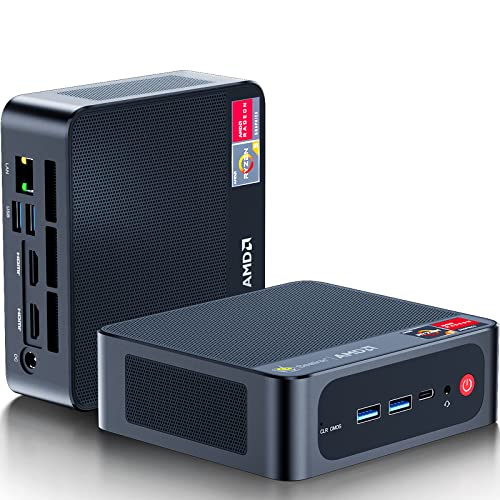
Beelink Mini PC, AMD Ryzen 5 5600H 6 Core(Up to 4.2GHz), 32GB DDR4 RAM 500GB NVME M.2 SSD, SER5 Pro Mini Desktop Computer Support 4K@60Hz Output/WiFi 6E/BT5.2/Dual HDMI/Type-C for Gaming/Office/Home
Standing screen display size
2.5 Inches
Processor
4.2 GHz ryzen_5_5600h
RAM
32 GB DDR4
Hard Drive
500 GB
Graphics Coprocessor
AMD Radeon Graphics 8core
Chipset Brand
AMD
Card Description
Integrated
Graphics Card Ram Size
8.00
Wireless Type
802.11ax
Number of USB 2.0 Ports
1
Number of USB 3.0 Ports
3
Test video – Beelink Mini PC, AMD Ryzen 5 5600H :
Product highlights :
◆AMD, Yes! – Ryzen 5000 Series is equipped with new Zen3 architecture. with the “Zen 3” architecture, gaming performance at 1080p is expected to increase by an average of 19% over Zen2 Architecture. The small pc also can be used for gaming and virtualization work. Gaming recommendations: LOL, DOTA 2, PUBG, CSGO, OW, GTA 4/5, Apex Legends, Team Fortress, New World, etc.
◆New Upgrade – Mini pc powered with AMD Ryzen 5 5600H 6 Core/12 Thread(3.3GHz up to 4.2GHz, L2 3MB L3 16MB Cache), Radeon Graphics 7 Core 1800MHz. Which can turn your desk into a powerful workstation just by adding a keyboard and mouse. WiFi 6E(802.11ax) and Bluetooth 5.2 is faster and more stable data transmission and there is no network congestion. More wireless support, say goodbye to cluttered desktop.
◆Triple Screen Display & 4K UHD Output – AMD Radeon Graphics 6 Core 1800MHz delivers powerful graphics processing. Triple screen 4K@60Hz display output via dual HDMI and Type-C port. Enjoy super first-class picture quality and easily improve work efficiency. Fully capable of browsing the internet, using Office, Adobe PR and PS applications, 4K videos playback, etc.
◆Freely Expand Capacity – Mini computer loaded with 32GB RAM DDR4 (2666MHz). Dual channel DDR4 upgradeable to max 64GB(2 x 32GB, up to 3200MHz). And 500GB M.2 SSD NVME 2280 (upgradeable to max 2TB), reading speed up to 1900mb/s and writing speed up to 1700mb/s. Supporting up to 2TB external 2.5-inch 7mm HDD expansion (not included). Reduce latency, powerful loading and processing capabilities for a smoother experience.
◆Multi Interface Design & Meet Deeply Needs – Beelink SER4 small computer is equipped with 2*HDMI2.1 ports, 3*USB3.0 ports, 1*USB2.0 port, 1*Type-C video&data port, 1*DC Jack, 1*RJ45 1000m port, 1*3.5mm Audio Jack(HP&MIC) port. Supports Gigabit Ethernet RJ45 1000M network connectivity. The small pc also can be used for gaming and virtualization work.
➕ What is the price of Beelink Mini PC, AMD Ryzen 5 5600H in Saudi Arabia ?
The price of Beelink Mini PC, AMD Ryzen 5 5600H in-store is 2100 SAR VAT.
➕ When Beelink Mini PC, AMD Ryzen 5 5600H was released ?
The release date was .
➕ What is the price of Beelink Mini PC, AMD Ryzen 5 5600H cheap used ?
The price of Beelink Mini PC, AMD Ryzen 5 5600H used is 1470 SAR VAT.
➕ What are the main characteristics of Beelink Mini PC, AMD Ryzen 5 5600H ?
Special specifications :
◆AMD, Yes! – Ryzen 5000 Series is equipped with new Zen3 architecture. with the “Zen 3” architecture, gaming performance at 1080p is expected to increase by an average of 19% over Zen2 Architecture. The small pc also can be used for gaming and virtualization work. Gaming recommendations: LOL, DOTA 2, PUBG, CSGO, OW, GTA 4/5, Apex Legends, Team Fortress, New World, etc.
➕ Is it interesting to buy this product ?
The best people who can answer you are customers who have already bought and tested this product (See Customer Reviews). This product is rated 4.3 / 5 on Amazon.
➕ Where to buy Beelink Mini PC, AMD Ryzen 5 5600H in Saudi Arabia ?
Check the duration of the warranty and also the faults and defects it covers. Is it complete or limited? and What is included in the warranty (parts, repairs or both)?
Shipping :
Is delivery offered? And how long does it take to get delivered (Delivery time)
Proof of purchase :
Does the shop give you an invoice ?
After-sales service :
Do they have an after-sales service to have information about the installation or operation (instructions for use). Also in case of problem, it is the seller who takes charge or you must contact the manufacturer or supplier yourself.
_____________________________
16 reviews for Beelink Mini PC, AMD Ryzen 5 5600H
Rated 5 out of 5
D. E (verified owner)–
Great little replacement for a desktop – The size makes it easy to use because of space. It runs nice and fast.
Rated 5 out of 5
G. J (verified owner)–
Great price, easy setup – I replaced my 10-year-old laptop with the 4800U with 32 GB RAM and 500 GB storage. It was a simple out-of-the-box setup, and the install of Windows 11 was smooth. The performance is great for my needs, and the unit is quiet. I run WSL2 and multiple monitors. In a few years I’ll probably look seriously about upgrading to a model with a newer generation of AMD CPU. I looked at Mac Mini’s and Intel NUC – both did not seem to be a good value for money. We’ll probably replace my wife’s desktop with another Beelink next year.
Rated 5 out of 5
O. J (verified owner)–
A very nice Linux machine for the seniors in the audience – We purchased the Ryzen 5 5560U version of the mini-pc. We removed the NVMe containing Windows Pro and installed a fresh Samsung EVO. We copied the hard disk from the old machine to the new Beelink machine. It was mostly trouble free.
Rated 5 out of 5
T. E (verified owner)–
Excellent little workstation – I run two 4K monitors with tons of Chrome tabs and other small business productivity apps. It is very snappy the whole way. Excellent little workhorse for an amazing value. I manage 25 workstations and will be transitioning folks to these over time.
Rated 4 out of 5
C. Z (verified owner)–
Will not reboot without unplugging the system – I love this little PC. The only issue I have is that it will not reboot. If I click the restart button in Windows 11, the PC powers down with no issue, but will not start back up. The only way to get it to power back up is to unplug the power and then plug it back in after a few seconds. Maybe this could be fixed with a Bios update, but I can’t find a link to update the Bios for an SER5 machine. I searched both the Beelink website and the pdf provided by Amazon. I don’t see a bios update listed. I have enable the bios to start up when powered on already, but that doesn’t fix the reboot issue. Any ideas??
Rated 2 out of 5
G. D (verified owner)–
Just a bad hardware setup, graphics go green screen when doing nothing. POS. – Radeon graphics setup is terrible, goes green screen, have to hard reboot. Cannot trust this thing. Support no help, would return if I could. Into the garbage.
Rated 5 out of 5
F. G (verified owner)–
So far so good! – I got this a few weeks ago and mostly use it for work, which mostly entails complex Excel workbooks with a lot of intensive macros. I usually need to have two sheets open at once. So far it’s a great PC that hasn’t had any problems running this stuff at all. I love the interface and the overall functionality. Very happy for the money. I did use it to do some work in Blender and it functions really well aside from taking quite awhile to render a fairly simple model (1-2 minutes for something with a few different textures and one light source). I think that’s to be expected tho for the hardware. It’s not designed to do graphics intensive stuff out of the box, but it will render anything if you have some time to spare. Overall, I’m really happy with it and it’s all I need until I can afford a $2,000 computer with a few extra bells and whistles.
Rated 5 out of 5
F. G (verified owner)–
So far so good! – I got this a few weeks ago and mostly use it for work, which mostly entails complex Excel workbooks with a lot of intensive macros. I usually need to have two sheets open at once. So far it’s a great PC that hasn’t had any problems running this stuff at all. I love the interface and the overall functionality. Very happy for the money. I did use it to do some work in Blender and it functions really well aside from taking quite awhile to render a fairly simple model (1-2 minutes for something with a few different textures and one light source). I think that’s to be expected tho for the hardware. It’s not designed to do graphics intensive stuff out of the box, but it will render anything if you have some time to spare. Overall, I’m really happy with it and it’s all I need until I can afford a $2,000 computer with a few extra bells and whistles.
Rated 2 out of 5
G. D (verified owner)–
Just a bad hardware setup, graphics go green screen when doing nothing. POS. – Radeon graphics setup is terrible, goes green screen, have to hard reboot. Cannot trust this thing. Support no help, would return if I could. Into the garbage.
Rated 5 out of 5
C. B (verified owner)–
Pefect for normal pc works – You can do all normal Pc works on this little PC. work can be done on two screens without any problem.
Rated 5 out of 5
O. J (verified owner)–
A very nice Linux machine for the seniors in the audience – We purchased the Ryzen 5 5560U version of the mini-pc. We removed the NVMe containing Windows Pro and installed a fresh Samsung EVO. We copied the hard disk from the old machine to the new Beelink machine. It was mostly trouble free.
Rated 5 out of 5
D. E (verified owner)–
Great little replacement for a desktop – The size makes it easy to use because of space. It runs nice and fast.
Rated 5 out of 5
G. J (verified owner)–
Great price, easy setup – I replaced my 10-year-old laptop with the 4800U with 32 GB RAM and 500 GB storage. It was a simple out-of-the-box setup, and the install of Windows 11 was smooth. The performance is great for my needs, and the unit is quiet. I run WSL2 and multiple monitors. In a few years I’ll probably look seriously about upgrading to a model with a newer generation of AMD CPU. I looked at Mac Mini’s and Intel NUC – both did not seem to be a good value for money. We’ll probably replace my wife’s desktop with another Beelink next year.
Rated 5 out of 5
T. E (verified owner)–
Excellent little workstation – I run two 4K monitors with tons of Chrome tabs and other small business productivity apps. It is very snappy the whole way. Excellent little workhorse for an amazing value. I manage 25 workstations and will be transitioning folks to these over time.
Rated 4 out of 5
C. Z (verified owner)–
Will not reboot without unplugging the system – I love this little PC. The only issue I have is that it will not reboot. If I click the restart button in Windows 11, the PC powers down with no issue, but will not start back up. The only way to get it to power back up is to unplug the power and then plug it back in after a few seconds. Maybe this could be fixed with a Bios update, but I can’t find a link to update the Bios for an SER5 machine. I searched both the Beelink website and the pdf provided by Amazon. I don’t see a bios update listed. I have enable the bios to start up when powered on already, but that doesn’t fix the reboot issue. Any ideas??
Rated 5 out of 5
C. B (verified owner)–
Pefect for normal pc works – You can do all normal Pc works on this little PC. work can be done on two screens without any problem.

![Syntech USB C to USB Adapter [2 Pack] USB C Male to USB3 Female Adapter Compatible with iMac 2021 iPad Mini/Pro 2021 MacBook Pro 2020 MacBook Air 2020 and Other Type C Devices](/wp-content/uploads/2023/05/41nSZMNmLGL-300x225.jpg)

D. E (verified owner) –
Great little replacement for a desktop – The size makes it easy to use because of space. It runs nice and fast.
G. J (verified owner) –
Great price, easy setup – I replaced my 10-year-old laptop with the 4800U with 32 GB RAM and 500 GB storage. It was a simple out-of-the-box setup, and the install of Windows 11 was smooth. The performance is great for my needs, and the unit is quiet. I run WSL2 and multiple monitors. In a few years I’ll probably look seriously about upgrading to a model with a newer generation of AMD CPU. I looked at Mac Mini’s and Intel NUC – both did not seem to be a good value for money. We’ll probably replace my wife’s desktop with another Beelink next year.
O. J (verified owner) –
A very nice Linux machine for the seniors in the audience – We purchased the Ryzen 5 5560U version of the mini-pc. We removed the NVMe containing Windows Pro and installed a fresh Samsung EVO. We copied the hard disk from the old machine to the new Beelink machine. It was mostly trouble free.
T. E (verified owner) –
Excellent little workstation – I run two 4K monitors with tons of Chrome tabs and other small business productivity apps. It is very snappy the whole way. Excellent little workhorse for an amazing value. I manage 25 workstations and will be transitioning folks to these over time.
C. Z (verified owner) –
Will not reboot without unplugging the system – I love this little PC. The only issue I have is that it will not reboot. If I click the restart button in Windows 11, the PC powers down with no issue, but will not start back up. The only way to get it to power back up is to unplug the power and then plug it back in after a few seconds. Maybe this could be fixed with a Bios update, but I can’t find a link to update the Bios for an SER5 machine. I searched both the Beelink website and the pdf provided by Amazon. I don’t see a bios update listed. I have enable the bios to start up when powered on already, but that doesn’t fix the reboot issue. Any ideas??
G. D (verified owner) –
Just a bad hardware setup, graphics go green screen when doing nothing. POS. – Radeon graphics setup is terrible, goes green screen, have to hard reboot. Cannot trust this thing. Support no help, would return if I could. Into the garbage.
F. G (verified owner) –
So far so good! – I got this a few weeks ago and mostly use it for work, which mostly entails complex Excel workbooks with a lot of intensive macros. I usually need to have two sheets open at once. So far it’s a great PC that hasn’t had any problems running this stuff at all. I love the interface and the overall functionality. Very happy for the money. I did use it to do some work in Blender and it functions really well aside from taking quite awhile to render a fairly simple model (1-2 minutes for something with a few different textures and one light source). I think that’s to be expected tho for the hardware. It’s not designed to do graphics intensive stuff out of the box, but it will render anything if you have some time to spare. Overall, I’m really happy with it and it’s all I need until I can afford a $2,000 computer with a few extra bells and whistles.
F. G (verified owner) –
So far so good! – I got this a few weeks ago and mostly use it for work, which mostly entails complex Excel workbooks with a lot of intensive macros. I usually need to have two sheets open at once. So far it’s a great PC that hasn’t had any problems running this stuff at all. I love the interface and the overall functionality. Very happy for the money. I did use it to do some work in Blender and it functions really well aside from taking quite awhile to render a fairly simple model (1-2 minutes for something with a few different textures and one light source). I think that’s to be expected tho for the hardware. It’s not designed to do graphics intensive stuff out of the box, but it will render anything if you have some time to spare. Overall, I’m really happy with it and it’s all I need until I can afford a $2,000 computer with a few extra bells and whistles.
G. D (verified owner) –
Just a bad hardware setup, graphics go green screen when doing nothing. POS. – Radeon graphics setup is terrible, goes green screen, have to hard reboot. Cannot trust this thing. Support no help, would return if I could. Into the garbage.
C. B (verified owner) –
Pefect for normal pc works – You can do all normal Pc works on this little PC. work can be done on two screens without any problem.
O. J (verified owner) –
A very nice Linux machine for the seniors in the audience – We purchased the Ryzen 5 5560U version of the mini-pc. We removed the NVMe containing Windows Pro and installed a fresh Samsung EVO. We copied the hard disk from the old machine to the new Beelink machine. It was mostly trouble free.
D. E (verified owner) –
Great little replacement for a desktop – The size makes it easy to use because of space. It runs nice and fast.
G. J (verified owner) –
Great price, easy setup – I replaced my 10-year-old laptop with the 4800U with 32 GB RAM and 500 GB storage. It was a simple out-of-the-box setup, and the install of Windows 11 was smooth. The performance is great for my needs, and the unit is quiet. I run WSL2 and multiple monitors. In a few years I’ll probably look seriously about upgrading to a model with a newer generation of AMD CPU. I looked at Mac Mini’s and Intel NUC – both did not seem to be a good value for money. We’ll probably replace my wife’s desktop with another Beelink next year.
T. E (verified owner) –
Excellent little workstation – I run two 4K monitors with tons of Chrome tabs and other small business productivity apps. It is very snappy the whole way. Excellent little workhorse for an amazing value. I manage 25 workstations and will be transitioning folks to these over time.
C. Z (verified owner) –
Will not reboot without unplugging the system – I love this little PC. The only issue I have is that it will not reboot. If I click the restart button in Windows 11, the PC powers down with no issue, but will not start back up. The only way to get it to power back up is to unplug the power and then plug it back in after a few seconds. Maybe this could be fixed with a Bios update, but I can’t find a link to update the Bios for an SER5 machine. I searched both the Beelink website and the pdf provided by Amazon. I don’t see a bios update listed. I have enable the bios to start up when powered on already, but that doesn’t fix the reboot issue. Any ideas??
C. B (verified owner) –
Pefect for normal pc works – You can do all normal Pc works on this little PC. work can be done on two screens without any problem.