Beelink Mini S Mini PC W11 Pro, – Features & Prices in Saudi Arabia :
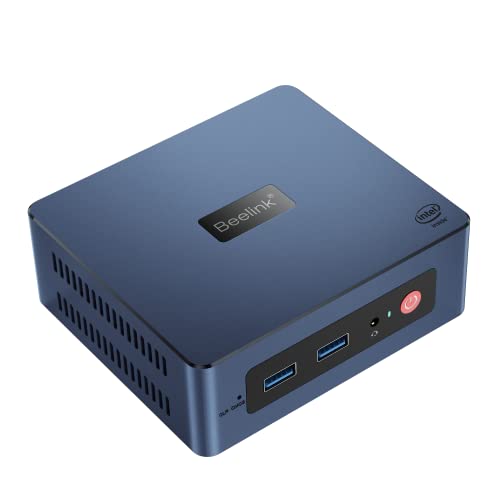
Beelink Mini S Mini PC W11 Pro, Intel 11th Gen N5095 (Max 2.9 GHz), Small Desktop PC 8GB DDR4 RAM 128GB SSD, Mini Computer Support 4K Dual HDMI, WiFi5 Bluetooth 4.0, Gigabit Ethernet, 4USB3.0
Processor
2.9 GHz celeron
RAM
8 GB DDR4
Hard Drive
128 GB SSD
Chipset Brand
Intel
Wireless Type
5 GHz Radio Frequency, 2.4 GHz Radio Frequency
National Stock Number
Mini S
Processor Brand
Intel
Hard Drive Interface
Serial ATA
Hard Drive Rotational Speed
500.00
Test video – Beelink Mini S Mini PC W11 Pro, :
Product highlights :
【11th High-efficiency Intel Processor】Beelink Mini PC equipped with 11th generation Intel N5095 Processor (4 Cores 4 Threads, max turbo to 2.9GHz, 4MB Cache). The mini computer is pre-installed with W11 and is perfect for easy work. For example, apply software such as AI, PS, CAD, Office, PR, and Keyshot.
【Storage Expansion & Heat Dissipation】The Mini computer with 8GB DDR4 RAM(Max 2933MHz) can be upgraded to 16GB(excluded). It also comes with 128GB M.2 SATA SSD 2280. Supports upgrade storage to 2TB (excluded) and via 2.5-inch SATA HDD up to 2T (excluded).Tip: Built-in FPC cable that can expand the hard disk memory.
【4K UHD & Dual Screen Display】Beelink Minis mini computer comes with Intel UHD Graphics, which can improve your video pictures to be more vivid. Speed shift technology makes the processor run more quickly so as to improve the gaming experience. Also, support 4K Dual Display via connecting 2*HDMI ports to improve work efficiency.
【Multiple Ports & Packages】The Mini Desktop Computer has WiFi 5 and 1000Mbps LAN, which can improve wireless network performance. Additional, it has 2xHDMI, 4xUSB3.0, 1xDC(12V-3A 36W), 1xAudio jack. It also comes with a 1x power adapter, 2x HDMI cables, and a 1x VESA mount. Turn any desk into a powerful workstation by simply adding a keyboard, mouse, and up to two monitors.
【Quality Certification & Product Guarantee】 All Beelink Mini PCS with PSE, FCC, CE, and RoHS certification. All have passed rigorous inspection before shipping. We provide lifelong technical support, a 1-year warranty, and 24-hour customer service. If you have any questions, please feel free to contact us!
Questions & Answers – Beelink Mini S Mini PC W11 Pro, :
➕ What is the price of Beelink Mini S Mini PC W11 Pro, in Saudi Arabia ?
The price of Beelink Mini S Mini PC W11 Pro, in-store is 720 SAR VAT.
➕ When Beelink Mini S Mini PC W11 Pro, was released ?
The release date was .
➕ What is the price of Beelink Mini S Mini PC W11 Pro, cheap used ?
The price of Beelink Mini S Mini PC W11 Pro, used is 500 SAR VAT.
➕ What are the main characteristics of Beelink Mini S Mini PC W11 Pro, ?
Special specifications :
【11th High-efficiency Intel Processor】Beelink Mini PC equipped with 11th generation Intel N5095 Processor (4 Cores 4 Threads, max turbo to 2.9GHz, 4MB Cache). The mini computer is pre-installed with W11 and is perfect for easy work. For example, apply software such as AI, PS, CAD, Office, PR, and Keyshot.
➕ Is it interesting to buy this product ?
The best people who can answer you are customers who have already bought and tested this product (See Customer Reviews). This product is rated 4.3 / 5 on Amazon.
➕ Where to buy Beelink Mini S Mini PC W11 Pro, in Saudi Arabia ?
Technical specifications – Beelink Mini S Mini PC W11 Pro, :
Specific Uses For Product
Gaming
Brand
Beelink
Personal computer design type
Mini PC
Operating System
W-11 Pro
Memory Storage Capacity
128 GB
Ram Memory Installed Size
8 GB
Series
Mini S
Included Components
Mini PC*1, User Munual*1, HDMI Cable*2, VESA Mount*1, Power Adapter(12V 3A)*1
CPU Model
Celeron
CPU Manufacturer
Intel
Purchase advice :
Warranty :
Check the duration of the warranty and also the faults and defects it covers. Is it complete or limited? and What is included in the warranty (parts, repairs or both)?
Shipping :
Is delivery offered? And how long does it take to get delivered (Delivery time)
Proof of purchase :
Does the shop give you an invoice ?
After-sales service :
Do they have an after-sales service to have information about the installation or operation (instructions for use). Also in case of problem, it is the seller who takes charge or you must contact the manufacturer or supplier yourself.
_____________________________
16 reviews for Beelink Mini S Mini PC W11 Pro,
Rated 3 out of 5
B. S (verified owner)–
It has some glitches – Whenever it’s been in sleep/hibernation and then you bring it back on, it won’t start up with windows 11. To solve I shut it down and then unpaged the power. I then plug the power back on and turn the computer on. It resets the computer. Now it works fine.
Rated 5 out of 5
E. K (verified owner)–
Great support & price matching – Had some questions and was able to get answers via Amazon by reaching out to seller. Also had a price match that they eventually honored after some prodding on my part. Great device and seller.
Rated 5 out of 5
B. A (verified owner)–
Runs Linux fine – Got this today and never even turned Windows on. F7 on startup and told it to boot from a USB. If you need to get into the BIOS hit the delete key. For boot options hit F7. Mine was marked on the bottom. I booted into Linux mint first and tried to install it and got an error that stopped the installation. Yet I was able to use the live USB to download an ISO for AV-Linux-MX and with mint a mouse click lets you create a bootable USB with an ISO image. I like to play a guitar and AV Linux is geared to guitar players. Install was easy with no problems. Installed my VPN and that went easy then did a bunch of upgrades. Half an hour later it was running perfect. Fast, plugged in to a 24 in screen and graphics are good. Able to watch movies with it while surfing the net.
Rated 5 out of 5
O. Z (verified owner)–
Small Computer with a Big Punch! – I already had 2 monitors, an external 1TB thumb drive, a keyboard and a mouse, so all I needed was a desktop with Windows. I didn’t want to spend much, and the value for the money for this little box computer is insane! The processor rocks – I press the on button and literally within less than 15 seconds including the time I put my password in this thing is up and running 100%! I edit videos with a pretty intense software that needs a great graphics card, great processor, 8GB ram ideally (what this one has) – this little Beelink rocks and totally exceeded my expectations! Both of my monitors plugged in with HDMI cords (1 cord included I had the other one) and they worked immediately! I love that it includes Windows pre-installed! Love this and highly recommend for anyone needing a simple desktop for simple to moderate tasks. It does get pretty hot when it’s working hard so just needs to be in a well-ventilated cool area. A+ *Highly recommend!
Rated 5 out of 5
M. E (verified owner)–
Decent – Works well. Setup was easy.
Rated 5 out of 5
B. A (verified owner)–
Runs Linux fine – Got this today and never even turned Windows on. F7 on startup and told it to boot from a USB. If you need to get into the BIOS hit the delete key. For boot options hit F7. Mine was marked on the bottom. I booted into Linux mint first and tried to install it and got an error that stopped the installation. Yet I was able to use the live USB to download an ISO for AV-Linux-MX and with mint a mouse click lets you create a bootable USB with an ISO image. I like to play a guitar and AV Linux is geared to guitar players. Install was easy with no problems. Installed my VPN and that went easy then did a bunch of upgrades. Half an hour later it was running perfect. Fast, plugged in to a 24 in screen and graphics are good. Able to watch movies with it while surfing the net.
Rated 3 out of 5
T. M (verified owner)–
I really, really wanted to like this mini-pc… – Great features, great performance, great price. Until I opened it up. I wanted to remove the M.2 Sata SSD and replace it with another so I could install pfSense and leave the original SSD intact in case I wanted to go back. Page 3 of the manual shows how to install an SSD – slip the SSD into the slot, press it down and screw it in place. Well, who/what ever installed the SSD screw here must have used a torque wrench. No matter what I tried I could not get the screw out. As a result, I returned it. I would really like to get another one, but if this is a common problem, I’m not sure I want to try again.
Rated 5 out of 5
P. B (verified owner)–
WHAT ARE YOU WAITING FOR? – For $131 how can you go wrong? Does everything my big 200watt desktop does at a fraction of the cost and the size fits comfortably under my Sony big screen tv on the desk, I’m blown away by these little critters, so I bought 2 !
Rated 5 out of 5
O. Z (verified owner)–
Small Computer with a Big Punch! – I already had 2 monitors, an external 1TB thumb drive, a keyboard and a mouse, so all I needed was a desktop with Windows. I didn’t want to spend much, and the value for the money for this little box computer is insane! The processor rocks – I press the on button and literally within less than 15 seconds including the time I put my password in this thing is up and running 100%! I edit videos with a pretty intense software that needs a great graphics card, great processor, 8GB ram ideally (what this one has) – this little Beelink rocks and totally exceeded my expectations! Both of my monitors plugged in with HDMI cords (1 cord included I had the other one) and they worked immediately! I love that it includes Windows pre-installed! Love this and highly recommend for anyone needing a simple desktop for simple to moderate tasks. It does get pretty hot when it’s working hard so just needs to be in a well-ventilated cool area. A+ *Highly recommend!
Rated 3 out of 5
T. M (verified owner)–
I really, really wanted to like this mini-pc… – Great features, great performance, great price. Until I opened it up. I wanted to remove the M.2 Sata SSD and replace it with another so I could install pfSense and leave the original SSD intact in case I wanted to go back. Page 3 of the manual shows how to install an SSD – slip the SSD into the slot, press it down and screw it in place. Well, who/what ever installed the SSD screw here must have used a torque wrench. No matter what I tried I could not get the screw out. As a result, I returned it. I would really like to get another one, but if this is a common problem, I’m not sure I want to try again.
Rated 3 out of 5
B. S (verified owner)–
It has some glitches – Whenever it’s been in sleep/hibernation and then you bring it back on, it won’t start up with windows 11. To solve I shut it down and then unpaged the power. I then plug the power back on and turn the computer on. It resets the computer. Now it works fine.
Rated 5 out of 5
P. B (verified owner)–
WHAT ARE YOU WAITING FOR? – For $131 how can you go wrong? Does everything my big 200watt desktop does at a fraction of the cost and the size fits comfortably under my Sony big screen tv on the desk, I’m blown away by these little critters, so I bought 2 !
Rated 5 out of 5
E. K (verified owner)–
Great support & price matching – Had some questions and was able to get answers via Amazon by reaching out to seller. Also had a price match that they eventually honored after some prodding on my part. Great device and seller.
Rated 5 out of 5
A. S (verified owner)–
Blows Away Dell/Wyse Thin Clients – This is an initial review. I just got this today. So far it is fantastic. I installed Debian 11 and Home Assistant. I’ve been wasting money on Dell/Wyse thin clients. This has 3X more CPU power, 2X more RAM, and 4X more storage than the thin client I was using. Setting up auto start after power failure in the BIOS was odd but works fine.
Rated 5 out of 5
A. S (verified owner)–
Blows Away Dell/Wyse Thin Clients – This is an initial review. I just got this today. So far it is fantastic. I installed Debian 11 and Home Assistant. I’ve been wasting money on Dell/Wyse thin clients. This has 3X more CPU power, 2X more RAM, and 4X more storage than the thin client I was using. Setting up auto start after power failure in the BIOS was odd but works fine.


B. S (verified owner) –
It has some glitches – Whenever it’s been in sleep/hibernation and then you bring it back on, it won’t start up with windows 11. To solve I shut it down and then unpaged the power. I then plug the power back on and turn the computer on. It resets the computer. Now it works fine.
E. K (verified owner) –
Great support & price matching – Had some questions and was able to get answers via Amazon by reaching out to seller. Also had a price match that they eventually honored after some prodding on my part. Great device and seller.
B. A (verified owner) –
Runs Linux fine – Got this today and never even turned Windows on. F7 on startup and told it to boot from a USB. If you need to get into the BIOS hit the delete key. For boot options hit F7. Mine was marked on the bottom. I booted into Linux mint first and tried to install it and got an error that stopped the installation. Yet I was able to use the live USB to download an ISO for AV-Linux-MX and with mint a mouse click lets you create a bootable USB with an ISO image. I like to play a guitar and AV Linux is geared to guitar players. Install was easy with no problems. Installed my VPN and that went easy then did a bunch of upgrades. Half an hour later it was running perfect. Fast, plugged in to a 24 in screen and graphics are good. Able to watch movies with it while surfing the net.
O. Z (verified owner) –
Small Computer with a Big Punch! – I already had 2 monitors, an external 1TB thumb drive, a keyboard and a mouse, so all I needed was a desktop with Windows. I didn’t want to spend much, and the value for the money for this little box computer is insane! The processor rocks – I press the on button and literally within less than 15 seconds including the time I put my password in this thing is up and running 100%! I edit videos with a pretty intense software that needs a great graphics card, great processor, 8GB ram ideally (what this one has) – this little Beelink rocks and totally exceeded my expectations! Both of my monitors plugged in with HDMI cords (1 cord included I had the other one) and they worked immediately! I love that it includes Windows pre-installed! Love this and highly recommend for anyone needing a simple desktop for simple to moderate tasks. It does get pretty hot when it’s working hard so just needs to be in a well-ventilated cool area. A+ *Highly recommend!
M. E (verified owner) –
Decent – Works well. Setup was easy.
B. A (verified owner) –
Runs Linux fine – Got this today and never even turned Windows on. F7 on startup and told it to boot from a USB. If you need to get into the BIOS hit the delete key. For boot options hit F7. Mine was marked on the bottom. I booted into Linux mint first and tried to install it and got an error that stopped the installation. Yet I was able to use the live USB to download an ISO for AV-Linux-MX and with mint a mouse click lets you create a bootable USB with an ISO image. I like to play a guitar and AV Linux is geared to guitar players. Install was easy with no problems. Installed my VPN and that went easy then did a bunch of upgrades. Half an hour later it was running perfect. Fast, plugged in to a 24 in screen and graphics are good. Able to watch movies with it while surfing the net.
T. M (verified owner) –
I really, really wanted to like this mini-pc… – Great features, great performance, great price. Until I opened it up. I wanted to remove the M.2 Sata SSD and replace it with another so I could install pfSense and leave the original SSD intact in case I wanted to go back. Page 3 of the manual shows how to install an SSD – slip the SSD into the slot, press it down and screw it in place. Well, who/what ever installed the SSD screw here must have used a torque wrench. No matter what I tried I could not get the screw out. As a result, I returned it. I would really like to get another one, but if this is a common problem, I’m not sure I want to try again.
P. B (verified owner) –
WHAT ARE YOU WAITING FOR? – For $131 how can you go wrong? Does everything my big 200watt desktop does at a fraction of the cost and the size fits comfortably under my Sony big screen tv on the desk, I’m blown away by these little critters, so I bought 2 !
O. Z (verified owner) –
Small Computer with a Big Punch! – I already had 2 monitors, an external 1TB thumb drive, a keyboard and a mouse, so all I needed was a desktop with Windows. I didn’t want to spend much, and the value for the money for this little box computer is insane! The processor rocks – I press the on button and literally within less than 15 seconds including the time I put my password in this thing is up and running 100%! I edit videos with a pretty intense software that needs a great graphics card, great processor, 8GB ram ideally (what this one has) – this little Beelink rocks and totally exceeded my expectations! Both of my monitors plugged in with HDMI cords (1 cord included I had the other one) and they worked immediately! I love that it includes Windows pre-installed! Love this and highly recommend for anyone needing a simple desktop for simple to moderate tasks. It does get pretty hot when it’s working hard so just needs to be in a well-ventilated cool area. A+ *Highly recommend!
T. M (verified owner) –
I really, really wanted to like this mini-pc… – Great features, great performance, great price. Until I opened it up. I wanted to remove the M.2 Sata SSD and replace it with another so I could install pfSense and leave the original SSD intact in case I wanted to go back. Page 3 of the manual shows how to install an SSD – slip the SSD into the slot, press it down and screw it in place. Well, who/what ever installed the SSD screw here must have used a torque wrench. No matter what I tried I could not get the screw out. As a result, I returned it. I would really like to get another one, but if this is a common problem, I’m not sure I want to try again.
B. S (verified owner) –
It has some glitches – Whenever it’s been in sleep/hibernation and then you bring it back on, it won’t start up with windows 11. To solve I shut it down and then unpaged the power. I then plug the power back on and turn the computer on. It resets the computer. Now it works fine.
P. B (verified owner) –
WHAT ARE YOU WAITING FOR? – For $131 how can you go wrong? Does everything my big 200watt desktop does at a fraction of the cost and the size fits comfortably under my Sony big screen tv on the desk, I’m blown away by these little critters, so I bought 2 !
E. K (verified owner) –
Great support & price matching – Had some questions and was able to get answers via Amazon by reaching out to seller. Also had a price match that they eventually honored after some prodding on my part. Great device and seller.
A. S (verified owner) –
Blows Away Dell/Wyse Thin Clients – This is an initial review. I just got this today. So far it is fantastic. I installed Debian 11 and Home Assistant. I’ve been wasting money on Dell/Wyse thin clients. This has 3X more CPU power, 2X more RAM, and 4X more storage than the thin client I was using. Setting up auto start after power failure in the BIOS was odd but works fine.
A. S (verified owner) –
Blows Away Dell/Wyse Thin Clients – This is an initial review. I just got this today. So far it is fantastic. I installed Debian 11 and Home Assistant. I’ve been wasting money on Dell/Wyse thin clients. This has 3X more CPU power, 2X more RAM, and 4X more storage than the thin client I was using. Setting up auto start after power failure in the BIOS was odd but works fine.
M. E (verified owner) –
Decent – Works well. Setup was easy.