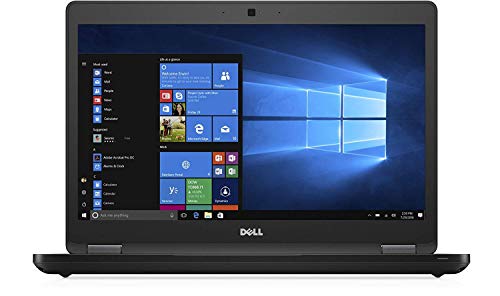
Dell Latitude 5480 14-inch Business Laptop Notebook is available in Saudi Arabia.
Find out all you need to know about Dell Latitude 5480 14-inch Business Laptop Notebook before buying : Price, Test video, Datasheet, Similar products.
Dell Latitude 5480 14-inch Business Laptop Notebook – Features & Prices in Saudi Arabia :
Dell Latitude 5480 14-inch Business Laptop Notebook PC Intel i5-6300U 2.4GHz 8GB DDR4 500GB HDD Backlit Keyboard Windows 10 Pro (Renewed)
Standing screen display size
14 Inches
Screen Resolution
1366×768
Max Screen Resolution
1366 x 768 Pixels
Processor
2.4 GHz core_i5_family
RAM
8 GB SDRAM
Memory Speed
2400 MHz
Hard Drive
500 GB HDD
Graphics Coprocessor
Intel Graphics
Chipset Brand
Intel
Card Description
Integrated
Wireless Type
802.11a
Hard Drive Interface
Serial ATA
Power Source
AC & Battery
Test video – Dell Latitude 5480 14-inch Business Laptop Notebook :
Product highlights :
Powered By Intel Dual Core i5-6300U 2.4GHz Processor (Boost up to 3.0 GHz, 3M Cache), Intel vPro Technology Enabled, Backlit Keyboard
14- inch HD (1366×768) Anti-Glare Non-Touch Display, Smart Card Reader, No Optical Drive, No Camera
8GB 2400MHz DDR4 Memory, 500GB SATA Hard Drive(HDD), Intel Wireless 8265 AC WiFi, Bluetooth, 1 x USB Type C, 3 x USB 3.1, 1 x HDMI, RJ-45, Audio Combo
Windows 10 Professional 64-Bit, 4-Cell 68 WHr Battery
Questions & Answers – Dell Latitude 5480 14-inch Business Laptop Notebook :
➕ What is the price of Dell Latitude 5480 14-inch Business Laptop Notebook in Saudi Arabia ?
The price of Dell Latitude 5480 14-inch Business Laptop Notebook in-store is 750 SAR VAT.
➕ When Dell Latitude 5480 14-inch Business Laptop Notebook was released ?
The release date was .
➕ What is the price of Dell Latitude 5480 14-inch Business Laptop Notebook cheap used ?
The price of Dell Latitude 5480 14-inch Business Laptop Notebook used is 520 SAR VAT.
➕ What are the main characteristics of Dell Latitude 5480 14-inch Business Laptop Notebook ?
Special specifications :
Powered By Intel Dual Core i5-6300U 2.4GHz Processor (Boost up to 3.0 GHz, 3M Cache), Intel vPro Technology Enabled, Backlit Keyboard
➕ Is it interesting to buy this product ?
The best people who can answer you are customers who have already bought and tested this product (See Customer Reviews). This product is rated 3.8 / 5 on Amazon.
➕ Where to buy Dell Latitude 5480 14-inch Business Laptop Notebook in Saudi Arabia ?
Technical specifications – Dell Latitude 5480 14-inch Business Laptop Notebook :
Brand
Dell
Series
Dell Latitude
Screen Size
14 Inches
Hard Disk Size
500 GB
CPU Model
Core i5 Family
Ram Memory Installed Size
8 GB
Operating System
Windows 10 Pro
Card Description
Integrated
Graphics Coprocessor
Intel Graphics
CPU Speed
2.4 GHz
Purchase advice :
Warranty :
Check the duration of the warranty and also the faults and defects it covers. Is it complete or limited? and What is included in the warranty (parts, repairs or both)?
Shipping :
Is delivery offered? And how long does it take to get delivered (Delivery time)
Proof of purchase :
Does the shop give you an invoice ?
After-sales service :
Do they have an after-sales service to have information about the installation or operation (instructions for use). Also in case of problem, it is the seller who takes charge or you must contact the manufacturer or supplier yourself.
_____________________________
16 reviews for Dell Latitude 5480 14-inch Business Laptop Notebook
Rated 5 out of 5
T. S (verified owner)–
Nice cheap little laptop once I finally got it working – So I haven’t got to play around with it much, but it seems to be a nice little cheap laptop, I will update later once I’ve gotten to use it, but wanted to share this in case anyone else had this problem. I had troubles during setup, when I went through all the steps I was asked to create a pin with no option to decline or skip so I click next and it just got stuck on a blue screen saying to wait a moment…but the moment never came. I tried several times but it never worked so I thought maybe I got a dud. I requested a replacement which I just received and ended up with the same problem, so I decided to turn to the good ol google and found out it was windows 10, not the laptop…for whatever reason it does this and I found a website that gives 3 solutions, the 3rd one worked for me. I had already set up the WiFi and it was saying to turn it off either with a button in the laptop or to turn my modem off which I didn’t feel like doing. I couldn’t find a wifi button but I did get it in airplane mode which had the same effect. I then clocked the next button again and it said something went wrong and asked if u wanted to skip the pin set up and boom! I was in. So hopefully this helps someone else. You’re welcome.
Rated 1 out of 5
F. J (verified owner)–
screen – The Laptop came with the screen cracked and the ink spread out all over the screen. Hence it cannot be used. I am highly disappointed with this service rendered.
Rated 4 out of 5
F. T (verified owner)–
Great quality – Arrived fast and not damaged
Rated 1 out of 5
J. H (verified owner)–
No funciona como corresponde – La batería mala, la cámara no funciona y esta tapada y el Windows no funciona bien
Rated 5 out of 5
T. S (verified owner)–
Nice cheap little laptop once I finally got it working – So I haven’t got to play around with it much, but it seems to be a nice little cheap laptop, I will update later once I’ve gotten to use it, but wanted to share this in case anyone else had this problem. I had troubles during setup, when I went through all the steps I was asked to create a pin with no option to decline or skip so I click next and it just got stuck on a blue screen saying to wait a moment…but the moment never came. I tried several times but it never worked so I thought maybe I got a dud. I requested a replacement which I just received and ended up with the same problem, so I decided to turn to the good ol google and found out it was windows 10, not the laptop…for whatever reason it does this and I found a website that gives 3 solutions, the 3rd one worked for me. I had already set up the WiFi and it was saying to turn it off either with a button in the laptop or to turn my modem off which I didn’t feel like doing. I couldn’t find a wifi button but I did get it in airplane mode which had the same effect. I then clocked the next button again and it said something went wrong and asked if u wanted to skip the pin set up and boom! I was in. So hopefully this helps someone else. You’re welcome.
Rated 1 out of 5
J. H (verified owner)–
No funciona como corresponde – La batería mala, la cámara no funciona y esta tapada y el Windows no funciona bien
Rated 1 out of 5
F. J (verified owner)–
screen – The Laptop came with the screen cracked and the ink spread out all over the screen. Hence it cannot be used. I am highly disappointed with this service rendered.
Rated 4 out of 5
F. T (verified owner)–
Great quality – Arrived fast and not damaged
Rated 3 out of 5
E. S (verified owner)–
Dell Latitude 5480 – I guess you get what you pay for….been stuck on Just a Moment for the past 4 hours. No matter what I do there is no way to get out of this without shutting it down and starting over. I think I will need to return it.
Rated 5 out of 5
P. A (verified owner)–
Buen equipo – Batería en excelente estado y la cámara tiene buena resolución
Rated 1 out of 5
M. C (verified owner)–
Impossibly slow – Believe me, you will be wasting your time waiting for most of the application to load. Just browsing the internet or watching Youtube was slow. Seriously, it is pretty impossible to use.
Rated 3 out of 5
E. S (verified owner)–
Dell Latitude 5480 – I guess you get what you pay for….been stuck on Just a Moment for the past 4 hours. No matter what I do there is no way to get out of this without shutting it down and starting over. I think I will need to return it.
Rated 3 out of 5
I. Z (verified owner)–
3 of the 7 laptops I bought needed to be returned – Unfortunately, 3 of the 7 laptops I bought needed to be returned. Two booted into “Automatic Repair” errors and had the wrong cords shipped with them, and the 3rd was stated to have Bluetooth but did not have Bluetooth capabilities. Better luck next time, maybe?
Rated 5 out of 5
P. A (verified owner)–
Buen equipo – Batería en excelente estado y la cámara tiene buena resolución
Rated 1 out of 5
M. C (verified owner)–
Impossibly slow – Believe me, you will be wasting your time waiting for most of the application to load. Just browsing the internet or watching Youtube was slow. Seriously, it is pretty impossible to use.
Rated 3 out of 5
I. Z (verified owner)–
3 of the 7 laptops I bought needed to be returned – Unfortunately, 3 of the 7 laptops I bought needed to be returned. Two booted into “Automatic Repair” errors and had the wrong cords shipped with them, and the 3rd was stated to have Bluetooth but did not have Bluetooth capabilities. Better luck next time, maybe?
T. S (verified owner) –
Nice cheap little laptop once I finally got it working – So I haven’t got to play around with it much, but it seems to be a nice little cheap laptop, I will update later once I’ve gotten to use it, but wanted to share this in case anyone else had this problem. I had troubles during setup, when I went through all the steps I was asked to create a pin with no option to decline or skip so I click next and it just got stuck on a blue screen saying to wait a moment…but the moment never came. I tried several times but it never worked so I thought maybe I got a dud. I requested a replacement which I just received and ended up with the same problem, so I decided to turn to the good ol google and found out it was windows 10, not the laptop…for whatever reason it does this and I found a website that gives 3 solutions, the 3rd one worked for me. I had already set up the WiFi and it was saying to turn it off either with a button in the laptop or to turn my modem off which I didn’t feel like doing. I couldn’t find a wifi button but I did get it in airplane mode which had the same effect. I then clocked the next button again and it said something went wrong and asked if u wanted to skip the pin set up and boom! I was in. So hopefully this helps someone else. You’re welcome.
F. J (verified owner) –
screen – The Laptop came with the screen cracked and the ink spread out all over the screen. Hence it cannot be used. I am highly disappointed with this service rendered.
F. T (verified owner) –
Great quality – Arrived fast and not damaged
J. H (verified owner) –
No funciona como corresponde – La batería mala, la cámara no funciona y esta tapada y el Windows no funciona bien
T. S (verified owner) –
Nice cheap little laptop once I finally got it working – So I haven’t got to play around with it much, but it seems to be a nice little cheap laptop, I will update later once I’ve gotten to use it, but wanted to share this in case anyone else had this problem. I had troubles during setup, when I went through all the steps I was asked to create a pin with no option to decline or skip so I click next and it just got stuck on a blue screen saying to wait a moment…but the moment never came. I tried several times but it never worked so I thought maybe I got a dud. I requested a replacement which I just received and ended up with the same problem, so I decided to turn to the good ol google and found out it was windows 10, not the laptop…for whatever reason it does this and I found a website that gives 3 solutions, the 3rd one worked for me. I had already set up the WiFi and it was saying to turn it off either with a button in the laptop or to turn my modem off which I didn’t feel like doing. I couldn’t find a wifi button but I did get it in airplane mode which had the same effect. I then clocked the next button again and it said something went wrong and asked if u wanted to skip the pin set up and boom! I was in. So hopefully this helps someone else. You’re welcome.
J. H (verified owner) –
No funciona como corresponde – La batería mala, la cámara no funciona y esta tapada y el Windows no funciona bien
F. J (verified owner) –
screen – The Laptop came with the screen cracked and the ink spread out all over the screen. Hence it cannot be used. I am highly disappointed with this service rendered.
F. T (verified owner) –
Great quality – Arrived fast and not damaged
E. S (verified owner) –
Dell Latitude 5480 – I guess you get what you pay for….been stuck on Just a Moment for the past 4 hours. No matter what I do there is no way to get out of this without shutting it down and starting over. I think I will need to return it.
P. A (verified owner) –
Buen equipo – Batería en excelente estado y la cámara tiene buena resolución
M. C (verified owner) –
Impossibly slow – Believe me, you will be wasting your time waiting for most of the application to load. Just browsing the internet or watching Youtube was slow. Seriously, it is pretty impossible to use.
E. S (verified owner) –
Dell Latitude 5480 – I guess you get what you pay for….been stuck on Just a Moment for the past 4 hours. No matter what I do there is no way to get out of this without shutting it down and starting over. I think I will need to return it.
I. Z (verified owner) –
3 of the 7 laptops I bought needed to be returned – Unfortunately, 3 of the 7 laptops I bought needed to be returned. Two booted into “Automatic Repair” errors and had the wrong cords shipped with them, and the 3rd was stated to have Bluetooth but did not have Bluetooth capabilities. Better luck next time, maybe?
P. A (verified owner) –
Buen equipo – Batería en excelente estado y la cámara tiene buena resolución
M. C (verified owner) –
Impossibly slow – Believe me, you will be wasting your time waiting for most of the application to load. Just browsing the internet or watching Youtube was slow. Seriously, it is pretty impossible to use.
I. Z (verified owner) –
3 of the 7 laptops I bought needed to be returned – Unfortunately, 3 of the 7 laptops I bought needed to be returned. Two booted into “Automatic Repair” errors and had the wrong cords shipped with them, and the 3rd was stated to have Bluetooth but did not have Bluetooth capabilities. Better luck next time, maybe?