
Description
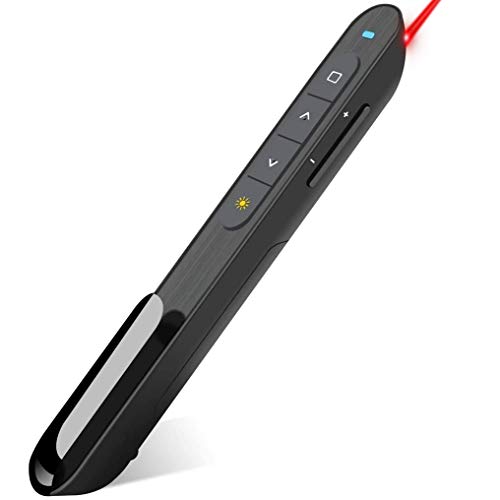
DinoFire Wireless Presenter, Hyperlink Volume Control Presentation – Features & Prices in Saudi Arabia :
DinoFire Wireless Presenter, Hyperlink Volume Control Presentation Clicker RF 2.4GHz USB PowerPoint Clicker Presentation Remote Control Pointer Slide Advancer (Black)
Product Dimensions
7 x 2.7 x 1.4 inches
Item Weight
0.3 ounces
ASIN
B01410YNAM
Item model number
rcrf-011
Batteries
1 AAA batteries required.
Is Discontinued By Manufacturer
No
Date First Available
July 23, 2015
Manufacturer
Shenzhen Qixun Space Technology Co., Ltd
Country of Origin
China
Test video – DinoFire Wireless Presenter, Hyperlink Volume Control Presentation :
Product highlights :
Questions & Answers – DinoFire Wireless Presenter, Hyperlink Volume Control Presentation :
Technical specifications – DinoFire Wireless Presenter, Hyperlink Volume Control Presentation :
Purchase advice :
-
Warranty :
Check the duration of the warranty and also the faults and defects it covers. Is it complete or limited? and What is included in the warranty (parts, repairs or both)?
-
Shipping :
Is delivery offered? And how long does it take to get delivered (Delivery time)
-
Proof of purchase :
Does the shop give you an invoice ?
-
After-sales service :
Do they have an after-sales service to have information about the installation or operation (instructions for use). Also in case of problem, it is the seller who takes charge or you must contact the manufacturer or supplier yourself.
_____________________________
G. J (verified owner) –
Would like a USB charger option – My other one quit so I needed another. Who knew these could have so many bells and whistles?! The hyperlink opener for presentations on the pen is something I’ve never seen before (haven’t tried it yet), I like the clip to put it on your shirt or whenever when not needing to hold it, and I like the magnetic USB holder. I only wish that it also had a USB charger option. I like the battery because sometimes you don’t have time to charge, but I also think about not having that option kind of stinks to always have an extra battery on have. Either way, way better than my old one.
E. R (verified owner) –
Straightforward to use, doesn’t have a mouse function like some others do – The trend nowadays is to make instructions so small that you almost need a magnifying glass to read. This is the case here. The diagram showing the button functions could certainly do with being bigger.
O. N (verified owner) –
Muy practico para dar presentación – Me gusta todas sus funciones, es mas de lo qué esperaba por el precio.
M. G (verified owner) –
Good but NOT a remote mouse – picked wrong one – I had ordered what I thought was a replacement to the Dino I had but this one does not move like a mouse it is only a clicker/pointer! Oops…read carefully!
E. K (verified owner) –
Stopped working – I bought 2 of these in Spring 2022 for my macbook pro to control volume when playing music Both stopped working. How do I get them to work or be replaced?. I don’t see how to contact them or ask in the customer questions.
O. N (verified owner) –
Muy practico para dar presentación – Me gusta todas sus funciones, es mas de lo qué esperaba por el precio.
G. J (verified owner) –
Would like a USB charger option – My other one quit so I needed another. Who knew these could have so many bells and whistles?! The hyperlink opener for presentations on the pen is something I’ve never seen before (haven’t tried it yet), I like the clip to put it on your shirt or whenever when not needing to hold it, and I like the magnetic USB holder. I only wish that it also had a USB charger option. I like the battery because sometimes you don’t have time to charge, but I also think about not having that option kind of stinks to always have an extra battery on have. Either way, way better than my old one.
E. R (verified owner) –
Straightforward to use, doesn’t have a mouse function like some others do – The trend nowadays is to make instructions so small that you almost need a magnifying glass to read. This is the case here. The diagram showing the button functions could certainly do with being bigger.
D. P (verified owner) –
Great device – Impressed with the features and functionality. Great value.
L. R (verified owner) –
Love it! – Love this pointer! Nice and easy to use, and I have complete control over the slides and the volume (used with my Macbook Pro). It is nice and easy to hold and use, and I had no issues at all when lecturing for an hour at a time.
N. E (verified owner) –
Quick set up, easy to use! – The clicker works very well and required no set up time. Truly a plug and play. The laser pointer works without issue. It fits perfectly in my pencil case.
N. E (verified owner) –
Quick set up, easy to use! – The clicker works very well and required no set up time. Truly a plug and play. The laser pointer works without issue. It fits perfectly in my pencil case.
M. G (verified owner) –
Good but NOT a remote mouse – picked wrong one – I had ordered what I thought was a replacement to the Dino I had but this one does not move like a mouse it is only a clicker/pointer! Oops…read carefully!
E. K (verified owner) –
Stopped working – I bought 2 of these in Spring 2022 for my macbook pro to control volume when playing music Both stopped working. How do I get them to work or be replaced?. I don’t see how to contact them or ask in the customer questions.
L. R (verified owner) –
Love it! – Love this pointer! Nice and easy to use, and I have complete control over the slides and the volume (used with my Macbook Pro). It is nice and easy to hold and use, and I had no issues at all when lecturing for an hour at a time.
D. P (verified owner) –
Great device – Impressed with the features and functionality. Great value.