Description
Dragon Touch Y88X Pro 7 inch Kids – Features & Prices in Saudi Arabia :
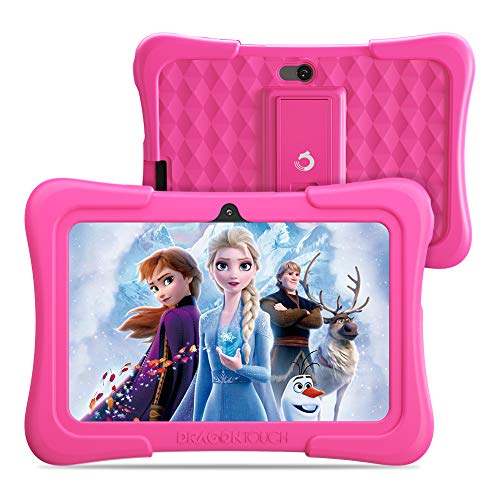
Dragon Touch Y88X Pro 7 inch Kids Tablets, 2GB RAM 16GB ROM, Android 9.0 pie Tablet, Kidoz Pre-Installed with Kid-Proof Case (Pink)
Standing screen display size
Average Battery Life (in hours)
1 Lithium Polymer batteries required. (included)
Test video – Dragon Touch Y88X Pro 7 inch Kids :
Product highlights :
Easy-to-use Parental Control: Filter and select content for your kids to keep them safe and set screen time limits to keep them healthy. Through Child-Lock Launcher feature, the android kids tablet is to be locked in the Kidoz dashboard, and the kids can only access the contents included in the Kidoz.
Tough Enough for Small Hands: The kid-proof case is well designed for kids above 3 years, each side and edges are designed to stay slightly above from screen to protect the 7” portable kids tablet from the occasional “oops” moment. With built-in stand, give your little ones for viewing and typing comfort.
Lots of Age-appropriate Apps & Games: Enjoy thousands of kid-friendly contents in the COPPA Certified KIDOZ, age filters ensure kids see filtered contents, parents can add contents to kids’ profiles with age-appropriate Apps & Games. It’s a great Birthday, Christmas, and New Year gift for kids above 3 years.
Full Access to Google Service: Y88X Pro is not only a kids tablet, but also a full function android tablet. With GMS Certified, you have full access to the latest Google service, such as Gmail,Youtube, Drive, Maps, and more brilliant apps and contents from Google Play Store.
A Perfect wifi Android Tablet for Online Learning: Y88X Pro kids tablet features Wifi connectivity and full access to google service, parents can download massive educational Apps on Google Play Store, like Khan Academy Kids, Duolingo, ABC mouse, etc, also pre-installed Kidoz provides endless online age-appropriate contents, ensure safe engagement when you are busy working, I am sure this wifi android tablet will be your kids’ good learning partner at home.
Questions & Answers – Dragon Touch Y88X Pro 7 inch Kids :
➕ What is the price of Dragon Touch Y88X Pro 7 inch Kids in Saudi Arabia ?
The price of Dragon Touch Y88X Pro 7 inch Kids in-store is 250 SAR VAT.
➕ When Dragon Touch Y88X Pro 7 inch Kids was released ?
The release date was .
➕ What is the price of Dragon Touch Y88X Pro 7 inch Kids cheap used ?
The price of Dragon Touch Y88X Pro 7 inch Kids used is 170 SAR VAT.
➕ What are the main characteristics of Dragon Touch Y88X Pro 7 inch Kids ?
Special specifications :
Easy-to-use Parental Control: Filter and select content for your kids to keep them safe and set screen time limits to keep them healthy. Through Child-Lock Launcher feature, the android kids tablet is to be locked in the Kidoz dashboard, and the kids can only access the contents included in the Kidoz.
➕ Is it interesting to buy this product ?
The best people who can answer you are customers who have already bought and tested
this product (
See Customer Reviews). This product is rated 4.1 / 5
on Amazon.
➕ Where to buy Dragon Touch Y88X Pro 7 inch Kids in Saudi Arabia ?
Mall, Supermarkets, Amazon, Specialized stores, ….
Technical specifications – Dragon Touch Y88X Pro 7 inch Kids :
Display Resolution Maximum
Purchase advice :
-
Warranty :
Check the duration of the warranty and also the faults and defects it covers. Is it complete or limited? and What is included in the warranty (parts, repairs or both)?
-
Shipping :
Is delivery offered? And how long does it take to get delivered (Delivery time)
-
Proof of purchase :
Does the shop give you an invoice ?
-
After-sales service :
Do they have an after-sales service to have information about the installation or operation (instructions for use). Also in case of problem, it is the seller who takes charge or you must contact the manufacturer or supplier yourself.
_____________________________



K. I (verified owner) –
Good customer service – It completely died after a few months, but customer service reached out and replaced it for free.
L. F (verified owner) –
Great for kids – I bought this for my daughter because her old one broke and since she’s only 4 she just uses them to watch Disney or YouTube kids once we set it up and realized there was so much she could learn and rather than her always having my phone to call daddy or grandma it can be set up with Duo so she can call only the contacts you approve so she thinks she’s so grown up now. I was so empressed I bought another one in blue for my son who just turned 3 and is now counting to 20 by himself, he knows all his basic colors and doesn’t start preschool until next year. Only issue we have is every now and then the touch screen glitches like you try to swipe up and have to do it a few times before it actually works but it’s very seldom other than that I would recommend recommend this to anyone
L. F (verified owner) –
Great for kids – I bought this for my daughter because her old one broke and since she’s only 4 she just uses them to watch Disney or YouTube kids once we set it up and realized there was so much she could learn and rather than her always having my phone to call daddy or grandma it can be set up with Duo so she can call only the contacts you approve so she thinks she’s so grown up now. I was so empressed I bought another one in blue for my son who just turned 3 and is now counting to 20 by himself, he knows all his basic colors and doesn’t start preschool until next year. Only issue we have is every now and then the touch screen glitches like you try to swipe up and have to do it a few times before it actually works but it’s very seldom other than that I would recommend recommend this to anyone
T. B (verified owner) –
Excellent Tool for Exploring Technology! – I bought two of these for my grand children, who were out of school for the semester and doing e-learning activities. I also looked at Amazon tablets. These tablets are an amazing value and your child can use them all throughout their childhood/teen years if they wanted to. These are not toys–they are full fledged Android tablets. Parents, you might have a little learning curve setting them up, but once you get the hang of it, your kids will love them! One of my grandkids, who is 4, downloads new games and activities every day by himself from out of state since he returned home. I am set up as his parental figure so I can see everything he does and alter permissions if needed. To do that, you need a parental Google account and then a child Google account. You then have to link the child account to your parental account as a ‘family member’. Give your parental account the ability to reset passwords of course. If you do not want to constantly enter your password on this tablet, which has a tiny touch keyboard, and you’ve set permissions accordingly from your parent account–allow the child to download games or activities without you entering your password each time. The tablet does come with a built in set of games, shows, etc. You need to read the instructions to ensure that you know how to pull that up and get it ready for your child before they use the tablet for the first time. Once you have it set up with content displaying on the desktop of the device, the child can easily figure out how to take it from there! Kids are very tech savvy when it comes to exploring content and technology! The google accounts allow them to access school work if your school system gives them lessons through Google. However, the keyboard is not the same as a computer or laptop keyboard, so you will need to see if your child can type on it efficiently. These are a great value for the price and I can’t recommend them highly enough!
I. S (verified owner) –
Great starter tablet, we are very happy with it, and would definitely recommend it to others! – We bought this for our 3 yr old, and he/we love it! It is perfect for ages 3-5, maybe slightly older, if it’s their first one. I almost didn’t choose this one, based on some people’s reviews, but being a tech savvy family, that has owned many tablets, I felt the issues I read about were mostly fixable, or not a concern of mine. I was right. First and foremost…no, it is not an Ipad, or top notch Galaxy tablet, but if you want one of those, you need to pay that price. It is however, very good for this particular price tag. This tablet was capable of holding a few movies, 20 Spiderman episodes, and 13 Super Hero Squad episodes, plus some games/apps, for a long family road trip we took, and it played them flawlessly! We deleted them when we got back, to free up the space again, because he can just stream them over the wifi. The slowest part of this tablet is the startup, it takes a bit, but after that the speed is fine for that age group, there is no lag. One thing you have to keep in mind is that when you fill up the storage, that slows operation down, just like with any other tablet or phone, but we have not experienced this yet. I went through the apps in the beginning and deleted or disabled apps he wouldn’t use, I also installed an SD card. You should go through your child’s tablet every once in a while, and uninstall anything you notice they don’t use/play, this will help keep the system running at optimum level. I only have 2 recommendations for improvement…1) The volume could be better. This may not be an issue for a 1 or 2 child family, but we have 4, so the background noise level can be high at times, and that makes it hard to hear some things on the tablet. This is also a plus though, because it keeps the child from using the volume at an unsafe level, even with headphones on. 2) We found the Kiddoz app to be useless. It’s a great idea, but not well executed. There were engaging activities and videos on it, but most were not available away from wifi. Your own offline apps will work in it, but we found that the app caused lag, and occasionally froze the tablet. We just decided not to use it, and we haven’t had any problems since. My son uses the apps/videos I installed, and everything works great. The battery life is fine, but again that will depend on your apps, if you have several of them running in the background, it will drain the battery faster. To put it into perspective though…my child watched videos and played games nearly the entire road trip (almost 4 hours), and it never died. I disabled all notifications from all apps when I set it up, I make sure to close apps, and put the tablet to sleep when I notice he has put it down, that helps to conserve power, then I plug it in every night before bed. I should also state that he has thrown this thing many times, and it has withstood the abuse…of course you want to avoid that as much as possible, but at age 3, there’s not much you can do when they unexpectedly decide to toss it! We are on a strict budget, there is no way I would spend a pretty penny on an expensive device for my toddler, especially knowing he could smash it at any given moment, LOL! Anyhow…we love it, and would definitely purchase it again, if anything should happen to this one…it’s a wonderful product, and at a good price!
G. M (verified owner) –
Great customer service! – My daughter needed a kid-safe tablet that could also connect to her school assignments online. This worked perfectly. Then about a year after we purchased it, the screen froze on startup and there wasn’t anything we could do to fix it. All the restarts and resets failed. So I contacted the company initially through Amazon and they immediately took interest in the problem and tried to help me with a solution. Once I explained what we had tried, they realized we had done all we could and asked for me to ship the product to them for repair or replacement. I was happy to do that for just the cost of shipping (as I hadn’t purchased any add-on insurance). Each email I sent got a direct reply. Then I had a delay and couldn’t deal with the issue for almost a month. I was worried they would tell me the repair window had expired and I’d be out of luck, but they simply said to go ahead and send it, they would still honor the arrangement made.
I. S (verified owner) –
Great starter tablet, we are very happy with it, and would definitely recommend it to others! – We bought this for our 3 yr old, and he/we love it! It is perfect for ages 3-5, maybe slightly older, if it’s their first one. I almost didn’t choose this one, based on some people’s reviews, but being a tech savvy family, that has owned many tablets, I felt the issues I read about were mostly fixable, or not a concern of mine. I was right. First and foremost…no, it is not an Ipad, or top notch Galaxy tablet, but if you want one of those, you need to pay that price. It is however, very good for this particular price tag. This tablet was capable of holding a few movies, 20 Spiderman episodes, and 13 Super Hero Squad episodes, plus some games/apps, for a long family road trip we took, and it played them flawlessly! We deleted them when we got back, to free up the space again, because he can just stream them over the wifi. The slowest part of this tablet is the startup, it takes a bit, but after that the speed is fine for that age group, there is no lag. One thing you have to keep in mind is that when you fill up the storage, that slows operation down, just like with any other tablet or phone, but we have not experienced this yet. I went through the apps in the beginning and deleted or disabled apps he wouldn’t use, I also installed an SD card. You should go through your child’s tablet every once in a while, and uninstall anything you notice they don’t use/play, this will help keep the system running at optimum level. I only have 2 recommendations for improvement…1) The volume could be better. This may not be an issue for a 1 or 2 child family, but we have 4, so the background noise level can be high at times, and that makes it hard to hear some things on the tablet. This is also a plus though, because it keeps the child from using the volume at an unsafe level, even with headphones on. 2) We found the Kiddoz app to be useless. It’s a great idea, but not well executed. There were engaging activities and videos on it, but most were not available away from wifi. Your own offline apps will work in it, but we found that the app caused lag, and occasionally froze the tablet. We just decided not to use it, and we haven’t had any problems since. My son uses the apps/videos I installed, and everything works great. The battery life is fine, but again that will depend on your apps, if you have several of them running in the background, it will drain the battery faster. To put it into perspective though…my child watched videos and played games nearly the entire road trip (almost 4 hours), and it never died. I disabled all notifications from all apps when I set it up, I make sure to close apps, and put the tablet to sleep when I notice he has put it down, that helps to conserve power, then I plug it in every night before bed. I should also state that he has thrown this thing many times, and it has withstood the abuse…of course you want to avoid that as much as possible, but at age 3, there’s not much you can do when they unexpectedly decide to toss it! We are on a strict budget, there is no way I would spend a pretty penny on an expensive device for my toddler, especially knowing he could smash it at any given moment, LOL! Anyhow…we love it, and would definitely purchase it again, if anything should happen to this one…it’s a wonderful product, and at a good price!
T. B (verified owner) –
Excellent Tool for Exploring Technology! – I bought two of these for my grand children, who were out of school for the semester and doing e-learning activities. I also looked at Amazon tablets. These tablets are an amazing value and your child can use them all throughout their childhood/teen years if they wanted to. These are not toys–they are full fledged Android tablets. Parents, you might have a little learning curve setting them up, but once you get the hang of it, your kids will love them! One of my grandkids, who is 4, downloads new games and activities every day by himself from out of state since he returned home. I am set up as his parental figure so I can see everything he does and alter permissions if needed. To do that, you need a parental Google account and then a child Google account. You then have to link the child account to your parental account as a ‘family member’. Give your parental account the ability to reset passwords of course. If you do not want to constantly enter your password on this tablet, which has a tiny touch keyboard, and you’ve set permissions accordingly from your parent account–allow the child to download games or activities without you entering your password each time. The tablet does come with a built in set of games, shows, etc. You need to read the instructions to ensure that you know how to pull that up and get it ready for your child before they use the tablet for the first time. Once you have it set up with content displaying on the desktop of the device, the child can easily figure out how to take it from there! Kids are very tech savvy when it comes to exploring content and technology! The google accounts allow them to access school work if your school system gives them lessons through Google. However, the keyboard is not the same as a computer or laptop keyboard, so you will need to see if your child can type on it efficiently. These are a great value for the price and I can’t recommend them highly enough!
K. I (verified owner) –
Good customer service – It completely died after a few months, but customer service reached out and replaced it for free.
G. M (verified owner) –
Great customer service! – My daughter needed a kid-safe tablet that could also connect to her school assignments online. This worked perfectly. Then about a year after we purchased it, the screen froze on startup and there wasn’t anything we could do to fix it. All the restarts and resets failed. So I contacted the company initially through Amazon and they immediately took interest in the problem and tried to help me with a solution. Once I explained what we had tried, they realized we had done all we could and asked for me to ship the product to them for repair or replacement. I was happy to do that for just the cost of shipping (as I hadn’t purchased any add-on insurance). Each email I sent got a direct reply. Then I had a delay and couldn’t deal with the issue for almost a month. I was worried they would tell me the repair window had expired and I’d be out of luck, but they simply said to go ahead and send it, they would still honor the arrangement made.