Fusion5 10″ Windows 11 Pro FWIN232 Plus – Features & Prices in Saudi Arabia :
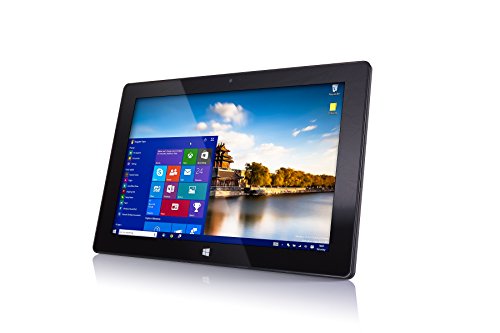
Fusion5 10″ Windows 11 Pro FWIN232 Plus S1 Ultra Slim Windows Tablet PC – (4GB RAM, USB 3.0, Micro HDMI, Intel Quad-Core CPU, IPS HD Display, 5MP and 2MP Cameras, Bluetooth 4.0, Windows 11) (64GB)
Standing screen display size
10.1 Inches
Screen Resolution
1280 x 800 pixels
RAM
4 GB DDR3_SDRAM
Hard Drive
64 GB
Graphics Coprocessor
Broadwell GPU (Intel Gen8)
Wireless Type
802.11bgn, 802.11b, 802.11b/g
Average Battery Life (in hours)
6 Hours
Item Dimensions LxWxH
10.24 x 0.67 x 0.39 inches
Color
Black
Rear Webcam Resolution
5 MP
Processor Brand
Intel
Processor Count
4
Computer Memory Type
DDR3 SDRAM
Flash Memory Size
64 GB
Power Source
Corded Electric
Batteries
1 Lithium Polymer batteries required.
Test video – Fusion5 10″ Windows 11 Pro FWIN232 Plus :
Product highlights :
Ultra Slim & Ultra Style: Windows 11 Tablet – The ultimate user experience. This newest version of Windows Tablet PC from Fusion5 is fully loaded with the latest user-friendly Windows 11 package. Perfect Windows tablet PC for your daily requirement, be it education, office work or industrial use.
Powerful & Mega Storage Space: Upgraded Intel -core CPU with powerful GPU – 4GB of RAM Your new Windows tablet laptop PC is all ready for work, fun and play.
10” Graphic Display for Optimal Viewing: The 10 inch screen on this Windows 11 tablet PC by Fusion5 is perfect for viewing our favourite TV shows, movies, Youtube and playing games!
Want More? This is a Bluetooth 4.0 Windows PC laptop tablet. Equipped with Intel Quad-core Processor, and full-size USB 3.0 port.
Why Buy This Windows 11 Tablet PC by Fusion5? This ultra-slim and stylish Windows 11 laptop tablet not only ticks all the boxes in terms of ultimate usability, fantastic graphics and overall specs but…it also comes with 2 months of full USA warranty at our US service center.
Questions & Answers – Fusion5 10″ Windows 11 Pro FWIN232 Plus :
➕ What is the price of Fusion5 10
The price of Fusion5 10″ Windows 11 Pro FWIN232 Plus in-store is 880 SAR VAT.
➕ When Fusion5 10
The release date was .
➕ What is the price of Fusion5 10
The price of Fusion5 10″ Windows 11 Pro FWIN232 Plus used is 620 SAR VAT.
➕ What are the main characteristics of Fusion5 10
Special specifications :
Ultra Slim & Ultra Style: Windows 11 Tablet – The ultimate user experience. This newest version of Windows Tablet PC from Fusion5 is fully loaded with the latest user-friendly Windows 11 package. Perfect Windows tablet PC for your daily requirement, be it education, office work or industrial use.
➕ Is it interesting to buy this product ?
The best people who can answer you are customers who have already bought and tested this product (See Customer Reviews). This product is rated 4.2 / 5 on Amazon.
Technical specifications – Fusion5 10″ Windows 11 Pro FWIN232 Plus :
Brand
Fusion5
Series
FWIN232+
Memory Storage Capacity
64 GB
Screen Size
10.1 Inches
Operating System
Windows
Purchase advice :
Warranty :
Check the duration of the warranty and also the faults and defects it covers. Is it complete or limited? and What is included in the warranty (parts, repairs or both)?
Shipping :
Is delivery offered? And how long does it take to get delivered (Delivery time)
Proof of purchase :
Does the shop give you an invoice ?
After-sales service :
Do they have an after-sales service to have information about the installation or operation (instructions for use). Also in case of problem, it is the seller who takes charge or you must contact the manufacturer or supplier yourself.
_____________________________
2 reviews for Fusion5 10″ Windows 11 Pro FWIN232 Plus
Rated 5 out of 5
P. J (verified owner)–
A quality windows tablet for a good price. – The fusion 5 Windows 11 tablet has many features for its size. The Intel processor gives The fusion 5 the speed needed for multitasking.. The screen delivers crisp clear images and the touch gestures are smooth.
Rated 4 out of 5
J. N (verified owner)–
A Nice Device for a Good Price – Fusion 5 10.1″ Windows 10 Tablet
Rated 4 out of 5
K. E (verified owner)–
Great budget Windows tablet but short battery life – I really like this Windows tablet; great value for the money. Great for watching videos, surfing the internet, and playing games. I just wish the battery lasted longer before having to be charged again.
Rated 5 out of 5
P. J (verified owner)–
A quality windows tablet for a good price. – The fusion 5 Windows 11 tablet has many features for its size. The Intel processor gives The fusion 5 the speed needed for multitasking.. The screen delivers crisp clear images and the touch gestures are smooth.
Rated 4 out of 5
O. S (verified owner)–
Thin Face – I’ve have this little machine for about a month now, most of it waiting for another electric hookup, and noticed the face is terribly scratched. How’d that happen. First time, too. Never have I had a tablet to
Rated 5 out of 5
F. P (verified owner)–
Great Tablet for the Price – I purchased this tablet to replace my Microsoft Surface Pro 2 that had died. I am totally satisfied with this Fusion5. Setup was a total breeze. I had contact with Customer Service with several questions. One was to find out what type HDMI connector I needed. Some web information said it was a micro HDMI. The correct connector for this device is mini HDMI cable. Customer Service was the most responsive of any company I’ve delt with lately.
Rated 4 out of 5
B. H (verified owner)–
Not too bad suffers from windows bloat. – I’ve used this for quite a while now and I can say for sure being able to use windows on a tablet is a bajillion times better than useless android devices. Unfortunately Windows really cripples these types of devices quite heavily with it’s sheer girth and annoying background shenanigans. If it decided to start doing tasks in the background like updating or scanning the computer with windows defender you will 100% notice. It’s rough. I skimmed through settings and shut off as much as I could and still you can see with the task manager it eats up a hunk of the CPU. Once it’s done it becomes way more usable. I think this would benefit greatly with a light Linux install but good lord it seems like every other task you try to do ends up either being a cake walk to a rabbit hole of dispair with Linux. The screen and it’s case with keyboard you can get is extraordinarily disappointing. The keyboard has a hard time staying connected and loses contact with the pins easily and the screen is plastic. I bought the case to help protect it but the plastic keyboard rubbing up against the screen causes scratching. That’s right the keyboard made for this device scratches the screen in the thing you use to protect it. A screen protector if you can get one to work with it is necessary. My brother just tossed it in a box like an idiot while we where moving. Yes tossed my $200 tablet loose in a box not even in it’s protector that was in same box and it looks like it got attacked by a raccoon with scratches and gauges all over. I honestly don’t know how I feel about it overall, I’m a bit disappointed but it’s a pretty darn low price and I don’t know how the windows surface pro that has half the cores with more hz can stack up. I use it to program games with java and it is nice to test them on such a slow machine vs my beast of a desktop that could make the least optimized trash code run like normal. I’d just beware you need to have patience when working on this machine don’t expect ultra responsiveness like you get with a desktop. Oh and I filled the SSD up in no time and sd cards are not very fast as a substitute.
Rated 4 out of 5
K. G (verified owner)–
Great mobile supplement to my PC’s – I love this little tablet, I use it to operate a laser engraver and it works extremely well. Occasionally my fat fingers don’t do well with the touch screen due to it’s small size and I don’t create content on it because of that. A docking station with a keyboard is a definite needed addition for me and I will add soon.
Rated 4 out of 5
J. N (verified owner)–
A Nice Device for a Good Price – Fusion 5 10.1″ Windows 10 Tablet
Rated 5 out of 5
F. P (verified owner)–
Great Tablet for the Price – I purchased this tablet to replace my Microsoft Surface Pro 2 that had died. I am totally satisfied with this Fusion5. Setup was a total breeze. I had contact with Customer Service with several questions. One was to find out what type HDMI connector I needed. Some web information said it was a micro HDMI. The correct connector for this device is mini HDMI cable. Customer Service was the most responsive of any company I’ve delt with lately.
Rated 4 out of 5
O. S (verified owner)–
Thin Face – I’ve have this little machine for about a month now, most of it waiting for another electric hookup, and noticed the face is terribly scratched. How’d that happen. First time, too. Never have I had a tablet to
Rated 4 out of 5
D. K (verified owner)–
Great tablet for working with my CNC. – It’s a great tablet for what I need it for. Touch screen is a little off or maybe it’s my fingers. I recommend getting the keyboard and a case. Definitely plan on getting another one for my other CNC machine.
Rated 4 out of 5
D. K (verified owner)–
Great tablet for working with my CNC. – It’s a great tablet for what I need it for. Touch screen is a little off or maybe it’s my fingers. I recommend getting the keyboard and a case. Definitely plan on getting another one for my other CNC machine.
Rated 4 out of 5
B. H (verified owner)–
Not too bad suffers from windows bloat. – I’ve used this for quite a while now and I can say for sure being able to use windows on a tablet is a bajillion times better than useless android devices. Unfortunately Windows really cripples these types of devices quite heavily with it’s sheer girth and annoying background shenanigans. If it decided to start doing tasks in the background like updating or scanning the computer with windows defender you will 100% notice. It’s rough. I skimmed through settings and shut off as much as I could and still you can see with the task manager it eats up a hunk of the CPU. Once it’s done it becomes way more usable. I think this would benefit greatly with a light Linux install but good lord it seems like every other task you try to do ends up either being a cake walk to a rabbit hole of dispair with Linux. The screen and it’s case with keyboard you can get is extraordinarily disappointing. The keyboard has a hard time staying connected and loses contact with the pins easily and the screen is plastic. I bought the case to help protect it but the plastic keyboard rubbing up against the screen causes scratching. That’s right the keyboard made for this device scratches the screen in the thing you use to protect it. A screen protector if you can get one to work with it is necessary. My brother just tossed it in a box like an idiot while we where moving. Yes tossed my $200 tablet loose in a box not even in it’s protector that was in same box and it looks like it got attacked by a raccoon with scratches and gauges all over. I honestly don’t know how I feel about it overall, I’m a bit disappointed but it’s a pretty darn low price and I don’t know how the windows surface pro that has half the cores with more hz can stack up. I use it to program games with java and it is nice to test them on such a slow machine vs my beast of a desktop that could make the least optimized trash code run like normal. I’d just beware you need to have patience when working on this machine don’t expect ultra responsiveness like you get with a desktop. Oh and I filled the SSD up in no time and sd cards are not very fast as a substitute.
Rated 4 out of 5
K. E (verified owner)–
Great budget Windows tablet but short battery life – I really like this Windows tablet; great value for the money. Great for watching videos, surfing the internet, and playing games. I just wish the battery lasted longer before having to be charged again.
Rated 4 out of 5
K. G (verified owner)–
Great mobile supplement to my PC’s – I love this little tablet, I use it to operate a laser engraver and it works extremely well. Occasionally my fat fingers don’t do well with the touch screen due to it’s small size and I don’t create content on it because of that. A docking station with a keyboard is a definite needed addition for me and I will add soon.


P. J (verified owner) –
A quality windows tablet for a good price. – The fusion 5 Windows 11 tablet has many features for its size. The Intel processor gives The fusion 5 the speed needed for multitasking.. The screen delivers crisp clear images and the touch gestures are smooth.
J. N (verified owner) –
A Nice Device for a Good Price – Fusion 5 10.1″ Windows 10 Tablet
K. E (verified owner) –
Great budget Windows tablet but short battery life – I really like this Windows tablet; great value for the money. Great for watching videos, surfing the internet, and playing games. I just wish the battery lasted longer before having to be charged again.
P. J (verified owner) –
A quality windows tablet for a good price. – The fusion 5 Windows 11 tablet has many features for its size. The Intel processor gives The fusion 5 the speed needed for multitasking.. The screen delivers crisp clear images and the touch gestures are smooth.
O. S (verified owner) –
Thin Face – I’ve have this little machine for about a month now, most of it waiting for another electric hookup, and noticed the face is terribly scratched. How’d that happen. First time, too. Never have I had a tablet to
F. P (verified owner) –
Great Tablet for the Price – I purchased this tablet to replace my Microsoft Surface Pro 2 that had died. I am totally satisfied with this Fusion5. Setup was a total breeze. I had contact with Customer Service with several questions. One was to find out what type HDMI connector I needed. Some web information said it was a micro HDMI. The correct connector for this device is mini HDMI cable. Customer Service was the most responsive of any company I’ve delt with lately.
B. H (verified owner) –
Not too bad suffers from windows bloat. – I’ve used this for quite a while now and I can say for sure being able to use windows on a tablet is a bajillion times better than useless android devices. Unfortunately Windows really cripples these types of devices quite heavily with it’s sheer girth and annoying background shenanigans. If it decided to start doing tasks in the background like updating or scanning the computer with windows defender you will 100% notice. It’s rough. I skimmed through settings and shut off as much as I could and still you can see with the task manager it eats up a hunk of the CPU. Once it’s done it becomes way more usable. I think this would benefit greatly with a light Linux install but good lord it seems like every other task you try to do ends up either being a cake walk to a rabbit hole of dispair with Linux. The screen and it’s case with keyboard you can get is extraordinarily disappointing. The keyboard has a hard time staying connected and loses contact with the pins easily and the screen is plastic. I bought the case to help protect it but the plastic keyboard rubbing up against the screen causes scratching. That’s right the keyboard made for this device scratches the screen in the thing you use to protect it. A screen protector if you can get one to work with it is necessary. My brother just tossed it in a box like an idiot while we where moving. Yes tossed my $200 tablet loose in a box not even in it’s protector that was in same box and it looks like it got attacked by a raccoon with scratches and gauges all over. I honestly don’t know how I feel about it overall, I’m a bit disappointed but it’s a pretty darn low price and I don’t know how the windows surface pro that has half the cores with more hz can stack up. I use it to program games with java and it is nice to test them on such a slow machine vs my beast of a desktop that could make the least optimized trash code run like normal. I’d just beware you need to have patience when working on this machine don’t expect ultra responsiveness like you get with a desktop. Oh and I filled the SSD up in no time and sd cards are not very fast as a substitute.
K. G (verified owner) –
Great mobile supplement to my PC’s – I love this little tablet, I use it to operate a laser engraver and it works extremely well. Occasionally my fat fingers don’t do well with the touch screen due to it’s small size and I don’t create content on it because of that. A docking station with a keyboard is a definite needed addition for me and I will add soon.
J. N (verified owner) –
A Nice Device for a Good Price – Fusion 5 10.1″ Windows 10 Tablet
F. P (verified owner) –
Great Tablet for the Price – I purchased this tablet to replace my Microsoft Surface Pro 2 that had died. I am totally satisfied with this Fusion5. Setup was a total breeze. I had contact with Customer Service with several questions. One was to find out what type HDMI connector I needed. Some web information said it was a micro HDMI. The correct connector for this device is mini HDMI cable. Customer Service was the most responsive of any company I’ve delt with lately.
O. S (verified owner) –
Thin Face – I’ve have this little machine for about a month now, most of it waiting for another electric hookup, and noticed the face is terribly scratched. How’d that happen. First time, too. Never have I had a tablet to
D. K (verified owner) –
Great tablet for working with my CNC. – It’s a great tablet for what I need it for. Touch screen is a little off or maybe it’s my fingers. I recommend getting the keyboard and a case. Definitely plan on getting another one for my other CNC machine.
D. K (verified owner) –
Great tablet for working with my CNC. – It’s a great tablet for what I need it for. Touch screen is a little off or maybe it’s my fingers. I recommend getting the keyboard and a case. Definitely plan on getting another one for my other CNC machine.
B. H (verified owner) –
Not too bad suffers from windows bloat. – I’ve used this for quite a while now and I can say for sure being able to use windows on a tablet is a bajillion times better than useless android devices. Unfortunately Windows really cripples these types of devices quite heavily with it’s sheer girth and annoying background shenanigans. If it decided to start doing tasks in the background like updating or scanning the computer with windows defender you will 100% notice. It’s rough. I skimmed through settings and shut off as much as I could and still you can see with the task manager it eats up a hunk of the CPU. Once it’s done it becomes way more usable. I think this would benefit greatly with a light Linux install but good lord it seems like every other task you try to do ends up either being a cake walk to a rabbit hole of dispair with Linux. The screen and it’s case with keyboard you can get is extraordinarily disappointing. The keyboard has a hard time staying connected and loses contact with the pins easily and the screen is plastic. I bought the case to help protect it but the plastic keyboard rubbing up against the screen causes scratching. That’s right the keyboard made for this device scratches the screen in the thing you use to protect it. A screen protector if you can get one to work with it is necessary. My brother just tossed it in a box like an idiot while we where moving. Yes tossed my $200 tablet loose in a box not even in it’s protector that was in same box and it looks like it got attacked by a raccoon with scratches and gauges all over. I honestly don’t know how I feel about it overall, I’m a bit disappointed but it’s a pretty darn low price and I don’t know how the windows surface pro that has half the cores with more hz can stack up. I use it to program games with java and it is nice to test them on such a slow machine vs my beast of a desktop that could make the least optimized trash code run like normal. I’d just beware you need to have patience when working on this machine don’t expect ultra responsiveness like you get with a desktop. Oh and I filled the SSD up in no time and sd cards are not very fast as a substitute.
K. E (verified owner) –
Great budget Windows tablet but short battery life – I really like this Windows tablet; great value for the money. Great for watching videos, surfing the internet, and playing games. I just wish the battery lasted longer before having to be charged again.
K. G (verified owner) –
Great mobile supplement to my PC’s – I love this little tablet, I use it to operate a laser engraver and it works extremely well. Occasionally my fat fingers don’t do well with the touch screen due to it’s small size and I don’t create content on it because of that. A docking station with a keyboard is a definite needed addition for me and I will add soon.