GAOMON S620 6.5 x 4 Inches Graphics – Features & Prices in Saudi Arabia :
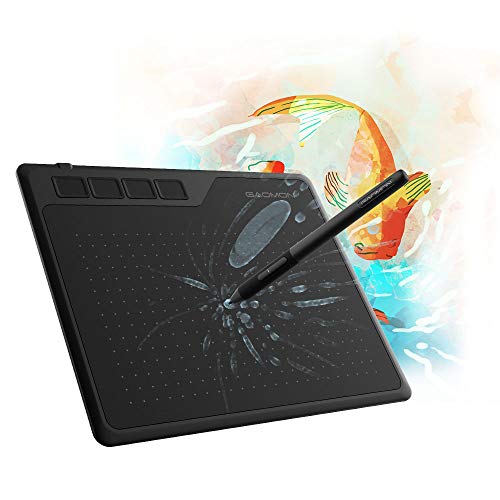
GAOMON S620 6.5 x 4 Inches Graphics Tablet with 8192 Passive Pen 4 Express Keys for Digital Drawing & OSU & Online Teaching-for Mac Windows Android OS
Product Dimensions
8.3 x 6.85 x 0.31 inches
Item Weight
9.5 ounces
ASIN
B07R77SNX9
Item model number
GAOMON S620
Date First Available
April 25, 2019
Manufacturer
GAOMON TECHNOLOGY CORPORATION
Country of Origin
China
Test video – GAOMON S620 6.5 x 4 Inches Graphics :
Product highlights :
【FOR DIGITAL ART & CREATION】– Perfect for beginner who starts digital drawing, sketching, graphics design, 3D art work, animation, etc. Also meet basic use of professionals who requires portable feature especially during travel.【FOR ANNOTATING AND SIGNATURE】–You can sign and write in excel, word, pdf, ppt, etc.【FOR ONLINE MEETING & ONLINE CLASS】It works with most online meeting programs, like Zoom, and so on. 【FOR Osu! & GAMING】–It’s a large help for playing rythm games like Osu!
【PASSIVE PEN】–Battery-free pen cuts the inconveneince of charging the pen. 【8192 HIGH LEVEL PEN PRESSURE & 4 CUSTOMIZABLE EXPRESS KEYS】It will provide you precise control and accuracy at your fingertips, to bring more natural lines and enhance creative performance. 4 customizable express keys could be set to more functions as you like. Using them while working will largely improve your work flow.
【COMPATIBILITY OR APPLICATION】– It compatible with Windows OS 7/8/10 or above and mac-10.12 or above. Work with most art programs like Adobe Photoshop, Illustrator, Clip Studio, Lightroom, Sketchbook Pro, Manga Studio, CorelPainter, FireAlpaca, OpenCanvas, Paint Tool Sai2, Krita and so on. 【WORK WITH ANDROID DEVICES】–It works with android devices with 6.0 or above system which support OTG function. 【NEED PURCHASE EXTRAUSB ADAPTERS FOR ANDROID DEVICES】
【266 PPS REPORT RATE + 5080LPI RESOLUTION + 10MM PEN READING HEIGHT + 6.5*4 INCHES ACTIVE AREA】– This size is more portable and lightweight, easy to be carried around in the laptop bag to the workplace, school, and travel. But it’s also big enough for digital painting, handwriting, playing games and animation design, etc.
【HUMANIZED DESIGN】– 4 rubber feet are created to ensure the stability of the tablet from slipper. 【LEFT & RIGHT HANDED SUPPORT】–Set 180 degree roate inside GAOMON Driver to set left hand mode.
➕ What is the price of GAOMON S620 6.5 x 4 Inches Graphics in Saudi Arabia ?
The price of GAOMON S620 6.5 x 4 Inches Graphics in-store is 100 SAR VAT.
➕ When GAOMON S620 6.5 x 4 Inches Graphics was released ?
The release date was April 25, 2019.
➕ What is the price of GAOMON S620 6.5 x 4 Inches Graphics cheap used ?
The price of GAOMON S620 6.5 x 4 Inches Graphics used is 70 SAR VAT.
➕ What are the main characteristics of GAOMON S620 6.5 x 4 Inches Graphics ?
Special specifications :
【FOR DIGITAL ART & CREATION】– Perfect for beginner who starts digital drawing, sketching, graphics design, 3D art work, animation, etc. Also meet basic use of professionals who requires portable feature especially during travel.【FOR ANNOTATING AND SIGNATURE】–You can sign and write in excel, word, pdf, ppt, etc.【FOR ONLINE MEETING & ONLINE CLASS】It works with most online meeting programs, like Zoom, and so on. 【FOR Osu! & GAMING】–It’s a large help for playing rythm games like Osu!
➕ Is it interesting to buy this product ?
The best people who can answer you are customers who have already bought and tested this product (See Customer Reviews). This product is rated 4.5 / 5 on Amazon.
➕ Where to buy GAOMON S620 6.5 x 4 Inches Graphics in Saudi Arabia ?
Check the duration of the warranty and also the faults and defects it covers. Is it complete or limited? and What is included in the warranty (parts, repairs or both)?
Shipping :
Is delivery offered? And how long does it take to get delivered (Delivery time)
Proof of purchase :
Does the shop give you an invoice ?
After-sales service :
Do they have an after-sales service to have information about the installation or operation (instructions for use). Also in case of problem, it is the seller who takes charge or you must contact the manufacturer or supplier yourself.
_____________________________
14 reviews for GAOMON S620 6.5 x 4 Inches Graphics
Rated 5 out of 5
K. S (verified owner)–
Cheap & reliable – a great tablet for beginners and teachers – When I first saw this tablet I was rather skeptical; even for a smaller tablet it was incredibly cheap, especially when compared to the prices set by other brands. I went ahead and ordered this tablet, after all there’s not much to lose; on top of the Gaomon warranty I was also offered a 3 year long protection plan for a little under $5. Already a better start than any other tablet I’ve purchased. The tablet arrived much quicker than expected and I was also pleased to see how nicely everything was packaged. I attached a little unboxing video here; I went ahead and removed the plastic from the products (tablet, tablet pen, and glove) before recording, but everything was re-placed as how it was when it came in.
Rated 5 out of 5
I. C (verified owner)–
This is great – this took 5 mins to draw with this pad. the drivers are kind of weird but you get the hang of it. I will defently be buying other items from this company.
Rated 4 out of 5
B. E (verified owner)–
Great, still using it – Not much to say here, the tablet works great. I use it to draw and play Osu, and it works perfectly for both. The drivers aren’t the best and don’t let you save different work areas, but all the buttons, including the ones on the stylus, are configurable. It has different pressure levels and still works after two years of almost daily use. Giving it four stars because the pen fell apart after a few months but thankfully all the electronic bits are in the tip with the rest being empty plastic for comfort, so I just put it back together, and it works fine.
Rated 4 out of 5
P. A (verified owner)–
Great drawing tablet for my class notes on laptop, just don’t lose the pen! – I got this tablet as a cheap and easy solution to take digital notes that I don’t have to worry about physically (as well as all the other advantages of taking digital notes) on my non-touchscreen laptop, no need to go out and buy an ipad or other tablet. Just generally using one of these, a drawing tablet with no screen to draw on and instead a black surface – get’s some getting used to, but can be learned. You are quite reliant on the pen to do anything with it however, and I eventually inevitably lost it. A replacement cost $20, which was a bit annoying considering the whole combo was $30, but I got it and ended up 3D printing a clip and sticking it on the tablet so I would make sure the pen is always with and secure to the tablet when I put it back in my bag.
Rated 4 out of 5
B. E (verified owner)–
Great, still using it – Not much to say here, the tablet works great. I use it to draw and play Osu, and it works perfectly for both. The drivers aren’t the best and don’t let you save different work areas, but all the buttons, including the ones on the stylus, are configurable. It has different pressure levels and still works after two years of almost daily use. Giving it four stars because the pen fell apart after a few months but thankfully all the electronic bits are in the tip with the rest being empty plastic for comfort, so I just put it back together, and it works fine.
Rated 4 out of 5
B. H (verified owner)–
Not bad – I got this drawing pad for my college physics class so I could work out problems over zoom. It’s works really well and makes answering problems easier; however, I can’t get it to take up my whole laptop screen. I’m limited to a portion of the screen, but I have a second monitor and it works flawlessly on it. So it’s not a big deal for me.
Rated 4 out of 5
M. H (verified owner)–
Principiantes – Es ideal para quienes desean aprender a dibujar con una tableta gráfica
Rated 5 out of 5
I. E (verified owner)–
Everything I wanted it to do!!! – Customizable buttons (4) on the tablet and additional buttons on the wireless/battery-less pen. Takes a little to get use to. Other than that, love it and would buy it again. I currently use it for graphics business.
Rated 4 out of 5
M. H (verified owner)–
Principiantes – Es ideal para quienes desean aprender a dibujar con una tableta gráfica
Rated 4 out of 5
B. H (verified owner)–
Not bad – I got this drawing pad for my college physics class so I could work out problems over zoom. It’s works really well and makes answering problems easier; however, I can’t get it to take up my whole laptop screen. I’m limited to a portion of the screen, but I have a second monitor and it works flawlessly on it. So it’s not a big deal for me.
Rated 5 out of 5
I. E (verified owner)–
Everything I wanted it to do!!! – Customizable buttons (4) on the tablet and additional buttons on the wireless/battery-less pen. Takes a little to get use to. Other than that, love it and would buy it again. I currently use it for graphics business.
Rated 4 out of 5
P. A (verified owner)–
Great drawing tablet for my class notes on laptop, just don’t lose the pen! – I got this tablet as a cheap and easy solution to take digital notes that I don’t have to worry about physically (as well as all the other advantages of taking digital notes) on my non-touchscreen laptop, no need to go out and buy an ipad or other tablet. Just generally using one of these, a drawing tablet with no screen to draw on and instead a black surface – get’s some getting used to, but can be learned. You are quite reliant on the pen to do anything with it however, and I eventually inevitably lost it. A replacement cost $20, which was a bit annoying considering the whole combo was $30, but I got it and ended up 3D printing a clip and sticking it on the tablet so I would make sure the pen is always with and secure to the tablet when I put it back in my bag.
Rated 5 out of 5
I. C (verified owner)–
This is great – this took 5 mins to draw with this pad. the drivers are kind of weird but you get the hang of it. I will defently be buying other items from this company.
Rated 5 out of 5
K. S (verified owner)–
Cheap & reliable – a great tablet for beginners and teachers – When I first saw this tablet I was rather skeptical; even for a smaller tablet it was incredibly cheap, especially when compared to the prices set by other brands. I went ahead and ordered this tablet, after all there’s not much to lose; on top of the Gaomon warranty I was also offered a 3 year long protection plan for a little under $5. Already a better start than any other tablet I’ve purchased. The tablet arrived much quicker than expected and I was also pleased to see how nicely everything was packaged. I attached a little unboxing video here; I went ahead and removed the plastic from the products (tablet, tablet pen, and glove) before recording, but everything was re-placed as how it was when it came in.

K. S (verified owner) –
Cheap & reliable – a great tablet for beginners and teachers – When I first saw this tablet I was rather skeptical; even for a smaller tablet it was incredibly cheap, especially when compared to the prices set by other brands. I went ahead and ordered this tablet, after all there’s not much to lose; on top of the Gaomon warranty I was also offered a 3 year long protection plan for a little under $5. Already a better start than any other tablet I’ve purchased. The tablet arrived much quicker than expected and I was also pleased to see how nicely everything was packaged. I attached a little unboxing video here; I went ahead and removed the plastic from the products (tablet, tablet pen, and glove) before recording, but everything was re-placed as how it was when it came in.
I. C (verified owner) –
This is great – this took 5 mins to draw with this pad. the drivers are kind of weird but you get the hang of it. I will defently be buying other items from this company.
B. E (verified owner) –
Great, still using it – Not much to say here, the tablet works great. I use it to draw and play Osu, and it works perfectly for both. The drivers aren’t the best and don’t let you save different work areas, but all the buttons, including the ones on the stylus, are configurable. It has different pressure levels and still works after two years of almost daily use. Giving it four stars because the pen fell apart after a few months but thankfully all the electronic bits are in the tip with the rest being empty plastic for comfort, so I just put it back together, and it works fine.
P. A (verified owner) –
Great drawing tablet for my class notes on laptop, just don’t lose the pen! – I got this tablet as a cheap and easy solution to take digital notes that I don’t have to worry about physically (as well as all the other advantages of taking digital notes) on my non-touchscreen laptop, no need to go out and buy an ipad or other tablet. Just generally using one of these, a drawing tablet with no screen to draw on and instead a black surface – get’s some getting used to, but can be learned. You are quite reliant on the pen to do anything with it however, and I eventually inevitably lost it. A replacement cost $20, which was a bit annoying considering the whole combo was $30, but I got it and ended up 3D printing a clip and sticking it on the tablet so I would make sure the pen is always with and secure to the tablet when I put it back in my bag.
B. E (verified owner) –
Great, still using it – Not much to say here, the tablet works great. I use it to draw and play Osu, and it works perfectly for both. The drivers aren’t the best and don’t let you save different work areas, but all the buttons, including the ones on the stylus, are configurable. It has different pressure levels and still works after two years of almost daily use. Giving it four stars because the pen fell apart after a few months but thankfully all the electronic bits are in the tip with the rest being empty plastic for comfort, so I just put it back together, and it works fine.
B. H (verified owner) –
Not bad – I got this drawing pad for my college physics class so I could work out problems over zoom. It’s works really well and makes answering problems easier; however, I can’t get it to take up my whole laptop screen. I’m limited to a portion of the screen, but I have a second monitor and it works flawlessly on it. So it’s not a big deal for me.
M. H (verified owner) –
Principiantes – Es ideal para quienes desean aprender a dibujar con una tableta gráfica
I. E (verified owner) –
Everything I wanted it to do!!! – Customizable buttons (4) on the tablet and additional buttons on the wireless/battery-less pen. Takes a little to get use to. Other than that, love it and would buy it again. I currently use it for graphics business.
M. H (verified owner) –
Principiantes – Es ideal para quienes desean aprender a dibujar con una tableta gráfica
B. H (verified owner) –
Not bad – I got this drawing pad for my college physics class so I could work out problems over zoom. It’s works really well and makes answering problems easier; however, I can’t get it to take up my whole laptop screen. I’m limited to a portion of the screen, but I have a second monitor and it works flawlessly on it. So it’s not a big deal for me.
I. E (verified owner) –
Everything I wanted it to do!!! – Customizable buttons (4) on the tablet and additional buttons on the wireless/battery-less pen. Takes a little to get use to. Other than that, love it and would buy it again. I currently use it for graphics business.
P. A (verified owner) –
Great drawing tablet for my class notes on laptop, just don’t lose the pen! – I got this tablet as a cheap and easy solution to take digital notes that I don’t have to worry about physically (as well as all the other advantages of taking digital notes) on my non-touchscreen laptop, no need to go out and buy an ipad or other tablet. Just generally using one of these, a drawing tablet with no screen to draw on and instead a black surface – get’s some getting used to, but can be learned. You are quite reliant on the pen to do anything with it however, and I eventually inevitably lost it. A replacement cost $20, which was a bit annoying considering the whole combo was $30, but I got it and ended up 3D printing a clip and sticking it on the tablet so I would make sure the pen is always with and secure to the tablet when I put it back in my bag.
I. C (verified owner) –
This is great – this took 5 mins to draw with this pad. the drivers are kind of weird but you get the hang of it. I will defently be buying other items from this company.
K. S (verified owner) –
Cheap & reliable – a great tablet for beginners and teachers – When I first saw this tablet I was rather skeptical; even for a smaller tablet it was incredibly cheap, especially when compared to the prices set by other brands. I went ahead and ordered this tablet, after all there’s not much to lose; on top of the Gaomon warranty I was also offered a 3 year long protection plan for a little under $5. Already a better start than any other tablet I’ve purchased. The tablet arrived much quicker than expected and I was also pleased to see how nicely everything was packaged. I attached a little unboxing video here; I went ahead and removed the plastic from the products (tablet, tablet pen, and glove) before recording, but everything was re-placed as how it was when it came in.