GAOMON S620 Graphics Tablet 6.5 x 4 – Features & Prices in Saudi Arabia :
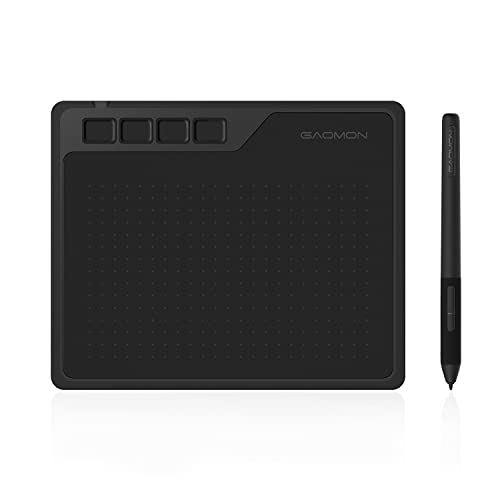
GAOMON S620 Graphics Tablet 6.5 x 4 Inches Pen Tablet with 4 Express Keys and Battery-Free Pen for Digital Drawing and Gaming on Windows&Mac OS & Android Device
Product Dimensions
8.3 x 6.4 x 0.3 inches
Item Weight
4.6 ounces
ASIN
B081VF94CG
Item model number
S620 Graphic Tablet-M
Date First Available
November 22, 2019
Manufacturer
GAOMON TECHNOLOGY CORPORATION
Test video – GAOMON S620 Graphics Tablet 6.5 x 4 :
Product highlights :
【8192 Levels Battery Free Pen】 The pen uses state-of-the-art passive technology, no need to recharge, continuous drawing. 4 customizable shortcut keys on the pen provide you with a convenient working experience. 8192-level pressure sensitivity, making lines more convenient and natural. Report Rate: 266 RPS/ Resolution: 5080 LPI/ Read Height: 10mm/ Work Area: 6.5 x 4 inches/ USB Port: Micro USB.
【4 Customizable Shortcut Keys】 The digital graphics tablet comes with 4 customizable shortcut keys that can be set as needed to improve your productivity.
【Lightweight Design and Technical Support】 GAOMON S620 is only 8mm thick and weighs 1.23lbs. It’s a portable and lightweight graphics tablet that you can take anywhere. GAOMON provides lifetime technical support for all GAOMON tablets/monitors. We consider excellent ongoing customer support part of our offering.
【Connected with Windows & Mac OS & Android】 Compatible with Win 7/8/10 and mac OS 10.12 or above, Android phone 6.0 or above. Please note that the Android phone must have OTG function. No need to install GAOMON driver on your Android phone.
【Wide Applicability & Multi-compatible Software】S620 drawing tablet support with most drawing programs: Adobe Photoshop, Illustrator, Clip Studio, Lightroom, Sketchbook Pro, Manga Studio, CorelPainter, FireAlpaca, OpenCanvas, Paint Tool Sai2, Krita, etc. It is suitable for digital drawing, painting,OSU games, distance education, sketching, electronic signature, online teaching, remote work, photo editing, etc.
➕ What is the price of GAOMON S620 Graphics Tablet 6.5 x 4 in Saudi Arabia ?
The price of GAOMON S620 Graphics Tablet 6.5 x 4 in-store is 100 SAR VAT.
➕ When GAOMON S620 Graphics Tablet 6.5 x 4 was released ?
The release date was November 22, 2019.
➕ What is the price of GAOMON S620 Graphics Tablet 6.5 x 4 cheap used ?
The price of GAOMON S620 Graphics Tablet 6.5 x 4 used is 70 SAR VAT.
➕ What are the main characteristics of GAOMON S620 Graphics Tablet 6.5 x 4 ?
Special specifications :
【8192 Levels Battery Free Pen】 The pen uses state-of-the-art passive technology, no need to recharge, continuous drawing. 4 customizable shortcut keys on the pen provide you with a convenient working experience. 8192-level pressure sensitivity, making lines more convenient and natural. Report Rate: 266 RPS/ Resolution: 5080 LPI/ Read Height: 10mm/ Work Area: 6.5 x 4 inches/ USB Port: Micro USB.
➕ Is it interesting to buy this product ?
The best people who can answer you are customers who have already bought and tested this product (See Customer Reviews). This product is rated 4.4 / 5 on Amazon.
➕ Where to buy GAOMON S620 Graphics Tablet 6.5 x 4 in Saudi Arabia ?
Windows 7 & above, Android 6.0 and above, MacOS 10.12 or later
Model Name
GAOMON S620-M
Color
S620 Black
Purchase advice :
Warranty :
Check the duration of the warranty and also the faults and defects it covers. Is it complete or limited? and What is included in the warranty (parts, repairs or both)?
Shipping :
Is delivery offered? And how long does it take to get delivered (Delivery time)
Proof of purchase :
Does the shop give you an invoice ?
After-sales service :
Do they have an after-sales service to have information about the installation or operation (instructions for use). Also in case of problem, it is the seller who takes charge or you must contact the manufacturer or supplier yourself.
_____________________________
https://www.youtube.com/www.youtube.com/wat
14 reviews for GAOMON S620 Graphics Tablet 6.5 x 4
Rated 5 out of 5
J. I (verified owner)–
It’s a graphics tablet! – It’s a graphics tablet! It does exactly what is advertised. It is plug and play, so you can just plug it in and use it without needing to install the drivers (though it is recommended). My box didn’t come with a quick start guide like it said on the packaging contents on the back of the box (due to me buying it used), but below that was a link to the website with the drivers, so it all worked out!
Rated 4 out of 5
F. I (verified owner)–
Well made product. – Really good pad as a beginner to start with. Sometimes it doesn’t respond how I would like it to, but I am still getting used to the program I am using so hopefully I will learn over time. Looks nice and feels good. Buttons to customize are a plus. Can’t go wrong.
Rated 5 out of 5
C. C (verified owner)–
Good and accurate – Cable Port Guard – Update 1/23/2022
Rated 4 out of 5
F. I (verified owner)–
Well made product. – Really good pad as a beginner to start with. Sometimes it doesn’t respond how I would like it to, but I am still getting used to the program I am using so hopefully I will learn over time. Looks nice and feels good. Buttons to customize are a plus. Can’t go wrong.
Rated 4 out of 5
K. M (verified owner)–
It’s very easy to use. – I used this product to draw graphic designs. It’s pretty nice, I like it.
Rated 5 out of 5
C. C (verified owner)–
Good and accurate – Cable Port Guard – Update 1/23/2022
Rated 4 out of 5
K. M (verified owner)–
It’s very easy to use. – I used this product to draw graphic designs. It’s pretty nice, I like it.
Rated 5 out of 5
L. K (verified owner)–
Great Item – I love it! I have used a Wacom tablet but this is excellent and so easy to use. And a great price!!!!
Rated 4 out of 5
G. J (verified owner)–
This tablet is amazing! – For those wondering, I purchased the GAOMON M106K PRO. I had originally bought this tablet in the hopes of it working for my laptop. I had a Wacom tablet that was twice as expensive that I’d been using for my PC at home to do my digital artwork. Over the years, I’ve been trying to save up for a laptop so that I could do my work away from home as well to make things more convenient. I was finally able to buy one using credit, and I bought an HP laptop. However, most Wacom tablets, including the one that I’ve had for a while now, don’t support that brand, and I didn’t think to check beforehand because it had Windows, so I had just assumed. I found out that the laptop I have supports Gaomon drivers, so I decided to go ahead and install those, and browse for a tablet that would work, and stumbled upon this tablet that I purchased. It works amazingly, and it functions really well in ClipStudio as well! It’s a very good alternative and cheap buy for a really amazing tablet that works very well!
Rated 5 out of 5
J. I (verified owner)–
It’s a graphics tablet! – It’s a graphics tablet! It does exactly what is advertised. It is plug and play, so you can just plug it in and use it without needing to install the drivers (though it is recommended). My box didn’t come with a quick start guide like it said on the packaging contents on the back of the box (due to me buying it used), but below that was a link to the website with the drivers, so it all worked out!
Rated 4 out of 5
P. R (verified owner)–
Won’t move between monitors without going in to settings – I purchased the MK10Pro to replace the Wacom Bamboo Fun (that isn’t made anymore). It appeared to be a good lower-cost option for what I use the tablet for. The response time is great. The touch is so slight, that I have to remember not to press as hard as I did with the Bamboo Fun. What very well could be the deal-breaker for me is that I can not move from monitor to monitor without going into settings. This is very frustrating, I want to use the tablet as a mouse as well as for designing. I have not been able to find a way to increase the work area to both monitors. For this reason, I will probably be returning the Gaomon and purchasing a pen tablet that will allow me to move across monitors.
Rated 4 out of 5
G. J (verified owner)–
This tablet is amazing! – For those wondering, I purchased the GAOMON M106K PRO. I had originally bought this tablet in the hopes of it working for my laptop. I had a Wacom tablet that was twice as expensive that I’d been using for my PC at home to do my digital artwork. Over the years, I’ve been trying to save up for a laptop so that I could do my work away from home as well to make things more convenient. I was finally able to buy one using credit, and I bought an HP laptop. However, most Wacom tablets, including the one that I’ve had for a while now, don’t support that brand, and I didn’t think to check beforehand because it had Windows, so I had just assumed. I found out that the laptop I have supports Gaomon drivers, so I decided to go ahead and install those, and browse for a tablet that would work, and stumbled upon this tablet that I purchased. It works amazingly, and it functions really well in ClipStudio as well! It’s a very good alternative and cheap buy for a really amazing tablet that works very well!
Rated 5 out of 5
L. K (verified owner)–
Great Item – I love it! I have used a Wacom tablet but this is excellent and so easy to use. And a great price!!!!
Rated 4 out of 5
P. R (verified owner)–
Won’t move between monitors without going in to settings – I purchased the MK10Pro to replace the Wacom Bamboo Fun (that isn’t made anymore). It appeared to be a good lower-cost option for what I use the tablet for. The response time is great. The touch is so slight, that I have to remember not to press as hard as I did with the Bamboo Fun. What very well could be the deal-breaker for me is that I can not move from monitor to monitor without going into settings. This is very frustrating, I want to use the tablet as a mouse as well as for designing. I have not been able to find a way to increase the work area to both monitors. For this reason, I will probably be returning the Gaomon and purchasing a pen tablet that will allow me to move across monitors.

J. I (verified owner) –
It’s a graphics tablet! – It’s a graphics tablet! It does exactly what is advertised. It is plug and play, so you can just plug it in and use it without needing to install the drivers (though it is recommended). My box didn’t come with a quick start guide like it said on the packaging contents on the back of the box (due to me buying it used), but below that was a link to the website with the drivers, so it all worked out!
F. I (verified owner) –
Well made product. – Really good pad as a beginner to start with. Sometimes it doesn’t respond how I would like it to, but I am still getting used to the program I am using so hopefully I will learn over time. Looks nice and feels good. Buttons to customize are a plus. Can’t go wrong.
C. C (verified owner) –
Good and accurate – Cable Port Guard – Update 1/23/2022
F. I (verified owner) –
Well made product. – Really good pad as a beginner to start with. Sometimes it doesn’t respond how I would like it to, but I am still getting used to the program I am using so hopefully I will learn over time. Looks nice and feels good. Buttons to customize are a plus. Can’t go wrong.
K. M (verified owner) –
It’s very easy to use. – I used this product to draw graphic designs. It’s pretty nice, I like it.
C. C (verified owner) –
Good and accurate – Cable Port Guard – Update 1/23/2022
K. M (verified owner) –
It’s very easy to use. – I used this product to draw graphic designs. It’s pretty nice, I like it.
L. K (verified owner) –
Great Item – I love it! I have used a Wacom tablet but this is excellent and so easy to use. And a great price!!!!
G. J (verified owner) –
This tablet is amazing! – For those wondering, I purchased the GAOMON M106K PRO. I had originally bought this tablet in the hopes of it working for my laptop. I had a Wacom tablet that was twice as expensive that I’d been using for my PC at home to do my digital artwork. Over the years, I’ve been trying to save up for a laptop so that I could do my work away from home as well to make things more convenient. I was finally able to buy one using credit, and I bought an HP laptop. However, most Wacom tablets, including the one that I’ve had for a while now, don’t support that brand, and I didn’t think to check beforehand because it had Windows, so I had just assumed. I found out that the laptop I have supports Gaomon drivers, so I decided to go ahead and install those, and browse for a tablet that would work, and stumbled upon this tablet that I purchased. It works amazingly, and it functions really well in ClipStudio as well! It’s a very good alternative and cheap buy for a really amazing tablet that works very well!
J. I (verified owner) –
It’s a graphics tablet! – It’s a graphics tablet! It does exactly what is advertised. It is plug and play, so you can just plug it in and use it without needing to install the drivers (though it is recommended). My box didn’t come with a quick start guide like it said on the packaging contents on the back of the box (due to me buying it used), but below that was a link to the website with the drivers, so it all worked out!
P. R (verified owner) –
Won’t move between monitors without going in to settings – I purchased the MK10Pro to replace the Wacom Bamboo Fun (that isn’t made anymore). It appeared to be a good lower-cost option for what I use the tablet for. The response time is great. The touch is so slight, that I have to remember not to press as hard as I did with the Bamboo Fun. What very well could be the deal-breaker for me is that I can not move from monitor to monitor without going into settings. This is very frustrating, I want to use the tablet as a mouse as well as for designing. I have not been able to find a way to increase the work area to both monitors. For this reason, I will probably be returning the Gaomon and purchasing a pen tablet that will allow me to move across monitors.
G. J (verified owner) –
This tablet is amazing! – For those wondering, I purchased the GAOMON M106K PRO. I had originally bought this tablet in the hopes of it working for my laptop. I had a Wacom tablet that was twice as expensive that I’d been using for my PC at home to do my digital artwork. Over the years, I’ve been trying to save up for a laptop so that I could do my work away from home as well to make things more convenient. I was finally able to buy one using credit, and I bought an HP laptop. However, most Wacom tablets, including the one that I’ve had for a while now, don’t support that brand, and I didn’t think to check beforehand because it had Windows, so I had just assumed. I found out that the laptop I have supports Gaomon drivers, so I decided to go ahead and install those, and browse for a tablet that would work, and stumbled upon this tablet that I purchased. It works amazingly, and it functions really well in ClipStudio as well! It’s a very good alternative and cheap buy for a really amazing tablet that works very well!
L. K (verified owner) –
Great Item – I love it! I have used a Wacom tablet but this is excellent and so easy to use. And a great price!!!!
P. R (verified owner) –
Won’t move between monitors without going in to settings – I purchased the MK10Pro to replace the Wacom Bamboo Fun (that isn’t made anymore). It appeared to be a good lower-cost option for what I use the tablet for. The response time is great. The touch is so slight, that I have to remember not to press as hard as I did with the Bamboo Fun. What very well could be the deal-breaker for me is that I can not move from monitor to monitor without going into settings. This is very frustrating, I want to use the tablet as a mouse as well as for designing. I have not been able to find a way to increase the work area to both monitors. For this reason, I will probably be returning the Gaomon and purchasing a pen tablet that will allow me to move across monitors.