
Description
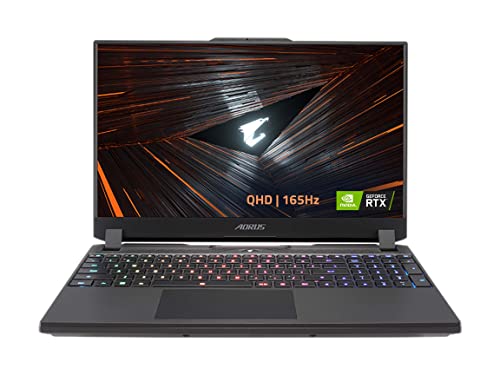
GIGABYTE AORUS 15 XE5: 15.6″ QHD 2560×1440 – Features & Prices in Saudi Arabia :
GIGABYTE AORUS 15 XE5: 15.6″ QHD 2560×1440 IPS-Level Display, Intel Core i7-12700H, NVIDIA GeForce RTX 3070 Ti Laptop GPU 8GB GDDR6, 16GB DDR5 RAM, 1TB SSD, Win11 Home (AORUS 15 XE5-73USB34SH)
Standing screen display size
15.6 Inches
Max Screen Resolution
2560 x 1440 Pixels
Processor
3.5 core_i7
RAM
8 GB DDR5
Hard Drive
SSD
Graphics Coprocessor
NVIDIA GeForce RTX 3070
Chipset Brand
NVIDIA
Card Description
Dedicated
Wireless Type
Bluetooth
Number of USB 3.0 Ports
3
Batteries
1 Lithium Polymer batteries required. (included)
Test video – GIGABYTE AORUS 15 XE5: 15.6″ QHD 2560×1440 :
Product highlights :
Questions & Answers – GIGABYTE AORUS 15 XE5: 15.6″ QHD 2560×1440 :
Technical specifications – GIGABYTE AORUS 15 XE5: 15.6″ QHD 2560×1440 :
Brand
GIGABYTE
Series
AORUS 15 XE5
Screen Size
15.6 Inches
CPU Model
Core i7
Ram Memory Installed Size
16 GB
Operating System
Windows 11 Home
Card Description
Dedicated
Graphics Coprocessor
NVIDIA GeForce RTX 3070
CPU Speed
3.5
Hard Disk Description
SSD
Purchase advice :
-
Warranty :
Check the duration of the warranty and also the faults and defects it covers. Is it complete or limited? and What is included in the warranty (parts, repairs or both)?
-
Shipping :
Is delivery offered? And how long does it take to get delivered (Delivery time)
-
Proof of purchase :
Does the shop give you an invoice ?
-
After-sales service :
Do they have an after-sales service to have information about the installation or operation (instructions for use). Also in case of problem, it is the seller who takes charge or you must contact the manufacturer or supplier yourself.
_____________________________


T. B (verified owner) –
Arrived with severe hardware failure – It worked for a single day. Played a few games with excellent results but tried to boot it up the next day and wouldn’t boot past bios. It could not locate the SSD to boot windows.
M. E (verified owner) –
Great Computer!!! – Ultimate machine for sure… definitely recommend
K. A (verified owner) –
Amazing – So far the laptop Hasn’t give me any problem, I can play all the games at full setting max out. The screen is amazing and beautiful.
N. E (verified owner) –
Not manufactured very well – I really wanted to like this laptop. It was great on the first day, until it started to show its true colors. First defect right out of the box, was that the webcam wasn’t working. I searched left and right for a solution, and eventually realized that the laptop didn’t even have a default webcam driver installed.
I. G (verified owner) –
GIGABYTE AORUS 17 XE4 17.3 | You don’t get what you pay for, you get more! – My review is on: ‘GIGABYTE AORUS 17 XE4 17.3 | AORUS 17 XE4-73US514SH’ | I’ve only had it for 6 days now. But so far so good. To early to give a complete in depth review yet. But being that I was an IT for close to 10 years… I can tell you that: A. Great refresh rate. My eyes feel the difference! B. I understand why Gigabyte went with the lower quality screen. But the reason for it, could have been avoided with a 4K screen, in order to fully take advantage of the high refresh rate. C. The BIOS does not support XMP 2.0 –> That’s intel’s OC / overclocking settings when enabled. Therefore, we are not going to be seeing any CAS 16 or 17 as advertised by some of the upgrade RAM being sold. Maybe in a future BIOS upgrade Aorus will unlock this feature? Trust me, I checked all over the BIOS and the internet forums, in order to enable this RAMs OC feature, it’s grayed out, and we all know what grayed out features in the BIOS means –> Not an available option for us lowly mortals. D. I see a lot of complaints about the size of the keys. Not a problem for me, I’m coming to Aorus from an MSI laptop. Keyword being laptop. And most laptops now adays, have smaller keys. What I do not like, is that secondary functions on the number pad and above the regular keyboard, are hard to see, as in not really visible, unless you have the brightness maxed out, which in turn blinds the user a little bit. Even then, the secondary functions are hard to see. By secondary, I mean, example; when you press ‘Shift +2, in order to get the @ symbol. Well other keys have other symbols we use too right? This might be a Gigabyte Aorus way, of getting us to do brain exercise, in order to help us improve our memory, because you’re going to have to remember where the special symbols are if you want to use them in the dark, with only the keyboard and monitor illumination as a light source. The RGB feature is also pretty cool. I enjoy sitting down with my son, and just changing the options for the patterns, he gets trilled by it! I like the raindrops one. E. The graphics *ARE pretty nice! I might be coming from an Nvidia GeForce GTX1070, (It was the top of the line when I bought it… for a whole 4 months ;-P ,) but as I said, I was an IT for over 10 years. The combo of a 3070 Ti, coupled with the 12700H series intel CPU, man it makes things run so much faster! F. The fact the touchpad is a bit more centered than on my MSI, is also a welcomed feature. The lack of buttons on it? A bit confusing for me. As I said, in the dark it’s hard to see were I’m touching, and the lack of buttons forces me more often than not, to look down and see what part of it I’m pressing on. Not necessarily a bad thing, I just need to get used to this new laptop. The touch pad has a nice flush with the rest of the surface it’s located on. G. Not the flashiest system when it comes to it’s appearance. But with this specific model, you are paying for the hardware, not the looks. It’s still nice to look at. I like how the screen is raised from the main body. I believe it gives it a bit more heat dissipation breathing room. My main gripe, is the location of the power connector! Most of us use our mouse on that spot. It does get a bit in the way. Also, the mini display port could have been used instead for another Thunder Bolt connector. Yes I get it miny-display for people that want to connect a few monitors. Most of us will use it, but we will need an adapter dongle for it, which would be the same, if it were a Thunder Port instead 😉 . H. Overall, I give this laptop 4 stars. I would have made it 5 without any hesitation, but the lack of availability of XMP 2.0, is a total buzz kill for me. Even for this laptop, XMP could have easily bumped up RAM to 1.35V, in order to get a CAS 16-17, without creating any serious heat to worry about. Nothing that could not have been fixed by an addition of heat spreaders on the RAM. Even though at 1.35V, no one has reported actually needing heat sinks on other systems with much less internal breathing room. That’s my other **Pro here; good breathing room inside. It does not heat up as easily, which is a nice surprise, being that it has an RTX 3070 Ti –> Ti being the key word here. | I’m receiving my RAM upgrade today, T-Force Zeus edition, I’m maxing it out to 64GB. I’ve taken learning how to game develop on Unity, during these pandemic times. Something I’ve always wanted to do! Lots and lots of rendering involved! I will be using a good amount of this much needed extra RAM, GPU and CPU power. Unity dev –> the actual reason why I bought this laptop. I need the extra horse power 😉 , And this baby has more than enough for it. It would have been nice for it to also include DDR5 for the price, or even $200 more as a price increase for it. But for those of us that did our research, same specs, except for the RAM being DDR5 instead of DDR4, the price increase was an extra $700! Not worth it in my book. I’m not into competitive gamming. When it comes to the RAM, if this laptop would have had DDR5, then the RAM lacking XMP 2.0 OC capabilities, would have not been an issue with me. But since it does not, it is. A MUX switch would have solved the lack for XMP 2.0 BIOS support also. As you people can see, not too many CONS with this laptop, mainly PROs! | All in all, as I said earlier, you get your moneys worth and *More with this laptop! | The next part, will be to carnivalize my 7 month old SSDs from my MSI and install them into my Aorus. They are two, 2TB SSDs each, for a total of 4TB. I planned ahead when I bought them. I got the 4X4 form factor, not the fastest at only 5000+ read and write speeds, but they will do, until the Sept and Nov sales arrive. That’s when I will upgrade the SSDs to 4TB each, with speeds of 7000+ read and write. Too much power for a normal user. But any one else in development, or like me, even learning it, knows that this is perfect (Not, not spending a decent chunk of change on a Pandemic fad. I actually already took a C# Unity focused class. Also took both of Unity’s Essentials Pathway and the Junior Programmer Pathway. Plus bought some store assets, along with this laptop and the upgrades 😉 .) Yes, a 3090 Ti, with an intel 12900K CPU and 64GB DDR5 RAM would be nicer, but those laptops were an **Average of mid $4,500. Too rich for me, because with the 5 and 2 nm CPUs hitting the market in the next 1.5-2.5 years, this laptop will be considered a 90s calculator next to those beasts! | As I said, for the price, this laptop gives you more than what you paid for. It **Is a steal! And a few upgrades, like the ones I’m making myself. The laptop would have costed over or close to $4k, with the new specs it’s going to have in the next few days. The package was delivered without any damage –> (Thank you Seller and Amazon for that!) My review is on the –> GIGABYTE AORUS 17 XE4 17.3 | AORUS 17 XE4-73US514SH
C. F (verified owner) –
Factory defect and the seller is not responsible, only guarantee with the gigabyte! – Everything seemed to work fine, when I realize that I am 100% charged, I unplugged it, used it, and recharged it. When I connected it I thought it would charge and I realize that it recognizes the power input but does not charge the device. It stays at the same percentage that I left it at. The seller took about a week and a half to answer me, to tell me that they are not responsible. A high priced laptop so that it does not have support from the seller. Amazon does not give me a concrete answer to solve my problem, it is my work tool and I cannot use it without disconnecting it.
K. A (verified owner) –
Amazing – So far the laptop Hasn’t give me any problem, I can play all the games at full setting max out. The screen is amazing and beautiful.
F. C (verified owner) –
Really powerful laptop – So far I’m loving it. Had some problems with windows 11 and drivers. But they released updates and working fine now.
S. F (verified owner) –
Amazing quality – Fast and easy to use.
C. F (verified owner) –
Factory defect and the seller is not responsible, only guarantee with the gigabyte! – Everything seemed to work fine, when I realize that I am 100% charged, I unplugged it, used it, and recharged it. When I connected it I thought it would charge and I realize that it recognizes the power input but does not charge the device. It stays at the same percentage that I left it at. The seller took about a week and a half to answer me, to tell me that they are not responsible. A high priced laptop so that it does not have support from the seller. Amazon does not give me a concrete answer to solve my problem, it is my work tool and I cannot use it without disconnecting it.
T. B (verified owner) –
Arrived with severe hardware failure – It worked for a single day. Played a few games with excellent results but tried to boot it up the next day and wouldn’t boot past bios. It could not locate the SSD to boot windows.
F. C (verified owner) –
Really powerful laptop – So far I’m loving it. Had some problems with windows 11 and drivers. But they released updates and working fine now.
M. E (verified owner) –
Great Computer!!! – Ultimate machine for sure… definitely recommend
S. F (verified owner) –
Amazing quality – Fast and easy to use.
N. E (verified owner) –
Not manufactured very well – I really wanted to like this laptop. It was great on the first day, until it started to show its true colors. First defect right out of the box, was that the webcam wasn’t working. I searched left and right for a solution, and eventually realized that the laptop didn’t even have a default webcam driver installed.
I. G (verified owner) –
GIGABYTE AORUS 17 XE4 17.3 | You don’t get what you pay for, you get more! – My review is on: ‘GIGABYTE AORUS 17 XE4 17.3 | AORUS 17 XE4-73US514SH’ | I’ve only had it for 6 days now. But so far so good. To early to give a complete in depth review yet. But being that I was an IT for close to 10 years… I can tell you that: A. Great refresh rate. My eyes feel the difference! B. I understand why Gigabyte went with the lower quality screen. But the reason for it, could have been avoided with a 4K screen, in order to fully take advantage of the high refresh rate. C. The BIOS does not support XMP 2.0 –> That’s intel’s OC / overclocking settings when enabled. Therefore, we are not going to be seeing any CAS 16 or 17 as advertised by some of the upgrade RAM being sold. Maybe in a future BIOS upgrade Aorus will unlock this feature? Trust me, I checked all over the BIOS and the internet forums, in order to enable this RAMs OC feature, it’s grayed out, and we all know what grayed out features in the BIOS means –> Not an available option for us lowly mortals. D. I see a lot of complaints about the size of the keys. Not a problem for me, I’m coming to Aorus from an MSI laptop. Keyword being laptop. And most laptops now adays, have smaller keys. What I do not like, is that secondary functions on the number pad and above the regular keyboard, are hard to see, as in not really visible, unless you have the brightness maxed out, which in turn blinds the user a little bit. Even then, the secondary functions are hard to see. By secondary, I mean, example; when you press ‘Shift +2, in order to get the @ symbol. Well other keys have other symbols we use too right? This might be a Gigabyte Aorus way, of getting us to do brain exercise, in order to help us improve our memory, because you’re going to have to remember where the special symbols are if you want to use them in the dark, with only the keyboard and monitor illumination as a light source. The RGB feature is also pretty cool. I enjoy sitting down with my son, and just changing the options for the patterns, he gets trilled by it! I like the raindrops one. E. The graphics *ARE pretty nice! I might be coming from an Nvidia GeForce GTX1070, (It was the top of the line when I bought it… for a whole 4 months ;-P ,) but as I said, I was an IT for over 10 years. The combo of a 3070 Ti, coupled with the 12700H series intel CPU, man it makes things run so much faster! F. The fact the touchpad is a bit more centered than on my MSI, is also a welcomed feature. The lack of buttons on it? A bit confusing for me. As I said, in the dark it’s hard to see were I’m touching, and the lack of buttons forces me more often than not, to look down and see what part of it I’m pressing on. Not necessarily a bad thing, I just need to get used to this new laptop. The touch pad has a nice flush with the rest of the surface it’s located on. G. Not the flashiest system when it comes to it’s appearance. But with this specific model, you are paying for the hardware, not the looks. It’s still nice to look at. I like how the screen is raised from the main body. I believe it gives it a bit more heat dissipation breathing room. My main gripe, is the location of the power connector! Most of us use our mouse on that spot. It does get a bit in the way. Also, the mini display port could have been used instead for another Thunder Bolt connector. Yes I get it miny-display for people that want to connect a few monitors. Most of us will use it, but we will need an adapter dongle for it, which would be the same, if it were a Thunder Port instead 😉 . H. Overall, I give this laptop 4 stars. I would have made it 5 without any hesitation, but the lack of availability of XMP 2.0, is a total buzz kill for me. Even for this laptop, XMP could have easily bumped up RAM to 1.35V, in order to get a CAS 16-17, without creating any serious heat to worry about. Nothing that could not have been fixed by an addition of heat spreaders on the RAM. Even though at 1.35V, no one has reported actually needing heat sinks on other systems with much less internal breathing room. That’s my other **Pro here; good breathing room inside. It does not heat up as easily, which is a nice surprise, being that it has an RTX 3070 Ti –> Ti being the key word here. | I’m receiving my RAM upgrade today, T-Force Zeus edition, I’m maxing it out to 64GB. I’ve taken learning how to game develop on Unity, during these pandemic times. Something I’ve always wanted to do! Lots and lots of rendering involved! I will be using a good amount of this much needed extra RAM, GPU and CPU power. Unity dev –> the actual reason why I bought this laptop. I need the extra horse power 😉 , And this baby has more than enough for it. It would have been nice for it to also include DDR5 for the price, or even $200 more as a price increase for it. But for those of us that did our research, same specs, except for the RAM being DDR5 instead of DDR4, the price increase was an extra $700! Not worth it in my book. I’m not into competitive gamming. When it comes to the RAM, if this laptop would have had DDR5, then the RAM lacking XMP 2.0 OC capabilities, would have not been an issue with me. But since it does not, it is. A MUX switch would have solved the lack for XMP 2.0 BIOS support also. As you people can see, not too many CONS with this laptop, mainly PROs! | All in all, as I said earlier, you get your moneys worth and *More with this laptop! | The next part, will be to carnivalize my 7 month old SSDs from my MSI and install them into my Aorus. They are two, 2TB SSDs each, for a total of 4TB. I planned ahead when I bought them. I got the 4X4 form factor, not the fastest at only 5000+ read and write speeds, but they will do, until the Sept and Nov sales arrive. That’s when I will upgrade the SSDs to 4TB each, with speeds of 7000+ read and write. Too much power for a normal user. But any one else in development, or like me, even learning it, knows that this is perfect (Not, not spending a decent chunk of change on a Pandemic fad. I actually already took a C# Unity focused class. Also took both of Unity’s Essentials Pathway and the Junior Programmer Pathway. Plus bought some store assets, along with this laptop and the upgrades 😉 .) Yes, a 3090 Ti, with an intel 12900K CPU and 64GB DDR5 RAM would be nicer, but those laptops were an **Average of mid $4,500. Too rich for me, because with the 5 and 2 nm CPUs hitting the market in the next 1.5-2.5 years, this laptop will be considered a 90s calculator next to those beasts! | As I said, for the price, this laptop gives you more than what you paid for. It **Is a steal! And a few upgrades, like the ones I’m making myself. The laptop would have costed over or close to $4k, with the new specs it’s going to have in the next few days. The package was delivered without any damage –> (Thank you Seller and Amazon for that!) My review is on the –> GIGABYTE AORUS 17 XE4 17.3 | AORUS 17 XE4-73US514SH