GMKtec Mini PC Windows 11 Pro, 8GB – Features & Prices in Saudi Arabia :
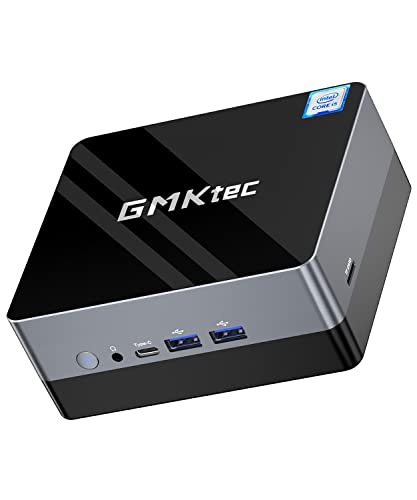
GMKtec Mini PC Windows 11 Pro, 8GB DDR4 256GB SSD Mini Desktop Computer Intel i5-8279U Processor, Quad Core Micro Computer 4K, M.2 Nvme SSD 2.4G/5.0G WiFi, Gigabit Ethernet, HTPC, Auto Power On
Standing screen display size
1
Processor
2.4 hertz core_i5
RAM
8 GB DDR4
Memory Speed
2400 MHz
Hard Drive
256 GB
Graphics Coprocessor
Intel Iris Plus Graphics 655
Chipset Brand
Intel
Card Description
Integrated
Graphics Card Ram Size
655.00
Wireless Type
802.11ac
Number of USB 3.0 Ports
4
Flash Memory Size
256 GB
Hard Drive Interface
USB 3.0
Power Source
DC
Test video – GMKtec Mini PC Windows 11 Pro, 8GB :
Product highlights :
【Ultra High-efficiency Mini Computer】GMK Nucbox 2 is equipped with 8th Gen Intel Coffee Lake i5-8279U (2.4GHz, Turbo 4.1GHz, 4 cores 8 threads, support 6M Intel Smart Cache), 14nm lithography technology. It runs much faster than i5-8259U, N5105, N5095, N3450, j3455, j4125, etc. chips. Fast and smooth performance makes it can handle various tasks simultaneously, ideal for casual and retro gaming, business office, home theater, education etc.
【Intel Iris Plus Graphics 655 and 4K HD Dual Screen Display】Nucbox 2 mini desktop pc comes with Intel Iris Plus Graphics 655, which supports 4K HD Ultra HD content. With dual HDMI ports, you can easily connect 2 monitors, reduce waiting time and double your work efficiency. You can enjoy 4K web surfing, video playback, watching TV, home theater, or entertaining with your family. Also can work for point-of-sale terminals, billboards, surveillance cameras and kiosk displays.
【Powerful Capacity and Storage Expansion】Nucbox 2 micro pc computer is equipped with high-speed 8GB DDR4 memory, which can be upgraded to 32GB (not included) through two SO-DIMM channels. Also comes with a 256GB M.2 2280 Nvme SSD, expandable up to 2TB (not included) via a 2.5″ SATA HDD. Amazingly fast for everyday tasks like word processing (running Microsoft Office and LibreOffice smoothly), browsing the internet, watching movies on YouTube or via Plex.
【Rich interfaces and efficient heat dissipation】Nucbox 2 mini tower computer 28W power-saving high-performance version, including Gigabit Ethernet LAN (RJ45 port) dual-band WiFi 2.4G + 5G and Bluetooth 4.2, USB 3.0*4, HDMI*2, the audio jack (HP&MIC)*1, DC jack*1, Type-C*1. Efficient heat dissipation, cooling computer hardware, reducing hardware loss, strong heat dissipation capacity, strong heat dissipation capacity, good heat dissipation performance, and good heat dissipation performance.
【Operating System and Technical Support】mini tower pc Nucbox 2 comes pre-installed with Windows 11 Pro. We also provide lifetime technical support, 7 days / 24 hours service. All our micro desktop computer have obtained FCC, CE, ROSH certification.
Questions & Answers – GMKtec Mini PC Windows 11 Pro, 8GB :
➕ What is the price of GMKtec Mini PC Windows 11 Pro, 8GB in Saudi Arabia ?
The price of GMKtec Mini PC Windows 11 Pro, 8GB in-store is 1210 SAR VAT.
➕ When GMKtec Mini PC Windows 11 Pro, 8GB was released ?
The release date was .
➕ What is the price of GMKtec Mini PC Windows 11 Pro, 8GB cheap used ?
The price of GMKtec Mini PC Windows 11 Pro, 8GB used is 840 SAR VAT.
➕ What are the main characteristics of GMKtec Mini PC Windows 11 Pro, 8GB ?
Special specifications :
【Ultra High-efficiency Mini Computer】GMK Nucbox 2 is equipped with 8th Gen Intel Coffee Lake i5-8279U (2.4GHz, Turbo 4.1GHz, 4 cores 8 threads, support 6M Intel Smart Cache), 14nm lithography technology. It runs much faster than i5-8259U, N5105, N5095, N3450, j3455, j4125, etc. chips. Fast and smooth performance makes it can handle various tasks simultaneously, ideal for casual and retro gaming, business office, home theater, education etc.
➕ Is it interesting to buy this product ?
The best people who can answer you are customers who have already bought and tested this product (See Customer Reviews). This product is rated 4.3 / 5 on Amazon.
➕ Where to buy GMKtec Mini PC Windows 11 Pro, 8GB in Saudi Arabia ?
Technical specifications – GMKtec Mini PC Windows 11 Pro, 8GB :
Specific Uses For Product
Personal
Brand
Gmk
Personal computer design type
Mini PC
Operating System
Windows 11 Pro
Memory Storage Capacity
256 GB
Screen Size
1
Ram Memory Installed Size
8 GB
Series
NucBox2
CPU Model
Core i5
CPU Manufacturer
Intel
Purchase advice :
Warranty :
Check the duration of the warranty and also the faults and defects it covers. Is it complete or limited? and What is included in the warranty (parts, repairs or both)?
Shipping :
Is delivery offered? And how long does it take to get delivered (Delivery time)
Proof of purchase :
Does the shop give you an invoice ?
After-sales service :
Do they have an after-sales service to have information about the installation or operation (instructions for use). Also in case of problem, it is the seller who takes charge or you must contact the manufacturer or supplier yourself.
_____________________________
16 reviews for GMKtec Mini PC Windows 11 Pro, 8GB
Rated 5 out of 5
D. S (verified owner)–
Above and beyond customer service – After receiving the product (awesome mini pc) they reached out to me and when I mentioned the packaging was slightly damaged – no damage to the pc – they sent me a free keyboard and mouse. I was already satisfied with the order but they went above and beyond. 5 star service and 5 star product. Highly recommend.
Rated 4 out of 5
F. R (verified owner)–
Great Low-Price NUC-based PC – I bought this PC to use as a Home Theater PC, and it does a great job at that. Since it sits in my living room, I needed something quiet that would fit in a small space that was also low-priced, and this fit the bill. It lost a star because the SSD crashed after just four months, but, after asking me to run a few tests, cheerfully sent me a new one.
Rated 5 out of 5
L. S (verified owner)–
Fun little computer – Easy to set-up, for the money this is a great little computer.
Rated 3 out of 5
N. Z (verified owner)–
Slower and noisier than the first NucBox and touch screen doesn’t work with their GMK Monitor – Returned my NucBox for the newer NucBox2 because of the i5 and more ports. But this gave me a lot of trouble setting up. Slow to connect Bluetooth keyboard, slower to turn on and for some reason, the GMK K1 14inch monitor they sell bundled with the Nucabox, does not except the Monitors touch screen function. I do not know why, it worked with the NucBox one, and suggest selling it with the NucBox2, but cannot get the touch screen function to work. It even shows that the screen is not Touch Screen capable. Very frustrating and angry as tech support or answers as to why have gone to deaf ears and eyes. I can’t get their own Monitor to function with their own newest mini CPU.
Rated 5 out of 5
N. M (verified owner)–
Gerat value – What I like about this, in addition to all the other features, is that it will automatically restart when power is out and restored.
Rated 5 out of 5
D. K (verified owner)–
Great little computer at a great price – I had an Intel NUC11i3 on order for two months (to replace my aging NUC6i3) and it kept being delayed so I looked around for a different option, just as this GMK NucBox2 was released (with an obvious ripoff of Intel’s NUC brand name). It’s a slightly older generation CPU, but an i5 instead of i3, and the performance specs were fairly close (slower single core, but faster multi core). Plus, with the pre-installed 8GB RAM and 256GB drive it ended up being around $100 cheaper than getting the cheapest NUC11 kit and adding memory and storage myself. After a quick boot-up into the included Windows OS to ensure it worked, I erased the drive and install Ubuntu Linux 21.04 with no problems at all. The box came with pretty much no instructions, so it took some experimentation to get into the BIOS menu (via the “ESC” key during boot) to adjust the boot device order. The box feel REALLY fast and so far has been 100% silent, though I haven’t done anything too CPU intensive for too long which might trigger more cooling. Overall I’m really happy with this and may even buy a second one.
Rated 5 out of 5
D. S (verified owner)–
Above and beyond customer service – After receiving the product (awesome mini pc) they reached out to me and when I mentioned the packaging was slightly damaged – no damage to the pc – they sent me a free keyboard and mouse. I was already satisfied with the order but they went above and beyond. 5 star service and 5 star product. Highly recommend.
Rated 5 out of 5
D. K (verified owner)–
Great little computer at a great price – I had an Intel NUC11i3 on order for two months (to replace my aging NUC6i3) and it kept being delayed so I looked around for a different option, just as this GMK NucBox2 was released (with an obvious ripoff of Intel’s NUC brand name). It’s a slightly older generation CPU, but an i5 instead of i3, and the performance specs were fairly close (slower single core, but faster multi core). Plus, with the pre-installed 8GB RAM and 256GB drive it ended up being around $100 cheaper than getting the cheapest NUC11 kit and adding memory and storage myself. After a quick boot-up into the included Windows OS to ensure it worked, I erased the drive and install Ubuntu Linux 21.04 with no problems at all. The box came with pretty much no instructions, so it took some experimentation to get into the BIOS menu (via the “ESC” key during boot) to adjust the boot device order. The box feel REALLY fast and so far has been 100% silent, though I haven’t done anything too CPU intensive for too long which might trigger more cooling. Overall I’m really happy with this and may even buy a second one.
Rated 5 out of 5
L. S (verified owner)–
Fun little computer – Easy to set-up, for the money this is a great little computer.
Rated 5 out of 5
G. K (verified owner)–
Fine pc for light tasks. – Bought this with the Black Friday sales. Works great. Runs at the speed it is supposed to. The cpu is a 2.40GHz cpu with a boost speed of 4.1, which it seems to run at most of the time. You can find out what speed your cpu is running at by using Task Manager, picking the performance tab and then picking cpu. That reviewer that complained about the cpu being 2.4GHz may not understand that the cpu will be running at the top end of its speed unless it gets hot, at which point the pc will slow that cpu speed if needed.
Rated 5 out of 5
G. K (verified owner)–
Fine pc for light tasks. – Bought this with the Black Friday sales. Works great. Runs at the speed it is supposed to. The cpu is a 2.40GHz cpu with a boost speed of 4.1, which it seems to run at most of the time. You can find out what speed your cpu is running at by using Task Manager, picking the performance tab and then picking cpu. That reviewer that complained about the cpu being 2.4GHz may not understand that the cpu will be running at the top end of its speed unless it gets hot, at which point the pc will slow that cpu speed if needed.
Rated 5 out of 5
N. M (verified owner)–
Gerat value – What I like about this, in addition to all the other features, is that it will automatically restart when power is out and restored.
Rated 4 out of 5
F. R (verified owner)–
Great Low-Price NUC-based PC – I bought this PC to use as a Home Theater PC, and it does a great job at that. Since it sits in my living room, I needed something quiet that would fit in a small space that was also low-priced, and this fit the bill. It lost a star because the SSD crashed after just four months, but, after asking me to run a few tests, cheerfully sent me a new one.
Rated 5 out of 5
A. B (verified owner)–
Amazing Mini Computer – This mini computer is amazing! I use it for work and school, and it works great. It’s fast and reliable.
Rated 5 out of 5
A. B (verified owner)–
Amazing Mini Computer – This mini computer is amazing! I use it for work and school, and it works great. It’s fast and reliable.
Rated 3 out of 5
N. Z (verified owner)–
Slower and noisier than the first NucBox and touch screen doesn’t work with their GMK Monitor – Returned my NucBox for the newer NucBox2 because of the i5 and more ports. But this gave me a lot of trouble setting up. Slow to connect Bluetooth keyboard, slower to turn on and for some reason, the GMK K1 14inch monitor they sell bundled with the Nucabox, does not except the Monitors touch screen function. I do not know why, it worked with the NucBox one, and suggest selling it with the NucBox2, but cannot get the touch screen function to work. It even shows that the screen is not Touch Screen capable. Very frustrating and angry as tech support or answers as to why have gone to deaf ears and eyes. I can’t get their own Monitor to function with their own newest mini CPU.


D. S (verified owner) –
Above and beyond customer service – After receiving the product (awesome mini pc) they reached out to me and when I mentioned the packaging was slightly damaged – no damage to the pc – they sent me a free keyboard and mouse. I was already satisfied with the order but they went above and beyond. 5 star service and 5 star product. Highly recommend.
F. R (verified owner) –
Great Low-Price NUC-based PC – I bought this PC to use as a Home Theater PC, and it does a great job at that. Since it sits in my living room, I needed something quiet that would fit in a small space that was also low-priced, and this fit the bill. It lost a star because the SSD crashed after just four months, but, after asking me to run a few tests, cheerfully sent me a new one.
L. S (verified owner) –
Fun little computer – Easy to set-up, for the money this is a great little computer.
N. Z (verified owner) –
Slower and noisier than the first NucBox and touch screen doesn’t work with their GMK Monitor – Returned my NucBox for the newer NucBox2 because of the i5 and more ports. But this gave me a lot of trouble setting up. Slow to connect Bluetooth keyboard, slower to turn on and for some reason, the GMK K1 14inch monitor they sell bundled with the Nucabox, does not except the Monitors touch screen function. I do not know why, it worked with the NucBox one, and suggest selling it with the NucBox2, but cannot get the touch screen function to work. It even shows that the screen is not Touch Screen capable. Very frustrating and angry as tech support or answers as to why have gone to deaf ears and eyes. I can’t get their own Monitor to function with their own newest mini CPU.
N. M (verified owner) –
Gerat value – What I like about this, in addition to all the other features, is that it will automatically restart when power is out and restored.
D. K (verified owner) –
Great little computer at a great price – I had an Intel NUC11i3 on order for two months (to replace my aging NUC6i3) and it kept being delayed so I looked around for a different option, just as this GMK NucBox2 was released (with an obvious ripoff of Intel’s NUC brand name). It’s a slightly older generation CPU, but an i5 instead of i3, and the performance specs were fairly close (slower single core, but faster multi core). Plus, with the pre-installed 8GB RAM and 256GB drive it ended up being around $100 cheaper than getting the cheapest NUC11 kit and adding memory and storage myself. After a quick boot-up into the included Windows OS to ensure it worked, I erased the drive and install Ubuntu Linux 21.04 with no problems at all. The box came with pretty much no instructions, so it took some experimentation to get into the BIOS menu (via the “ESC” key during boot) to adjust the boot device order. The box feel REALLY fast and so far has been 100% silent, though I haven’t done anything too CPU intensive for too long which might trigger more cooling. Overall I’m really happy with this and may even buy a second one.
D. S (verified owner) –
Above and beyond customer service – After receiving the product (awesome mini pc) they reached out to me and when I mentioned the packaging was slightly damaged – no damage to the pc – they sent me a free keyboard and mouse. I was already satisfied with the order but they went above and beyond. 5 star service and 5 star product. Highly recommend.
D. K (verified owner) –
Great little computer at a great price – I had an Intel NUC11i3 on order for two months (to replace my aging NUC6i3) and it kept being delayed so I looked around for a different option, just as this GMK NucBox2 was released (with an obvious ripoff of Intel’s NUC brand name). It’s a slightly older generation CPU, but an i5 instead of i3, and the performance specs were fairly close (slower single core, but faster multi core). Plus, with the pre-installed 8GB RAM and 256GB drive it ended up being around $100 cheaper than getting the cheapest NUC11 kit and adding memory and storage myself. After a quick boot-up into the included Windows OS to ensure it worked, I erased the drive and install Ubuntu Linux 21.04 with no problems at all. The box came with pretty much no instructions, so it took some experimentation to get into the BIOS menu (via the “ESC” key during boot) to adjust the boot device order. The box feel REALLY fast and so far has been 100% silent, though I haven’t done anything too CPU intensive for too long which might trigger more cooling. Overall I’m really happy with this and may even buy a second one.
L. S (verified owner) –
Fun little computer – Easy to set-up, for the money this is a great little computer.
G. K (verified owner) –
Fine pc for light tasks. – Bought this with the Black Friday sales. Works great. Runs at the speed it is supposed to. The cpu is a 2.40GHz cpu with a boost speed of 4.1, which it seems to run at most of the time. You can find out what speed your cpu is running at by using Task Manager, picking the performance tab and then picking cpu. That reviewer that complained about the cpu being 2.4GHz may not understand that the cpu will be running at the top end of its speed unless it gets hot, at which point the pc will slow that cpu speed if needed.
G. K (verified owner) –
Fine pc for light tasks. – Bought this with the Black Friday sales. Works great. Runs at the speed it is supposed to. The cpu is a 2.40GHz cpu with a boost speed of 4.1, which it seems to run at most of the time. You can find out what speed your cpu is running at by using Task Manager, picking the performance tab and then picking cpu. That reviewer that complained about the cpu being 2.4GHz may not understand that the cpu will be running at the top end of its speed unless it gets hot, at which point the pc will slow that cpu speed if needed.
N. M (verified owner) –
Gerat value – What I like about this, in addition to all the other features, is that it will automatically restart when power is out and restored.
F. R (verified owner) –
Great Low-Price NUC-based PC – I bought this PC to use as a Home Theater PC, and it does a great job at that. Since it sits in my living room, I needed something quiet that would fit in a small space that was also low-priced, and this fit the bill. It lost a star because the SSD crashed after just four months, but, after asking me to run a few tests, cheerfully sent me a new one.
A. B (verified owner) –
Amazing Mini Computer – This mini computer is amazing! I use it for work and school, and it works great. It’s fast and reliable.
A. B (verified owner) –
Amazing Mini Computer – This mini computer is amazing! I use it for work and school, and it works great. It’s fast and reliable.
N. Z (verified owner) –
Slower and noisier than the first NucBox and touch screen doesn’t work with their GMK Monitor – Returned my NucBox for the newer NucBox2 because of the i5 and more ports. But this gave me a lot of trouble setting up. Slow to connect Bluetooth keyboard, slower to turn on and for some reason, the GMK K1 14inch monitor they sell bundled with the Nucabox, does not except the Monitors touch screen function. I do not know why, it worked with the NucBox one, and suggest selling it with the NucBox2, but cannot get the touch screen function to work. It even shows that the screen is not Touch Screen capable. Very frustrating and angry as tech support or answers as to why have gone to deaf ears and eyes. I can’t get their own Monitor to function with their own newest mini CPU.