Description
HP Chromebase 21.5″ All-in-One Desktop, Intel Pentium – Features & Prices in Saudi Arabia :
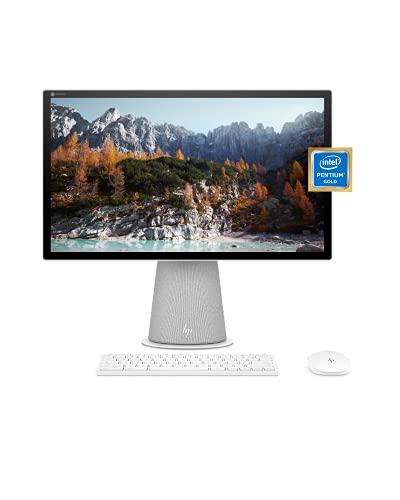
HP Chromebase 21.5″ All-in-One Desktop, Intel Pentium Gold 6405U Processor, 4 GB RAM, 128 GB SSD, Rotating Full HD IPS Touchscreen, Chrome OS, Bluetooth Keyboard and Mouse Combo (22-aa0022, 2021)
Standing screen display size
2.4 GHz pentium_gold_g5600
Test video – HP Chromebase 21.5″ All-in-One Desktop, Intel Pentium :
Product highlights :
FLEXIBLE FAMILY FUN – Designed to live at the heart of your home, the HP Chromebase features a 21.5 inch Full HD rotating screen lets you pivot from homework to entertainment (1).
A NEW SPIN ON SIMPLICITY – Work smarter and faster with such built-in tools as voice commands with Google Assistant (2), the Everything Button for more convenient searching, and easy 90-degree rotating between portrait or landscape mode.
PROCESSOR AND GRAPHICS – Enjoy the perfect combination of performance, power consumption, and value with the Intel Pentium Gold 6405U processor (3) and Intel UHD Graphics (4).
PREMIUM TOUCHSCREEN – Control your entertainment right from the screen and see more of your display with 178-degree wide-viewing angles and a three-sided micro-edge bezel; plus, the screen’s anti-glare panel means you’ll get less glare even in direct sunlight.
MEMORY AND STORAGE – Boost your efficiency as you browse, create, and multitask faster than ever with 4 GB of RAM (5). Shorten your load times and store all of your family’s important files with 128 GB of PCIe NVMe M.2 Solid State Drive storage (6) (7).
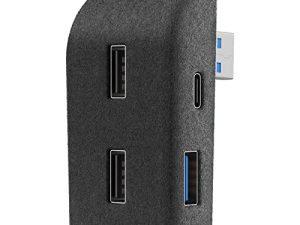
USB PORTS – Power your laptop, connect to an external display or an external storage device with 4 USB ports (2 SuperSpeed USB Type-A 10Gbps signaling rate, 2 SuperSpeed USB Type-C 5Gbps signaling rate) (8) (9).
Questions & Answers – HP Chromebase 21.5″ All-in-One Desktop, Intel Pentium :
➕ What is the price of HP Chromebase 21.5
The price of HP Chromebase 21.5″ All-in-One Desktop, Intel Pentium in-store is 1640 SAR VAT.
➕ When HP Chromebase 21.5
The release date was .
➕ What is the price of HP Chromebase 21.5
The price of HP Chromebase 21.5″ All-in-One Desktop, Intel Pentium used is 1150 SAR VAT.
➕ What are the main characteristics of HP Chromebase 21.5
Special specifications :
FLEXIBLE FAMILY FUN – Designed to live at the heart of your home, the HP Chromebase features a 21.5 inch Full HD rotating screen lets you pivot from homework to entertainment (1).
➕ Is it interesting to buy this product ?
The best people who can answer you are customers who have already bought and tested
this product (
See Customer Reviews). This product is rated 4.2 / 5
on Amazon.
➕ Where to buy HP Chromebase 21.5
Mall, Supermarkets, Amazon, Specialized stores, ….
Technical specifications – HP Chromebase 21.5″ All-in-One Desktop, Intel Pentium :
Specific Uses For Product
Personal computer design type
Ram Memory Installed Size
HP Chromebase 22-aa0022, HP 910 white Bluetooth keyboard and mouse combo
Purchase advice :
-
Warranty :
Check the duration of the warranty and also the faults and defects it covers. Is it complete or limited? and What is included in the warranty (parts, repairs or both)?
-
Shipping :
Is delivery offered? And how long does it take to get delivered (Delivery time)
-
Proof of purchase :
Does the shop give you an invoice ?
-
After-sales service :
Do they have an after-sales service to have information about the installation or operation (instructions for use). Also in case of problem, it is the seller who takes charge or you must contact the manufacturer or supplier yourself.
_____________________________

B. D (verified owner) –
Impressive – New to Chrome OS and so far I have no complaints. Love the look and the style. Switching from horizontal to vertical is extremely helpful especially when reading long articles. Truly happy I followed my gut and made the switchover. BTW, I am 71 and I highly recommend this Chrome All-in-One desktop computer to folks of all ages.
L. O (verified owner) –
Before you buy this, research what printer you will use. – This is a beautifully designed computer. Minimalist, small footprint, impressive screen that goes to tablet mode seamlessly, HOWEVER, finding a compatible printer could spoil the whole romance. Seriously Google, make a compatible printer if this thing is going to be so finicky about connection! Don’t assume that particular brands are compatible, no, you will need to find make and specific model (check every number and letter) to find the perfect printing mate. If you read reviews you will find that its a mixed bag of responses from works seamlessly, to hours to set up but rigged finally, to no, nada, nothing..just won’t connect. I have gone down some of those rabbit holes and settled with the recommended
L. B (verified owner) –
NO anti glare screen – Contrary to the description, this Chromebase has NO anti glare film or screen. It’s extremely reflective. Also, looking to upgrade the ram. I wished 8gb of memory would be the minimum for 2022 and beyond. But it’s an OK product “for the money”
G. D (verified owner) –
Time will tell – Just got this today so time will tell the tale that only time can….but baaaaaby let me tell you – this thing is sleek! Very nice! I was concerned.with it being on a pedestal like it is that maybe my cat could knock it over – no chance. This is heavy and very stable
K. P (verified owner) –
Not a Work from Home System – This is a Google system, it is so similar to a Phone I was taken aback. I work from home but I also do other business with a computer, this system does almost nothing business. You go to the Playstore….really for apps, i need programs to preform work related things. Its a nice system for KIDS not adults. Windows work and at least not at this time, can not be substituted, I was glad that I worked with it during off business hours. I opened it and returned it the next day,
K. F (verified owner) –
This thing is a brilliant idea! – I saw this and I knew I wanted one: I’m an older person who likes a big screen so I can increase text size for visibility. I use my computer for reading the news, email, social media, loads of writing, streaming, shopping, and researching everything. Chrome OS suits me: It is snappy and relatively safe from corruption. I can access MS Office products on the web. I tend to store all my files in “the cloud,” which means i can access everything from any device. I see people reviewing this product who did not understand they were buying a Chrome OS system. Because this has a unique design and an unusually large screen for Chrome OS, this All-in-One is over-priced. I ended up buying a version with less storage but at a greatly reduced price pre-holiday — (I thought it was an error, nope, I got it) — and returning this one, even though it was relatively well-priced at the time on Amazon. The screen is not anti-glare. I personally will not use the touch-screen function, although it might be very useful for education use, where a teacher, tutor, or parent is working with a student. I will use the portrait mode a lot for reading, writing, shopping, and social media. When used on the horizontal orientation, my unit is not 100% level and that annoys me because I see it — not everyone would notice. Used on the horizontal, the screen is rather high, to allow it to swivel. (Now I really want a height-adjustible desk.)
B. D (verified owner) –
Impressive – New to Chrome OS and so far I have no complaints. Love the look and the style. Switching from horizontal to vertical is extremely helpful especially when reading long articles. Truly happy I followed my gut and made the switchover. BTW, I am 71 and I highly recommend this Chrome All-in-One desktop computer to folks of all ages.
M. S (verified owner) –
Awesome! – The computer is a great value and easy to use. I’m enjoying it!
C. B (verified owner) –
A mixed bag. – Computer is fine for my simple needs. The screen is good and mounted at just the right height for reading. For that it’s way better than any laptop. But just the opposite is true of the keyboard. There my MacBook is far better. The space bar often doesn’t pick up my thumb touch. And the mouse failed after about a year. So buy the machine, but get a good keyboard/mouse combo. I bought a logitech package for about $35 and am very pleased.
K. F (verified owner) –
This thing is a brilliant idea! – I saw this and I knew I wanted one: I’m an older person who likes a big screen so I can increase text size for visibility. I use my computer for reading the news, email, social media, loads of writing, streaming, shopping, and researching everything. Chrome OS suits me: It is snappy and relatively safe from corruption. I can access MS Office products on the web. I tend to store all my files in “the cloud,” which means i can access everything from any device. I see people reviewing this product who did not understand they were buying a Chrome OS system. Because this has a unique design and an unusually large screen for Chrome OS, this All-in-One is over-priced. I ended up buying a version with less storage but at a greatly reduced price pre-holiday — (I thought it was an error, nope, I got it) — and returning this one, even though it was relatively well-priced at the time on Amazon. The screen is not anti-glare. I personally will not use the touch-screen function, although it might be very useful for education use, where a teacher, tutor, or parent is working with a student. I will use the portrait mode a lot for reading, writing, shopping, and social media. When used on the horizontal orientation, my unit is not 100% level and that annoys me because I see it — not everyone would notice. Used on the horizontal, the screen is rather high, to allow it to swivel. (Now I really want a height-adjustible desk.)
K. P (verified owner) –
Not a Work from Home System – This is a Google system, it is so similar to a Phone I was taken aback. I work from home but I also do other business with a computer, this system does almost nothing business. You go to the Playstore….really for apps, i need programs to preform work related things. Its a nice system for KIDS not adults. Windows work and at least not at this time, can not be substituted, I was glad that I worked with it during off business hours. I opened it and returned it the next day,
M. S (verified owner) –
Awesome! – The computer is a great value and easy to use. I’m enjoying it!
G. D (verified owner) –
Time will tell – Just got this today so time will tell the tale that only time can….but baaaaaby let me tell you – this thing is sleek! Very nice! I was concerned.with it being on a pedestal like it is that maybe my cat could knock it over – no chance. This is heavy and very stable
L. O (verified owner) –
Before you buy this, research what printer you will use. – This is a beautifully designed computer. Minimalist, small footprint, impressive screen that goes to tablet mode seamlessly, HOWEVER, finding a compatible printer could spoil the whole romance. Seriously Google, make a compatible printer if this thing is going to be so finicky about connection! Don’t assume that particular brands are compatible, no, you will need to find make and specific model (check every number and letter) to find the perfect printing mate. If you read reviews you will find that its a mixed bag of responses from works seamlessly, to hours to set up but rigged finally, to no, nada, nothing..just won’t connect. I have gone down some of those rabbit holes and settled with the recommended
L. B (verified owner) –
NO anti glare screen – Contrary to the description, this Chromebase has NO anti glare film or screen. It’s extremely reflective. Also, looking to upgrade the ram. I wished 8gb of memory would be the minimum for 2022 and beyond. But it’s an OK product “for the money”
C. B (verified owner) –
A mixed bag. – Computer is fine for my simple needs. The screen is good and mounted at just the right height for reading. For that it’s way better than any laptop. But just the opposite is true of the keyboard. There my MacBook is far better. The space bar often doesn’t pick up my thumb touch. And the mouse failed after about a year. So buy the machine, but get a good keyboard/mouse combo. I bought a logitech package for about $35 and am very pleased.