
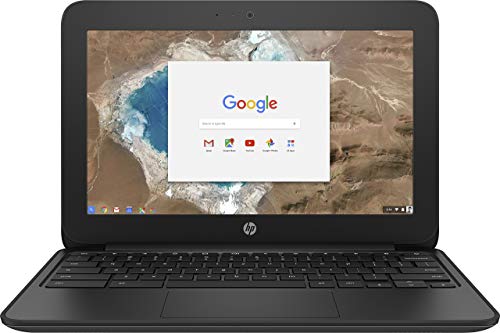
Description
HP G5 11.6 inch HD Chromebook Intel – Features & Prices in Saudi Arabia :
HP G5 11.6 inch HD Chromebook Intel Celeron N3060 (1.60 GHz) 2 GB Ram 16 GB eMMC SSD Chrome OS (Renewed)
Standing screen display size
11.6 Inches
Max Screen Resolution
1366 x 768 Pixels
Processor
8032
Memory Speed
1600 MHz
Hard Drive
SSD
Graphics Coprocessor
Intel HD Graphics 400
Chipset Brand
Intel
Card Description
Integrated
Wireless Type
802.11n, 802.11b, 802.11g
Number of USB 2.0 Ports
3
Hard Drive Interface
ATA-4
Hard Drive Rotational Speed
3 RPM
Power Source
Corded Electric
Test video – HP G5 11.6 inch HD Chromebook Intel :
Product highlights :
Questions & Answers – HP G5 11.6 inch HD Chromebook Intel :
Technical specifications – HP G5 11.6 inch HD Chromebook Intel :
Brand
HP
Series
1FX81UT#ABA
Screen Size
11.6 Inches
Color
Black
CPU Model
8032
Ram Memory Installed Size
2 GB
Operating System
Chrome OS
Special Feature
Alcohol-Free
Card Description
Integrated
Graphics Coprocessor
Intel HD Graphics 400
Purchase advice :
-
Warranty :
Check the duration of the warranty and also the faults and defects it covers. Is it complete or limited? and What is included in the warranty (parts, repairs or both)?
-
Shipping :
Is delivery offered? And how long does it take to get delivered (Delivery time)
-
Proof of purchase :
Does the shop give you an invoice ?
-
After-sales service :
Do they have an after-sales service to have information about the installation or operation (instructions for use). Also in case of problem, it is the seller who takes charge or you must contact the manufacturer or supplier yourself.
_____________________________
L. M (verified owner) –
Wouldn’t turn on – Unfortunately would not turn on but the return process was really smooth.
R. E (verified owner) –
Would not recommend!!!! – It is a slow-moving Chromebook needs more RAM and a smaller operating system for the specs it has. The HDMI port would work sometimes while streaming and would not provide sound through HDMI port. We got it to use with a projector to watch movies on and it was a terrible buy. Would not suggest for anything but email!!!
R. E (verified owner) –
Would not recommend!!!! – It is a slow-moving Chromebook needs more RAM and a smaller operating system for the specs it has. The HDMI port would work sometimes while streaming and would not provide sound through HDMI port. We got it to use with a projector to watch movies on and it was a terrible buy. Would not suggest for anything but email!!!
M. T (verified owner) –
It works and does what I need it to do. – So far been using it to test with different things I do, and only thing I can tell I have an issue with is the mouse pad, I guess it is to picky to tell where to use the left mouse button on it, but its okay as I plan to use a mouse anyway. No issues with the screen, battery life, or overall function of the chrome book yet.
M. T (verified owner) –
It works and does what I need it to do. – So far been using it to test with different things I do, and only thing I can tell I have an issue with is the mouse pad, I guess it is to picky to tell where to use the left mouse button on it, but its okay as I plan to use a mouse anyway. No issues with the screen, battery life, or overall function of the chrome book yet.
L. M (verified owner) –
Wouldn’t turn on – Unfortunately would not turn on but the return process was really smooth.