HP Newest Flagship Chromebook, 11.6″ HD (1366 – Features & Prices in Saudi Arabia :
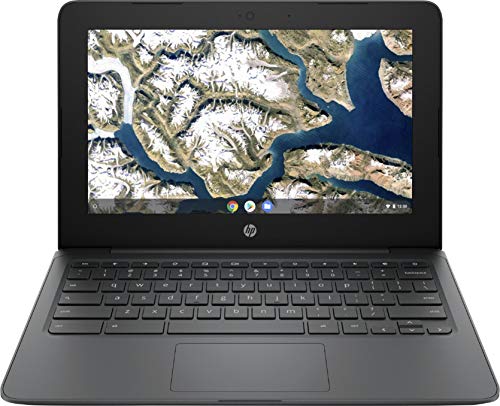
HP Newest Flagship Chromebook, 11.6″ HD (1366 x 768) Display, Intel Celeron Processor N3350, 4GB LPDDR2, 32GB eMMC, Chrome OS, HD Graphics 500, 11A-NB0013DX, Ash Gray
Standing screen display size
11.6 Inches
Max Screen Resolution
1366 Pixels
Processor
1.1 GHz celeron_n3350
RAM
4 GB DDR
Hard Drive
32 GB hybrid
Graphics Coprocessor
Intel HD Graphics 500
Chipset Brand
Intel
Card Description
Integrated
Wireless Type
801.11ac
Average Battery Life (in hours)
12 Hours
Processor Count
2
Computer Memory Type
DDR2 SDRAM
Flash Memory Size
32
Hard Drive Interface
Solid State
Optical Drive Type
No Optical Drive
Power Source
AC & Battery
Batteries
1 Lithium Metal batteries required.
Test video – HP Newest Flagship Chromebook, 11.6″ HD (1366 :
Product highlights :
HP Google Chrome OS Chromebook is a computer for the way the modern world works, with thousands of apps, built-in virus protection and cloud backups. It is secure, fast, up-to-date, versatile and simple.
Intel Celeron processor N3350 Enjoy a computer with an Intel Celeron processor. Experience Intel performance with entertainment features and fast connectivity. The Intel Celeron processor delivers performance in a new computer that fits your lifestyle and budget.
11.6″ display Typical 1366 x 768 HD resolution. Energy-efficient WLED backlight. Intel HD Graphics 500 On-processor graphics with shared video memory provide everyday image quality for Internet use, basic photo editing and casual gaming.
4GB system memory for basic multitasking Adequate high-bandwidth RAM to smoothly run multiple applications and browser tabs all at once.
32GB eMMC flash memory This ultracompact memory system is ideal for mobile devices and applications, providing enhanced storage capabilities, streamlined data management, quick boot-up times and support for high-definition video playback.
Questions & Answers – HP Newest Flagship Chromebook, 11.6″ HD (1366 :
➕ What is the price of HP Newest Flagship Chromebook, 11.6
The price of HP Newest Flagship Chromebook, 11.6″ HD (1366 in-store is 480 SAR VAT.
➕ When HP Newest Flagship Chromebook, 11.6
The release date was .
➕ What is the price of HP Newest Flagship Chromebook, 11.6
The price of HP Newest Flagship Chromebook, 11.6″ HD (1366 used is 330 SAR VAT.
➕ What are the main characteristics of HP Newest Flagship Chromebook, 11.6
Special specifications :
HP Google Chrome OS Chromebook is a computer for the way the modern world works, with thousands of apps, built-in virus protection and cloud backups. It is secure, fast, up-to-date, versatile and simple.
➕ Is it interesting to buy this product ?
The best people who can answer you are customers who have already bought and tested this product (See Customer Reviews). This product is rated 4.5 / 5 on Amazon.
➕ Where to buy HP Newest Flagship Chromebook, 11.6
Technical specifications – HP Newest Flagship Chromebook, 11.6″ HD (1366 :
Brand
HP
Series
HP Chromebook
Screen Size
11.6 Inches
Color
Ash Gray
Hard Disk Size
32 GB
CPU Model
Celeron N3350
Ram Memory Installed Size
32 GB
Operating System
Chrome OS
Special Feature
Personal Computer
Card Description
Integrated
Purchase advice :
Warranty :
Check the duration of the warranty and also the faults and defects it covers. Is it complete or limited? and What is included in the warranty (parts, repairs or both)?
Shipping :
Is delivery offered? And how long does it take to get delivered (Delivery time)
Proof of purchase :
Does the shop give you an invoice ?
After-sales service :
Do they have an after-sales service to have information about the installation or operation (instructions for use). Also in case of problem, it is the seller who takes charge or you must contact the manufacturer or supplier yourself.
_____________________________
16 reviews for HP Newest Flagship Chromebook, 11.6″ HD (1366
Rated 5 out of 5
M. E (verified owner)–
great simple Work pad – I’ve been an apple person since 1999 and it never purchased anything other than laptops and desktops and imacs.
Rated 4 out of 5
H. E (verified owner)–
Great little machine, poor multitask capabilities. – Everything about this product has meet my expectations, but running multiple browsers tanks the CPU. Having more than 3 browsers while running YouTube or Spotify (and similar browsers/applications) causes the CPU percentage to climb and causes the machine to run slow.
Rated 4 out of 5
H. E (verified owner)–
Great little machine, poor multitask capabilities. – Everything about this product has meet my expectations, but running multiple browsers tanks the CPU. Having more than 3 browsers while running YouTube or Spotify (and similar browsers/applications) causes the CPU percentage to climb and causes the machine to run slow.
Rated 3 out of 5
D. K (verified owner)–
Very minimal capability – I bought this computer just to use to write on Google documents and it randomly crashes it sometimes does not keep a window open. Its computational ability is fragile and must be carefully managed to be functional. If you are careful, you can have one thing open at a time and it is functional
Rated 5 out of 5
R. K (verified owner)–
Customer Service Response – My NEW HP Chromebook went black. I reached out to the customer service dept. for PCOnline 365 and left a v/m message. I received an email within 10 minutes explaining 2 steps to take to restore my Chromebook. The first one worked! So glad they responded so quickly and I don’t have to wipe and return my Chromebook!
Rated 3 out of 5
D. H (verified owner)–
You get what you pay for. – It was inexpensive. But without the touchscreen, it’s not as easy to scroll. It’s okay. Just okay.
Rated 4 out of 5
F. T (verified owner)–
EOL is only 2-years – The low price is for a reason. There re only 2 years before the auto update policy makes the operating system obsolete and will not receive updates for security etc. The Chromebook will still work but there will be no more security or other updates. For the more technically inclined there is a way to turn it into a linux box. I did this with a Asus Chromebook and it works very well. Linux is much more friendly now and will do nearly all the online things that a Chrome book will do plus much more offline utility..
Rated 3 out of 5
D. H (verified owner)–
You get what you pay for. – It was inexpensive. But without the touchscreen, it’s not as easy to scroll. It’s okay. Just okay.
Rated 3 out of 5
D. K (verified owner)–
Very minimal capability – I bought this computer just to use to write on Google documents and it randomly crashes it sometimes does not keep a window open. Its computational ability is fragile and must be carefully managed to be functional. If you are careful, you can have one thing open at a time and it is functional
Rated 5 out of 5
H. K (verified owner)–
Simple easy to use laptop – This laptop was a replacement for my 81-year-old mother. Plugged it in, turned it on, logged into Google, and everything automatically downloaded onto her laptop. Works fantastic!! The transition from her old laptop to the new laptop was seamless. If my 81-year-old mother can use the laptop anyone can!
Rated 5 out of 5
H. K (verified owner)–
Simple easy to use laptop – This laptop was a replacement for my 81-year-old mother. Plugged it in, turned it on, logged into Google, and everything automatically downloaded onto her laptop. Works fantastic!! The transition from her old laptop to the new laptop was seamless. If my 81-year-old mother can use the laptop anyone can!
Rated 4 out of 5
I. J (verified owner)–
Check all the functions ,because is really bad that you cannot change the screensaver. – I start to work in this computer but when i want to change the background ,the right botton don’t work properly,so i keep my same image forever,if you know how i can to fix ,apreciette the tip,thank you.
Rated 5 out of 5
R. K (verified owner)–
Customer Service Response – My NEW HP Chromebook went black. I reached out to the customer service dept. for PCOnline 365 and left a v/m message. I received an email within 10 minutes explaining 2 steps to take to restore my Chromebook. The first one worked! So glad they responded so quickly and I don’t have to wipe and return my Chromebook!
Rated 4 out of 5
F. T (verified owner)–
EOL is only 2-years – The low price is for a reason. There re only 2 years before the auto update policy makes the operating system obsolete and will not receive updates for security etc. The Chromebook will still work but there will be no more security or other updates. For the more technically inclined there is a way to turn it into a linux box. I did this with a Asus Chromebook and it works very well. Linux is much more friendly now and will do nearly all the online things that a Chrome book will do plus much more offline utility..
Rated 5 out of 5
M. E (verified owner)–
great simple Work pad – I’ve been an apple person since 1999 and it never purchased anything other than laptops and desktops and imacs.
Rated 4 out of 5
I. J (verified owner)–
Check all the functions ,because is really bad that you cannot change the screensaver. – I start to work in this computer but when i want to change the background ,the right botton don’t work properly,so i keep my same image forever,if you know how i can to fix ,apreciette the tip,thank you.
M. E (verified owner) –
great simple Work pad – I’ve been an apple person since 1999 and it never purchased anything other than laptops and desktops and imacs.
H. E (verified owner) –
Great little machine, poor multitask capabilities. – Everything about this product has meet my expectations, but running multiple browsers tanks the CPU. Having more than 3 browsers while running YouTube or Spotify (and similar browsers/applications) causes the CPU percentage to climb and causes the machine to run slow.
H. E (verified owner) –
Great little machine, poor multitask capabilities. – Everything about this product has meet my expectations, but running multiple browsers tanks the CPU. Having more than 3 browsers while running YouTube or Spotify (and similar browsers/applications) causes the CPU percentage to climb and causes the machine to run slow.
D. K (verified owner) –
Very minimal capability – I bought this computer just to use to write on Google documents and it randomly crashes it sometimes does not keep a window open. Its computational ability is fragile and must be carefully managed to be functional. If you are careful, you can have one thing open at a time and it is functional
R. K (verified owner) –
Customer Service Response – My NEW HP Chromebook went black. I reached out to the customer service dept. for PCOnline 365 and left a v/m message. I received an email within 10 minutes explaining 2 steps to take to restore my Chromebook. The first one worked! So glad they responded so quickly and I don’t have to wipe and return my Chromebook!
D. H (verified owner) –
You get what you pay for. – It was inexpensive. But without the touchscreen, it’s not as easy to scroll. It’s okay. Just okay.
F. T (verified owner) –
EOL is only 2-years – The low price is for a reason. There re only 2 years before the auto update policy makes the operating system obsolete and will not receive updates for security etc. The Chromebook will still work but there will be no more security or other updates. For the more technically inclined there is a way to turn it into a linux box. I did this with a Asus Chromebook and it works very well. Linux is much more friendly now and will do nearly all the online things that a Chrome book will do plus much more offline utility..
D. H (verified owner) –
You get what you pay for. – It was inexpensive. But without the touchscreen, it’s not as easy to scroll. It’s okay. Just okay.
D. K (verified owner) –
Very minimal capability – I bought this computer just to use to write on Google documents and it randomly crashes it sometimes does not keep a window open. Its computational ability is fragile and must be carefully managed to be functional. If you are careful, you can have one thing open at a time and it is functional
H. K (verified owner) –
Simple easy to use laptop – This laptop was a replacement for my 81-year-old mother. Plugged it in, turned it on, logged into Google, and everything automatically downloaded onto her laptop. Works fantastic!! The transition from her old laptop to the new laptop was seamless. If my 81-year-old mother can use the laptop anyone can!
H. K (verified owner) –
Simple easy to use laptop – This laptop was a replacement for my 81-year-old mother. Plugged it in, turned it on, logged into Google, and everything automatically downloaded onto her laptop. Works fantastic!! The transition from her old laptop to the new laptop was seamless. If my 81-year-old mother can use the laptop anyone can!
I. J (verified owner) –
Check all the functions ,because is really bad that you cannot change the screensaver. – I start to work in this computer but when i want to change the background ,the right botton don’t work properly,so i keep my same image forever,if you know how i can to fix ,apreciette the tip,thank you.
R. K (verified owner) –
Customer Service Response – My NEW HP Chromebook went black. I reached out to the customer service dept. for PCOnline 365 and left a v/m message. I received an email within 10 minutes explaining 2 steps to take to restore my Chromebook. The first one worked! So glad they responded so quickly and I don’t have to wipe and return my Chromebook!
F. T (verified owner) –
EOL is only 2-years – The low price is for a reason. There re only 2 years before the auto update policy makes the operating system obsolete and will not receive updates for security etc. The Chromebook will still work but there will be no more security or other updates. For the more technically inclined there is a way to turn it into a linux box. I did this with a Asus Chromebook and it works very well. Linux is much more friendly now and will do nearly all the online things that a Chrome book will do plus much more offline utility..
M. E (verified owner) –
great simple Work pad – I’ve been an apple person since 1999 and it never purchased anything other than laptops and desktops and imacs.
I. J (verified owner) –
Check all the functions ,because is really bad that you cannot change the screensaver. – I start to work in this computer but when i want to change the background ,the right botton don’t work properly,so i keep my same image forever,if you know how i can to fix ,apreciette the tip,thank you.