
Description
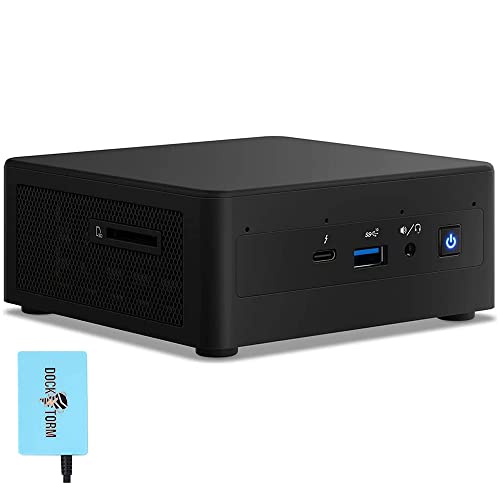
Intel NUC11PAHi5 Home & Business Mini Desktop – Features & Prices in Saudi Arabia :
Intel NUC11PAHi5 Home & Business Mini Desktop i5-1135G7 4-Core, 16GB RAM, 1TB PCIe SSD, Integrated Graphics, WiFi, Bluetooth, 1xHDMI, 1 Mini Display Port, SD Card, Win 10 Pro with Hub
Processor
2.4 GHz intel_core_i5_1135g7
RAM
16 GB SO-DIMM
Hard Drive
1 TB Solid State Hard Drive
Graphics Coprocessor
Integrated Graphics
Chipset Brand
Intel
Card Description
Integrated
Wireless Type
2.4 GHz Radio Frequency
Color
Black
Processor Brand
Win 10Pro
Processor Count
4
Computer Memory Type
DDR4 SDRAM
Hard Drive Interface
USB-C
Test video – Intel NUC11PAHi5 Home & Business Mini Desktop :
Product highlights :
Questions & Answers – Intel NUC11PAHi5 Home & Business Mini Desktop :
Technical specifications – Intel NUC11PAHi5 Home & Business Mini Desktop :
Specific Uses For Product
Business
Brand
Intel
Personal computer design type
Mini PC
Operating System
Windows 10 Pro
Memory Storage Capacity
1 TB
Ram Memory Installed Size
16 GB
Series
NUC11PAHi5
CPU Model
Intel Core i5-1135G7
Color
Black
CPU Manufacturer
Win 10Pro
Purchase advice :
-
Warranty :
Check the duration of the warranty and also the faults and defects it covers. Is it complete or limited? and What is included in the warranty (parts, repairs or both)?
-
Shipping :
Is delivery offered? And how long does it take to get delivered (Delivery time)
-
Proof of purchase :
Does the shop give you an invoice ?
-
After-sales service :
Do they have an after-sales service to have information about the installation or operation (instructions for use). Also in case of problem, it is the seller who takes charge or you must contact the manufacturer or supplier yourself.
_____________________________
B. A (verified owner) –
“Just works” experience migrating a 10-year old AMD A10 desktop to the NUC. – Using it for a desktop computer. For a start, it means less clutter on the desktop. There’s a little more odds and ends outside the box now — USB hub, external audio interface and so on. Noticeably faster starting up large programs. Props to Microsoft as well, I simply restored a backup of Windows Home from my old AMD system to the NUC. In about 15 minutes it had found and installed drivers for all the new hardware. Logging in with an MS account meant I was able to upgrade that image to Win Pro painlessly (Note: The first thing I did when I took the NUC out of the box was to turn it on and install the system that came with the NUC so that the MS account knew the NUC was supposed to have Win Pro. I also made a backup of the clean install in case I needed it. Belt and suspenders is worth the effort.) All the MS software was happy, but I had to re-authenticate a couple of pieces of commercial software. Now I have USB C and an NVME disk drive and all those nice things, and when I sit down to use it, the screen looks exactly the same — everything’s there in the right place, and it’s all a little crisper and quicker.
D. F (verified owner) –
Used for camera security system – Nice PC. Not sure what others are referring to about it being loud, because mine is very quiet. Small, robust, quiet. Perfect for me.
B. A (verified owner) –
“Just works” experience migrating a 10-year old AMD A10 desktop to the NUC. – Using it for a desktop computer. For a start, it means less clutter on the desktop. There’s a little more odds and ends outside the box now — USB hub, external audio interface and so on. Noticeably faster starting up large programs. Props to Microsoft as well, I simply restored a backup of Windows Home from my old AMD system to the NUC. In about 15 minutes it had found and installed drivers for all the new hardware. Logging in with an MS account meant I was able to upgrade that image to Win Pro painlessly (Note: The first thing I did when I took the NUC out of the box was to turn it on and install the system that came with the NUC so that the MS account knew the NUC was supposed to have Win Pro. I also made a backup of the clean install in case I needed it. Belt and suspenders is worth the effort.) All the MS software was happy, but I had to re-authenticate a couple of pieces of commercial software. Now I have USB C and an NVME disk drive and all those nice things, and when I sit down to use it, the screen looks exactly the same — everything’s there in the right place, and it’s all a little crisper and quicker.
D. F (verified owner) –
Used for camera security system – Nice PC. Not sure what others are referring to about it being loud, because mine is very quiet. Small, robust, quiet. Perfect for me.