
Description
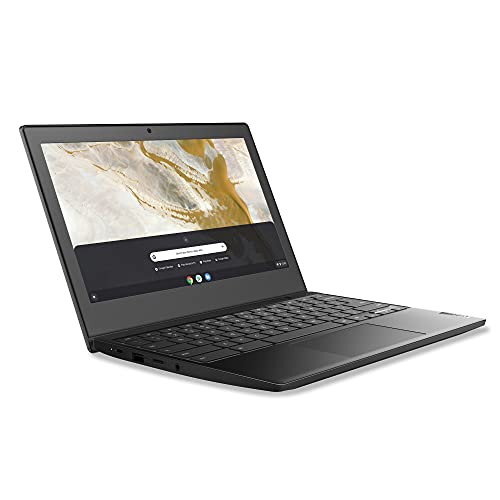
Lenovo IdeaPad 3 11 Chromebook Laptop,11.6″ HD – Features & Prices in Saudi Arabia :
Lenovo IdeaPad 3 11 Chromebook Laptop,11.6″ HD Display,Intel Celeron N4020, 4GB RAM, 64GB Storage, UHD Graphics 600, Chrome OS, Onyx Black
Standing screen display size
11.6 Inches
Screen Resolution
1366 x 768
Max Screen Resolution
1366 x 768 Pixels
Processor
1.1 GHz celeron_n4020
RAM
4 GB DDR4
Memory Speed
2400 MHz
Hard Drive
64 GB SSD
Graphics Coprocessor
Intel Integrated Graphics
Chipset Brand
Intel
Card Description
Integrated
Wireless Type
Bluetooth, 802.11ac
Number of USB 3.0 Ports
2
Average Battery Life (in hours)
10 Hours
Power Source
Battery Powered
Batteries
1 Lithium Polymer batteries required. (included)
Test video – Lenovo IdeaPad 3 11 Chromebook Laptop,11.6″ HD :
Product highlights :
Questions & Answers – Lenovo IdeaPad 3 11 Chromebook Laptop,11.6″ HD :
Technical specifications – Lenovo IdeaPad 3 11 Chromebook Laptop,11.6″ HD :
Brand
Lenovo
Series
Chromebook 3 11″
Screen Size
11.6 Inches
Color
Onyx Black
Hard Disk Size
64 GB
CPU Model
Celeron N4020
Ram Memory Installed Size
4 GB
Operating System
Chrome OS
Card Description
Integrated
Graphics Coprocessor
Intel Integrated Graphics
Purchase advice :
-
Warranty :
Check the duration of the warranty and also the faults and defects it covers. Is it complete or limited? and What is included in the warranty (parts, repairs or both)?
-
Shipping :
Is delivery offered? And how long does it take to get delivered (Delivery time)
-
Proof of purchase :
Does the shop give you an invoice ?
-
After-sales service :
Do they have an after-sales service to have information about the installation or operation (instructions for use). Also in case of problem, it is the seller who takes charge or you must contact the manufacturer or supplier yourself.
_____________________________
F. K (verified owner) –
A Hidden Gem Among the Bargain Chromebooks – SUMMARY
B. L (verified owner) –
– Set up took only a few minutes and the laptop is all ready for simple everyday tasks including surfing, watching videos and typing documents. Reasonably fast and surprisingly loud speakers. Long-lasting battery. Has 2 USB-A and 2 USB-C ports. Great laptop!
Z. S (verified owner) –
Good for Practical Use – This Chromebook is dirt cheap and would be great for a student on a budget or someone who just needs to use a few apps and browse the internet. I use it as a writing laptop, as I don’t want to take my expensive, bulky gaming laptop all over the place.
D. E (verified owner) –
So far, so good – Day one, and the Ideapad 3 started right up. I’m going to let it charge for a while before I complete the setup. One star deducted for no English setup instructions in the box.
K. R (verified owner) –
Simple, well rounded chromebook. – I got this computer for work. I needed something cheap and highly portable, and having used a chromebook in school I knew I wanted one. This chromebook is great for the price and needs I needed met. ChromeOS is a pretty smooth and well rounded system, and this particular laptop is sleek, thin, lightweight, and visually pleasing. It does have Linux built in, but I can’t comment on that because I’m not the most tech savvy. The good thing about chromebooks is you don’t really have to be.
Z. S (verified owner) –
Good for Practical Use – This Chromebook is dirt cheap and would be great for a student on a budget or someone who just needs to use a few apps and browse the internet. I use it as a writing laptop, as I don’t want to take my expensive, bulky gaming laptop all over the place.
F. K (verified owner) –
A Hidden Gem Among the Bargain Chromebooks – SUMMARY
B. L (verified owner) –
– Set up took only a few minutes and the laptop is all ready for simple everyday tasks including surfing, watching videos and typing documents. Reasonably fast and surprisingly loud speakers. Long-lasting battery. Has 2 USB-A and 2 USB-C ports. Great laptop!
K. R (verified owner) –
Simple, well rounded chromebook. – I got this computer for work. I needed something cheap and highly portable, and having used a chromebook in school I knew I wanted one. This chromebook is great for the price and needs I needed met. ChromeOS is a pretty smooth and well rounded system, and this particular laptop is sleek, thin, lightweight, and visually pleasing. It does have Linux built in, but I can’t comment on that because I’m not the most tech savvy. The good thing about chromebooks is you don’t really have to be.
D. E (verified owner) –
So far, so good – Day one, and the Ideapad 3 started right up. I’m going to let it charge for a while before I complete the setup. One star deducted for no English setup instructions in the box.