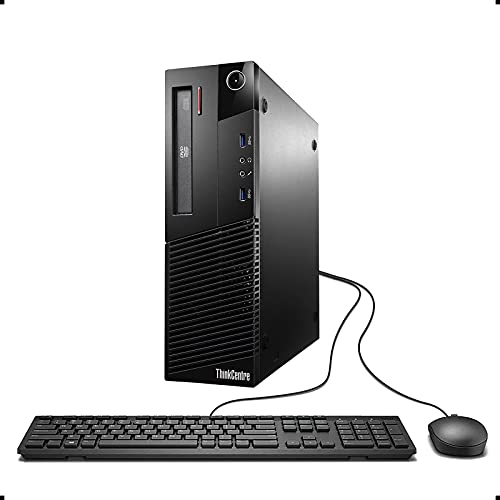
lenovo ThinkCentre M93p Business Class Desktop, Quad is available in Saudi Arabia.
Find out all you need to know about lenovo ThinkCentre M93p Business Class Desktop, Quad before buying : Price, Test video, Datasheet, Similar products.
lenovo ThinkCentre M93p Business Class Desktop, Quad – Features & Prices in Saudi Arabia :
lenovo ThinkCentre M93p Business Class Desktop, Quad Core i7 4770 3.4Ghz, 16GB DDR3 RAM, 512GB SSD Hard Drive, DVD-RW, Windows 10 Pro (Renewed)
Processor
3.4 GHz core_i7
RAM
16 GB DDR3
Hard Drive
512 GB Solid State Hard Drive
Graphics Coprocessor
Integrated Intel HD Graphics 4600
Chipset Brand
Intel
Card Description
Integrated
Graphics Card Ram Size
128 MB
Item Dimensions LxWxH
14.8 x 4 x 4 inches
Color
Black
Processor Brand
Intel
Processor Count
1
Computer Memory Type
DDR3 SDRAM
Flash Memory Size
512 GB
Hard Drive Interface
Solid State
Hard Drive Rotational Speed
7200 RPM
Optical Drive Type
DVD-RW
Batteries
1 Lithium Ion batteries required.
Test video – lenovo ThinkCentre M93p Business Class Desktop, Quad :
https://www.youtube.com/watch?v=Z1u20pa-ics
Product highlights :
This Certified Refurbished product is tested and certified to look and work like new. The refurbishing process includes functionality testing, basic cleaning, inspection, and repackaging. The product ships with all relevant accessories, a minimum 91-day warranty, and may arrive in a generic box. Only select sellers who maintain a high-performance bar may offer Certified Refurbished products on Amazon.com.
Lenovo ThinkCentre M93p Business Desktop Computer, Intel Quad Core i7-4770 up to 3.9GHz, 16GB DDR3 RAM, 512GB SSD
Includes: USB Keyboard & Mouse, Microsoft office 30 days free trail.
Support 4K (3840×2160) Dual display, makes it easy to connect two monitors at the same time, and you can expand working Windows, mirror content, or expand a single window across multiple monitors.
Operating System: Windows 10 Pro 64 Bit-Multi-Language Supports English/Spanish/French.
Questions & Answers – lenovo ThinkCentre M93p Business Class Desktop, Quad :
➕ What is the price of lenovo ThinkCentre M93p Business Class Desktop, Quad in Saudi Arabia ?
The price of lenovo ThinkCentre M93p Business Class Desktop, Quad in-store is 770 SAR VAT.
➕ When lenovo ThinkCentre M93p Business Class Desktop, Quad was released ?
The release date was .
➕ What is the price of lenovo ThinkCentre M93p Business Class Desktop, Quad cheap used ?
The price of lenovo ThinkCentre M93p Business Class Desktop, Quad used is 540 SAR VAT.
➕ What are the main characteristics of lenovo ThinkCentre M93p Business Class Desktop, Quad ?
Special specifications :
This Certified Refurbished product is tested and certified to look and work like new. The refurbishing process includes functionality testing, basic cleaning, inspection, and repackaging. The product ships with all relevant accessories, a minimum 91-day warranty, and may arrive in a generic box. Only select sellers who maintain a high-performance bar may offer Certified Refurbished products on Amazon.com.
➕ Is it interesting to buy this product ?
The best people who can answer you are customers who have already bought and tested this product (See Customer Reviews). This product is rated 4.4 / 5 on Amazon.
➕ Where to buy lenovo ThinkCentre M93p Business Class Desktop, Quad in Saudi Arabia ?
Technical specifications – lenovo ThinkCentre M93p Business Class Desktop, Quad :
Specific Uses For Product
Business
Brand
Lenovo
Operating System
Windows 10 Pro
Memory Storage Capacity
512 GB
Ram Memory Installed Size
16 GB
Series
M93p
Included Components
1
CPU Model
Core i7
Color
Black
Optical Storage Device
DVD-RW
Purchase advice :
Warranty :
Check the duration of the warranty and also the faults and defects it covers. Is it complete or limited? and What is included in the warranty (parts, repairs or both)?
Shipping :
Is delivery offered? And how long does it take to get delivered (Delivery time)
Proof of purchase :
Does the shop give you an invoice ?
After-sales service :
Do they have an after-sales service to have information about the installation or operation (instructions for use). Also in case of problem, it is the seller who takes charge or you must contact the manufacturer or supplier yourself.
_____________________________
10 reviews for lenovo ThinkCentre M93p Business Class Desktop, Quad
Rated 5 out of 5
B. A (verified owner)–
Great deal, excellent machine – We have had 3 computers destroyed by Windows updates this year, and the most recent casualty was my desktop (though my husband thinks the drive actually went out this time). It is the same generation as this computer and almost identical, but for the Nvidia card. It actually runs as smoothly because I got an I7 for about 1/10th of what I paid for my I5, and there is more ram as well.
Rated 5 out of 5
S. E (verified owner)–
A worthwhile buy! – This desktop computer has really turned out to be a good buy. It seems to be well built, and the wi-fi chip (I don’t know what to call it) in lieu of bluetooth has worked out quite well and connects well with my fitbit, which is the main thing I use it for… I’d been afraid it wouldn’t connect. It was decently easy to set up as well. So far it seems very suited to my needs. I commend the work these sellers do.
Rated 5 out of 5
B. A (verified owner)–
Great deal, excellent machine – We have had 3 computers destroyed by Windows updates this year, and the most recent casualty was my desktop (though my husband thinks the drive actually went out this time). It is the same generation as this computer and almost identical, but for the Nvidia card. It actually runs as smoothly because I got an I7 for about 1/10th of what I paid for my I5, and there is more ram as well.
Rated 5 out of 5
B. B (verified owner)–
Nice system for the money. I have now bought 3. – Update 11/5: so I have bought two more since and they can from different sellers. I will still stand with 5-stars as all systems were clean and overall I am happy with their refurbishing. They all needed different amounts up updating (which I expected) and took anywhere between 1-3 hours to get all updated with several reboots and what software needed to be loaded via download. That is not bad. Boot time is quick and these will definitely be good for years to come. I use the display ports with an HDMI adapter without issue. From what i can see they may not meet the requirements for Windows 11….but honestly for what they are used for, Windows 10 is well supported and not an issue. Not much else to add and so far so good!
Rated 5 out of 5
B. B (verified owner)–
Nice system for the money. I have now bought 3. – Update 11/5: so I have bought two more since and they can from different sellers. I will still stand with 5-stars as all systems were clean and overall I am happy with their refurbishing. They all needed different amounts up updating (which I expected) and took anywhere between 1-3 hours to get all updated with several reboots and what software needed to be loaded via download. That is not bad. Boot time is quick and these will definitely be good for years to come. I use the display ports with an HDMI adapter without issue. From what i can see they may not meet the requirements for Windows 11….but honestly for what they are used for, Windows 10 is well supported and not an issue. Not much else to add and so far so good!
Rated 4 out of 5
N. G (verified owner)–
Good machine – As good as expected. Will need wi fi adapter and it does not qualify for Windows 11 upgrade.
Rated 4 out of 5
A. T (verified owner)–
This renewed desktop WORKS GREAT – Oh, my for $279 I got me a fast working refurbished Lenovo computer. First I had a very hard time connecting to my home WIFI. After one hour and googling it, I didn’t realized it doesn’t have a built in Wifi adapter. I was like “What”? I was ready to throw it across the room. How can an Intel 7 with 16gb memory computer can’t connect to the internet? It just shows me to connect it to an Ethernet to my Router. But my Router is downstairs which means I had to run an Ethernet cable from the 1st floor, run it through the stairs and connect it to my computer at the 2nd floor. What an inconvenience! That means I had to buy a 50 foot cable. Well, just my luck. I happened to have a Comcast Xpod Wifi extender that has a RJ45 port. All I had to do is buy a 5ft Ethernet cable which I was able to buy on Amazon also. Two days later my cable came, connected it from the computer to the Xpod. Lo and behold, I’m connected to the internet. Sooo happy. And it only cost me $2.45 for the cable. I wish the description on the listing would say “Needs a Wifi Adapter” to connect to the internet. Anyways, problem solved.
Rated 5 out of 5
S. E (verified owner)–
A worthwhile buy! – This desktop computer has really turned out to be a good buy. It seems to be well built, and the wi-fi chip (I don’t know what to call it) in lieu of bluetooth has worked out quite well and connects well with my fitbit, which is the main thing I use it for… I’d been afraid it wouldn’t connect. It was decently easy to set up as well. So far it seems very suited to my needs. I commend the work these sellers do.
Rated 4 out of 5
N. G (verified owner)–
Good machine – As good as expected. Will need wi fi adapter and it does not qualify for Windows 11 upgrade.
Rated 4 out of 5
A. T (verified owner)–
This renewed desktop WORKS GREAT – Oh, my for $279 I got me a fast working refurbished Lenovo computer. First I had a very hard time connecting to my home WIFI. After one hour and googling it, I didn’t realized it doesn’t have a built in Wifi adapter. I was like “What”? I was ready to throw it across the room. How can an Intel 7 with 16gb memory computer can’t connect to the internet? It just shows me to connect it to an Ethernet to my Router. But my Router is downstairs which means I had to run an Ethernet cable from the 1st floor, run it through the stairs and connect it to my computer at the 2nd floor. What an inconvenience! That means I had to buy a 50 foot cable. Well, just my luck. I happened to have a Comcast Xpod Wifi extender that has a RJ45 port. All I had to do is buy a 5ft Ethernet cable which I was able to buy on Amazon also. Two days later my cable came, connected it from the computer to the Xpod. Lo and behold, I’m connected to the internet. Sooo happy. And it only cost me $2.45 for the cable. I wish the description on the listing would say “Needs a Wifi Adapter” to connect to the internet. Anyways, problem solved.
B. A (verified owner) –
Great deal, excellent machine – We have had 3 computers destroyed by Windows updates this year, and the most recent casualty was my desktop (though my husband thinks the drive actually went out this time). It is the same generation as this computer and almost identical, but for the Nvidia card. It actually runs as smoothly because I got an I7 for about 1/10th of what I paid for my I5, and there is more ram as well.
S. E (verified owner) –
A worthwhile buy! – This desktop computer has really turned out to be a good buy. It seems to be well built, and the wi-fi chip (I don’t know what to call it) in lieu of bluetooth has worked out quite well and connects well with my fitbit, which is the main thing I use it for… I’d been afraid it wouldn’t connect. It was decently easy to set up as well. So far it seems very suited to my needs. I commend the work these sellers do.
B. A (verified owner) –
Great deal, excellent machine – We have had 3 computers destroyed by Windows updates this year, and the most recent casualty was my desktop (though my husband thinks the drive actually went out this time). It is the same generation as this computer and almost identical, but for the Nvidia card. It actually runs as smoothly because I got an I7 for about 1/10th of what I paid for my I5, and there is more ram as well.
B. B (verified owner) –
Nice system for the money. I have now bought 3. – Update 11/5: so I have bought two more since and they can from different sellers. I will still stand with 5-stars as all systems were clean and overall I am happy with their refurbishing. They all needed different amounts up updating (which I expected) and took anywhere between 1-3 hours to get all updated with several reboots and what software needed to be loaded via download. That is not bad. Boot time is quick and these will definitely be good for years to come. I use the display ports with an HDMI adapter without issue. From what i can see they may not meet the requirements for Windows 11….but honestly for what they are used for, Windows 10 is well supported and not an issue. Not much else to add and so far so good!
B. B (verified owner) –
Nice system for the money. I have now bought 3. – Update 11/5: so I have bought two more since and they can from different sellers. I will still stand with 5-stars as all systems were clean and overall I am happy with their refurbishing. They all needed different amounts up updating (which I expected) and took anywhere between 1-3 hours to get all updated with several reboots and what software needed to be loaded via download. That is not bad. Boot time is quick and these will definitely be good for years to come. I use the display ports with an HDMI adapter without issue. From what i can see they may not meet the requirements for Windows 11….but honestly for what they are used for, Windows 10 is well supported and not an issue. Not much else to add and so far so good!
N. G (verified owner) –
Good machine – As good as expected. Will need wi fi adapter and it does not qualify for Windows 11 upgrade.
A. T (verified owner) –
This renewed desktop WORKS GREAT – Oh, my for $279 I got me a fast working refurbished Lenovo computer. First I had a very hard time connecting to my home WIFI. After one hour and googling it, I didn’t realized it doesn’t have a built in Wifi adapter. I was like “What”? I was ready to throw it across the room. How can an Intel 7 with 16gb memory computer can’t connect to the internet? It just shows me to connect it to an Ethernet to my Router. But my Router is downstairs which means I had to run an Ethernet cable from the 1st floor, run it through the stairs and connect it to my computer at the 2nd floor. What an inconvenience! That means I had to buy a 50 foot cable. Well, just my luck. I happened to have a Comcast Xpod Wifi extender that has a RJ45 port. All I had to do is buy a 5ft Ethernet cable which I was able to buy on Amazon also. Two days later my cable came, connected it from the computer to the Xpod. Lo and behold, I’m connected to the internet. Sooo happy. And it only cost me $2.45 for the cable. I wish the description on the listing would say “Needs a Wifi Adapter” to connect to the internet. Anyways, problem solved.
S. E (verified owner) –
A worthwhile buy! – This desktop computer has really turned out to be a good buy. It seems to be well built, and the wi-fi chip (I don’t know what to call it) in lieu of bluetooth has worked out quite well and connects well with my fitbit, which is the main thing I use it for… I’d been afraid it wouldn’t connect. It was decently easy to set up as well. So far it seems very suited to my needs. I commend the work these sellers do.
N. G (verified owner) –
Good machine – As good as expected. Will need wi fi adapter and it does not qualify for Windows 11 upgrade.
A. T (verified owner) –
This renewed desktop WORKS GREAT – Oh, my for $279 I got me a fast working refurbished Lenovo computer. First I had a very hard time connecting to my home WIFI. After one hour and googling it, I didn’t realized it doesn’t have a built in Wifi adapter. I was like “What”? I was ready to throw it across the room. How can an Intel 7 with 16gb memory computer can’t connect to the internet? It just shows me to connect it to an Ethernet to my Router. But my Router is downstairs which means I had to run an Ethernet cable from the 1st floor, run it through the stairs and connect it to my computer at the 2nd floor. What an inconvenience! That means I had to buy a 50 foot cable. Well, just my luck. I happened to have a Comcast Xpod Wifi extender that has a RJ45 port. All I had to do is buy a 5ft Ethernet cable which I was able to buy on Amazon also. Two days later my cable came, connected it from the computer to the Xpod. Lo and behold, I’m connected to the internet. Sooo happy. And it only cost me $2.45 for the cable. I wish the description on the listing would say “Needs a Wifi Adapter” to connect to the internet. Anyways, problem solved.