
Description
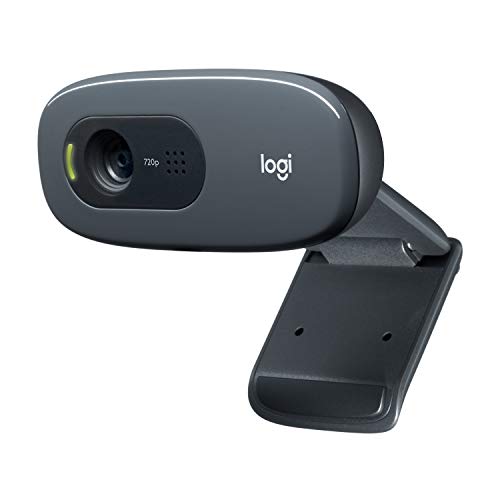
Logitech C270 HD Webcam, HD 720p, Widescreen – Features & Prices in Saudi Arabia :
Logitech C270 HD Webcam, HD 720p, Widescreen HD Video Calling, HD Light Correction, Noise-Reducing Mic, For Skype, FaceTime, Hangouts, WebEx, PC/Mac/Laptop/Macbook/Tablet – Black
Standing screen display size
3 Inches
Number of USB 2.0 Ports
1
Item model number
960-000694
Hardware Platform
Mac
Item Weight
4.6 ounces
Product Dimensions
9.85 x 4.94 x 6.45 inches
Item Dimensions LxWxH
9.85 x 4.94 x 6.45 inches
Color
Black
Rear Webcam Resolution
8 MP
Batteries
1 Lithium Ion batteries required.
Manufacturer
Logitech
ASIN
B004FHO5Y6
Country of Origin
China
Is Discontinued By Manufacturer
No
Date First Available
December 26, 2010
Test video – Logitech C270 HD Webcam, HD 720p, Widescreen :
Product highlights :
Questions & Answers – Logitech C270 HD Webcam, HD 720p, Widescreen :
Technical specifications – Logitech C270 HD Webcam, HD 720p, Widescreen :
Brand
Logitech
Connectivity Technology
USB
Color
Black
Special Feature
Low Light
Screen Size
3 Inches
Photo Sensor Technology
CCD
Camcorder type
Video Camera
Series
960-000694
Included Components
User documentation, Webcam with 5ft cable
Video Capture Resolution
720p
Purchase advice :
-
Warranty :
Check the duration of the warranty and also the faults and defects it covers. Is it complete or limited? and What is included in the warranty (parts, repairs or both)?
-
Shipping :
Is delivery offered? And how long does it take to get delivered (Delivery time)
-
Proof of purchase :
Does the shop give you an invoice ?
-
After-sales service :
Do they have an after-sales service to have information about the installation or operation (instructions for use). Also in case of problem, it is the seller who takes charge or you must contact the manufacturer or supplier yourself.
_____________________________
![Syntech USB C to USB Adapter [2 Pack] USB C Male to USB3 Female Adapter Compatible with iMac 2021 iPad Mini/Pro 2021 MacBook Pro 2020 MacBook Air 2020 and Other Type C Devices](/wp-content/uploads/2023/05/41nSZMNmLGL-300x225.jpg)
K. P (verified owner) –
Great Colors with This Camera – I’ve purchased quite a few webcams over the years. One thing I’ve discovered is that each camera tends to vary a lot when it comes to color correction. In the same room with the same light, I’m surprised at how different the image looks when I’m Zooming, using FaceTime, etc. With even very expensive cameras I’ve found that generally the tones are too red and makes me look like I’ve got a sunburn. However, with this camera the colors look very true. The resolution isn’t as good as the higher end Logitech cameras, but that’s not such a bad thing. Sometimes those HD cameras show every blemish, wrinkle, etc.! I’m very happy with this camera!
E. I (verified owner) –
Pleased with this – I’m pleased with this. I’ve used it for Zoom meetings on a Linux box and the quality of the picture is quite good. Easy to set up, it just rests on the top of your monitor and can be tilted up and down. When it’s active, a green light shows up which is nice.
H. H (verified owner) –
Great for price – I use this at work for video conferencing. In my office it works well. Picture quality is fine for meetings and I have not had any complaints about the microphone from people I am talking too. It’s really easy to use (just plug into to USB slot). It doesn’t have a cover for the camera, but it does have a hinge. Thus if I am not using it, I can just flip it up to point at the ceiling.
R. G (verified owner) –
Great value! Works well. – The picture and audio quality are great for my purpose, work Teams meetings. The mic on this camera woks better than the built in mic on my lad too. Easily sits on the monitor. I used some removable Velcro strips to attach it to the wall behind my monitor. That worked really well
A. F (verified owner) –
Everybody noticed my new camera! – I got a new computer with Windows11 on it, and it was having a problem with my old camera (that was working fine on Windows10?) so I bought this one. A name I recognized at a reasonable price. But what sold it was that people I video chatted with noticed the increase in picture quality without me even mentioning the new camera. If there is a negative to list so far, it would only be that there is no ‘paranoia shutter’ on the device to help assure you no one is remotely viewing anything.
C. R (verified owner) –
It’s a good webcam but I still have other things I’m unsatisfied with – Basically it looks exactly like the pictures. The quality of the camera isn’t my greatest concern since it is pretty great from what I’ve seen on calls. It has this weird blue hue at times but that’s probably the lighting or just how the camera is. The only thing I wish this has is like a better design for setting it up like to clip or hold on the monitors better. I also thought it would have a cover for privacy, since it doesn’t I’ll probably just stick to using a sticky not to cover up when I’m not using the webcam(since I’m paranoid). The part where it you put on the monitor looks odd and loose, you can’t exactly turn the angle of the webcam too much as well. In all, it works pretty good as a webcam and for the price, if you just want a webcam that works well and not care much about the set up and if it has a cover for not, it’s for you ^^ in the second picture, that’s the highest I can turn the angle, it’s a pretty low angle camera since it’s facing down all the time.
P. S (verified owner) –
Works great to let my boss babysit me on Zoom – It’s got a nice clear picture allowing my boss to treat me like a child and easily see I’m sitting at my computer. If you work remotely and your boss treats you like a child this camera will work great to allow them to verify you’re actually sitting at your desk. We all know just getting your work done isn’t enough to prove you’re doing your job. You also need to let them babysit you all day and send you emails about why you weren’t at your desk from 9:47 to 9:59. I was taking a dump, Steven! Is that ok with you?
H. H (verified owner) –
Great for price – I use this at work for video conferencing. In my office it works well. Picture quality is fine for meetings and I have not had any complaints about the microphone from people I am talking too. It’s really easy to use (just plug into to USB slot). It doesn’t have a cover for the camera, but it does have a hinge. Thus if I am not using it, I can just flip it up to point at the ceiling.
K. P (verified owner) –
Great Colors with This Camera – I’ve purchased quite a few webcams over the years. One thing I’ve discovered is that each camera tends to vary a lot when it comes to color correction. In the same room with the same light, I’m surprised at how different the image looks when I’m Zooming, using FaceTime, etc. With even very expensive cameras I’ve found that generally the tones are too red and makes me look like I’ve got a sunburn. However, with this camera the colors look very true. The resolution isn’t as good as the higher end Logitech cameras, but that’s not such a bad thing. Sometimes those HD cameras show every blemish, wrinkle, etc.! I’m very happy with this camera!
E. I (verified owner) –
Pleased with this – I’m pleased with this. I’ve used it for Zoom meetings on a Linux box and the quality of the picture is quite good. Easy to set up, it just rests on the top of your monitor and can be tilted up and down. When it’s active, a green light shows up which is nice.
R. G (verified owner) –
Great value! Works well. – The picture and audio quality are great for my purpose, work Teams meetings. The mic on this camera woks better than the built in mic on my lad too. Easily sits on the monitor. I used some removable Velcro strips to attach it to the wall behind my monitor. That worked really well
P. S (verified owner) –
Works great to let my boss babysit me on Zoom – It’s got a nice clear picture allowing my boss to treat me like a child and easily see I’m sitting at my computer. If you work remotely and your boss treats you like a child this camera will work great to allow them to verify you’re actually sitting at your desk. We all know just getting your work done isn’t enough to prove you’re doing your job. You also need to let them babysit you all day and send you emails about why you weren’t at your desk from 9:47 to 9:59. I was taking a dump, Steven! Is that ok with you?
H. B (verified owner) –
3 years of very heavy use – I bought this thinking I could really use a webcam on my home office computer in the middle of February, 2020. Well, turned out I REALLY NEEDED a webcam on my home office computer starting a month later. I’m in higher ed and used this camera to make videos for courses all throughout 2020-2021, for taking every single meeting on Zoom for a year, and then for continuing to meet with students and colleagues regularly on zoom ever since. Sometimes, my computer was on Zoom for 8 hours straight.
C. R (verified owner) –
It’s a good webcam but I still have other things I’m unsatisfied with – Basically it looks exactly like the pictures. The quality of the camera isn’t my greatest concern since it is pretty great from what I’ve seen on calls. It has this weird blue hue at times but that’s probably the lighting or just how the camera is. The only thing I wish this has is like a better design for setting it up like to clip or hold on the monitors better. I also thought it would have a cover for privacy, since it doesn’t I’ll probably just stick to using a sticky not to cover up when I’m not using the webcam(since I’m paranoid). The part where it you put on the monitor looks odd and loose, you can’t exactly turn the angle of the webcam too much as well. In all, it works pretty good as a webcam and for the price, if you just want a webcam that works well and not care much about the set up and if it has a cover for not, it’s for you ^^ in the second picture, that’s the highest I can turn the angle, it’s a pretty low angle camera since it’s facing down all the time.
H. B (verified owner) –
3 years of very heavy use – I bought this thinking I could really use a webcam on my home office computer in the middle of February, 2020. Well, turned out I REALLY NEEDED a webcam on my home office computer starting a month later. I’m in higher ed and used this camera to make videos for courses all throughout 2020-2021, for taking every single meeting on Zoom for a year, and then for continuing to meet with students and colleagues regularly on zoom ever since. Sometimes, my computer was on Zoom for 8 hours straight.
A. F (verified owner) –
Everybody noticed my new camera! – I got a new computer with Windows11 on it, and it was having a problem with my old camera (that was working fine on Windows10?) so I bought this one. A name I recognized at a reasonable price. But what sold it was that people I video chatted with noticed the increase in picture quality without me even mentioning the new camera. If there is a negative to list so far, it would only be that there is no ‘paranoia shutter’ on the device to help assure you no one is remotely viewing anything.