
Description
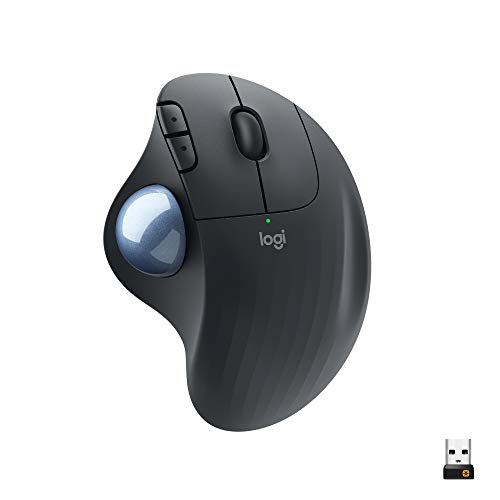
Logitech Ergo M575 Wireless Trackball (Black) – Features & Prices in Saudi Arabia :
Logitech Ergo M575 Wireless Trackball (Black)
Product Dimensions
2.01 x 4.21 x 6.3 inches
Item Weight
8.2 ounces
ASIN
B08TLYK78K
Item model number
910-005869
Batteries
1 Lithium Ion batteries required. (included)
Date First Available
February 2, 2021
Manufacturer
Logitech
Test video – Logitech Ergo M575 Wireless Trackball (Black) :
Product highlights :
Questions & Answers – Logitech Ergo M575 Wireless Trackball (Black) :
Technical specifications – Logitech Ergo M575 Wireless Trackball (Black) :
Brand
Logitech
Color
Black
Connectivity Technology
Wireless, Bluetooth, USB
Special Feature
Wireless
Movement Detection Technology
Trackball, Optical
Purchase advice :
-
Warranty :
Check the duration of the warranty and also the faults and defects it covers. Is it complete or limited? and What is included in the warranty (parts, repairs or both)?
-
Shipping :
Is delivery offered? And how long does it take to get delivered (Delivery time)
-
Proof of purchase :
Does the shop give you an invoice ?
-
After-sales service :
Do they have an after-sales service to have information about the installation or operation (instructions for use). Also in case of problem, it is the seller who takes charge or you must contact the manufacturer or supplier yourself.
_____________________________


Z. Z (verified owner) –
Its a awesome mouse that lasted me 9yrs worth your money – I loved it no complaints.. your first time will be a little confusing but once you learned it . You will continue to buy. The old one lasted me 9yrs !!
S. E (verified owner) –
Love these. Wish they would last longer than 3 years. This is my 3rd one! – Highly recommend, with the caveat that the mouse buttons fail after about 3 years. This is my 3rd one. Many other people complain about the same thing, so I know it’s not just me. Having said that, $40 every 3 years isn’t too much money if you spend a lot of time in front of your computer and want to avoid hand injuries.
T. P (verified owner) –
Works well, even at 10 feet away – The Logitech Ergo M575 Wireless Trackball does most of what I want. I’ve connected an old Mac PowerBook to my not-so-smart TV, and I’m using this trackball to navigate the streaming sites. It was easy to set up. The computer is tucked away a bit, but it works fine from across the room. It may be a bit too sensitive for my use– it seems tuned more to gaming. But I needed something that fits on the arm of a chair, and this works well.
O. I (verified owner) –
Battery life excellent, YEAR OR MORE. It sleeps. No need to it shut off, “DOUBLE CLICK IT TURNS ON!” – I like it, some comment on battery life.
O. I (verified owner) –
Battery life excellent, YEAR OR MORE. It sleeps. No need to it shut off, “DOUBLE CLICK IT TURNS ON!” – I like it, some comment on battery life.
B. L (verified owner) –
Takes some getting used to….. – It works great, and the only complaint is that it’ll take me a while longer to really get used to it. But already, my wrists are thanking me – and it’s been nothing but smooth operating since I got it a couple months ago.
S. E (verified owner) –
Love these. Wish they would last longer than 3 years. This is my 3rd one! – Highly recommend, with the caveat that the mouse buttons fail after about 3 years. This is my 3rd one. Many other people complain about the same thing, so I know it’s not just me. Having said that, $40 every 3 years isn’t too much money if you spend a lot of time in front of your computer and want to avoid hand injuries.
T. A (verified owner) –
Easy to use after a couple days! – I cannot even tell you how skeptical I was of this!! I had never used a trackball before and I was very concerned that I wasn’t going to like it! I recently had surgery on my left arm for ulnar nerve entrapment and they warned me about my right so I am trying to take steps to lessen the impact on my right arm, wrist, and hand. So I got this. It was very easy to get used to. I was quite surprised. It only took me a couple days. At first, my arm wanted to move it like a mouse out of habit and it took a bit of getting used to the ball but after I did, I don’t think I ever want to go back to a mouse! I no longer have to make sure I have something that my mouse can rest on that works for it to love around when I travel. I don’t carry a mousepad with me because I didn’t need one on my desk so I didn’t have one. With this, I don’t need one at all!
T. A (verified owner) –
Easy to use after a couple days! – I cannot even tell you how skeptical I was of this!! I had never used a trackball before and I was very concerned that I wasn’t going to like it! I recently had surgery on my left arm for ulnar nerve entrapment and they warned me about my right so I am trying to take steps to lessen the impact on my right arm, wrist, and hand. So I got this. It was very easy to get used to. I was quite surprised. It only took me a couple days. At first, my arm wanted to move it like a mouse out of habit and it took a bit of getting used to the ball but after I did, I don’t think I ever want to go back to a mouse! I no longer have to make sure I have something that my mouse can rest on that works for it to love around when I travel. I don’t carry a mousepad with me because I didn’t need one on my desk so I didn’t have one. With this, I don’t need one at all!
K. N (verified owner) –
A fine trackball for a great price! – I am a long-time user of trackballs, and a couple of years ago I purchased three Logitech MX Ergo trackballs, one each for home, office, and laptop. When I began working from home and created a new workstation separate from my home office and with a white aesthetic, I purchased a white Logitech M575 from another vendor. I found it to be as comfortable to use as the MX Ergo and the battery life was longer (the MX Ergo uses rechargeable batteries which frequently required recharging; the M575 takes a single AA battery which lasts for two years!). I decided to buy another one from Amazon for my laptop station, and I’m about to buy a third to replace my other MX Ergo trackball. I highly recommend the M575; you don’t have to spend a lot of money to get good quality and performance.
B. L (verified owner) –
Takes some getting used to….. – It works great, and the only complaint is that it’ll take me a while longer to really get used to it. But already, my wrists are thanking me – and it’s been nothing but smooth operating since I got it a couple months ago.
T. P (verified owner) –
Works well, even at 10 feet away – The Logitech Ergo M575 Wireless Trackball does most of what I want. I’ve connected an old Mac PowerBook to my not-so-smart TV, and I’m using this trackball to navigate the streaming sites. It was easy to set up. The computer is tucked away a bit, but it works fine from across the room. It may be a bit too sensitive for my use– it seems tuned more to gaming. But I needed something that fits on the arm of a chair, and this works well.
Z. Z (verified owner) –
Its a awesome mouse that lasted me 9yrs worth your money – I loved it no complaints.. your first time will be a little confusing but once you learned it . You will continue to buy. The old one lasted me 9yrs !!
K. N (verified owner) –
A fine trackball for a great price! – I am a long-time user of trackballs, and a couple of years ago I purchased three Logitech MX Ergo trackballs, one each for home, office, and laptop. When I began working from home and created a new workstation separate from my home office and with a white aesthetic, I purchased a white Logitech M575 from another vendor. I found it to be as comfortable to use as the MX Ergo and the battery life was longer (the MX Ergo uses rechargeable batteries which frequently required recharging; the M575 takes a single AA battery which lasts for two years!). I decided to buy another one from Amazon for my laptop station, and I’m about to buy a third to replace my other MX Ergo trackball. I highly recommend the M575; you don’t have to spend a lot of money to get good quality and performance.
C. B (verified owner) –
Why do they sell the M570? – I have struggled for the last few years with the absolutely horrible Logitech M570 trackball mouse. I require a unifying receiver to share both the keyboard/mouse between multiple computers, and so have been stuck with Logitech. Reluctantly, I just tried their “half-the-price” M575 model and wow; its night and day. The M575 tracks perfectly and is very smooth, compared to the M570 which is jumpy impossible to get pinpoint accuracy. Why they are still selling the M570 is beyond me, but if you are trying to decide between the two, go with the M575.
C. B (verified owner) –
Why do they sell the M570? – I have struggled for the last few years with the absolutely horrible Logitech M570 trackball mouse. I require a unifying receiver to share both the keyboard/mouse between multiple computers, and so have been stuck with Logitech. Reluctantly, I just tried their “half-the-price” M575 model and wow; its night and day. The M575 tracks perfectly and is very smooth, compared to the M570 which is jumpy impossible to get pinpoint accuracy. Why they are still selling the M570 is beyond me, but if you are trying to decide between the two, go with the M575.