Logitech MX Master 2S Wireless Mouse – – Features & Prices in Saudi Arabia :
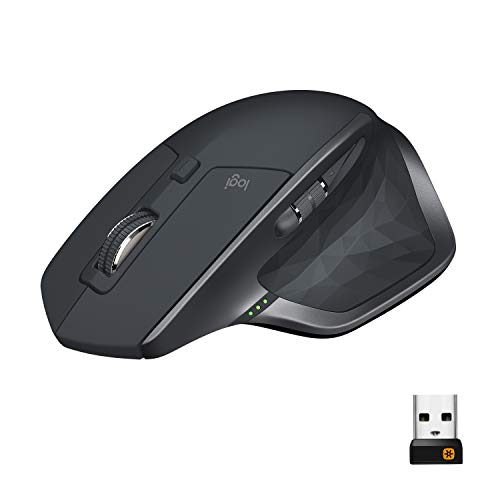
Logitech MX Master 2S Wireless Mouse – Use on Any Surface, Hyper-Fast Scrolling, Ergonomic Shape, Rechargeable, Control Upto 3 Apple Mac and Windows Computers, Graphite (Discontinued by Manufacturer)
Wireless Type
Bluetooth
Series
2017 Model
Item model number
2017 Model
Hardware Platform
Laptop, PC
Operating System
Windows 8, Windows 10
Item Weight
5.1 ounces
Product Dimensions
1.9 x 3.37 x 4.9 inches
Item Dimensions LxWxH
1.9 x 3.37 x 4.9 inches
Color
Graphite
Rear Webcam Resolution
4000 MP
Power Source
Battery Powered
Batteries
1 CR123A batteries required. (included)
Manufacturer
Logitech
ASIN
B071YZJ1G1
Is Discontinued By Manufacturer
No
Date First Available
May 10, 2017
Test video – Logitech MX Master 2S Wireless Mouse – :
Product highlights :
Cross computer control: Game changing capacity to navigate seamlessly on 3 computers, and copy paste text, images, and files from 1 to the other using Logitech flow
Dual connectivity: Use with upto 3 Windows or Mac computers via included Unifying receiver or Bluetooth Smart wireless technology. Gesture button- Yes
Advanced ergonomic design: Perfectly sculpted, hand crafted shape supports your hand and wrist in a comfortable, natural position
Auto shift scrolling: Speed adaptive scroll wheel auto shifts on the fly from click to click to hyper fast scrolling
Rechargable battery: Upto 70 days of power on a single charge
➕ What is the price of Logitech MX Master 2S Wireless Mouse – in Saudi Arabia ?
The price of Logitech MX Master 2S Wireless Mouse – in-store is 270 SAR VAT.
➕ When Logitech MX Master 2S Wireless Mouse – was released ?
The release date was May 10, 2017.
➕ What is the price of Logitech MX Master 2S Wireless Mouse – cheap used ?
The price of Logitech MX Master 2S Wireless Mouse – used is 190 SAR VAT.
➕ What are the main characteristics of Logitech MX Master 2S Wireless Mouse – ?
Special specifications :
Cross computer control: Game changing capacity to navigate seamlessly on 3 computers, and copy paste text, images, and files from 1 to the other using Logitech flow
➕ Is it interesting to buy this product ?
The best people who can answer you are customers who have already bought and tested this product (See Customer Reviews). This product is rated 4.6 / 5 on Amazon.
➕ Where to buy Logitech MX Master 2S Wireless Mouse – in Saudi Arabia ?
Check the duration of the warranty and also the faults and defects it covers. Is it complete or limited? and What is included in the warranty (parts, repairs or both)?
Shipping :
Is delivery offered? And how long does it take to get delivered (Delivery time)
Proof of purchase :
Does the shop give you an invoice ?
After-sales service :
Do they have an after-sales service to have information about the installation or operation (instructions for use). Also in case of problem, it is the seller who takes charge or you must contact the manufacturer or supplier yourself.
_____________________________
14 reviews for Logitech MX Master 2S Wireless Mouse –
Rated 5 out of 5
B. G (verified owner)–
The perfect mouse – I love this mouse. When, or if, it dies… I’ll be buying this exact same one again. It feels great in my hand and comfortable for my wrist. The battery life on this thing is insane, especially with how much use I put into it.
Rated 5 out of 5
O. M (verified owner)–
Best mouse I have ever used – I recently purchased this computer mouse, as it has rave reviews, and I am extremely impressed with it. The mouse is highly customizable, with many different buttons that can be programmed to perform different actions. This makes it very easy to use and customize to my needs.
Rated 4 out of 5
R. N (verified owner)–
Great mouse, but like all Logitech mice the left mouse buttons always wear out in a year a two. – I bought this mouse to use the Logitech Flow feature while working at home. It works great. Much better than having to switch mice and keyboard when switching systems. There is a little pause when switching, but you get used to it. Overall a nice mouse, but like all Logitech mice I’ve owned, the left mouse button wears out after a year or so of daily use. The button works, but it no longer reliably allows me to drag and drop. The button releases when I think I’m holding down. I can get it to work more reliably by pressing near the front (end where the cable normally comes out of), but I normally press the middle of the button. I’ve had this happen on all my Logitech mice over the years and just replace them every year or two. I’d definitely pay a little more for a mouse with better switches.
Rated 5 out of 5
C. J (verified owner)–
The best mouse I’ve ever used – I have owned the previous MX Master for over two years. It was amazing in pretty much every respect. Over time it got scratched up from being in my travel bag so when the new version came out, I jumped on it. I’ve had no regrets since. It’s everything the original version offered plus more.
Rated 4 out of 5
R. N (verified owner)–
Great mouse, but like all Logitech mice the left mouse buttons always wear out in a year a two. – I bought this mouse to use the Logitech Flow feature while working at home. It works great. Much better than having to switch mice and keyboard when switching systems. There is a little pause when switching, but you get used to it. Overall a nice mouse, but like all Logitech mice I’ve owned, the left mouse button wears out after a year or so of daily use. The button works, but it no longer reliably allows me to drag and drop. The button releases when I think I’m holding down. I can get it to work more reliably by pressing near the front (end where the cable normally comes out of), but I normally press the middle of the button. I’ve had this happen on all my Logitech mice over the years and just replace them every year or two. I’d definitely pay a little more for a mouse with better switches.
Rated 5 out of 5
C. J (verified owner)–
The best mouse I’ve ever used – I have owned the previous MX Master for over two years. It was amazing in pretty much every respect. Over time it got scratched up from being in my travel bag so when the new version came out, I jumped on it. I’ve had no regrets since. It’s everything the original version offered plus more.
Rated 4 out of 5
R. K (verified owner)–
Very comfortable – At first I was skeptical if the ergonomics would help my hand. I like to rest my arm on the table and move the mouse with my wrist. This mouse is very comfortable and the shape molds with the natural resting position of my hand. I like the function buttons too. My favorite is the side scroll. I work through Excel documents quite often and the side scroll function makes my lift so much more convenient when navigating! Only downside is that the Logitech software seems to lose connection causing me to lose my assigned function keys. I would have to relaunch the logitech application for my function keys to enable again which is a little annoying. Other than that, great mouse!
Rated 5 out of 5
O. M (verified owner)–
Best mouse I have ever used – I recently purchased this computer mouse, as it has rave reviews, and I am extremely impressed with it. The mouse is highly customizable, with many different buttons that can be programmed to perform different actions. This makes it very easy to use and customize to my needs.
Rated 5 out of 5
J. Z (verified owner)–
Love this mouse – Comfortable, responsive, and durable. I’ve had this mouse for a while now and its still pristine. The tracking, buttons, and overall feel is very well made. The battery life is very solid
Rated 4 out of 5
R. K (verified owner)–
Very comfortable – At first I was skeptical if the ergonomics would help my hand. I like to rest my arm on the table and move the mouse with my wrist. This mouse is very comfortable and the shape molds with the natural resting position of my hand. I like the function buttons too. My favorite is the side scroll. I work through Excel documents quite often and the side scroll function makes my lift so much more convenient when navigating! Only downside is that the Logitech software seems to lose connection causing me to lose my assigned function keys. I would have to relaunch the logitech application for my function keys to enable again which is a little annoying. Other than that, great mouse!
Rated 5 out of 5
B. G (verified owner)–
The perfect mouse – I love this mouse. When, or if, it dies… I’ll be buying this exact same one again. It feels great in my hand and comfortable for my wrist. The battery life on this thing is insane, especially with how much use I put into it.
Rated 4 out of 5
S. G (verified owner)–
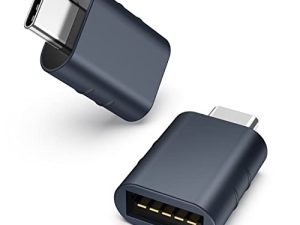
Good mouse. Missing part. – Didn’t come with a logitech unifying receiver. Using bluetooth, though, so it doesn’t really matter to me.
Rated 4 out of 5
S. G (verified owner)–
Good mouse. Missing part. – Didn’t come with a logitech unifying receiver. Using bluetooth, though, so it doesn’t really matter to me.
Rated 5 out of 5
J. Z (verified owner)–
Love this mouse – Comfortable, responsive, and durable. I’ve had this mouse for a while now and its still pristine. The tracking, buttons, and overall feel is very well made. The battery life is very solid



B. G (verified owner) –
The perfect mouse – I love this mouse. When, or if, it dies… I’ll be buying this exact same one again. It feels great in my hand and comfortable for my wrist. The battery life on this thing is insane, especially with how much use I put into it.
O. M (verified owner) –
Best mouse I have ever used – I recently purchased this computer mouse, as it has rave reviews, and I am extremely impressed with it. The mouse is highly customizable, with many different buttons that can be programmed to perform different actions. This makes it very easy to use and customize to my needs.
R. N (verified owner) –
Great mouse, but like all Logitech mice the left mouse buttons always wear out in a year a two. – I bought this mouse to use the Logitech Flow feature while working at home. It works great. Much better than having to switch mice and keyboard when switching systems. There is a little pause when switching, but you get used to it. Overall a nice mouse, but like all Logitech mice I’ve owned, the left mouse button wears out after a year or so of daily use. The button works, but it no longer reliably allows me to drag and drop. The button releases when I think I’m holding down. I can get it to work more reliably by pressing near the front (end where the cable normally comes out of), but I normally press the middle of the button. I’ve had this happen on all my Logitech mice over the years and just replace them every year or two. I’d definitely pay a little more for a mouse with better switches.
C. J (verified owner) –
The best mouse I’ve ever used – I have owned the previous MX Master for over two years. It was amazing in pretty much every respect. Over time it got scratched up from being in my travel bag so when the new version came out, I jumped on it. I’ve had no regrets since. It’s everything the original version offered plus more.
R. N (verified owner) –
Great mouse, but like all Logitech mice the left mouse buttons always wear out in a year a two. – I bought this mouse to use the Logitech Flow feature while working at home. It works great. Much better than having to switch mice and keyboard when switching systems. There is a little pause when switching, but you get used to it. Overall a nice mouse, but like all Logitech mice I’ve owned, the left mouse button wears out after a year or so of daily use. The button works, but it no longer reliably allows me to drag and drop. The button releases when I think I’m holding down. I can get it to work more reliably by pressing near the front (end where the cable normally comes out of), but I normally press the middle of the button. I’ve had this happen on all my Logitech mice over the years and just replace them every year or two. I’d definitely pay a little more for a mouse with better switches.
C. J (verified owner) –
The best mouse I’ve ever used – I have owned the previous MX Master for over two years. It was amazing in pretty much every respect. Over time it got scratched up from being in my travel bag so when the new version came out, I jumped on it. I’ve had no regrets since. It’s everything the original version offered plus more.
R. K (verified owner) –
Very comfortable – At first I was skeptical if the ergonomics would help my hand. I like to rest my arm on the table and move the mouse with my wrist. This mouse is very comfortable and the shape molds with the natural resting position of my hand. I like the function buttons too. My favorite is the side scroll. I work through Excel documents quite often and the side scroll function makes my lift so much more convenient when navigating! Only downside is that the Logitech software seems to lose connection causing me to lose my assigned function keys. I would have to relaunch the logitech application for my function keys to enable again which is a little annoying. Other than that, great mouse!
O. M (verified owner) –
Best mouse I have ever used – I recently purchased this computer mouse, as it has rave reviews, and I am extremely impressed with it. The mouse is highly customizable, with many different buttons that can be programmed to perform different actions. This makes it very easy to use and customize to my needs.
J. Z (verified owner) –
Love this mouse – Comfortable, responsive, and durable. I’ve had this mouse for a while now and its still pristine. The tracking, buttons, and overall feel is very well made. The battery life is very solid
R. K (verified owner) –
Very comfortable – At first I was skeptical if the ergonomics would help my hand. I like to rest my arm on the table and move the mouse with my wrist. This mouse is very comfortable and the shape molds with the natural resting position of my hand. I like the function buttons too. My favorite is the side scroll. I work through Excel documents quite often and the side scroll function makes my lift so much more convenient when navigating! Only downside is that the Logitech software seems to lose connection causing me to lose my assigned function keys. I would have to relaunch the logitech application for my function keys to enable again which is a little annoying. Other than that, great mouse!
B. G (verified owner) –
The perfect mouse – I love this mouse. When, or if, it dies… I’ll be buying this exact same one again. It feels great in my hand and comfortable for my wrist. The battery life on this thing is insane, especially with how much use I put into it.
S. G (verified owner) –
Good mouse. Missing part. – Didn’t come with a logitech unifying receiver. Using bluetooth, though, so it doesn’t really matter to me.
S. G (verified owner) –
Good mouse. Missing part. – Didn’t come with a logitech unifying receiver. Using bluetooth, though, so it doesn’t really matter to me.
J. Z (verified owner) –
Love this mouse – Comfortable, responsive, and durable. I’ve had this mouse for a while now and its still pristine. The tracking, buttons, and overall feel is very well made. The battery life is very solid