
Description
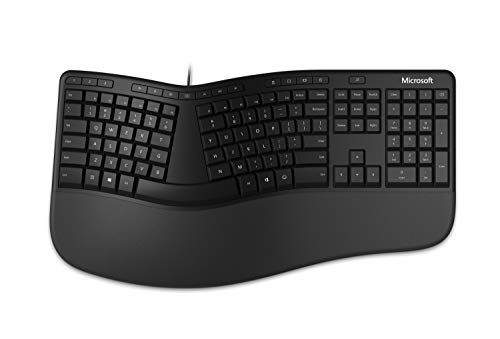
Microsoft Ergonomic Keyboard – Black. Wired, Comfortable, – Features & Prices in Saudi Arabia :
Microsoft Ergonomic Keyboard – Black. Wired, Comfortable, Ergonomic Keyboard with Cushioned Wrist and Palm Support. Split Keyboard. Dedicated Office Key.
Brand
Microsoft
Series
Ergonomic Keyboard
Item model number
LXM-00001
Hardware Platform
Windows
Operating System
Windows 8.1, Windows 10
Item Weight
2.25 pounds
Product Dimensions
10.33 x 2.39 x 19.2 inches
Item Dimensions LxWxH
10.33 x 2.39 x 19.2 inches
Color
Black
Batteries
2 AA batteries required.
Manufacturer
Microsoft
Language
English
ASIN
B07Y414QXJ
Country of Origin
China
Is Discontinued By Manufacturer
No
Date First Available
October 2, 2019
Test video – Microsoft Ergonomic Keyboard – Black. Wired, Comfortable, :
Product highlights :
Questions & Answers – Microsoft Ergonomic Keyboard – Black. Wired, Comfortable, :
Technical specifications – Microsoft Ergonomic Keyboard – Black. Wired, Comfortable, :
Brand
Microsoft
Compatible Devices
Microsoft Windows 11 Home/Pro, Microsoft Windows 10*
Connectivity Technology
Wired
Keyboard Description
AZERTY
Recommended Uses For Product
Office
Special Feature
Multimedia Keyboard, Wrist Support
Color
Black
Operating System
Windows 8.1, Windows 10
Number of Keys
126
Keyboard backlighting color support
Single Color
Purchase advice :
-
Warranty :
Check the duration of the warranty and also the faults and defects it covers. Is it complete or limited? and What is included in the warranty (parts, repairs or both)?
-
Shipping :
Is delivery offered? And how long does it take to get delivered (Delivery time)
-
Proof of purchase :
Does the shop give you an invoice ?
-
After-sales service :
Do they have an after-sales service to have information about the installation or operation (instructions for use). Also in case of problem, it is the seller who takes charge or you must contact the manufacturer or supplier yourself.
_____________________________
D. K (verified owner) –
Best ergonomic keyboard – Until Apple comes off their high, snooty horse and does what any smart company would do and make a true ergonomic keyboard, I can NEVER use their envelope-sized keyboards! I LOVE the feel of the keys on the Apple keyboard, but the outdated rectangular shape–and WAY TOO TINY–design, they can drop their lofty, “cool” stance and make probably TONS of sales with ergonomic keyboards. EVERYONE knows about carpal tunnel injury…except Apple, I guess.
O. R (verified owner) –
Great ergo keyboard – Microsoft ergo keyboards have always been my goto. I have tried some alternatives from Logitech, but wasn’t a fan of the layout and the travel of the keys.
O. R (verified owner) –
Great ergo keyboard – Microsoft ergo keyboards have always been my goto. I have tried some alternatives from Logitech, but wasn’t a fan of the layout and the travel of the keys.
K. K (verified owner) –
Mixed feelings. You will hit the “special” keys a lot. Pull them. – I’m really mixed on this. Overall it is a really good keyboard. I own several of the MS split keyboards. The very old Explorer was really good, the 4000 requires too much activation force and the Sculpt has the right side rearranged.
D. K (verified owner) –
Best ergonomic keyboard – Until Apple comes off their high, snooty horse and does what any smart company would do and make a true ergonomic keyboard, I can NEVER use their envelope-sized keyboards! I LOVE the feel of the keys on the Apple keyboard, but the outdated rectangular shape–and WAY TOO TINY–design, they can drop their lofty, “cool” stance and make probably TONS of sales with ergonomic keyboards. EVERYONE knows about carpal tunnel injury…except Apple, I guess.
I. B (verified owner) –
Comfortable keyboard – I like the comfort of the QWERTY part of the keyboard and the number pad, but some of the extra keys are in different places from my older keyboard at work. It just means I have to look a little bit when I use those keys. Otherwise, it’s great!
F. P (verified owner) –
Low cost, good quality, some minor issues – I have been using this keyboard daily at the office for nearly two years.
G. N (verified owner) –
Favorite keyboard – This is the third time I’ve purchased this keyboard over the past 15+ years. Before purchasing this one I decided to try a different brand that had high reviews; used it for about 30 seconds and put it back in the box and returned it. Maybe I’m just used to the Microsoft model, it just feels comfortable to me. My IT department gave me a cordless keyboard (different brand) to use, hated that thing too. It would start acting up later in the afternoon after hours of use by typing the same letter multiple times, along with other key malfunctions. So back to this model with the cord I went. The reason I needed a new one is because after cleaning my last keyboard with Clorox wipes over the past few years, more than normal, half of the letters were rubbed off. The previous model also had some type of faux leather on the palm cushion that started peeling off and sticking to my palms. I had the last one about 7 years.
F. P (verified owner) –
Low cost, good quality, some minor issues – I have been using this keyboard daily at the office for nearly two years.
K. K (verified owner) –
Mixed feelings. You will hit the “special” keys a lot. Pull them. – I’m really mixed on this. Overall it is a really good keyboard. I own several of the MS split keyboards. The very old Explorer was really good, the 4000 requires too much activation force and the Sculpt has the right side rearranged.
G. N (verified owner) –
Favorite keyboard – This is the third time I’ve purchased this keyboard over the past 15+ years. Before purchasing this one I decided to try a different brand that had high reviews; used it for about 30 seconds and put it back in the box and returned it. Maybe I’m just used to the Microsoft model, it just feels comfortable to me. My IT department gave me a cordless keyboard (different brand) to use, hated that thing too. It would start acting up later in the afternoon after hours of use by typing the same letter multiple times, along with other key malfunctions. So back to this model with the cord I went. The reason I needed a new one is because after cleaning my last keyboard with Clorox wipes over the past few years, more than normal, half of the letters were rubbed off. The previous model also had some type of faux leather on the palm cushion that started peeling off and sticking to my palms. I had the last one about 7 years.
I. B (verified owner) –
Comfortable keyboard – I like the comfort of the QWERTY part of the keyboard and the number pad, but some of the extra keys are in different places from my older keyboard at work. It just means I have to look a little bit when I use those keys. Otherwise, it’s great!