
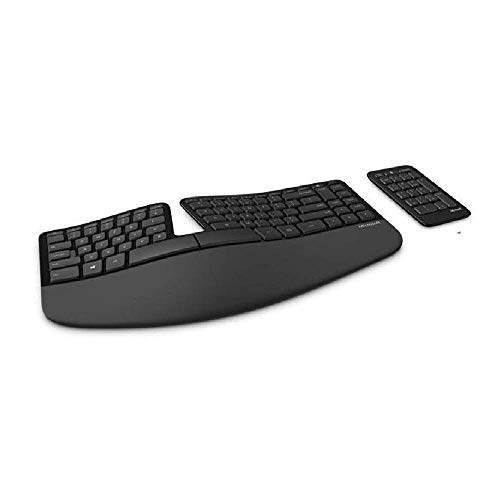
Description
Microsoft Sculpt Ergonomic Keyboard for Business (5KV-00001 – Features & Prices in Saudi Arabia :
Microsoft Sculpt Ergonomic Keyboard for Business (5KV-00001 )
Wireless Type
2.4 GHz Radio Frequency
Series
5KV-00001
Item model number
5KV-00001
Operating System
Windows 10
Item Weight
2 pounds
Product Dimensions
9 x 16 x 2.48 inches
Item Dimensions LxWxH
9 x 16 x 2.48 inches
Color
Without Mouse
Batteries
3 Lithium Ion batteries required. (included)
Manufacturer
Microsoft
Language
English
ASIN
B00CYX26BC
Country of Origin
China
Is Discontinued By Manufacturer
No
Date First Available
September 12, 2013
Test video – Microsoft Sculpt Ergonomic Keyboard for Business (5KV-00001 :
Product highlights :
Questions & Answers – Microsoft Sculpt Ergonomic Keyboard for Business (5KV-00001 :
Technical specifications – Microsoft Sculpt Ergonomic Keyboard for Business (5KV-00001 :
Brand
Microsoft
Connectivity Technology
Wireless
Keyboard Description
Radio Frequency
Recommended Uses For Product
Office
Color
Without Mouse
Operating System
Windows 10
Number of Keys
107
Keyboard backlighting color support
Single Color
Item Dimensions LxWxH
9 x 16 x 2.48 inches
Included Components
Computer Keyboards
Purchase advice :
-
Warranty :
Check the duration of the warranty and also the faults and defects it covers. Is it complete or limited? and What is included in the warranty (parts, repairs or both)?
-
Shipping :
Is delivery offered? And how long does it take to get delivered (Delivery time)
-
Proof of purchase :
Does the shop give you an invoice ?
-
After-sales service :
Do they have an after-sales service to have information about the installation or operation (instructions for use). Also in case of problem, it is the seller who takes charge or you must contact the manufacturer or supplier yourself.
_____________________________
G. T (verified owner) –
Helps with wrist pain, lack of attached number pad helps – So I work at home and totally redid my home office to be more ergonomic due to pain and keyboards were part of the research. I will be doing a minimal comparison of Microsoft ergonomic surface, sculpt and Logitech Ergo K860 as those were my top 3. I wanted to post pics but see nowhere to do that now on my last few reviews in Amazon app! So all my research, my own and ergonomic online training class required at work, say the key features of keyboard are negative tilt (not positive like many old ones came with), not touching the wrist rest unless you are Not typing and therefore actually resting them, and not having a number pad if right handed, as it causes more reach to mouse. As I was having right wrist, arm and shoulder pain, the separate number key pad and the fact a cheaper version without a mouse available were deciding factors in getting this. Otherwise I would have went with logitech k860 for keyboard feel, design (normal fn buttons) and it comes with both hz dongle or bluetooth. I agonized over decision of losing number pad. I type up clinical review and reports, but use a lot of dates and some numbers for lab values. Equal use keyboard and mouse and for program I use, no keyboard shortcuts work, have to click. I have Kensington Slimblade trackball (in case wondering I get good result from trackball personally, ones without ball at thumb suggested by most experts) as close as possible to keyboard on right, number keypad on left (getting better at using left hand with it). If need to do a bunch of numbers, I temporarily move it back to right side. I haven’t used the negative tilt attachment because my new sit to standing desk came with a keyboard tray that tilts. I use 10 degrees when sitted, 20 deg standing. If I didnt have that, I would for sure use it and it seems very sturdy and useful. Wrist rest does stain a bit easily, but maybe its bc I use little alcohol wipes on it almost every day and it seems to have worn away the black a bit in 2 spots. Not unsightly yet, but only a few months old. Now the surface keyboard also got reviews saying the Alacantra was comfy but stained easily. Maybe some scotch guard would help with that since fabric? The logitech k860 is new, but already seen a couple complaints about it “crumbling” from a few people. Maybe they put something weird on it who knows bc material seemed nicer than Sculpt by far. My main concern with logitech was wrist rest felt a little high, but it seemed like it would be easier clean than sculpt with smoother material. Again a wrist rest can exacerbate carpal tunnel if your wrists rest on it all the time. To be fair, I only tested it at store a few times, I didnt bring it home. I took the sculpt to store to compare it instead! The logitech K860 is more compact than a traditional split keyboard, so if you insist on having attached number pad, this one lets your mouse be closer than all the others I tried. Now both the surface ergonomic keyboard (bluetooth only) and the sculpt (regular dongle only) get some bad reviews about connecting, skipping, etc. I have a lot of stuff plugged into my laptop, so I use an extra dock and so I can use peripherals with personal computer (everything tracked on work one & not for personal use). My prior logitech solar keyboard had zero connectivity issues or lag being plugged in that dock for years ( it was great, but not ergonomic and had positive tilt instead of negative!) The dock is directly next to the laptop, 2 or 3 inches away. Sculpt worked great for a week, but then in effort to reduce clutter made mistake of pulling off plastic and threw away the box bc it worked and I decided to keep it. It immediately started having skip and lag the next day. I would type a sentence and 2 letter would pop up. Sometimes it wouldn’t work at all while I was trying to look up something for a client on the phone. This was completely unacceptable for obvious reasons, our company monitors and tracks our productivity. The only way to fix it was to unplug the dongle and back in at least one or twice each day, and for some reason mine was almost impossible to pull out. It did this for a week. So I was going to try and sent it back, but then though let’s just try plugging it directly into my precious laptop usb port (this took serious rearranging of other things). Its worked perfectly ever since no issues. I still dont know why it couldn’t work with dock a few inches a way when logitech could. Other things mentioned in other reviews I found to be true are the function buttons are weird, but I dont go back and forth, I leave the function feature on and it this point I only use F9 for a program I use. The back button num pad is not a real key, it’s annoying if you use it a lot. If they update and revise the product, which I think they should, it has room to improve: get better fabric covering, get rid of the few weird faux squishy keys ( I.e fn and backspace), remove need for FN toggle switch for programmers, improve dongle connection. I’d pay bit more for a version that has both bluetooth and a dongle like logitech k860 for ease of switching computers. I will now have to remove that dongle every time from the laptop from work to personal PC bc it doesnt work in the dock 🙁 Everything else on it is great comfort wise, it’s the only one I found besides niche programmer split keyboards that doesnt have the number pad! So this is where being to upload pics would be useful makers of Amazon app! I took pics of sculpt to show how much closer you mouse can be with other keyboards and found that for Logitech K860 I could get the mouse almost 2 3/4 to 3 inches closer. Doesnt seem like much, but with pain I was having it was noticeable when you do it 20x per minute, 8 hrs daily, 5 days a week. With a big bulky old school microsoft ergonomic keyboard at the store, those added over 5 inches to reach the mouse compared to sculpt. I could no longer find the ergonomic surface on display by the time had the sculpt, so not sure if its compact like logitech, but looks like it is in pics. Obviously the sculpt with no mouse was like $55, surface ergo $100, logitech k860 $130. The savings was nice, but if I honestly didnt feel I could benefit from ditching the keypad i would have had no problem paying the higher price for the obviously nicer surface and logitech as i tend think I’m using the product 40 hrs or more per week 48 weeks a year. Break that difference down daily or weekly negligible if you can afford it. I’m having a lot less arm, back hip pain since adding all these ergonomic features (standing desk, dual monitor arms, ergonomic chair steelcase leap2, keyboard) but it was expensive! But I’m walking without as much pain and haven’t needed the chiropractor or massage in over a month. For the keyboard, I still get typical thumb and wrist pain, but shooting up arm to shoulder is gone and some of that may be due to this keyboard without the number pad.
B. J (verified owner) –
I love this ergonomic keyboard as much as my trusty old MS Elite–maybe more. – I’ll list the highlights first, then get into the descriptive details for keyboard aficionados.
B. J (verified owner) –
I love this ergonomic keyboard as much as my trusty old MS Elite–maybe more. – I’ll list the highlights first, then get into the descriptive details for keyboard aficionados.
G. T (verified owner) –
Helps with wrist pain, lack of attached number pad helps – So I work at home and totally redid my home office to be more ergonomic due to pain and keyboards were part of the research. I will be doing a minimal comparison of Microsoft ergonomic surface, sculpt and Logitech Ergo K860 as those were my top 3. I wanted to post pics but see nowhere to do that now on my last few reviews in Amazon app! So all my research, my own and ergonomic online training class required at work, say the key features of keyboard are negative tilt (not positive like many old ones came with), not touching the wrist rest unless you are Not typing and therefore actually resting them, and not having a number pad if right handed, as it causes more reach to mouse. As I was having right wrist, arm and shoulder pain, the separate number key pad and the fact a cheaper version without a mouse available were deciding factors in getting this. Otherwise I would have went with logitech k860 for keyboard feel, design (normal fn buttons) and it comes with both hz dongle or bluetooth. I agonized over decision of losing number pad. I type up clinical review and reports, but use a lot of dates and some numbers for lab values. Equal use keyboard and mouse and for program I use, no keyboard shortcuts work, have to click. I have Kensington Slimblade trackball (in case wondering I get good result from trackball personally, ones without ball at thumb suggested by most experts) as close as possible to keyboard on right, number keypad on left (getting better at using left hand with it). If need to do a bunch of numbers, I temporarily move it back to right side. I haven’t used the negative tilt attachment because my new sit to standing desk came with a keyboard tray that tilts. I use 10 degrees when sitted, 20 deg standing. If I didnt have that, I would for sure use it and it seems very sturdy and useful. Wrist rest does stain a bit easily, but maybe its bc I use little alcohol wipes on it almost every day and it seems to have worn away the black a bit in 2 spots. Not unsightly yet, but only a few months old. Now the surface keyboard also got reviews saying the Alacantra was comfy but stained easily. Maybe some scotch guard would help with that since fabric? The logitech k860 is new, but already seen a couple complaints about it “crumbling” from a few people. Maybe they put something weird on it who knows bc material seemed nicer than Sculpt by far. My main concern with logitech was wrist rest felt a little high, but it seemed like it would be easier clean than sculpt with smoother material. Again a wrist rest can exacerbate carpal tunnel if your wrists rest on it all the time. To be fair, I only tested it at store a few times, I didnt bring it home. I took the sculpt to store to compare it instead! The logitech K860 is more compact than a traditional split keyboard, so if you insist on having attached number pad, this one lets your mouse be closer than all the others I tried. Now both the surface ergonomic keyboard (bluetooth only) and the sculpt (regular dongle only) get some bad reviews about connecting, skipping, etc. I have a lot of stuff plugged into my laptop, so I use an extra dock and so I can use peripherals with personal computer (everything tracked on work one & not for personal use). My prior logitech solar keyboard had zero connectivity issues or lag being plugged in that dock for years ( it was great, but not ergonomic and had positive tilt instead of negative!) The dock is directly next to the laptop, 2 or 3 inches away. Sculpt worked great for a week, but then in effort to reduce clutter made mistake of pulling off plastic and threw away the box bc it worked and I decided to keep it. It immediately started having skip and lag the next day. I would type a sentence and 2 letter would pop up. Sometimes it wouldn’t work at all while I was trying to look up something for a client on the phone. This was completely unacceptable for obvious reasons, our company monitors and tracks our productivity. The only way to fix it was to unplug the dongle and back in at least one or twice each day, and for some reason mine was almost impossible to pull out. It did this for a week. So I was going to try and sent it back, but then though let’s just try plugging it directly into my precious laptop usb port (this took serious rearranging of other things). Its worked perfectly ever since no issues. I still dont know why it couldn’t work with dock a few inches a way when logitech could. Other things mentioned in other reviews I found to be true are the function buttons are weird, but I dont go back and forth, I leave the function feature on and it this point I only use F9 for a program I use. The back button num pad is not a real key, it’s annoying if you use it a lot. If they update and revise the product, which I think they should, it has room to improve: get better fabric covering, get rid of the few weird faux squishy keys ( I.e fn and backspace), remove need for FN toggle switch for programmers, improve dongle connection. I’d pay bit more for a version that has both bluetooth and a dongle like logitech k860 for ease of switching computers. I will now have to remove that dongle every time from the laptop from work to personal PC bc it doesnt work in the dock 🙁 Everything else on it is great comfort wise, it’s the only one I found besides niche programmer split keyboards that doesnt have the number pad! So this is where being to upload pics would be useful makers of Amazon app! I took pics of sculpt to show how much closer you mouse can be with other keyboards and found that for Logitech K860 I could get the mouse almost 2 3/4 to 3 inches closer. Doesnt seem like much, but with pain I was having it was noticeable when you do it 20x per minute, 8 hrs daily, 5 days a week. With a big bulky old school microsoft ergonomic keyboard at the store, those added over 5 inches to reach the mouse compared to sculpt. I could no longer find the ergonomic surface on display by the time had the sculpt, so not sure if its compact like logitech, but looks like it is in pics. Obviously the sculpt with no mouse was like $55, surface ergo $100, logitech k860 $130. The savings was nice, but if I honestly didnt feel I could benefit from ditching the keypad i would have had no problem paying the higher price for the obviously nicer surface and logitech as i tend think I’m using the product 40 hrs or more per week 48 weeks a year. Break that difference down daily or weekly negligible if you can afford it. I’m having a lot less arm, back hip pain since adding all these ergonomic features (standing desk, dual monitor arms, ergonomic chair steelcase leap2, keyboard) but it was expensive! But I’m walking without as much pain and haven’t needed the chiropractor or massage in over a month. For the keyboard, I still get typical thumb and wrist pain, but shooting up arm to shoulder is gone and some of that may be due to this keyboard without the number pad.