
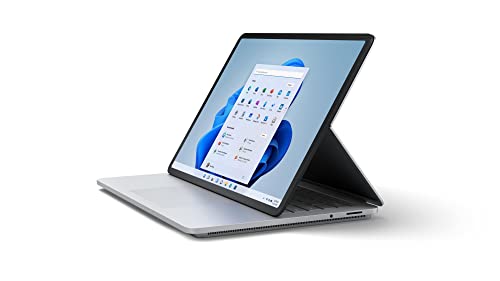
Description
Microsoft Surface Laptop Studio – 14.4″ Touchscreen – Features & Prices in Saudi Arabia :
Microsoft Surface Laptop Studio – 14.4″ Touchscreen – Intel® Core™ i5 – 16GB Memory – 256GB SSD – Platinum
Standing screen display size
14.4 Inches
Screen Resolution
2400 x 1600
Max Screen Resolution
2400 x 1600 Pixels
Processor
2.6 GHz apple_ci5
RAM
16 GB LPDDR4X
Hard Drive
512 GB SSD
Graphics Coprocessor
Intel Iris Xe Graphics
Chipset Brand
Intel
Card Description
Integrated
Wireless Type
802.11ax
Processor Count
4
Computer Memory Type
DDR4 SDRAM
Flash Memory Size
256 GB
Hard Drive Interface
Solid State
Optical Drive Type
No Optical Drive
Power Source
Battery Powered
Batteries
1 Lithium Ion batteries required. (included)
Test video – Microsoft Surface Laptop Studio – 14.4″ Touchscreen :
Product highlights :
Questions & Answers – Microsoft Surface Laptop Studio – 14.4″ Touchscreen :
Technical specifications – Microsoft Surface Laptop Studio – 14.4″ Touchscreen :
Brand
Microsoft
Series
Surface Laptop
Screen Size
14.4 Inches
Color
Platinum
Hard Disk Size
512 GB
CPU Model
Intel Core i5
Ram Memory Installed Size
16 GB
Operating System
Windows 11 Home
Card Description
Integrated
Graphics Coprocessor
Intel Iris Xe Graphics
Purchase advice :
-
Warranty :
Check the duration of the warranty and also the faults and defects it covers. Is it complete or limited? and What is included in the warranty (parts, repairs or both)?
-
Shipping :
Is delivery offered? And how long does it take to get delivered (Delivery time)
-
Proof of purchase :
Does the shop give you an invoice ?
-
After-sales service :
Do they have an after-sales service to have information about the installation or operation (instructions for use). Also in case of problem, it is the seller who takes charge or you must contact the manufacturer or supplier yourself.
_____________________________
K. B (verified owner) –
purchase something cheaper – i went with a more basemodel configuration because of price. it makes this laptop pointless. it struggles to handle white board. im not even going to get into adobe apps like fresco. the drawing experience is second place to apple ipad pro. and i was born into a windows fanboy family. the screen is nice but not worth the asking price. this is a very heavy laptop for what it does. i cannot find a carrying case for it that i trust. for what you pay its obviously susceptible to damage. i legit use the box it came in to this day. i look like an idiot unboxing it in class every time but what i am i suppose to do buy a pelican case?! the form factor is nice. but it takes some time getting use to and i can tell if i used it regularly it would end up breaking. i have the newer MS pen. that syncs and works well. i wouldn’t bother gaming on the base model in any form. it checks a lot of boxes for things like back lit keys but almost everything does now. the OS performs well. this laptop is not worth MSRP its the apple of microsoft products. youre paying a premium for the sake of paying a premium. get something more cost effective.
Z. T (verified owner) –
Best laptop I’ve ever purchased! – First of all: I am a tech junky and have bought a dozen, or more, portable computers over the years. I generally end up frustrated with poor screen quality, misrepresented battery stamina, poorly backlit (or not at all) keyboard, poor trackpad, or something else I didn’t know prior to purchase.
Z. T (verified owner) –
Best laptop I’ve ever purchased! – First of all: I am a tech junky and have bought a dozen, or more, portable computers over the years. I generally end up frustrated with poor screen quality, misrepresented battery stamina, poorly backlit (or not at all) keyboard, poor trackpad, or something else I didn’t know prior to purchase.
K. B (verified owner) –
purchase something cheaper – i went with a more basemodel configuration because of price. it makes this laptop pointless. it struggles to handle white board. im not even going to get into adobe apps like fresco. the drawing experience is second place to apple ipad pro. and i was born into a windows fanboy family. the screen is nice but not worth the asking price. this is a very heavy laptop for what it does. i cannot find a carrying case for it that i trust. for what you pay its obviously susceptible to damage. i legit use the box it came in to this day. i look like an idiot unboxing it in class every time but what i am i suppose to do buy a pelican case?! the form factor is nice. but it takes some time getting use to and i can tell if i used it regularly it would end up breaking. i have the newer MS pen. that syncs and works well. i wouldn’t bother gaming on the base model in any form. it checks a lot of boxes for things like back lit keys but almost everything does now. the OS performs well. this laptop is not worth MSRP its the apple of microsoft products. youre paying a premium for the sake of paying a premium. get something more cost effective.
T. K (verified owner) –
Very good but has flaws and definitely not for everyone – Now let me preface this by being clear. I am an undergraduate computer science student. My father pretty much gave this computer to me as a gift during Christmas just for something to take notes on. I use the Whiteboard app a lot in fact to be able to take notes on it. I understand that you could type out the notes on a computer or whatever but I prefer using a notebook but at the same time I need to know what I’m writing about and a notebook can only grant me so much space. So this may not be a device for everyone but it is for me at least for the version I got.
I. K (verified owner) –
Great laptop for the price! – I loved my surface pro tablet but needed more memory and a better keyboard. This was the perfect solution!
I. K (verified owner) –
Great laptop for the price! – I loved my surface pro tablet but needed more memory and a better keyboard. This was the perfect solution!
O. G (verified owner) –
La mejor laptop con Windows que he probado – He usado diferentes Dell XPS, Asus, HP, entre otros equipos. De todo lo que he probado, éste es por mucho el mejor PC que he tenido el placer de usar. Su pantalla táctil está aún por debajo de una pantalla táctil de un móvil o una tablet, la experiencia de uso con el lápiz no supera la experiencia de Samsung con el Galaxy Note. Sin embargo, como PC es suficiente para las tareas que requieren lo mejor de ambos mundos, PC y tablet. Eso es algo que no se consigue con ningún equipo excepto este.
T. K (verified owner) –
Very good but has flaws and definitely not for everyone – Now let me preface this by being clear. I am an undergraduate computer science student. My father pretty much gave this computer to me as a gift during Christmas just for something to take notes on. I use the Whiteboard app a lot in fact to be able to take notes on it. I understand that you could type out the notes on a computer or whatever but I prefer using a notebook but at the same time I need to know what I’m writing about and a notebook can only grant me so much space. So this may not be a device for everyone but it is for me at least for the version I got.
O. G (verified owner) –
La mejor laptop con Windows que he probado – He usado diferentes Dell XPS, Asus, HP, entre otros equipos. De todo lo que he probado, éste es por mucho el mejor PC que he tenido el placer de usar. Su pantalla táctil está aún por debajo de una pantalla táctil de un móvil o una tablet, la experiencia de uso con el lápiz no supera la experiencia de Samsung con el Galaxy Note. Sin embargo, como PC es suficiente para las tareas que requieren lo mejor de ambos mundos, PC y tablet. Eso es algo que no se consigue con ningún equipo excepto este.