
Description
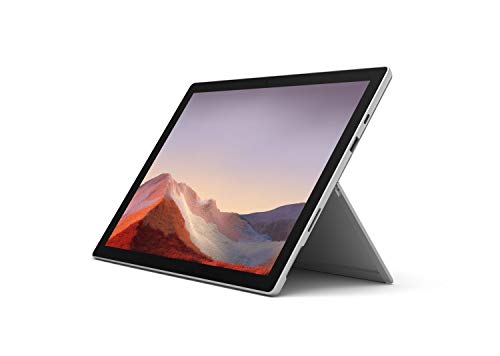
Microsoft Surface Pro 7 – 12.3″ Touch-Screen – Features & Prices in Saudi Arabia :
Microsoft Surface Pro 7 – 12.3″ Touch-Screen – 10th Gen Intel Core i7 – 16GB Memory – 1TB SSD – Platinum
Standing screen display size
12.3 Inches
Screen Resolution
2736 x 1824
Max Screen Resolution
2736 x 1824
Processor
core_i7
RAM
16 GB DDR4
Hard Drive
1 TB flash_memory_solid_state
Graphics Coprocessor
Intel Iris Plus Graphics
Chipset Brand
Intel
Card Description
Integrated
Graphics Card Ram Size
0.01 GB
Wireless Type
802.11ax
Number of USB 3.0 Ports
2
Computer Memory Type
Unknown
Flash Memory Size
1 GB
Hard Drive Interface
Serial ATA
Hard Drive Rotational Speed
0.01 RPM
Optical Drive Type
No Optical Drive
Power Source
Battery Powered
Batteries
1 Lithium Ion batteries required. (included)
Test video – Microsoft Surface Pro 7 – 12.3″ Touch-Screen :
Product highlights :
Questions & Answers – Microsoft Surface Pro 7 – 12.3″ Touch-Screen :
Technical specifications – Microsoft Surface Pro 7 – 12.3″ Touch-Screen :
Brand
Microsoft
Series
Surface Pro
Memory Storage Capacity
1000 GB
Screen Size
12.3 Inches
Display Resolution Maximum
2736 x 1824
Purchase advice :
-
Warranty :
Check the duration of the warranty and also the faults and defects it covers. Is it complete or limited? and What is included in the warranty (parts, repairs or both)?
-
Shipping :
Is delivery offered? And how long does it take to get delivered (Delivery time)
-
Proof of purchase :
Does the shop give you an invoice ?
-
After-sales service :
Do they have an after-sales service to have information about the installation or operation (instructions for use). Also in case of problem, it is the seller who takes charge or you must contact the manufacturer or supplier yourself.
_____________________________
H. T (verified owner) –
Surface pro8 – This is my second Surface Pro. Love the size and weight. Does everything a large laptop does.
D. K (verified owner) –
Best of the Best – Always worth the price to me. This is the 2nd one that I have owned.
T. J (verified owner) –
Love it – Love it for my projects and it’s very mobile
M. K (verified owner) –
The quality I need in a laptop with a few setbacks – This is my first purchase of a laptop and any surface product. I did my research on the device before purchasing because I’m doing remote learning and an art major so I already knew what I wanted in a laptop and the pro 7 delivered! I bought this laptop as new so I don’t know the case for the rest of these reviews but mine came in the box sealed with plastic NEW WITH EVERYTHING WORKING. Screen works perfect as a laptop/tablet and connects well with my hotspot. The only downside is that I paid so much hoping for the sim card or esim option to be there but it wasn’t and although the battery still needs improvement I find that if you allow the laptop to rest every hour the battery drains less. I work so I don’t have to use it every second but something to keep in mind.
K. R (verified owner) –
Amazing Device – Amazing Device and very elegant with smart features and incredible portable design
R. M (verified owner) –
I bought the item under new and received new – I was worried after reading reviews and seeing that a lot of people had received the wrong product. Could be they selected the buy used and save button. None the less I purchased the surface pro 7 with core i7 and 16gbs of ram and 256 gb SSD. A week later I received a brand new still in the unopened Microsoft packaging surface pro 7. It runs absolutely great on performance mode and charges fast really fast. The battery doesn’t last long under heavy load maybe 5 to 6 hours. And that’s fine for looking at blueprints and 3d modeling products for me.
K. R (verified owner) –
Amazing Device – Amazing Device and very elegant with smart features and incredible portable design
M. K (verified owner) –
The quality I need in a laptop with a few setbacks – This is my first purchase of a laptop and any surface product. I did my research on the device before purchasing because I’m doing remote learning and an art major so I already knew what I wanted in a laptop and the pro 7 delivered! I bought this laptop as new so I don’t know the case for the rest of these reviews but mine came in the box sealed with plastic NEW WITH EVERYTHING WORKING. Screen works perfect as a laptop/tablet and connects well with my hotspot. The only downside is that I paid so much hoping for the sim card or esim option to be there but it wasn’t and although the battery still needs improvement I find that if you allow the laptop to rest every hour the battery drains less. I work so I don’t have to use it every second but something to keep in mind.
R. M (verified owner) –
I bought the item under new and received new – I was worried after reading reviews and seeing that a lot of people had received the wrong product. Could be they selected the buy used and save button. None the less I purchased the surface pro 7 with core i7 and 16gbs of ram and 256 gb SSD. A week later I received a brand new still in the unopened Microsoft packaging surface pro 7. It runs absolutely great on performance mode and charges fast really fast. The battery doesn’t last long under heavy load maybe 5 to 6 hours. And that’s fine for looking at blueprints and 3d modeling products for me.
L. H (verified owner) –
Great tablet and touch screen computer for travel- limited apps available though – Great for travelers who need a functional computer that can also serve as a tablet. I got th Surface Pro 7 because I travel for work and will also be starting grad school so I may need to study on the plane or after work in the hotels. I wanted the full functionality of a computer that would allow me to use MS Office programs as well as the functionality of a touch screen, tablet and inking feature to take notes for class. I am just getting accustomed to the inking feature but I can see that it will be a great asset to me during my program and I enjoy the overall portability of the Microsoft Surface Pro 7. The screen size is just right for me as I don’t like large computers. I have also purchased a wireless keyboard and mouse for when at home to make it even easier to use when typing papers or working on projects. I also purchased a cute flowered skin with white. sage, pink and gray to protect the metal from any nicks or scratches. I also purchased the silver pen and got a sage green skin to protect it. I like that the pen magnetically attaches to the side of the Surface Pro 7 and that the pen can erase using the eraser on the pen. The only reason I gave it four rather than five stars is that I am finding that not all apps are offered in the Surface Pro that I currently have. The selection seems quite limited and you can’t get apps from iTunes or Google Play as neither service is compatible with Windows. I am most disappointed that Scribd is not offered as I was hoping to be able to read books while in flight. I have read that there is VM Ware apps that may work. I am not very technical so I don’t know much about it. I appreciate any suggestions from Microsoft or techies on how I can upload Scribd on my Surface Pro 7. Thank you!
T. K (verified owner) –
love it – I use this daily for school and have had no issues yet
H. T (verified owner) –
Surface pro8 – This is my second Surface Pro. Love the size and weight. Does everything a large laptop does.
T. K (verified owner) –
love it – I use this daily for school and have had no issues yet
T. J (verified owner) –
Love it – Love it for my projects and it’s very mobile
L. H (verified owner) –
Great tablet and touch screen computer for travel- limited apps available though – Great for travelers who need a functional computer that can also serve as a tablet. I got th Surface Pro 7 because I travel for work and will also be starting grad school so I may need to study on the plane or after work in the hotels. I wanted the full functionality of a computer that would allow me to use MS Office programs as well as the functionality of a touch screen, tablet and inking feature to take notes for class. I am just getting accustomed to the inking feature but I can see that it will be a great asset to me during my program and I enjoy the overall portability of the Microsoft Surface Pro 7. The screen size is just right for me as I don’t like large computers. I have also purchased a wireless keyboard and mouse for when at home to make it even easier to use when typing papers or working on projects. I also purchased a cute flowered skin with white. sage, pink and gray to protect the metal from any nicks or scratches. I also purchased the silver pen and got a sage green skin to protect it. I like that the pen magnetically attaches to the side of the Surface Pro 7 and that the pen can erase using the eraser on the pen. The only reason I gave it four rather than five stars is that I am finding that not all apps are offered in the Surface Pro that I currently have. The selection seems quite limited and you can’t get apps from iTunes or Google Play as neither service is compatible with Windows. I am most disappointed that Scribd is not offered as I was hoping to be able to read books while in flight. I have read that there is VM Ware apps that may work. I am not very technical so I don’t know much about it. I appreciate any suggestions from Microsoft or techies on how I can upload Scribd on my Surface Pro 7. Thank you!
D. K (verified owner) –
Best of the Best – Always worth the price to me. This is the 2nd one that I have owned.