MINISFORUM DeskMini UM580 Mini PC AMD Ryzen – Features & Prices in Saudi Arabia :
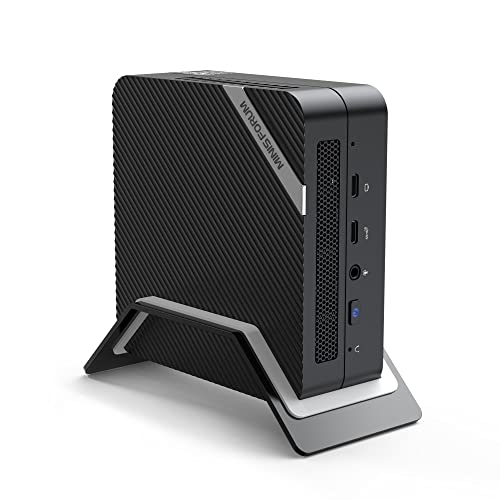
MINISFORUM DeskMini UM580 Mini PC AMD Ryzen 7 5800H DDR4 32GB RAM + 512GB NVMe SSD Windows 11 Pro Desktop Computer, 2xHDMI+2xUSB-C 4K@60Hz Outputs, 2.5G LAN, USB 3.2, AMD Radeon Graphics Mini Computer
Standing screen display size
25
Processor
3.2 GHz amd_r_series
RAM
DDR4
Hard Drive
512 SSD
Graphics Coprocessor
AMD Radeon™ Graphics (Graphics Frequency 2000 MHz)
Chipset Brand
AMD
Card Description
Integrated
Graphics Card Ram Size
4 GB
Wireless Type
Bluetooth, 802.11ax
Number of USB 2.0 Ports
2
Number of USB 3.0 Ports
5
Flash Memory Size
32 GB
Hard Drive Interface
Serial ATA-600
Hard Drive Rotational Speed
7200
Test video – MINISFORUM DeskMini UM580 Mini PC AMD Ryzen :
Product highlights :
【Powerful Performance】: The MINISFORUM UM580 Mini PC is a small form factor Desktop Tower Computer with an AMD Ryzen 7 5800H (8C/16T up to 4.4Ghz) processor. The faster performance can handle heavy computing tasks smoothly and better for multitasking. It widely used for light games, image editing, browsing, watching movies, programming etc.
【Equipped with GaN Power Supply and Support ALT-Mode】: The MINISFORUM UM580 comes with GaN Power Supply, which is safer, faster and more portable. One USB-C port on the back of computer supports ALT-Mode. It allows USB-C port to transfer data/video via multiple interfaces. If your monitor supports USB Power Delivery, you could use this port to power the computer and transfer video signal to the monitor at the same time.
【Quad Screen 4K@60Hz Display】: this Mini PC comes with Integrated Radeon Graphics(graphics frequency 1800 MHz), 4K@60Hz four display outputs via two HDMI Ports, and two USB-C Ports, you could connect four independent displays, which ensures smooth navigation, responsive work processes and comfortable handling of apps and files and expands multiple work-spaces for more efficient and comfortable productivity.
【2.5Gbps LAN】: This MINISFORUM UM580 Mini Computer comes with 2500Mbps Lan Port, it expands its functions and improved performance of computer to a large extent and allow you to use more networks such as software routers (OpenWRT / DD-WRT / Tomato etc.), firewalls, NAT, network isolation etc.
【Large Capacity】: DDR4 32GB RAM (2x SODIMM slot, each of slot can be upgraded to 32GB) + 512GB 2280 NVMe SSD(up to 2TB) pre-installed. One 2.5 inch SATA HDD slot can up to 2TB. Without worrying about lack of capacity, you can run software smoothly, watch and storage large-scale movies, photos without any stress. You can also enjoy some games to some extent.
【Package Contents】:1x MINISFORUM UM580 Mini PC, 1x HDMI cable, 1x Mounting Bracket, 1x Power Adapter, 1x US manual.
Questions & Answers – MINISFORUM DeskMini UM580 Mini PC AMD Ryzen :
➕ What is the price of MINISFORUM DeskMini UM580 Mini PC AMD Ryzen in Saudi Arabia ?
The price of MINISFORUM DeskMini UM580 Mini PC AMD Ryzen in-store is 2310 SAR VAT.
➕ When MINISFORUM DeskMini UM580 Mini PC AMD Ryzen was released ?
The release date was .
➕ What is the price of MINISFORUM DeskMini UM580 Mini PC AMD Ryzen cheap used ?
The price of MINISFORUM DeskMini UM580 Mini PC AMD Ryzen used is 1610 SAR VAT.
➕ What are the main characteristics of MINISFORUM DeskMini UM580 Mini PC AMD Ryzen ?
Special specifications :
【Powerful Performance】: The MINISFORUM UM580 Mini PC is a small form factor Desktop Tower Computer with an AMD Ryzen 7 5800H (8C/16T up to 4.4Ghz) processor. The faster performance can handle heavy computing tasks smoothly and better for multitasking. It widely used for light games, image editing, browsing, watching movies, programming etc.
➕ Is it interesting to buy this product ?
The best people who can answer you are customers who have already bought and tested this product (See Customer Reviews). This product is rated 4 / 5 on Amazon.
➕ Where to buy MINISFORUM DeskMini UM580 Mini PC AMD Ryzen in Saudi Arabia ?
Technical specifications – MINISFORUM DeskMini UM580 Mini PC AMD Ryzen :
Specific Uses For Product
Business, Education, Everyday Use, Multimedia, Personal, Office, Home Work
Brand
MINISFORUM
Personal computer design type
Mini PC
Operating System
Windows 11 Pro
Memory Storage Capacity
512 GB
Screen Size
25
Ram Memory Installed Size
32 GB
Series
MINIS-UM580(32+512)
Included Components
1x US Power Adapter, 1x HDMI Cable, 1x Mounting Backet, 1x Manual, 1x MINISFORUM UM580 Mini PC
CPU Model
AMD R Series
Purchase advice :
Warranty :
Check the duration of the warranty and also the faults and defects it covers. Is it complete or limited? and What is included in the warranty (parts, repairs or both)?
Shipping :
Is delivery offered? And how long does it take to get delivered (Delivery time)
Proof of purchase :
Does the shop give you an invoice ?
After-sales service :
Do they have an after-sales service to have information about the installation or operation (instructions for use). Also in case of problem, it is the seller who takes charge or you must contact the manufacturer or supplier yourself.
_____________________________
8 reviews for MINISFORUM DeskMini UM580 Mini PC AMD Ryzen
Rated 3 out of 5
K. H (verified owner)–
The PD feature didn’t deliver for me, and design issues don’t help. – I didn’t have the system for long enough to give me an idea of performance, but it seems deficient in enough little areas for me to return it:
Rated 5 out of 5
F. K (verified owner)–
Good value for the price / Some UEFI Boot Issues with Linux. – I bought a few of these for a homelab Kubernetes cluster. The base unit is nice. I had to upgrade the RAM and replace the tiny NVMe they come with with large unit. Ubuntu 22.04.1 works great with the included 2.5Gib Intel i225v (Gen 3) network card.
Rated 4 out of 5
I. B (verified owner)–
Built for Trading Stocks – In the past I used high end gaming laptops, for my stock trading, as they could handle multiple monitors. This MINISFORUM caught my eye as it could display up to 4 monitors. So far only using this with 2 monitors, trading platform, microsoft office, and video conversion tools. Its been up and running for a month now, and hasn’t disappointed me yet. If you need many USB ports, I suggest getting a USB hub to attach to this small unit. It doesn’t take long to fill up those USB ports! (wireless mouse dongle, wireless keyboard dongle, headset, microphone, USB storage device, USB stick, etc.)
Rated 5 out of 5
F. K (verified owner)–
Good value for the price / Some UEFI Boot Issues with Linux. – I bought a few of these for a homelab Kubernetes cluster. The base unit is nice. I had to upgrade the RAM and replace the tiny NVMe they come with with large unit. Ubuntu 22.04.1 works great with the included 2.5Gib Intel i225v (Gen 3) network card.
Rated 3 out of 5
K. H (verified owner)–
The PD feature didn’t deliver for me, and design issues don’t help. – I didn’t have the system for long enough to give me an idea of performance, but it seems deficient in enough little areas for me to return it:
Rated 4 out of 5
I. B (verified owner)–
Built for Trading Stocks – In the past I used high end gaming laptops, for my stock trading, as they could handle multiple monitors. This MINISFORUM caught my eye as it could display up to 4 monitors. So far only using this with 2 monitors, trading platform, microsoft office, and video conversion tools. Its been up and running for a month now, and hasn’t disappointed me yet. If you need many USB ports, I suggest getting a USB hub to attach to this small unit. It doesn’t take long to fill up those USB ports! (wireless mouse dongle, wireless keyboard dongle, headset, microphone, USB storage device, USB stick, etc.)
Rated 3 out of 5
C. K (verified owner)–
USB-C PD/monitor in the back is bad desgin. – The USB-C in the back is the power supply port (19v) with support the monitor for the 4th monitor. But it WILL NOT work if you don`t have the SPECIAL DOCK.
Rated 3 out of 5
C. K (verified owner)–
USB-C PD/monitor in the back is bad desgin. – The USB-C in the back is the power supply port (19v) with support the monitor for the 4th monitor. But it WILL NOT work if you don`t have the SPECIAL DOCK.


K. H (verified owner) –
The PD feature didn’t deliver for me, and design issues don’t help. – I didn’t have the system for long enough to give me an idea of performance, but it seems deficient in enough little areas for me to return it:
F. K (verified owner) –
Good value for the price / Some UEFI Boot Issues with Linux. – I bought a few of these for a homelab Kubernetes cluster. The base unit is nice. I had to upgrade the RAM and replace the tiny NVMe they come with with large unit. Ubuntu 22.04.1 works great with the included 2.5Gib Intel i225v (Gen 3) network card.
I. B (verified owner) –
Built for Trading Stocks – In the past I used high end gaming laptops, for my stock trading, as they could handle multiple monitors. This MINISFORUM caught my eye as it could display up to 4 monitors. So far only using this with 2 monitors, trading platform, microsoft office, and video conversion tools. Its been up and running for a month now, and hasn’t disappointed me yet. If you need many USB ports, I suggest getting a USB hub to attach to this small unit. It doesn’t take long to fill up those USB ports! (wireless mouse dongle, wireless keyboard dongle, headset, microphone, USB storage device, USB stick, etc.)
F. K (verified owner) –
Good value for the price / Some UEFI Boot Issues with Linux. – I bought a few of these for a homelab Kubernetes cluster. The base unit is nice. I had to upgrade the RAM and replace the tiny NVMe they come with with large unit. Ubuntu 22.04.1 works great with the included 2.5Gib Intel i225v (Gen 3) network card.
K. H (verified owner) –
The PD feature didn’t deliver for me, and design issues don’t help. – I didn’t have the system for long enough to give me an idea of performance, but it seems deficient in enough little areas for me to return it:
I. B (verified owner) –
Built for Trading Stocks – In the past I used high end gaming laptops, for my stock trading, as they could handle multiple monitors. This MINISFORUM caught my eye as it could display up to 4 monitors. So far only using this with 2 monitors, trading platform, microsoft office, and video conversion tools. Its been up and running for a month now, and hasn’t disappointed me yet. If you need many USB ports, I suggest getting a USB hub to attach to this small unit. It doesn’t take long to fill up those USB ports! (wireless mouse dongle, wireless keyboard dongle, headset, microphone, USB storage device, USB stick, etc.)
C. K (verified owner) –
USB-C PD/monitor in the back is bad desgin. – The USB-C in the back is the power supply port (19v) with support the monitor for the 4th monitor. But it WILL NOT work if you don`t have the SPECIAL DOCK.
C. K (verified owner) –
USB-C PD/monitor in the back is bad desgin. – The USB-C in the back is the power supply port (19v) with support the monitor for the 4th monitor. But it WILL NOT work if you don`t have the SPECIAL DOCK.