MINIX NEO J50C-8SE, 8GB/240GB Intel Pentium Silver – Features & Prices in Saudi Arabia :
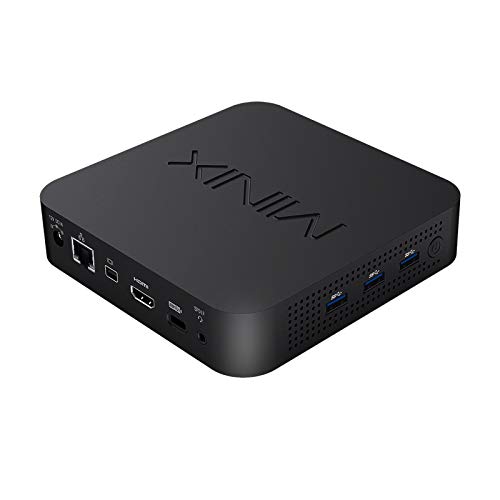
MINIX NEO J50C-8SE, 8GB/240GB Intel Pentium Silver Mini PC with Windows 10 Pro (64-bit) [Dual-Band Wi-Fi/Gigabit Ethernet/4K @ 60Hz/Triple Display/USB-C/Auto Power On/Vesa Mount]
Product Dimensions
5.47 x 5.47 x 1.18 inches
Item Weight
2.55 pounds
Manufacturer
MINIX Technology Limited
Language
English
ASIN
B09B266PFW
Country of Origin
China
Batteries
1 Lithium Metal batteries required. (included)
Is Discontinued By Manufacturer
No
Date First Available
July 22, 2021
Test video – MINIX NEO J50C-8SE, 8GB/240GB Intel Pentium Silver :
https://www.youtube.com/watch?v=yJPiPuobLV4
Product highlights :
[Fully configured], complete system pre-installed with 8GB DDR4 memory, 240 GB SSD internal storage and Windows 10 Pro OS. Simply connect your mouse, keyboard and display, and you’re ready to go.No setup or installation required.
[Brilliant Triple 4K @ 60Hz Display Support] All three display outputs, allowing simultaneous output on up to three screens in superb 4K ultra high definition. [Important Note: The integrated USB-C port only supports video output, not audio output].
[Expanded your RAM, inter storage] The pair of SODIMM slots support up to 16GB of DDR4 memory [Each support 8GB DDR4] The 2280 M.2 slot [SATA 6.0Gbps] ,support to storage expansion up to 1TB.
[Different from NEO J50C-4 Max] NEO J50C-8SE everything is same as NEO J50C-4 Max, only the CPU is different. NEO J50C-8SE with Intel Celeron J4125, NEO J50C-4 Max Intel Pentium Silver J5005 processor.
[Ideal for Commercial and Industrial Applications.] Built in accordance to the most stringent industrial standards, NEO J50C-8SE is highly reliable throughout periods of continuous 24/7 operation even under the most strenuous conditions.Strikes the perfect balance between size and power, providing the functionality of a desktop computer in a sleek, super compact enclosure.
➕ What is the price of MINIX NEO J50C-8SE, 8GB/240GB Intel Pentium Silver in Saudi Arabia ?
The price of MINIX NEO J50C-8SE, 8GB/240GB Intel Pentium Silver in-store is 1090 SAR VAT.
➕ When MINIX NEO J50C-8SE, 8GB/240GB Intel Pentium Silver was released ?
The release date was July 22, 2021.
➕ What is the price of MINIX NEO J50C-8SE, 8GB/240GB Intel Pentium Silver cheap used ?
The price of MINIX NEO J50C-8SE, 8GB/240GB Intel Pentium Silver used is 760 SAR VAT.
➕ What are the main characteristics of MINIX NEO J50C-8SE, 8GB/240GB Intel Pentium Silver ?
Special specifications :
[Fully configured], complete system pre-installed with 8GB DDR4 memory, 240 GB SSD internal storage and Windows 10 Pro OS. Simply connect your mouse, keyboard and display, and you’re ready to go.No setup or installation required.
➕ Is it interesting to buy this product ?
The best people who can answer you are customers who have already bought and tested this product (See Customer Reviews). This product is rated 4.3 / 5 on Amazon.
➕ Where to buy MINIX NEO J50C-8SE, 8GB/240GB Intel Pentium Silver in Saudi Arabia ?
Check the duration of the warranty and also the faults and defects it covers. Is it complete or limited? and What is included in the warranty (parts, repairs or both)?
Shipping :
Is delivery offered? And how long does it take to get delivered (Delivery time)
Proof of purchase :
Does the shop give you an invoice ?
After-sales service :
Do they have an after-sales service to have information about the installation or operation (instructions for use). Also in case of problem, it is the seller who takes charge or you must contact the manufacturer or supplier yourself.
_____________________________
10 reviews for MINIX NEO J50C-8SE, 8GB/240GB Intel Pentium Silver
Rated 3 out of 5
K. N (verified owner)–
Decent System – Warranty Was Problematic – ***Update***
Rated 4 out of 5
L. P (verified owner)–
Decent, neat and quiet, wish it could be more powerful – Spent less than 10 minutes to install an additional 4G memory. Set up/upgrade took more than 30 minutes, but that’s fine. Wifi works out of box (unlike someone mentioned that it would not work until after upgrade). Extremely easy to vesa-mount it on my monitor. The whole setup looks very neat.
Rated 5 out of 5
M. O (verified owner)–
So far, it’s great. – We bought a couple of these for the office. I took the 4gb of RAM from one and added it to the other, and then replaced the missing RAM in the first unit with an 8gb chip. I was worried about being able to run the Windows and Office software and also stream video with just 4gb. So this was preventative. We got the version of the minix with built-in 240GB ssd. The thing is cute, takes about 30sec to open (4 screws after you peel off the little rubber feet) and snaps in place in the included plastic VESA holder that screws to the back of the Benq screen we bought. Something to keep in mind: this is compatible for a 60hz screen, which is fine for us. Also, if you want to clamp it to a monitor, and simultaneously use the monitor’s stand, make sure the monitor’s stand bracket doesn’t use or get in the way of the vesa mount!
Rated 4 out of 5
L. P (verified owner)–
Decent, neat and quiet, wish it could be more powerful – Spent less than 10 minutes to install an additional 4G memory. Set up/upgrade took more than 30 minutes, but that’s fine. Wifi works out of box (unlike someone mentioned that it would not work until after upgrade). Extremely easy to vesa-mount it on my monitor. The whole setup looks very neat.
Rated 4 out of 5
E. E (verified owner)–
Great little PC that needs to be upgraded! – First, try to run all of the firmware and driver updates you can. Out of the box this had near 0 wifi signal when in the same room as my 802.11AX router. Did a driver update on the card (had to manually get it from another computer and place it on USB due to poor connection) and bam, full bars.
Rated 3 out of 5
K. N (verified owner)–
Decent System – Warranty Was Problematic – ***Update***
Rated 5 out of 5
M. C (verified owner)–
Great Product – About to order more
Rated 5 out of 5
M. C (verified owner)–
Great Product – About to order more
Rated 5 out of 5
M. O (verified owner)–
So far, it’s great. – We bought a couple of these for the office. I took the 4gb of RAM from one and added it to the other, and then replaced the missing RAM in the first unit with an 8gb chip. I was worried about being able to run the Windows and Office software and also stream video with just 4gb. So this was preventative. We got the version of the minix with built-in 240GB ssd. The thing is cute, takes about 30sec to open (4 screws after you peel off the little rubber feet) and snaps in place in the included plastic VESA holder that screws to the back of the Benq screen we bought. Something to keep in mind: this is compatible for a 60hz screen, which is fine for us. Also, if you want to clamp it to a monitor, and simultaneously use the monitor’s stand, make sure the monitor’s stand bracket doesn’t use or get in the way of the vesa mount!
Rated 4 out of 5
E. E (verified owner)–
Great little PC that needs to be upgraded! – First, try to run all of the firmware and driver updates you can. Out of the box this had near 0 wifi signal when in the same room as my 802.11AX router. Did a driver update on the card (had to manually get it from another computer and place it on USB due to poor connection) and bam, full bars.


K. N (verified owner) –
Decent System – Warranty Was Problematic – ***Update***
L. P (verified owner) –
Decent, neat and quiet, wish it could be more powerful – Spent less than 10 minutes to install an additional 4G memory. Set up/upgrade took more than 30 minutes, but that’s fine. Wifi works out of box (unlike someone mentioned that it would not work until after upgrade). Extremely easy to vesa-mount it on my monitor. The whole setup looks very neat.
M. O (verified owner) –
So far, it’s great. – We bought a couple of these for the office. I took the 4gb of RAM from one and added it to the other, and then replaced the missing RAM in the first unit with an 8gb chip. I was worried about being able to run the Windows and Office software and also stream video with just 4gb. So this was preventative. We got the version of the minix with built-in 240GB ssd. The thing is cute, takes about 30sec to open (4 screws after you peel off the little rubber feet) and snaps in place in the included plastic VESA holder that screws to the back of the Benq screen we bought. Something to keep in mind: this is compatible for a 60hz screen, which is fine for us. Also, if you want to clamp it to a monitor, and simultaneously use the monitor’s stand, make sure the monitor’s stand bracket doesn’t use or get in the way of the vesa mount!
L. P (verified owner) –
Decent, neat and quiet, wish it could be more powerful – Spent less than 10 minutes to install an additional 4G memory. Set up/upgrade took more than 30 minutes, but that’s fine. Wifi works out of box (unlike someone mentioned that it would not work until after upgrade). Extremely easy to vesa-mount it on my monitor. The whole setup looks very neat.
E. E (verified owner) –
Great little PC that needs to be upgraded! – First, try to run all of the firmware and driver updates you can. Out of the box this had near 0 wifi signal when in the same room as my 802.11AX router. Did a driver update on the card (had to manually get it from another computer and place it on USB due to poor connection) and bam, full bars.
K. N (verified owner) –
Decent System – Warranty Was Problematic – ***Update***
M. C (verified owner) –
Great Product – About to order more
M. C (verified owner) –
Great Product – About to order more
M. O (verified owner) –
So far, it’s great. – We bought a couple of these for the office. I took the 4gb of RAM from one and added it to the other, and then replaced the missing RAM in the first unit with an 8gb chip. I was worried about being able to run the Windows and Office software and also stream video with just 4gb. So this was preventative. We got the version of the minix with built-in 240GB ssd. The thing is cute, takes about 30sec to open (4 screws after you peel off the little rubber feet) and snaps in place in the included plastic VESA holder that screws to the back of the Benq screen we bought. Something to keep in mind: this is compatible for a 60hz screen, which is fine for us. Also, if you want to clamp it to a monitor, and simultaneously use the monitor’s stand, make sure the monitor’s stand bracket doesn’t use or get in the way of the vesa mount!
E. E (verified owner) –
Great little PC that needs to be upgraded! – First, try to run all of the firmware and driver updates you can. Out of the box this had near 0 wifi signal when in the same room as my 802.11AX router. Did a driver update on the card (had to manually get it from another computer and place it on USB due to poor connection) and bam, full bars.