
Description
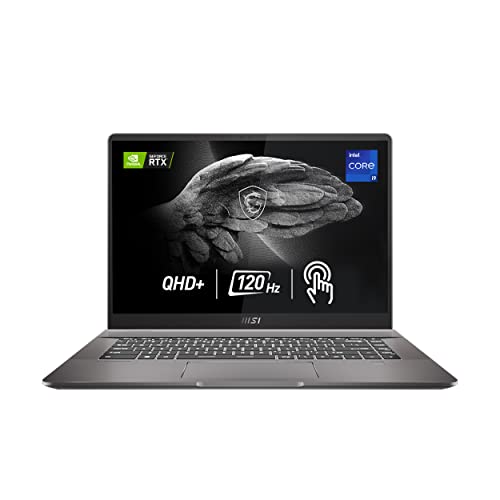
MSI Creator Z16 Professional Laptop: 16″ QHD+ – Features & Prices in Saudi Arabia :
MSI Creator Z16 Professional Laptop: 16″ QHD+ 16:10 120Hz Touch Display, Intel Core i9-11900H, NVIDIA GeForce RTX 3060, 32GB RAM, 2TB NVME SSD, Thunderbolt 4, Win10 PRO, Lunar Gray (A11UET-043)
Standing screen display size
16 Inches
Screen Resolution
2560 x 1600 pixels
Max Screen Resolution
2560 x 1600 Pixels
Processor
2.5 GHz core_i9
RAM
32 GB DDR4
Memory Speed
3200 MHz
Hard Drive
2 TB SSD
Graphics Coprocessor
NVIDIA GeForce RTX 3060
Chipset Brand
NVIDIA
Card Description
Dedicated
Graphics Card Ram Size
6 GB
Wireless Type
Bluetooth
Number of USB 3.0 Ports
4
Hard Drive Interface
USB
Optical Drive Type
No Optical Drive
Power Source
Battery Powered
Batteries
1 Lithium Polymer batteries required. (included)
Test video – MSI Creator Z16 Professional Laptop: 16″ QHD+ :
Product highlights :
Questions & Answers – MSI Creator Z16 Professional Laptop: 16″ QHD+ :
Technical specifications – MSI Creator Z16 Professional Laptop: 16″ QHD+ :
Brand
MSI
Series
Creator Z16 A11UET-043
Screen Size
16 Inches
Color
Black
Hard Disk Size
2 TB
CPU Model
Core i9
Ram Memory Installed Size
32 GB
Operating System
Windows 10 Pro
Card Description
Dedicated
Graphics Coprocessor
NVIDIA GeForce RTX 3060
Purchase advice :
-
Warranty :
Check the duration of the warranty and also the faults and defects it covers. Is it complete or limited? and What is included in the warranty (parts, repairs or both)?
-
Shipping :
Is delivery offered? And how long does it take to get delivered (Delivery time)
-
Proof of purchase :
Does the shop give you an invoice ?
-
After-sales service :
Do they have an after-sales service to have information about the installation or operation (instructions for use). Also in case of problem, it is the seller who takes charge or you must contact the manufacturer or supplier yourself.
_____________________________

G. J (verified owner) –
An amazing laptop – with one big flaw – I bought this laptop for video and photo editing and it has not let me down. It has digested large video projects edited with DaVinci Resolve Studio without a hiccup and has never over heated. It’s thin, light and packs well.
L. E (verified owner) –
Hard to find replacement parts – This laptop has been pretty great, I use it for engineering programs and for some gaming. It’s able to effortlessly run a bunch of games that I play with my Occulus and doesn’t bat an eye for any games I’ve played. At first, it struggled, but then I realized my settings were all wrong, and it has a lot of capabilities to maximize whatever you’re needing to do. This is my main computer and I use it for everything an I’ve not had any issues with it. Heat is probably the only large problem, and that’s only if you do not put on the proper cooling settings. This laptop lasts for a pretty long time on its battery depending on your settings. I challenge you to mess around with all of its features because it does make a large difference on how your experience is because this laptop is great and pretty well worth the money especially after the very old laptop I had, this thing is like a rocket ship. I did do the user benchmark test and its performance is pretty high tier, especially for a laptop. I’ve dropped this laptop and that was pretty scary but not a scratch or ding or any issues which was amazing. I would recommend this laptop for sure. The only downside I can think of is the lack of an Ethernet port or an HDMI port that is a big thing, but I just got a dock for it and for the most part I rarely use it anyways personally.
O. A (verified owner) –
Updated Review – After RMA – So, this laptop is obviously beautiful and it has all the spec we’d like. Sure there’s downsides as every laptop, mainly preferences from person to person but…
L. E (verified owner) –
Hard to find replacement parts – This laptop has been pretty great, I use it for engineering programs and for some gaming. It’s able to effortlessly run a bunch of games that I play with my Occulus and doesn’t bat an eye for any games I’ve played. At first, it struggled, but then I realized my settings were all wrong, and it has a lot of capabilities to maximize whatever you’re needing to do. This is my main computer and I use it for everything an I’ve not had any issues with it. Heat is probably the only large problem, and that’s only if you do not put on the proper cooling settings. This laptop lasts for a pretty long time on its battery depending on your settings. I challenge you to mess around with all of its features because it does make a large difference on how your experience is because this laptop is great and pretty well worth the money especially after the very old laptop I had, this thing is like a rocket ship. I did do the user benchmark test and its performance is pretty high tier, especially for a laptop. I’ve dropped this laptop and that was pretty scary but not a scratch or ding or any issues which was amazing. I would recommend this laptop for sure. The only downside I can think of is the lack of an Ethernet port or an HDMI port that is a big thing, but I just got a dock for it and for the most part I rarely use it anyways personally.
O. A (verified owner) –
Updated Review – After RMA – So, this laptop is obviously beautiful and it has all the spec we’d like. Sure there’s downsides as every laptop, mainly preferences from person to person but…
L. O (verified owner) –
Extremely high temperatures at medium load – I’m pretty tech savvy, I bought this laptop as a all in 1 investment I have a full desktop setup and this was for free time and at work as I have kids and don’t have time to use my desktop as much. I didn’t have any issues using this laptop up until I put it up to a very minor task (50-60%) CPU usage and I noticed that the spot of the laptop where the heat pipe is located (middle right directly below the screen) was so hot it felt like I touched a almost boiling pot. So I started to investigate and my temperature that day was 188°F I am now running a constant temperature check and I was forced to buy a 3rd party laptop cooler which manages to keep it down to around 170-185°F under high loads. The HUGE issue is I’ve hit temperatures of over 205 F which is definitely not okay for any laptop to be hitting that. If I get that temperature for even just 5 mins a month the life span of this laptop is a year max and for almost $3,000 I would not recommend you get this for anything other than basic office work (Microsoft word, excel) even video editing will put your CPU usage to around 60% on this thing which is normal but not when the temperature starts to hit 170+
T. O (verified owner) –
Very happy with this purchase – This laptop, is light and very ergonomic. I havent had any issues with the heat or noise as reported in some reviews. Yes if the processor really gets busy the fans kick in and the grill between the screen and keypad is way too hot to the touch… But after a month of heavy, graphics work, music, word processing, downloading all at the same time, that only happened once. And again… Not a problem. The keys have a very nice feel and a pleasure the type. Two issues though… When i first got it..
G. J (verified owner) –
An amazing laptop – with one big flaw – I bought this laptop for video and photo editing and it has not let me down. It has digested large video projects edited with DaVinci Resolve Studio without a hiccup and has never over heated. It’s thin, light and packs well.
C. M (verified owner) –
Great laptop but… – I got this because I do a lot of raw photo editing and I do a little gaming. This meets all my needs and more. However, within 3 months one of the USB-C ports stopped working for HDMI. It does fine for USB but that is it.
T. O (verified owner) –
Very happy with this purchase – This laptop, is light and very ergonomic. I havent had any issues with the heat or noise as reported in some reviews. Yes if the processor really gets busy the fans kick in and the grill between the screen and keypad is way too hot to the touch… But after a month of heavy, graphics work, music, word processing, downloading all at the same time, that only happened once. And again… Not a problem. The keys have a very nice feel and a pleasure the type. Two issues though… When i first got it..
C. M (verified owner) –
Great laptop but… – I got this because I do a lot of raw photo editing and I do a little gaming. This meets all my needs and more. However, within 3 months one of the USB-C ports stopped working for HDMI. It does fine for USB but that is it.
L. O (verified owner) –
Extremely high temperatures at medium load – I’m pretty tech savvy, I bought this laptop as a all in 1 investment I have a full desktop setup and this was for free time and at work as I have kids and don’t have time to use my desktop as much. I didn’t have any issues using this laptop up until I put it up to a very minor task (50-60%) CPU usage and I noticed that the spot of the laptop where the heat pipe is located (middle right directly below the screen) was so hot it felt like I touched a almost boiling pot. So I started to investigate and my temperature that day was 188°F I am now running a constant temperature check and I was forced to buy a 3rd party laptop cooler which manages to keep it down to around 170-185°F under high loads. The HUGE issue is I’ve hit temperatures of over 205 F which is definitely not okay for any laptop to be hitting that. If I get that temperature for even just 5 mins a month the life span of this laptop is a year max and for almost $3,000 I would not recommend you get this for anything other than basic office work (Microsoft word, excel) even video editing will put your CPU usage to around 60% on this thing which is normal but not when the temperature starts to hit 170+