N40 Mini PC Fanless Celeron N4020 (up – Features & Prices in Saudi Arabia :
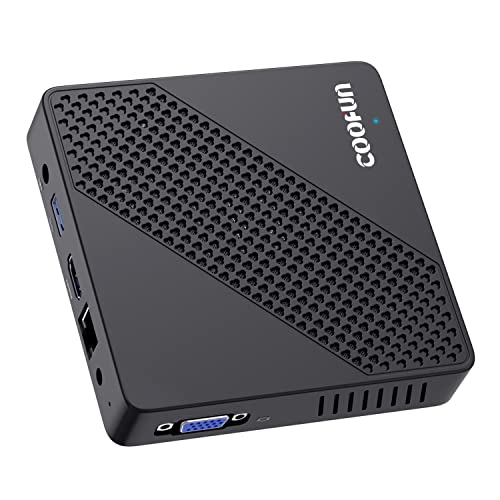
N40 Mini PC Fanless Celeron N4020 (up to 2.8GHz) with Windows 10 4GB DDR4/64GB eMMC Mini Computers HDMI 2.0 and VGA Port 2.4/5.8G WiFi BT4.2 3xUSB3.0 Support Linux,NGFF 2242 SSD Auto Power On Tiny PC
Processor
2.8 GHz celeron_n4020
RAM
4 GB DDR4
Hard Drive
64 GB SSD
Graphics Coprocessor
Intel HD Graphics 400
Chipset Brand
Intel
Card Description
Integrated
Graphics Card Ram Size
4 GB
Wireless Type
802.11ac
Number of USB 2.0 Ports
2
Processor Count
4
Computer Memory Type
GDDR4
Hard Drive Interface
USB 3.0
Hard Drive Rotational Speed
7200
Test video – N40 Mini PC Fanless Celeron N4020 (up :
Product highlights :
【Stable&Faster Performance】Built-in 4GB DDR4 /64GB eMMC, Celeron Processor N4020,up to 2.80GHz,running faster and more stable.
【Portable and Silent】 Equipped with a mounting bracket can be easily fixed to the back of the monitor and space saving.The fanless design with 6w SDP come trues the electricity bills saving and zero noise.
【Dual screen HD display】 Integrated UHD Graphics 600 supports 2x monitors 4K@60Hz using HDMI and VGA ports. It’s ideal for multitasking, home theater, office working, digital Security and surveillance, digital signage, media center,conference room etc.
【Full Function】 Support 2.4G/5.8G Band WiFi 4.2 and HDMI 2.0 &VGA ports for dual screen.With 3x usb 3.0 ports and SD card slot,M.2 2242 NGFF SSD port,it can expand the storage easily and works like as a desktop computer.
【Package】3x USB 3.0 ports,1x RJ45,1x HDMI,1x VGA,1x mounting bracket,1x power adapter and 1x HDMI cable. COOFUN 7/24 Care +
Questions & Answers – N40 Mini PC Fanless Celeron N4020 (up :
➕ What is the price of N40 Mini PC Fanless Celeron N4020 (up in Saudi Arabia ?
The price of N40 Mini PC Fanless Celeron N4020 (up in-store is 480 SAR VAT.
➕ When N40 Mini PC Fanless Celeron N4020 (up was released ?
The release date was .
➕ What is the price of N40 Mini PC Fanless Celeron N4020 (up cheap used ?
The price of N40 Mini PC Fanless Celeron N4020 (up used is 330 SAR VAT.
➕ What are the main characteristics of N40 Mini PC Fanless Celeron N4020 (up ?
Special specifications :
【Stable&Faster Performance】Built-in 4GB DDR4 /64GB eMMC, Celeron Processor N4020,up to 2.80GHz,running faster and more stable.
➕ Is it interesting to buy this product ?
The best people who can answer you are customers who have already bought and tested this product (See Customer Reviews). This product is rated 4.1 / 5 on Amazon.
➕ Where to buy N40 Mini PC Fanless Celeron N4020 (up in Saudi Arabia ?
Check the duration of the warranty and also the faults and defects it covers. Is it complete or limited? and What is included in the warranty (parts, repairs or both)?
Shipping :
Is delivery offered? And how long does it take to get delivered (Delivery time)
Proof of purchase :
Does the shop give you an invoice ?
After-sales service :
Do they have an after-sales service to have information about the installation or operation (instructions for use). Also in case of problem, it is the seller who takes charge or you must contact the manufacturer or supplier yourself.
_____________________________
10 reviews for N40 Mini PC Fanless Celeron N4020 (up
Rated 5 out of 5
O. L (verified owner)–
Has its quirks (but it does work) – The answer is YES – this is a legit Windows 10 Pro PC for $100-something dollars. And YES it does work well given the price point… a family member of mine has a PC that is about 7 years old and this thing blows it away in terms of speed and reliability. That’s because this thing is completely solid state – no moving parts whatsoever.
Rated 4 out of 5
E. D (verified owner)–
Wrong Windows flavor is advertized. – The Windows version which comes with the device is Windows 10 Home, not the Windows 10 Pro.
Rated 4 out of 5
A. T (verified owner)–
Need Linux? Put Debian 11 on it, not Ubuntu, not Manjaro – Nice little very quiet box. Comes up in Win10, but a version that demands an email and/or phone number to create an account to use it. Upon seeing that, I rebooted into an Ubuntu 22.04 installer (use F7 at power-on to get the boot device selector menu). 22.04 failed to come up, in regular or limited graphics mode. So I tried Ubuntu 20.04. It did better than 22.04, but still failed in both modes. Then I tried Manjaro with XFCE, that came up fine, but any time the screen blanked, the machine hung. Then I tried Debian 11 with KDE. Flawless. Runs very well. I recommend this device if you love Windows and want to give MSFT all that data, or if you like Debian (it is the foundation of Ubuntu after all).
Rated 4 out of 5
I. E (verified owner)–
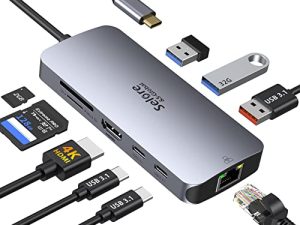
Typical Chinese Knockoff – Hey, you pay barely $100, you’re not going to get top notch hardware/software. However, it is doing exactly what my wife needs for casual Internet use and lite office app activities. It could definitely do with a few more USB ports but I’ve silver that with a cheap hub. I’m not entirely sure the Windows pro version is completely legal but the Microsoft site accepts the license and provides all updates and support so guess we’re ok. Can’t beat the price and value!
Rated 4 out of 5
M. K (verified owner)–
Update – 2nd Update:
Rated 4 out of 5
M. K (verified owner)–
Update – 2nd Update:
Rated 5 out of 5
O. L (verified owner)–
Has its quirks (but it does work) – The answer is YES – this is a legit Windows 10 Pro PC for $100-something dollars. And YES it does work well given the price point… a family member of mine has a PC that is about 7 years old and this thing blows it away in terms of speed and reliability. That’s because this thing is completely solid state – no moving parts whatsoever.
Rated 4 out of 5
I. E (verified owner)–
Typical Chinese Knockoff – Hey, you pay barely $100, you’re not going to get top notch hardware/software. However, it is doing exactly what my wife needs for casual Internet use and lite office app activities. It could definitely do with a few more USB ports but I’ve silver that with a cheap hub. I’m not entirely sure the Windows pro version is completely legal but the Microsoft site accepts the license and provides all updates and support so guess we’re ok. Can’t beat the price and value!
Rated 4 out of 5
A. T (verified owner)–
Need Linux? Put Debian 11 on it, not Ubuntu, not Manjaro – Nice little very quiet box. Comes up in Win10, but a version that demands an email and/or phone number to create an account to use it. Upon seeing that, I rebooted into an Ubuntu 22.04 installer (use F7 at power-on to get the boot device selector menu). 22.04 failed to come up, in regular or limited graphics mode. So I tried Ubuntu 20.04. It did better than 22.04, but still failed in both modes. Then I tried Manjaro with XFCE, that came up fine, but any time the screen blanked, the machine hung. Then I tried Debian 11 with KDE. Flawless. Runs very well. I recommend this device if you love Windows and want to give MSFT all that data, or if you like Debian (it is the foundation of Ubuntu after all).
Rated 4 out of 5
E. D (verified owner)–
Wrong Windows flavor is advertized. – The Windows version which comes with the device is Windows 10 Home, not the Windows 10 Pro.



O. L (verified owner) –
Has its quirks (but it does work) – The answer is YES – this is a legit Windows 10 Pro PC for $100-something dollars. And YES it does work well given the price point… a family member of mine has a PC that is about 7 years old and this thing blows it away in terms of speed and reliability. That’s because this thing is completely solid state – no moving parts whatsoever.
E. D (verified owner) –
Wrong Windows flavor is advertized. – The Windows version which comes with the device is Windows 10 Home, not the Windows 10 Pro.
A. T (verified owner) –
Need Linux? Put Debian 11 on it, not Ubuntu, not Manjaro – Nice little very quiet box. Comes up in Win10, but a version that demands an email and/or phone number to create an account to use it. Upon seeing that, I rebooted into an Ubuntu 22.04 installer (use F7 at power-on to get the boot device selector menu). 22.04 failed to come up, in regular or limited graphics mode. So I tried Ubuntu 20.04. It did better than 22.04, but still failed in both modes. Then I tried Manjaro with XFCE, that came up fine, but any time the screen blanked, the machine hung. Then I tried Debian 11 with KDE. Flawless. Runs very well. I recommend this device if you love Windows and want to give MSFT all that data, or if you like Debian (it is the foundation of Ubuntu after all).
I. E (verified owner) –
Typical Chinese Knockoff – Hey, you pay barely $100, you’re not going to get top notch hardware/software. However, it is doing exactly what my wife needs for casual Internet use and lite office app activities. It could definitely do with a few more USB ports but I’ve silver that with a cheap hub. I’m not entirely sure the Windows pro version is completely legal but the Microsoft site accepts the license and provides all updates and support so guess we’re ok. Can’t beat the price and value!
M. K (verified owner) –
Update – 2nd Update:
M. K (verified owner) –
Update – 2nd Update:
O. L (verified owner) –
Has its quirks (but it does work) – The answer is YES – this is a legit Windows 10 Pro PC for $100-something dollars. And YES it does work well given the price point… a family member of mine has a PC that is about 7 years old and this thing blows it away in terms of speed and reliability. That’s because this thing is completely solid state – no moving parts whatsoever.
I. E (verified owner) –
Typical Chinese Knockoff – Hey, you pay barely $100, you’re not going to get top notch hardware/software. However, it is doing exactly what my wife needs for casual Internet use and lite office app activities. It could definitely do with a few more USB ports but I’ve silver that with a cheap hub. I’m not entirely sure the Windows pro version is completely legal but the Microsoft site accepts the license and provides all updates and support so guess we’re ok. Can’t beat the price and value!
A. T (verified owner) –
Need Linux? Put Debian 11 on it, not Ubuntu, not Manjaro – Nice little very quiet box. Comes up in Win10, but a version that demands an email and/or phone number to create an account to use it. Upon seeing that, I rebooted into an Ubuntu 22.04 installer (use F7 at power-on to get the boot device selector menu). 22.04 failed to come up, in regular or limited graphics mode. So I tried Ubuntu 20.04. It did better than 22.04, but still failed in both modes. Then I tried Manjaro with XFCE, that came up fine, but any time the screen blanked, the machine hung. Then I tried Debian 11 with KDE. Flawless. Runs very well. I recommend this device if you love Windows and want to give MSFT all that data, or if you like Debian (it is the foundation of Ubuntu after all).
E. D (verified owner) –
Wrong Windows flavor is advertized. – The Windows version which comes with the device is Windows 10 Home, not the Windows 10 Pro.