Newest 4 Cores 11th Gen Intel N5095 – Features & Prices in Saudi Arabia :
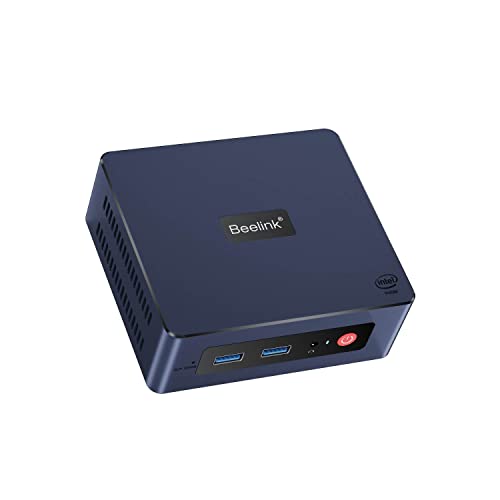
Newest 4 Cores 11th Gen Intel N5095 Beelink Mini-S Mini PC W-11 Pro, 8GB RAM 256GB SSD Gigabit Ethernet, 2.4G/ 5.0G WiFi, BT4.0, Dual HDMI Business Mini Desktop Computer, HTPC
Processor
2.9 GHz celeron
RAM
8 GB DDR4
Hard Drive
256 GB SSD
Chipset Brand
Intel
Wireless Type
2.4 GHz Radio Frequency
Processor Brand
Intel
Processor Count
4
Computer Memory Type
DDR4 SDRAM
Hard Drive Interface
PCIE x 4
Hard Drive Rotational Speed
500.00
Test video – Newest 4 Cores 11th Gen Intel N5095 :
Product highlights :
【Compact size & Incredible Performance】Equipped with 11th Gen Intel N5095 processor. (4C/4T, 4M Cache, 2.0 GHz, up to 2.9 GHz). More powerful than Celeron J4125 and Celeron N3350 and J3455. Beelink Mini-S Mini PC is compact and saves working station space taking it anywhere you go. Fully capable of browsing the internet, using office software, watching 4K videos, and doing some light photo and video editing( PS, PR.), which is a top choice for your OFFICE work.
【UHD Graphics & Dual HDMI Display】Beelink Mini-S Mini Desktop Computer equipped with Intel UHD Graphics supporting 4k video playback, which can be used as a media center to enjoy TV shows. Dual HDMI allows you to connect two monitors at the same time, and multi-tasking.
【High-Speed Network & Storage Expansion Option 】Beelink Mini-S supports 2.4+5G wifi and 1000M LAN ensuring the net speed and performance. Beelink Mini-S Mini Desktop PC has built-in 8GB DDR4 256GB M.2 SSD (Support up to 16GB DDR, Up to 2TB M.2 SATA3 2280 SSD, not included), and 2.5-inch 7mm HDD up to 2TB, not included.
【Rich Interfaces & Accessories】The Mini Computer is designed with 2*HDMI ports, 4*USB 3.0 ports, and 1*Gigabit Ethernet port. It also comes with 1 power adapter, 2*HDMI cables, and 1*VESA Mount. Just add a keyboard, mouse, and up to two displays, you can turn your desk into a workstation, and you can use VESA to mount the small pc on your monitor.
【Reliable Lifetime Service】We have been devoted to the production and R&D of Mini PC. Please feel free to contact us via store customer service for a quick response if you have any questions. We offer lifetime technical support, a 1-year worry-free warranty, and 24 hours customer service.
➕ What is the price of Newest 4 Cores 11th Gen Intel N5095 in Saudi Arabia ?
The price of Newest 4 Cores 11th Gen Intel N5095 in-store is 800 SAR VAT.
➕ When Newest 4 Cores 11th Gen Intel N5095 was released ?
The release date was .
➕ What is the price of Newest 4 Cores 11th Gen Intel N5095 cheap used ?
The price of Newest 4 Cores 11th Gen Intel N5095 used is 560 SAR VAT.
➕ What are the main characteristics of Newest 4 Cores 11th Gen Intel N5095 ?
Special specifications :
【Compact size & Incredible Performance】Equipped with 11th Gen Intel N5095 processor. (4C/4T, 4M Cache, 2.0 GHz, up to 2.9 GHz). More powerful than Celeron J4125 and Celeron N3350 and J3455. Beelink Mini-S Mini PC is compact and saves working station space taking it anywhere you go. Fully capable of browsing the internet, using office software, watching 4K videos, and doing some light photo and video editing( PS, PR.), which is a top choice for your OFFICE work.
➕ Is it interesting to buy this product ?
The best people who can answer you are customers who have already bought and tested this product (See Customer Reviews). This product is rated 4.1 / 5 on Amazon.
➕ Where to buy Newest 4 Cores 11th Gen Intel N5095 in Saudi Arabia ?
1 x User Manual, 1 x Beelink MINI-S, 1 x Power Adapter, 1 x VESA Mount, 2 x HDMI Cables
CPU Model
Celeron
CPU Manufacturer
Intel
CPU Speed
2.9 GHz
RAM Memory Technology
DDR4
Purchase advice :
Warranty :
Check the duration of the warranty and also the faults and defects it covers. Is it complete or limited? and What is included in the warranty (parts, repairs or both)?
Shipping :
Is delivery offered? And how long does it take to get delivered (Delivery time)
Proof of purchase :
Does the shop give you an invoice ?
After-sales service :
Do they have an after-sales service to have information about the installation or operation (instructions for use). Also in case of problem, it is the seller who takes charge or you must contact the manufacturer or supplier yourself.
_____________________________
16 reviews for Newest 4 Cores 11th Gen Intel N5095
Rated 4 out of 5
K. O (verified owner)–
works but quality control is hit and miss – had to return on unit where the lan port stopped working after 3 weeks, another with a defective audio jack and another where the power light is misaligned with the power button. a last one of a better model was working fine but now asks for windows the be activated after 2 and one half months of normal use.
Rated 5 out of 5
N. A (verified owner)–
Good mini-PC for media center – I bought a Samsung smart TV for the hardware specs, but wanted to avoid the spam which Samsung shoves into their smart TVs these days. The Beelink gives me an independent streaming media center so the TV remains offline, and therefore ad-free. The Beelink has onboard wireless, and also has an Ethernet connection. It’s capable of 3840 X 2160 px resolution at 60 Hz, and there is an audio output (3.5 mm TRRS, aka “headphone-and-mic” jack) if you want to run an independent sound system. The HDMI-to-screen worked seamlessly with my 55″ TV. The Beelink makes a very soft whispering sound, but you really have to get close and listen, it’s that quiet. Four USB ports allow wireless mouse and keyboard operation and leave a couple of ports open for viewing photos on a thumb drive or connecting other devices. Changing boot order in the BIOS allows booting from a thumb drive, meaning that the Linux of your choice can be run in live mode, or installed from the thumb drive. (I could not get hot-key access to the BIOS, and had to use the Windows method — search on “using windows recovery to access bios” for more info.) The SSD drive is only 64 GB, so I would not count on storing many large files on the PC itself. Likewise, the 2.4 gHz Celeron is not the speediest chip around, but this is not meant to be a powerhouse machine.
Rated 5 out of 5
E. A (verified owner)–
Bought it for streaming to TV – I got rid of cable and I use this for streaming video from the internet. So far it has worked flawlessly using an HDMI cable. Saves me over $100 a month in cable bills.
Rated 5 out of 5
A. B (verified owner)–
This is the best mini-desktop – It is small and light-weight, which can be held by one hand comfortably. But it has the latest windows, several usb plug-ins both in the front and at the back and one hdmi connection. The power switch turns on a fine and minute blue dot to indicate it is working. And it works so quietly that you won’t get any decibels of sound to your ears at all. And it works steadily with my office suit, which makes me very happy! This is really a best-buy for anyone who just needs to get on line or works with Office software. I should have bought this one last time when I purchased a mini-computer that lasted for only a few weeks and it made continuous humming noise. And it had costed more than this one.
Rated 5 out of 5
Z. S (verified owner)–
this works ok for a jellyfin server – this works ok for a jellyfin server
Rated 3 out of 5
I. A (verified owner)–
ddownload speed is very low – I like the computer but my download speed is between 5 and 10 and my service is 50.
Rated 3 out of 5
A. B (verified owner)–
Jury is still out – Jury is still out so far it will not wake back up from hibernation. Sleep it will. Tech support a little slow but we are working on it. The unit is fast and does a good job steaming…………………..12-15-22 Update You can not wake up from hibernation unless you push power button. Which is hard if you mounted it on back of TV.
Rated 5 out of 5
Z. S (verified owner)–
this works ok for a jellyfin server – this works ok for a jellyfin server
Rated 3 out of 5
A. B (verified owner)–
Jury is still out – Jury is still out so far it will not wake back up from hibernation. Sleep it will. Tech support a little slow but we are working on it. The unit is fast and does a good job steaming…………………..12-15-22 Update You can not wake up from hibernation unless you push power button. Which is hard if you mounted it on back of TV.
Rated 4 out of 5
K. O (verified owner)–
works but quality control is hit and miss – had to return on unit where the lan port stopped working after 3 weeks, another with a defective audio jack and another where the power light is misaligned with the power button. a last one of a better model was working fine but now asks for windows the be activated after 2 and one half months of normal use.
Rated 5 out of 5
N. A (verified owner)–
Good mini-PC for media center – I bought a Samsung smart TV for the hardware specs, but wanted to avoid the spam which Samsung shoves into their smart TVs these days. The Beelink gives me an independent streaming media center so the TV remains offline, and therefore ad-free. The Beelink has onboard wireless, and also has an Ethernet connection. It’s capable of 3840 X 2160 px resolution at 60 Hz, and there is an audio output (3.5 mm TRRS, aka “headphone-and-mic” jack) if you want to run an independent sound system. The HDMI-to-screen worked seamlessly with my 55″ TV. The Beelink makes a very soft whispering sound, but you really have to get close and listen, it’s that quiet. Four USB ports allow wireless mouse and keyboard operation and leave a couple of ports open for viewing photos on a thumb drive or connecting other devices. Changing boot order in the BIOS allows booting from a thumb drive, meaning that the Linux of your choice can be run in live mode, or installed from the thumb drive. (I could not get hot-key access to the BIOS, and had to use the Windows method — search on “using windows recovery to access bios” for more info.) The SSD drive is only 64 GB, so I would not count on storing many large files on the PC itself. Likewise, the 2.4 gHz Celeron is not the speediest chip around, but this is not meant to be a powerhouse machine.
Rated 5 out of 5
A. B (verified owner)–
This is the best mini-desktop – It is small and light-weight, which can be held by one hand comfortably. But it has the latest windows, several usb plug-ins both in the front and at the back and one hdmi connection. The power switch turns on a fine and minute blue dot to indicate it is working. And it works so quietly that you won’t get any decibels of sound to your ears at all. And it works steadily with my office suit, which makes me very happy! This is really a best-buy for anyone who just needs to get on line or works with Office software. I should have bought this one last time when I purchased a mini-computer that lasted for only a few weeks and it made continuous humming noise. And it had costed more than this one.
Rated 5 out of 5
E. A (verified owner)–
Bought it for streaming to TV – I got rid of cable and I use this for streaming video from the internet. So far it has worked flawlessly using an HDMI cable. Saves me over $100 a month in cable bills.
Rated 3 out of 5
I. A (verified owner)–
ddownload speed is very low – I like the computer but my download speed is between 5 and 10 and my service is 50.
Rated 5 out of 5
G. P (verified owner)–
GK35 with Celeron N3350 1.1GHz – 2.4GHz 4GB ram & 64GB storage good setup using Linux Mint and Kodi – It was on sale and I wanted a mini PC for my bedroom tv for video files. I was quite surprised it ran windows 10pro as well as it did with the specs of this mini pc (Celeron N3350 1.1GHz, Burst: up to 2.4GHz 4GB ram & 64GB storage). I turned off Cortona and other background apps and it did well with just about a second delay opening things. Ran all updates the saved a system image incase I wanted W10 later. I then wiped the drive and installed the latest Linux Mint XFCE with Kodi on top. I will say I was having trouble getting OS installed with USB so I plugged in a portable CD/DVD drive and everything went smooth after that. All drivers installed during install except the WI-Fi driver. I ran the driver tool and it found a 3rd party driver (takes a while just let it run). So I downloaded it and wi-fi works good. Security is a question with 3rd party stuff but seems okay so far and I don’t sync it to anything else. I then added a 2tb hard drive with several HD movie files to watch. I am very impressed at the quality of the video and how sharp the picture is without any hiccups. I have not tried the HDMI audio because I have some powered bookshelf speakers plugged in with an 8″ sub and it sounds amazing! When I can afford it I am going to try adding a M2 drive for even more movies. System has a limit of 2tb max per drive. It was a fun project that did not cost a lot and does exactly what I wanted. If you are thinking about doing the same thing, go for it, you will be happy 🙂
Rated 5 out of 5
G. P (verified owner)–
GK35 with Celeron N3350 1.1GHz – 2.4GHz 4GB ram & 64GB storage good setup using Linux Mint and Kodi – It was on sale and I wanted a mini PC for my bedroom tv for video files. I was quite surprised it ran windows 10pro as well as it did with the specs of this mini pc (Celeron N3350 1.1GHz, Burst: up to 2.4GHz 4GB ram & 64GB storage). I turned off Cortona and other background apps and it did well with just about a second delay opening things. Ran all updates the saved a system image incase I wanted W10 later. I then wiped the drive and installed the latest Linux Mint XFCE with Kodi on top. I will say I was having trouble getting OS installed with USB so I plugged in a portable CD/DVD drive and everything went smooth after that. All drivers installed during install except the WI-Fi driver. I ran the driver tool and it found a 3rd party driver (takes a while just let it run). So I downloaded it and wi-fi works good. Security is a question with 3rd party stuff but seems okay so far and I don’t sync it to anything else. I then added a 2tb hard drive with several HD movie files to watch. I am very impressed at the quality of the video and how sharp the picture is without any hiccups. I have not tried the HDMI audio because I have some powered bookshelf speakers plugged in with an 8″ sub and it sounds amazing! When I can afford it I am going to try adding a M2 drive for even more movies. System has a limit of 2tb max per drive. It was a fun project that did not cost a lot and does exactly what I wanted. If you are thinking about doing the same thing, go for it, you will be happy 🙂

K. O (verified owner) –
works but quality control is hit and miss – had to return on unit where the lan port stopped working after 3 weeks, another with a defective audio jack and another where the power light is misaligned with the power button. a last one of a better model was working fine but now asks for windows the be activated after 2 and one half months of normal use.
N. A (verified owner) –
Good mini-PC for media center – I bought a Samsung smart TV for the hardware specs, but wanted to avoid the spam which Samsung shoves into their smart TVs these days. The Beelink gives me an independent streaming media center so the TV remains offline, and therefore ad-free. The Beelink has onboard wireless, and also has an Ethernet connection. It’s capable of 3840 X 2160 px resolution at 60 Hz, and there is an audio output (3.5 mm TRRS, aka “headphone-and-mic” jack) if you want to run an independent sound system. The HDMI-to-screen worked seamlessly with my 55″ TV. The Beelink makes a very soft whispering sound, but you really have to get close and listen, it’s that quiet. Four USB ports allow wireless mouse and keyboard operation and leave a couple of ports open for viewing photos on a thumb drive or connecting other devices. Changing boot order in the BIOS allows booting from a thumb drive, meaning that the Linux of your choice can be run in live mode, or installed from the thumb drive. (I could not get hot-key access to the BIOS, and had to use the Windows method — search on “using windows recovery to access bios” for more info.) The SSD drive is only 64 GB, so I would not count on storing many large files on the PC itself. Likewise, the 2.4 gHz Celeron is not the speediest chip around, but this is not meant to be a powerhouse machine.
E. A (verified owner) –
Bought it for streaming to TV – I got rid of cable and I use this for streaming video from the internet. So far it has worked flawlessly using an HDMI cable. Saves me over $100 a month in cable bills.
A. B (verified owner) –
This is the best mini-desktop – It is small and light-weight, which can be held by one hand comfortably. But it has the latest windows, several usb plug-ins both in the front and at the back and one hdmi connection. The power switch turns on a fine and minute blue dot to indicate it is working. And it works so quietly that you won’t get any decibels of sound to your ears at all. And it works steadily with my office suit, which makes me very happy! This is really a best-buy for anyone who just needs to get on line or works with Office software. I should have bought this one last time when I purchased a mini-computer that lasted for only a few weeks and it made continuous humming noise. And it had costed more than this one.
Z. S (verified owner) –
this works ok for a jellyfin server – this works ok for a jellyfin server
I. A (verified owner) –
ddownload speed is very low – I like the computer but my download speed is between 5 and 10 and my service is 50.
A. B (verified owner) –
Jury is still out – Jury is still out so far it will not wake back up from hibernation. Sleep it will. Tech support a little slow but we are working on it. The unit is fast and does a good job steaming…………………..12-15-22 Update You can not wake up from hibernation unless you push power button. Which is hard if you mounted it on back of TV.
Z. S (verified owner) –
this works ok for a jellyfin server – this works ok for a jellyfin server
A. B (verified owner) –
Jury is still out – Jury is still out so far it will not wake back up from hibernation. Sleep it will. Tech support a little slow but we are working on it. The unit is fast and does a good job steaming…………………..12-15-22 Update You can not wake up from hibernation unless you push power button. Which is hard if you mounted it on back of TV.
K. O (verified owner) –
works but quality control is hit and miss – had to return on unit where the lan port stopped working after 3 weeks, another with a defective audio jack and another where the power light is misaligned with the power button. a last one of a better model was working fine but now asks for windows the be activated after 2 and one half months of normal use.
N. A (verified owner) –
Good mini-PC for media center – I bought a Samsung smart TV for the hardware specs, but wanted to avoid the spam which Samsung shoves into their smart TVs these days. The Beelink gives me an independent streaming media center so the TV remains offline, and therefore ad-free. The Beelink has onboard wireless, and also has an Ethernet connection. It’s capable of 3840 X 2160 px resolution at 60 Hz, and there is an audio output (3.5 mm TRRS, aka “headphone-and-mic” jack) if you want to run an independent sound system. The HDMI-to-screen worked seamlessly with my 55″ TV. The Beelink makes a very soft whispering sound, but you really have to get close and listen, it’s that quiet. Four USB ports allow wireless mouse and keyboard operation and leave a couple of ports open for viewing photos on a thumb drive or connecting other devices. Changing boot order in the BIOS allows booting from a thumb drive, meaning that the Linux of your choice can be run in live mode, or installed from the thumb drive. (I could not get hot-key access to the BIOS, and had to use the Windows method — search on “using windows recovery to access bios” for more info.) The SSD drive is only 64 GB, so I would not count on storing many large files on the PC itself. Likewise, the 2.4 gHz Celeron is not the speediest chip around, but this is not meant to be a powerhouse machine.
A. B (verified owner) –
This is the best mini-desktop – It is small and light-weight, which can be held by one hand comfortably. But it has the latest windows, several usb plug-ins both in the front and at the back and one hdmi connection. The power switch turns on a fine and minute blue dot to indicate it is working. And it works so quietly that you won’t get any decibels of sound to your ears at all. And it works steadily with my office suit, which makes me very happy! This is really a best-buy for anyone who just needs to get on line or works with Office software. I should have bought this one last time when I purchased a mini-computer that lasted for only a few weeks and it made continuous humming noise. And it had costed more than this one.
E. A (verified owner) –
Bought it for streaming to TV – I got rid of cable and I use this for streaming video from the internet. So far it has worked flawlessly using an HDMI cable. Saves me over $100 a month in cable bills.
I. A (verified owner) –
ddownload speed is very low – I like the computer but my download speed is between 5 and 10 and my service is 50.
G. P (verified owner) –
GK35 with Celeron N3350 1.1GHz – 2.4GHz 4GB ram & 64GB storage good setup using Linux Mint and Kodi – It was on sale and I wanted a mini PC for my bedroom tv for video files. I was quite surprised it ran windows 10pro as well as it did with the specs of this mini pc (Celeron N3350 1.1GHz, Burst: up to 2.4GHz 4GB ram & 64GB storage). I turned off Cortona and other background apps and it did well with just about a second delay opening things. Ran all updates the saved a system image incase I wanted W10 later. I then wiped the drive and installed the latest Linux Mint XFCE with Kodi on top. I will say I was having trouble getting OS installed with USB so I plugged in a portable CD/DVD drive and everything went smooth after that. All drivers installed during install except the WI-Fi driver. I ran the driver tool and it found a 3rd party driver (takes a while just let it run). So I downloaded it and wi-fi works good. Security is a question with 3rd party stuff but seems okay so far and I don’t sync it to anything else. I then added a 2tb hard drive with several HD movie files to watch. I am very impressed at the quality of the video and how sharp the picture is without any hiccups. I have not tried the HDMI audio because I have some powered bookshelf speakers plugged in with an 8″ sub and it sounds amazing! When I can afford it I am going to try adding a M2 drive for even more movies. System has a limit of 2tb max per drive. It was a fun project that did not cost a lot and does exactly what I wanted. If you are thinking about doing the same thing, go for it, you will be happy 🙂
G. P (verified owner) –
GK35 with Celeron N3350 1.1GHz – 2.4GHz 4GB ram & 64GB storage good setup using Linux Mint and Kodi – It was on sale and I wanted a mini PC for my bedroom tv for video files. I was quite surprised it ran windows 10pro as well as it did with the specs of this mini pc (Celeron N3350 1.1GHz, Burst: up to 2.4GHz 4GB ram & 64GB storage). I turned off Cortona and other background apps and it did well with just about a second delay opening things. Ran all updates the saved a system image incase I wanted W10 later. I then wiped the drive and installed the latest Linux Mint XFCE with Kodi on top. I will say I was having trouble getting OS installed with USB so I plugged in a portable CD/DVD drive and everything went smooth after that. All drivers installed during install except the WI-Fi driver. I ran the driver tool and it found a 3rd party driver (takes a while just let it run). So I downloaded it and wi-fi works good. Security is a question with 3rd party stuff but seems okay so far and I don’t sync it to anything else. I then added a 2tb hard drive with several HD movie files to watch. I am very impressed at the quality of the video and how sharp the picture is without any hiccups. I have not tried the HDMI audio because I have some powered bookshelf speakers plugged in with an 8″ sub and it sounds amazing! When I can afford it I am going to try adding a M2 drive for even more movies. System has a limit of 2tb max per drive. It was a fun project that did not cost a lot and does exactly what I wanted. If you are thinking about doing the same thing, go for it, you will be happy 🙂