NexiGo N930AF Webcam with Microphone for Desktop, – Features & Prices in Saudi Arabia :
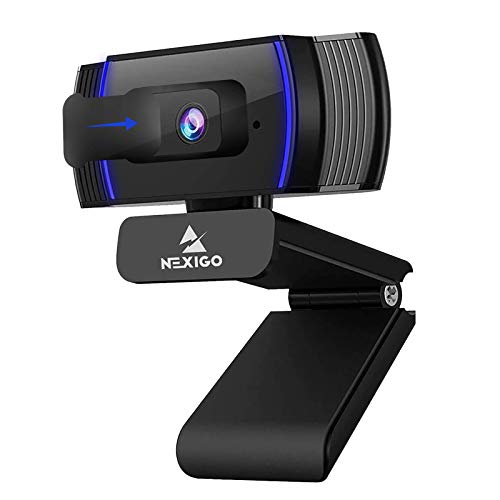
NexiGo N930AF Webcam with Microphone for Desktop, Autofocus, Webcam for Laptop, Computer Camera, 1080p HD USB Web Camera, Compatible with Zoom/Skype/Teams/Webex
Brand Name
NexiGo
Item Weight
6.7 ounces
Product Dimensions
3.94 x 2.24 x 2.01 inches
Item model number
A229AF/N930AF
Color Name
Black
Special Features
Autofocus, Low Light Correction, Software Support, Plug and Play
Test video – NexiGo N930AF Webcam with Microphone for Desktop, :
Product highlights :
【FHD 1080P Autofocus Webcam】 The NexiGo N930AF Webcam features a two MP CMOS with up to 1080p resolution at 30fps. With a 7 cm starting point and amazing range, the autofocus feature is able to ensure your videos are always sharp and crystal clear. The autofocus can also be turned off to manually set your focal point if needed, unlike fixed focus cameras that require you to be within a specific distance.
【Webcam w/ Privacy Cover】 The privacy cover for the NexiGo N930AF covers the lens when it is not in use. This helps prevent criminals from accessing your webcam without your knowledge. It also helps to protect the lens from dirt and debris to ensure your video remains clear for the life of the camera.
【Built-in Microphone & Noise Cancellation】 The built-in noise-canceling microphone reduces ambient noise to enhance the sound quality of your video. Great for Zoom / Facetime / Video Calling / OBS / Twitch / Facebook / YouTube / Conferences / Gaming / Streaming / Recording / Online School.
【USB Webcam Plug and Play】 Plug and play, no additional drivers required. Ready to use in one minute or less with any compatible device. The convenient folding design allows you to easily take it anywhere, and the 6.5 ft (2 Meter) USB cord is long enough for any task. The mounting clip can be flexibly placed on any monitor / laptop / tripod / or any flat surface.
【Widely Compatible and Software Support】The webcam can be compatible with the current popular video/meeting software. Compatible with Windows XP/7/8/10/11, Mac OS 10.6, Linux 2.6.24, Chrome OS 29.0.1547, Ubuntu Version 10.04 or above, and more. The optional NexiGo Webcam Software allows you to customize all available settings of your webcam while using Zoom, Skype, Teams, and other video conference apps. The software supports Windows 7/8/10/11 and MacOS 10.13 or later.
Questions & Answers – NexiGo N930AF Webcam with Microphone for Desktop, :
➕ What is the price of NexiGo N930AF Webcam with Microphone for Desktop, in Saudi Arabia ?
The price of NexiGo N930AF Webcam with Microphone for Desktop, in-store is 150 SAR VAT.
➕ When NexiGo N930AF Webcam with Microphone for Desktop, was released ?
The release date was .
➕ What is the price of NexiGo N930AF Webcam with Microphone for Desktop, cheap used ?
The price of NexiGo N930AF Webcam with Microphone for Desktop, used is 100 SAR VAT.
➕ What are the main characteristics of NexiGo N930AF Webcam with Microphone for Desktop, ?
Special specifications :
【FHD 1080P Autofocus Webcam】 The NexiGo N930AF Webcam features a two MP CMOS with up to 1080p resolution at 30fps. With a 7 cm starting point and amazing range, the autofocus feature is able to ensure your videos are always sharp and crystal clear. The autofocus can also be turned off to manually set your focal point if needed, unlike fixed focus cameras that require you to be within a specific distance.
【Webcam w/ Privacy Cover】 The privacy cover for the NexiGo N930AF covers the lens when it is not in use. This helps prevent criminals from accessing your webcam without your knowledge. It also helps to protect the lens from dirt and debris to ensure your video remains clear for the life of the camera.
➕ Is it interesting to buy this product ?
The best people who can answer you are customers who have already bought and tested this product (See Customer Reviews). This product is rated 4.5 / 5 on Amazon.
➕ Where to buy NexiGo N930AF Webcam with Microphone for Desktop, in Saudi Arabia ?
Technical specifications – NexiGo N930AF Webcam with Microphone for Desktop, :
Brand
NexiGo
Connectivity Technology
USB
Flash Memory Type
Memory Stick
Color
Black
Special Feature
Autofocus, Low Light Correction, Software Support, Plug and Play
Screen Size
6.5 Inches
Photo Sensor Technology
CMOS
Camcorder type
Video Camera
Video Capture Resolution
1080P Autofocus Webcam with Microphone and Privacy Cover
Has Image Stabilization
No
Purchase advice :
Warranty :
Check the duration of the warranty and also the faults and defects it covers. Is it complete or limited? and What is included in the warranty (parts, repairs or both)?
Shipping :
Is delivery offered? And how long does it take to get delivered (Delivery time)
Proof of purchase :
Does the shop give you an invoice ?
After-sales service :
Do they have an after-sales service to have information about the installation or operation (instructions for use). Also in case of problem, it is the seller who takes charge or you must contact the manufacturer or supplier yourself.
_____________________________
16 reviews for NexiGo N930AF Webcam with Microphone for Desktop,
Rated 5 out of 5
Z. J (verified owner)–
I made the decision to buy NexiGo N930AF FHD Webcam… SIMPLY WOW! – Let’s be honest, in these days where we are connected to multiple online calling platforms (Zoom, Teams, Skype, Meet… and many others)…
Rated 4 out of 5
M. O (verified owner)–
Plug and play – Just plugged it in and it worked. I tested it with MS Teams, great picture and people said sound was very good.
Rated 5 out of 5
F. O (verified owner)–
Easy to use. – Plug and play easy. Plug into USB port and it just works windows 10 plug and play easy. No software to install. Built in microphone. Great camera – sharp – focus great – good angle for 2 people at desktop. Sits on top of my desktop monitor. Looks good. No issues.
Rated 5 out of 5
Z. J (verified owner)–
I made the decision to buy NexiGo N930AF FHD Webcam… SIMPLY WOW! – Let’s be honest, in these days where we are connected to multiple online calling platforms (Zoom, Teams, Skype, Meet… and many others)…
Rated 5 out of 5
G. K (verified owner)–
Plug and play with a great picture – I connected this to my Win10 desktop to use for Zoom calls. I just plugged in the USB and BOOM, it was ready to go. It’s my first one so I can’t compare it to what I did not have before, but the picture looks great!
Rated 5 out of 5
Z. D (verified owner)–
Really nice HD webcam for a good price – I had an older Logitech webcam but it was only HD720 and the image was poor quality for Teams or Zoom meetings. I got this over the Logitech because I didn’t like all the extra software that was required to use the latter, or the price. The NexiGo works great, it sits on the monitor firmly, it tilts, and there’s a low-footprint software package available from the support page on the website that lets you adjust what needs adjusting. The printed manual text is way too small, so be sure you go to the website and download the manual.
Rated 5 out of 5
Z. D (verified owner)–
Great camera for those looking to save – Honestly surprised with how well this worked and auto focuses. I use it for streaming purposes and have loved the quality over the course of my time using it. This was a great purchase to save money and get decent results
Rated 4 out of 5
D. B (verified owner)–
It’s Pretty Good – Been using this camera for many months now and I’m overall satisfied with the experience. The picture quality is nice, nicer than many other models out there and it performs decently in low-light applications. The auto focus can be a bit annoying at times but it does a fair job trying to keep you in focus. The microphone is abysmal but that’s what I’d expect out of a webcam. I think it’s a good product for what you are paying and would likely recommend it to someone looking for a webcam that won’t disappoint or break the bank.
Rated 4 out of 5
K. R (verified owner)–
Great camera! – During covid I have been needing to participate in more remote sessions for work. My built in camera was not great and I wanted something a little higher quality that I was able to use when needed.
Rated 5 out of 5
Z. D (verified owner)–
Great camera for those looking to save – Honestly surprised with how well this worked and auto focuses. I use it for streaming purposes and have loved the quality over the course of my time using it. This was a great purchase to save money and get decent results
Rated 5 out of 5
Z. D (verified owner)–
Really nice HD webcam for a good price – I had an older Logitech webcam but it was only HD720 and the image was poor quality for Teams or Zoom meetings. I got this over the Logitech because I didn’t like all the extra software that was required to use the latter, or the price. The NexiGo works great, it sits on the monitor firmly, it tilts, and there’s a low-footprint software package available from the support page on the website that lets you adjust what needs adjusting. The printed manual text is way too small, so be sure you go to the website and download the manual.
Rated 5 out of 5
G. K (verified owner)–
Plug and play with a great picture – I connected this to my Win10 desktop to use for Zoom calls. I just plugged in the USB and BOOM, it was ready to go. It’s my first one so I can’t compare it to what I did not have before, but the picture looks great!
Rated 5 out of 5
F. O (verified owner)–
Easy to use. – Plug and play easy. Plug into USB port and it just works windows 10 plug and play easy. No software to install. Built in microphone. Great camera – sharp – focus great – good angle for 2 people at desktop. Sits on top of my desktop monitor. Looks good. No issues.
Rated 4 out of 5
M. O (verified owner)–
Plug and play – Just plugged it in and it worked. I tested it with MS Teams, great picture and people said sound was very good.
Rated 4 out of 5
K. R (verified owner)–
Great camera! – During covid I have been needing to participate in more remote sessions for work. My built in camera was not great and I wanted something a little higher quality that I was able to use when needed.
Rated 4 out of 5
D. B (verified owner)–
It’s Pretty Good – Been using this camera for many months now and I’m overall satisfied with the experience. The picture quality is nice, nicer than many other models out there and it performs decently in low-light applications. The auto focus can be a bit annoying at times but it does a fair job trying to keep you in focus. The microphone is abysmal but that’s what I’d expect out of a webcam. I think it’s a good product for what you are paying and would likely recommend it to someone looking for a webcam that won’t disappoint or break the bank.

Z. J (verified owner) –
I made the decision to buy NexiGo N930AF FHD Webcam… SIMPLY WOW! – Let’s be honest, in these days where we are connected to multiple online calling platforms (Zoom, Teams, Skype, Meet… and many others)…
M. O (verified owner) –
Plug and play – Just plugged it in and it worked. I tested it with MS Teams, great picture and people said sound was very good.
F. O (verified owner) –
Easy to use. – Plug and play easy. Plug into USB port and it just works windows 10 plug and play easy. No software to install. Built in microphone. Great camera – sharp – focus great – good angle for 2 people at desktop. Sits on top of my desktop monitor. Looks good. No issues.
Z. J (verified owner) –
I made the decision to buy NexiGo N930AF FHD Webcam… SIMPLY WOW! – Let’s be honest, in these days where we are connected to multiple online calling platforms (Zoom, Teams, Skype, Meet… and many others)…
G. K (verified owner) –
Plug and play with a great picture – I connected this to my Win10 desktop to use for Zoom calls. I just plugged in the USB and BOOM, it was ready to go. It’s my first one so I can’t compare it to what I did not have before, but the picture looks great!
Z. D (verified owner) –
Really nice HD webcam for a good price – I had an older Logitech webcam but it was only HD720 and the image was poor quality for Teams or Zoom meetings. I got this over the Logitech because I didn’t like all the extra software that was required to use the latter, or the price. The NexiGo works great, it sits on the monitor firmly, it tilts, and there’s a low-footprint software package available from the support page on the website that lets you adjust what needs adjusting. The printed manual text is way too small, so be sure you go to the website and download the manual.
Z. D (verified owner) –
Great camera for those looking to save – Honestly surprised with how well this worked and auto focuses. I use it for streaming purposes and have loved the quality over the course of my time using it. This was a great purchase to save money and get decent results
D. B (verified owner) –
It’s Pretty Good – Been using this camera for many months now and I’m overall satisfied with the experience. The picture quality is nice, nicer than many other models out there and it performs decently in low-light applications. The auto focus can be a bit annoying at times but it does a fair job trying to keep you in focus. The microphone is abysmal but that’s what I’d expect out of a webcam. I think it’s a good product for what you are paying and would likely recommend it to someone looking for a webcam that won’t disappoint or break the bank.
K. R (verified owner) –
Great camera! – During covid I have been needing to participate in more remote sessions for work. My built in camera was not great and I wanted something a little higher quality that I was able to use when needed.
Z. D (verified owner) –
Great camera for those looking to save – Honestly surprised with how well this worked and auto focuses. I use it for streaming purposes and have loved the quality over the course of my time using it. This was a great purchase to save money and get decent results
Z. D (verified owner) –
Really nice HD webcam for a good price – I had an older Logitech webcam but it was only HD720 and the image was poor quality for Teams or Zoom meetings. I got this over the Logitech because I didn’t like all the extra software that was required to use the latter, or the price. The NexiGo works great, it sits on the monitor firmly, it tilts, and there’s a low-footprint software package available from the support page on the website that lets you adjust what needs adjusting. The printed manual text is way too small, so be sure you go to the website and download the manual.
G. K (verified owner) –
Plug and play with a great picture – I connected this to my Win10 desktop to use for Zoom calls. I just plugged in the USB and BOOM, it was ready to go. It’s my first one so I can’t compare it to what I did not have before, but the picture looks great!
F. O (verified owner) –
Easy to use. – Plug and play easy. Plug into USB port and it just works windows 10 plug and play easy. No software to install. Built in microphone. Great camera – sharp – focus great – good angle for 2 people at desktop. Sits on top of my desktop monitor. Looks good. No issues.
M. O (verified owner) –
Plug and play – Just plugged it in and it worked. I tested it with MS Teams, great picture and people said sound was very good.
K. R (verified owner) –
Great camera! – During covid I have been needing to participate in more remote sessions for work. My built in camera was not great and I wanted something a little higher quality that I was able to use when needed.
D. B (verified owner) –
It’s Pretty Good – Been using this camera for many months now and I’m overall satisfied with the experience. The picture quality is nice, nicer than many other models out there and it performs decently in low-light applications. The auto focus can be a bit annoying at times but it does a fair job trying to keep you in focus. The microphone is abysmal but that’s what I’d expect out of a webcam. I think it’s a good product for what you are paying and would likely recommend it to someone looking for a webcam that won’t disappoint or break the bank.