Razer Kiyo Pro Streaming Webcam: Full HD – Features & Prices in Saudi Arabia :
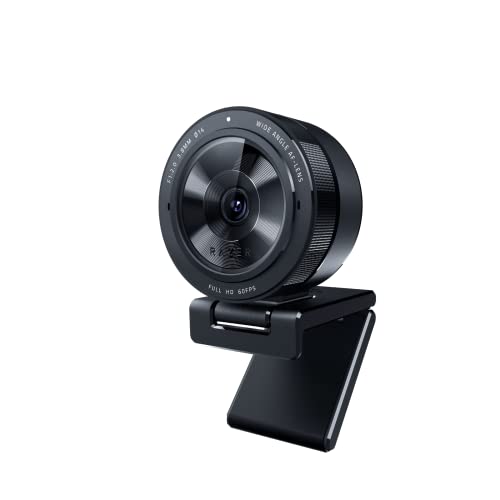
Razer Kiyo Pro Streaming Webcam: Full HD 1080p 60FPS – Adaptive Light Sensor – HDR-Enabled – Wide-Angle Lens with Adjustable FOV – Works with Zoom/Teams/Skype for Conferencing and Video Calling
Brand Name
Razer
Item Weight
6.9 ounces
Product Dimensions
2.71 x 2.71 x 1.91 inches
Country of Origin
China
Item model number
RZ19-03640100-R3U1
Color Name
Model
Special Features
Low Light
Test video – Razer Kiyo Pro Streaming Webcam: Full HD :
Product highlights :
Uncompressed Full HD 1080p Webcam: Experience smooth and vibrant professional quality with the highest fidelity through uncompressed Full HD 1080p 60FPS video – Works great for streaming, gaming, recording, video calling, conferencing, and online school.Field of View 103°, 90°, 80°
Adaptive Light Sensor: Packed with technology that enables the webcam to adapt to the lighting condition for picture-perfect clarity in any environment
Superior Low-Light Performance: Reduces graininess and brings out details to show you in the best light even in darker environments, The Razer Kiyo Pro’s light sensor performs better in more conditions compared to 4K webcams, which rely on professional lighting gear to achieve the same result.
HDR-Enabled: Make your stream pop with a full spectrum of vibrant colors by activating HDR at 30FPS, which ramps up your video’s dynamic range while correcting over and underexposed areas
Wide-Angle Lens with Adjustable FOV: Find the right amount of visual space you need to display on camera with a large aperture, wide-angle lens that can be customized across three field-of-view options using Razer Synapse
Plug and Play: Features a lightning-fast USB 3.0 connection that delivers a powerful 5GB/s camera signal for maximum video performance without any compression
Compatibility: Streamlabs certified and works with popular platforms like OBS, XSplit Twitch, YouTube, Zoom, Microsoft Teams and Skype. Cable Length 1.5 meters braided cable
Questions & Answers – Razer Kiyo Pro Streaming Webcam: Full HD :
➕ What is the price of Razer Kiyo Pro Streaming Webcam: Full HD in Saudi Arabia ?
The price of Razer Kiyo Pro Streaming Webcam: Full HD in-store is 380 SAR VAT.
➕ When Razer Kiyo Pro Streaming Webcam: Full HD was released ?
The release date was .
➕ What is the price of Razer Kiyo Pro Streaming Webcam: Full HD cheap used ?
The price of Razer Kiyo Pro Streaming Webcam: Full HD used is 260 SAR VAT.
➕ What are the main characteristics of Razer Kiyo Pro Streaming Webcam: Full HD ?
Special specifications :
Uncompressed Full HD 1080p Webcam: Experience smooth and vibrant professional quality with the highest fidelity through uncompressed Full HD 1080p 60FPS video – Works great for streaming, gaming, recording, video calling, conferencing, and online school.Field of View 103°, 90°, 80°
Adaptive Light Sensor: Packed with technology that enables the webcam to adapt to the lighting condition for picture-perfect clarity in any environment
➕ Is it interesting to buy this product ?
The best people who can answer you are customers who have already bought and tested this product (See Customer Reviews). This product is rated 4.4 / 5 on Amazon.
➕ Where to buy Razer Kiyo Pro Streaming Webcam: Full HD in Saudi Arabia ?
Technical specifications – Razer Kiyo Pro Streaming Webcam: Full HD :
Brand
Razer
Connectivity Technology
USB
Flash Memory Type
Micro SD
Color
Model
Special Feature
Low Light
Screen Size
2.7 Inches
Photo Sensor Technology
Other
Camcorder type
Video Camera
Model Name
Kiyo Pro
Included Components
Camera, USB Cable
Purchase advice :
Warranty :
Check the duration of the warranty and also the faults and defects it covers. Is it complete or limited? and What is included in the warranty (parts, repairs or both)?
Shipping :
Is delivery offered? And how long does it take to get delivered (Delivery time)
Proof of purchase :
Does the shop give you an invoice ?
After-sales service :
Do they have an after-sales service to have information about the installation or operation (instructions for use). Also in case of problem, it is the seller who takes charge or you must contact the manufacturer or supplier yourself.
_____________________________
10 reviews for Razer Kiyo Pro Streaming Webcam: Full HD
Rated 4 out of 5
I. D (verified owner)–
Great Quality Bad Software – I’ve had Razer Synapse downloaded before and it worked fine for my Viper Ultimate but when using this webcam (Kiyo Pro) at one point it would not recognize my camera. My PC even froze once. If this happens to you, try plugging in the Kiyo Pro in USB 2.0 port. Worked for me. Also discord and OBS recognized the webcam as “USB video device” rather than Razer Kiyo Pro. Go to device manager > click arrow next to Cameras > right click Razer Kiyo Pro > Update drivers > browse my computer for drivers > let me pick from a list of available drivers > click show compatible hardware if it isn’t checked yet > click USB video device > next and save it + restart PC. do this if you care about seeing the name “razer Kiyo pro” for the webcam. I didn’t see any performance/quality difference between each one so just a personal preference. You need synapse to use HDR and different field of views as well. I plan on just keeping my settings to one thing because I’m scared of synapse crashing my pc again lol. But other than the software issues, the quality of the webcam is great. Got it for $100 and I love everything about it. 1080p 60fps, HDR, autofocus, comes with their own virtual ring light for free (not that great but it’s free with the Kiyo pro so I’m not complaining). Would I recommend this webcam for its regular price ($200)? No. But for $99 it’s great.
Rated 5 out of 5
N. M (verified owner)–
Impressive – I have a somewhat elaborate video setup for my laptop, involving a mirrorless camera. However, I wanted a quick and portable option which I could use while working at the office or while using my laptop in another room. This webcam was the answer. The image quality is excellent for a webcam, and the audio from the internal mic is respectable. The camera has an auto-focusing lens, and also different focal lengths to choose from within the configuration software (narrow, medium, and wide). From my understanding (via online research), these focal lengths are determined by the internal hardware (the lens moving), not cropping of the image. I haven’t noticed any drop in resolution when changing this setting, so this seems to be correct. I tend to use the narrow setting (which is still wide enough for me), in order to avoid barrel distortion as much as possible. On the wide setting, the distortion is very noticeable, but that’s the price you pay to have an ultra-wide angle lens. The HDR feature is quite nice to have…it does a good job of balancing the dynamic range of the image. And the low-light performance of the lens is rather impressive. I highly recommend this camera.
Rated 5 out of 5
N. M (verified owner)–
Impressive – I have a somewhat elaborate video setup for my laptop, involving a mirrorless camera. However, I wanted a quick and portable option which I could use while working at the office or while using my laptop in another room. This webcam was the answer. The image quality is excellent for a webcam, and the audio from the internal mic is respectable. The camera has an auto-focusing lens, and also different focal lengths to choose from within the configuration software (narrow, medium, and wide). From my understanding (via online research), these focal lengths are determined by the internal hardware (the lens moving), not cropping of the image. I haven’t noticed any drop in resolution when changing this setting, so this seems to be correct. I tend to use the narrow setting (which is still wide enough for me), in order to avoid barrel distortion as much as possible. On the wide setting, the distortion is very noticeable, but that’s the price you pay to have an ultra-wide angle lens. The HDR feature is quite nice to have…it does a good job of balancing the dynamic range of the image. And the low-light performance of the lens is rather impressive. I highly recommend this camera.
Rated 5 out of 5
L. C (verified owner)–
Works out of the box with Debian Linux – This is about a million times better than the Microsoft HD 3000 it replaced. Works out of the box with linux (Debian Bullseye). Autofocus works great. Image quality is excellent even when lighting is not. Settings are nearly perfect out of the box, but can be easily tweaked with Webcamoid. (Note to Debian users: The version of Webcamoid in the Debian repository seems to be broken. Use the Appimage instead.)
Rated 2 out of 5
M. M (verified owner)–
Good camera, atrocious support from Razer (see details) – I really wanted to like the Razer Kiyo Pro Streaming Webcam, but the experience has really been made up of a few different stories.
Rated 4 out of 5
I. D (verified owner)–
Great Quality Bad Software – I’ve had Razer Synapse downloaded before and it worked fine for my Viper Ultimate but when using this webcam (Kiyo Pro) at one point it would not recognize my camera. My PC even froze once. If this happens to you, try plugging in the Kiyo Pro in USB 2.0 port. Worked for me. Also discord and OBS recognized the webcam as “USB video device” rather than Razer Kiyo Pro. Go to device manager > click arrow next to Cameras > right click Razer Kiyo Pro > Update drivers > browse my computer for drivers > let me pick from a list of available drivers > click show compatible hardware if it isn’t checked yet > click USB video device > next and save it + restart PC. do this if you care about seeing the name “razer Kiyo pro” for the webcam. I didn’t see any performance/quality difference between each one so just a personal preference. You need synapse to use HDR and different field of views as well. I plan on just keeping my settings to one thing because I’m scared of synapse crashing my pc again lol. But other than the software issues, the quality of the webcam is great. Got it for $100 and I love everything about it. 1080p 60fps, HDR, autofocus, comes with their own virtual ring light for free (not that great but it’s free with the Kiyo pro so I’m not complaining). Would I recommend this webcam for its regular price ($200)? No. But for $99 it’s great.
Rated 5 out of 5
L. C (verified owner)–
Works out of the box with Debian Linux – This is about a million times better than the Microsoft HD 3000 it replaced. Works out of the box with linux (Debian Bullseye). Autofocus works great. Image quality is excellent even when lighting is not. Settings are nearly perfect out of the box, but can be easily tweaked with Webcamoid. (Note to Debian users: The version of Webcamoid in the Debian repository seems to be broken. Use the Appimage instead.)
Rated 5 out of 5
T. N (verified owner)–
Exceeded Expectations by a Million! – I bought this Webcam in a Whim. I honestly wasn’t too sure what to expect. I was on the fence about purchasing a 4K Quality Webcam to enhance content that i make but wasn’t sure what to choose from.
Rated 2 out of 5
M. M (verified owner)–
Good camera, atrocious support from Razer (see details) – I really wanted to like the Razer Kiyo Pro Streaming Webcam, but the experience has really been made up of a few different stories.
Rated 5 out of 5
T. N (verified owner)–
Exceeded Expectations by a Million! – I bought this Webcam in a Whim. I honestly wasn’t too sure what to expect. I was on the fence about purchasing a 4K Quality Webcam to enhance content that i make but wasn’t sure what to choose from.



![Syntech USB C to USB Adapter [2 Pack] USB C Male to USB3 Female Adapter Compatible with iMac 2021 iPad Mini/Pro 2021 MacBook Pro 2020 MacBook Air 2020 and Other Type C Devices](/wp-content/uploads/2023/05/41nSZMNmLGL-300x225.jpg)
I. D (verified owner) –
Great Quality Bad Software – I’ve had Razer Synapse downloaded before and it worked fine for my Viper Ultimate but when using this webcam (Kiyo Pro) at one point it would not recognize my camera. My PC even froze once. If this happens to you, try plugging in the Kiyo Pro in USB 2.0 port. Worked for me. Also discord and OBS recognized the webcam as “USB video device” rather than Razer Kiyo Pro. Go to device manager > click arrow next to Cameras > right click Razer Kiyo Pro > Update drivers > browse my computer for drivers > let me pick from a list of available drivers > click show compatible hardware if it isn’t checked yet > click USB video device > next and save it + restart PC. do this if you care about seeing the name “razer Kiyo pro” for the webcam. I didn’t see any performance/quality difference between each one so just a personal preference. You need synapse to use HDR and different field of views as well. I plan on just keeping my settings to one thing because I’m scared of synapse crashing my pc again lol. But other than the software issues, the quality of the webcam is great. Got it for $100 and I love everything about it. 1080p 60fps, HDR, autofocus, comes with their own virtual ring light for free (not that great but it’s free with the Kiyo pro so I’m not complaining). Would I recommend this webcam for its regular price ($200)? No. But for $99 it’s great.
N. M (verified owner) –
Impressive – I have a somewhat elaborate video setup for my laptop, involving a mirrorless camera. However, I wanted a quick and portable option which I could use while working at the office or while using my laptop in another room. This webcam was the answer. The image quality is excellent for a webcam, and the audio from the internal mic is respectable. The camera has an auto-focusing lens, and also different focal lengths to choose from within the configuration software (narrow, medium, and wide). From my understanding (via online research), these focal lengths are determined by the internal hardware (the lens moving), not cropping of the image. I haven’t noticed any drop in resolution when changing this setting, so this seems to be correct. I tend to use the narrow setting (which is still wide enough for me), in order to avoid barrel distortion as much as possible. On the wide setting, the distortion is very noticeable, but that’s the price you pay to have an ultra-wide angle lens. The HDR feature is quite nice to have…it does a good job of balancing the dynamic range of the image. And the low-light performance of the lens is rather impressive. I highly recommend this camera.
N. M (verified owner) –
Impressive – I have a somewhat elaborate video setup for my laptop, involving a mirrorless camera. However, I wanted a quick and portable option which I could use while working at the office or while using my laptop in another room. This webcam was the answer. The image quality is excellent for a webcam, and the audio from the internal mic is respectable. The camera has an auto-focusing lens, and also different focal lengths to choose from within the configuration software (narrow, medium, and wide). From my understanding (via online research), these focal lengths are determined by the internal hardware (the lens moving), not cropping of the image. I haven’t noticed any drop in resolution when changing this setting, so this seems to be correct. I tend to use the narrow setting (which is still wide enough for me), in order to avoid barrel distortion as much as possible. On the wide setting, the distortion is very noticeable, but that’s the price you pay to have an ultra-wide angle lens. The HDR feature is quite nice to have…it does a good job of balancing the dynamic range of the image. And the low-light performance of the lens is rather impressive. I highly recommend this camera.
L. C (verified owner) –
Works out of the box with Debian Linux – This is about a million times better than the Microsoft HD 3000 it replaced. Works out of the box with linux (Debian Bullseye). Autofocus works great. Image quality is excellent even when lighting is not. Settings are nearly perfect out of the box, but can be easily tweaked with Webcamoid. (Note to Debian users: The version of Webcamoid in the Debian repository seems to be broken. Use the Appimage instead.)
M. M (verified owner) –
Good camera, atrocious support from Razer (see details) – I really wanted to like the Razer Kiyo Pro Streaming Webcam, but the experience has really been made up of a few different stories.
I. D (verified owner) –
Great Quality Bad Software – I’ve had Razer Synapse downloaded before and it worked fine for my Viper Ultimate but when using this webcam (Kiyo Pro) at one point it would not recognize my camera. My PC even froze once. If this happens to you, try plugging in the Kiyo Pro in USB 2.0 port. Worked for me. Also discord and OBS recognized the webcam as “USB video device” rather than Razer Kiyo Pro. Go to device manager > click arrow next to Cameras > right click Razer Kiyo Pro > Update drivers > browse my computer for drivers > let me pick from a list of available drivers > click show compatible hardware if it isn’t checked yet > click USB video device > next and save it + restart PC. do this if you care about seeing the name “razer Kiyo pro” for the webcam. I didn’t see any performance/quality difference between each one so just a personal preference. You need synapse to use HDR and different field of views as well. I plan on just keeping my settings to one thing because I’m scared of synapse crashing my pc again lol. But other than the software issues, the quality of the webcam is great. Got it for $100 and I love everything about it. 1080p 60fps, HDR, autofocus, comes with their own virtual ring light for free (not that great but it’s free with the Kiyo pro so I’m not complaining). Would I recommend this webcam for its regular price ($200)? No. But for $99 it’s great.
L. C (verified owner) –
Works out of the box with Debian Linux – This is about a million times better than the Microsoft HD 3000 it replaced. Works out of the box with linux (Debian Bullseye). Autofocus works great. Image quality is excellent even when lighting is not. Settings are nearly perfect out of the box, but can be easily tweaked with Webcamoid. (Note to Debian users: The version of Webcamoid in the Debian repository seems to be broken. Use the Appimage instead.)
T. N (verified owner) –
Exceeded Expectations by a Million! – I bought this Webcam in a Whim. I honestly wasn’t too sure what to expect. I was on the fence about purchasing a 4K Quality Webcam to enhance content that i make but wasn’t sure what to choose from.
M. M (verified owner) –
Good camera, atrocious support from Razer (see details) – I really wanted to like the Razer Kiyo Pro Streaming Webcam, but the experience has really been made up of a few different stories.
T. N (verified owner) –
Exceeded Expectations by a Million! – I bought this Webcam in a Whim. I honestly wasn’t too sure what to expect. I was on the fence about purchasing a 4K Quality Webcam to enhance content that i make but wasn’t sure what to choose from.