
Description
SABRENT USB 3.0 to SATA External Hard – Features & Prices in Saudi Arabia :
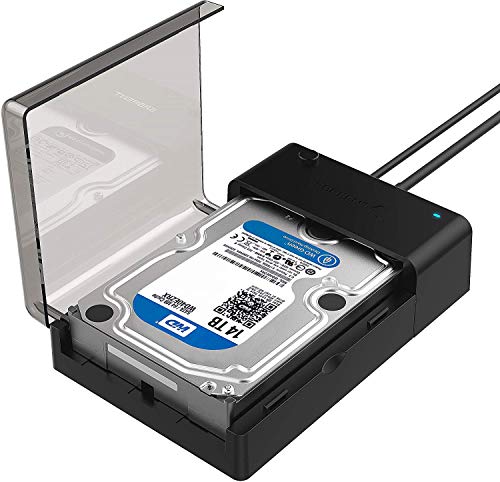
SABRENT USB 3.0 to SATA External Hard Drive Lay-Flat Docking Station for 2.5 or 3.5in HDD, SSD [Support UASP and 20TB] (EC-DFLT)
Hard Drive
Desktop
Series
EC-DFLT
Item model number
EC-DFLT
Hardware Platform
Windows
Item Weight
7.5 ounces
Product Dimensions
7.09 x 1.6 x 4.8 inches
Item Dimensions LxWxH
7.09 x 1.6 x 4.8 inches
Color
Black
Manufacturer
Sabrent
ASIN
B00LS5NFQ2
Country of Origin
China
Is Discontinued By Manufacturer
No
Date First Available
July 14, 2014
Test video – SABRENT USB 3.0 to SATA External Hard :
Product highlights :
Questions & Answers – SABRENT USB 3.0 to SATA External Hard :
Technical specifications – SABRENT USB 3.0 to SATA External Hard :
Hardware Interface
USB 3.2 Gen 1
Brand
SABRENT
Color
Black
Item Dimensions LxWxH
7.09 x 1.6 x 4.8 inches
Hardware Platform
Windows
Purchase advice :
-
Warranty :
Check the duration of the warranty and also the faults and defects it covers. Is it complete or limited? and What is included in the warranty (parts, repairs or both)?
-
Shipping :
Is delivery offered? And how long does it take to get delivered (Delivery time)
-
Proof of purchase :
Does the shop give you an invoice ?
-
After-sales service :
Do they have an after-sales service to have information about the installation or operation (instructions for use). Also in case of problem, it is the seller who takes charge or you must contact the manufacturer or supplier yourself.
_____________________________
F. P (verified owner) –
a very nice metal enclosure for 3.5″ HDD… – It performs admirably well. I put a 8TB Toshiba X300 7200rpm 3.5 HDD in it and did not know what to expect as I have not used a HDD for about 5 years. My backup storage outgrew my ssds and I don’t have the nice paying job I used to have before to get a large ssd. I used usb 3.0 and 3.1 ports and my transfer speeds bounced off of 270MB/s and went as low as ~40MB/s. The 40 MB speed was expected as it was a bunch of really small files where platter drives do not do as well. All in all, I transferred about 2.5TB of data in less than 4 hours. Did the enclosure get hot? Yes which means the metal was doing it’s job. I had already put some rubber bumper feet underneath to make sure there was airflow around the whole enclosure. After I buy all my needs for my steam deck I might buy a heatsink and 5v noctua usb fan to help move the heat faster next time I whip out the 8TB drive. Would I buy it again? I don’t know It has an Initio controller and I don’t know how well Initio does. I actually might buy another if I get another HDD because I need a second HDD for backup to the backup. I have also bought other Sabrent hardware and their quality and prices are middle of the road and sometimes being a top choice.
N. L (verified owner) –
Simple no tool quite high quality enclosure – I am extremely pleased with the thick power cord and the high quality USB3 cable. I have only tried out the 3.5 part of this device, but it is my main purpose for buying it. I may not have used it long, but I have Sabrent USB hubs and now enclosures. If they make it, it is mort likely a sure thing in terms of quality. If I need a computer item and they make it, they will be the manufacturer I select. If you upgrade a drive this is the best way to still have full access to the older drive.I suspect I will be using this for years to come. Just as any USB drive “EJECT IT” at least in Win10. That makes certain all reading and writing is done. Their power light DOES NOT offer any clue if reading or writing is taking place. FOr all USB drives, use software eject, then get the on screen message with tone, then wait a few seconds more before removing it. In this case, the device can simply be powered off by a decent sized power push button. I think it will be the first thing to fail and even then I would not be running to extend my warranty at their quality. You will spend more time uncurling the wires than “installing” the drive. It is just a slide in connection that seems to lock into place and then a lid with a gentle snap to close the enclosure. It is a nice color b;lack and would not be odd in any business environment.
B. F (verified owner) –
Works great with a 16TB drive – though it gets a bit warm – Need a drive to back up the 11TB of my 30TB NAS, Found a reasonably priced 16TB drive that should last me a while since I’ve only added 4TB over the past 3 years. Anyway, no issues recognizing the drive and it seems to work fine. Only concern is that it that the drive can get rather hot over a long backup job. I’m keeping the cover open until it is done.
F. P (verified owner) –
a very nice metal enclosure for 3.5″ HDD… – It performs admirably well. I put a 8TB Toshiba X300 7200rpm 3.5 HDD in it and did not know what to expect as I have not used a HDD for about 5 years. My backup storage outgrew my ssds and I don’t have the nice paying job I used to have before to get a large ssd. I used usb 3.0 and 3.1 ports and my transfer speeds bounced off of 270MB/s and went as low as ~40MB/s. The 40 MB speed was expected as it was a bunch of really small files where platter drives do not do as well. All in all, I transferred about 2.5TB of data in less than 4 hours. Did the enclosure get hot? Yes which means the metal was doing it’s job. I had already put some rubber bumper feet underneath to make sure there was airflow around the whole enclosure. After I buy all my needs for my steam deck I might buy a heatsink and 5v noctua usb fan to help move the heat faster next time I whip out the 8TB drive. Would I buy it again? I don’t know It has an Initio controller and I don’t know how well Initio does. I actually might buy another if I get another HDD because I need a second HDD for backup to the backup. I have also bought other Sabrent hardware and their quality and prices are middle of the road and sometimes being a top choice.
B. E (verified owner) –
Excellent Solution – I had a desktop I was using for file sharing fail, and was about to replace it when my son asked, “Why don’t you just move your file sharing to the cloud”? Hmm…. After two weeks of wrestling with Dropbox, only to find that the client doesn’t work the way any of their documentation says it does, I’ve accomplished that.
B. E (verified owner) –
Excellent Solution – I had a desktop I was using for file sharing fail, and was about to replace it when my son asked, “Why don’t you just move your file sharing to the cloud”? Hmm…. After two weeks of wrestling with Dropbox, only to find that the client doesn’t work the way any of their documentation says it does, I’ve accomplished that.
T. S (verified owner) –
Easy to use – I bought this drive on 11/03/2022. I had no trouble with setting up and install of my 5tb hd,took about 5 min from opening the box to running and downloading files. The operating speed is nice but there are times it lags. Other than that I am quite happy with this purchase. The only thing I can complain about it that get’s hot to the touch. Not enough to burn you, it’s more to the point of a surprise when I went to move it.
E. O (verified owner) –
Simplest external HDD install ever – I have several of my PCs set up to use an external USB HDD as a backup device. A script runs nightly, backs up any changed files at 3am or so and all’s well. Or was, until my wife’s backup drive stopped working. Minor panic attack when we thought she only had copies of the files on the backup drive (and had deleted them from the PC’s HDD). But forge on … I had another similar capacity raw drive, so I swapped that into the external HDD bay, hooked it up and … nada. Three different PCs looked at it and went “What? What’s this supposed to be, fool?”
T. S (verified owner) –
Easy to use – I bought this drive on 11/03/2022. I had no trouble with setting up and install of my 5tb hd,took about 5 min from opening the box to running and downloading files. The operating speed is nice but there are times it lags. Other than that I am quite happy with this purchase. The only thing I can complain about it that get’s hot to the touch. Not enough to burn you, it’s more to the point of a surprise when I went to move it.
N. L (verified owner) –
Simple no tool quite high quality enclosure – I am extremely pleased with the thick power cord and the high quality USB3 cable. I have only tried out the 3.5 part of this device, but it is my main purpose for buying it. I may not have used it long, but I have Sabrent USB hubs and now enclosures. If they make it, it is mort likely a sure thing in terms of quality. If I need a computer item and they make it, they will be the manufacturer I select. If you upgrade a drive this is the best way to still have full access to the older drive.I suspect I will be using this for years to come. Just as any USB drive “EJECT IT” at least in Win10. That makes certain all reading and writing is done. Their power light DOES NOT offer any clue if reading or writing is taking place. FOr all USB drives, use software eject, then get the on screen message with tone, then wait a few seconds more before removing it. In this case, the device can simply be powered off by a decent sized power push button. I think it will be the first thing to fail and even then I would not be running to extend my warranty at their quality. You will spend more time uncurling the wires than “installing” the drive. It is just a slide in connection that seems to lock into place and then a lid with a gentle snap to close the enclosure. It is a nice color b;lack and would not be odd in any business environment.
E. O (verified owner) –
Simplest external HDD install ever – I have several of my PCs set up to use an external USB HDD as a backup device. A script runs nightly, backs up any changed files at 3am or so and all’s well. Or was, until my wife’s backup drive stopped working. Minor panic attack when we thought she only had copies of the files on the backup drive (and had deleted them from the PC’s HDD). But forge on … I had another similar capacity raw drive, so I swapped that into the external HDD bay, hooked it up and … nada. Three different PCs looked at it and went “What? What’s this supposed to be, fool?”
C. P (verified owner) –
Vertical too – Seems like it can be used vertically, too, although it’s billed as a lay-flat model. Only issue with vertical use is there is no way too keep the inserted drive from hinging on drive connector. Unit could use a retaining bar or clip to do that. I just cut off a piece of packing foam and wedged it between the flip-up cover and the drive housing to do so.
B. H (verified owner) –
well, it works – I’ve had good luck with Sabrent enclosures. This one works OK. Something a little funny about this one, though. The manual, included in the box, refers to a power switch. THERE IS NO POWER SWITCH. Not that one really needs one, but cycling power, if needed, would be handier if one had one. If you want a power switch, don’t get this one. I do like the fact that the SATA drive is accessible by just opening a hatch. That is, no unscrewing is needed for disassembly. If you want to swap a SATA drive, you can do it with this enclosure real fast.
B. F (verified owner) –
Works great with a 16TB drive – though it gets a bit warm – Need a drive to back up the 11TB of my 30TB NAS, Found a reasonably priced 16TB drive that should last me a while since I’ve only added 4TB over the past 3 years. Anyway, no issues recognizing the drive and it seems to work fine. Only concern is that it that the drive can get rather hot over a long backup job. I’m keeping the cover open until it is done.
C. P (verified owner) –
Vertical too – Seems like it can be used vertically, too, although it’s billed as a lay-flat model. Only issue with vertical use is there is no way too keep the inserted drive from hinging on drive connector. Unit could use a retaining bar or clip to do that. I just cut off a piece of packing foam and wedged it between the flip-up cover and the drive housing to do so.
B. H (verified owner) –
well, it works – I’ve had good luck with Sabrent enclosures. This one works OK. Something a little funny about this one, though. The manual, included in the box, refers to a power switch. THERE IS NO POWER SWITCH. Not that one really needs one, but cycling power, if needed, would be handier if one had one. If you want a power switch, don’t get this one. I do like the fact that the SATA drive is accessible by just opening a hatch. That is, no unscrewing is needed for disassembly. If you want to swap a SATA drive, you can do it with this enclosure real fast.