
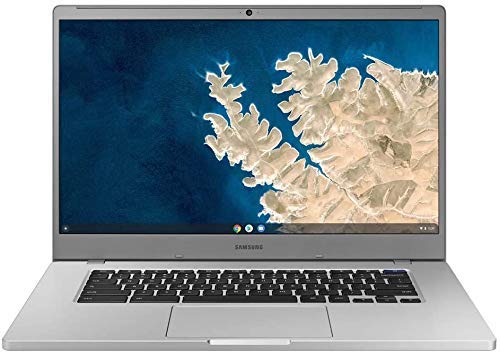
Description
Samsung XE350XBA-K05US Chromebook 4 + Chrome OS – Features & Prices in Saudi Arabia :
Samsung XE350XBA-K05US Chromebook 4 + Chrome OS 15.6″ Full HD Intel Celeron Processor N4000 4GB RAM 128GB SSD, Platinum Titan
Standing screen display size
15.6 Inches
Max Screen Resolution
1920 x 1080 Pixels
Processor
1.1 GHz celeron_n4000
RAM
4 GB LPDDR4
Hard Drive
32 GB SSD
Graphics Coprocessor
Intel Graphics
Chipset Brand
Intel
Card Description
Integrated
Average Battery Life (in hours)
11 Hours
Processor Brand
Intel
Processor Count
2
Computer Memory Type
DDR3 SDRAM
Flash Memory Size
128 GB
Hard Drive Interface
ATA
Power Source
Battery Powered
Batteries
1 Lithium Ion batteries required. (included)
Test video – Samsung XE350XBA-K05US Chromebook 4 + Chrome OS :
Product highlights :
Questions & Answers – Samsung XE350XBA-K05US Chromebook 4 + Chrome OS :
Technical specifications – Samsung XE350XBA-K05US Chromebook 4 + Chrome OS :
Brand
SAMSUNG
Series
Samsung Chromebook
Screen Size
15.6 Inches
Color
Platinum Titan
Hard Disk Size
32 GB
CPU Model
Celeron N4000
Ram Memory Installed Size
4 GB
Operating System
Chrome OS
Special Feature
With a lightning fast Gigabit Wi-Fi connection, stream or download massive files rapidly
Card Description
Integrated
Purchase advice :
-
Warranty :
Check the duration of the warranty and also the faults and defects it covers. Is it complete or limited? and What is included in the warranty (parts, repairs or both)?
-
Shipping :
Is delivery offered? And how long does it take to get delivered (Delivery time)
-
Proof of purchase :
Does the shop give you an invoice ?
-
After-sales service :
Do they have an after-sales service to have information about the installation or operation (instructions for use). Also in case of problem, it is the seller who takes charge or you must contact the manufacturer or supplier yourself.
_____________________________

M. D (verified owner) –
Nice Chromebook – So far is working out fine. Will update review in the near future.
B. F (verified owner) –
Great buy – Seems like an great build and what a buy at $177 … beautiful screen and sound, battery seems very good. Bought to stream and browse the internet.
G. G (verified owner) –
This is not a touch screen – This is not a touch screen. If it is, it doesn’t work . I don’t know how to use it yet & have not run it without the plug. It is nice & big & very clear. Just learning…
H. E (verified owner) –
Pay attention to the reviews about the clicker buttons – I actually really liked this laptop but the clicker buttons in the scroll pad jam randomly and frequently. Think like you’re trying to highlight a section of text and the buttons just don’t work to let you do it and then right click to copy. The hardware is clearly not quality in the scroll pad. The laptop and display were totally fine. I returned my laptop just now because I was in my 30 day window and I’m going to order another now and hope it doesn’t come with the same issue. I’m not the first one to complain about this if you read the other reviews. Also don’t forget to buy the $50 asurion insurance, you’re gonna want it for when this thing breaks in two years because I already feel it in my blood, it’s going to.
A. I (verified owner) –
So far so good – So far so good. Will update later after more use.
P. H (verified owner) –
Works fine but seems slow – If I had to do it again, I would pick something with more / better hardware for speed. And I know that would cost more.
G. G (verified owner) –
This is not a touch screen – This is not a touch screen. If it is, it doesn’t work . I don’t know how to use it yet & have not run it without the plug. It is nice & big & very clear. Just learning…
A. I (verified owner) –
So far so good – So far so good. Will update later after more use.
H. J (verified owner) –
Thumbs halfway up!!! – I was thrilled when I opened the chrome chromebook…it’s sleek with a large screen which I love. My only criticism is NO TOUCH SCREEN…I had a hard time with the pad. Once I got a mouse it worked perfectly.
P. H (verified owner) –
Works fine but seems slow – If I had to do it again, I would pick something with more / better hardware for speed. And I know that would cost more.
H. E (verified owner) –
Pay attention to the reviews about the clicker buttons – I actually really liked this laptop but the clicker buttons in the scroll pad jam randomly and frequently. Think like you’re trying to highlight a section of text and the buttons just don’t work to let you do it and then right click to copy. The hardware is clearly not quality in the scroll pad. The laptop and display were totally fine. I returned my laptop just now because I was in my 30 day window and I’m going to order another now and hope it doesn’t come with the same issue. I’m not the first one to complain about this if you read the other reviews. Also don’t forget to buy the $50 asurion insurance, you’re gonna want it for when this thing breaks in two years because I already feel it in my blood, it’s going to.
B. T (verified owner) –
I got this system to unleash ChromeOS – The system using Linux is fast as the specs on this system are better than the minimum specs needed for a Chromebook. I have without much difficulty, (I’m leaving the Microsoft camp so my experience level with linus is limited) got inkscape, rawtherapee (photo editing), Krita, Hugin with dcraw, pencil2d, kdenlive, LMMS, Audacity, Filezilla up without to much trouble. And it out preforms the desktop which has better specs but slow because of how Windows handles drivers for video, photo, audio, et la.
M. D (verified owner) –
Nice Chromebook – So far is working out fine. Will update review in the near future.
H. J (verified owner) –
Thumbs halfway up!!! – I was thrilled when I opened the chrome chromebook…it’s sleek with a large screen which I love. My only criticism is NO TOUCH SCREEN…I had a hard time with the pad. Once I got a mouse it worked perfectly.
B. F (verified owner) –
Great buy – Seems like an great build and what a buy at $177 … beautiful screen and sound, battery seems very good. Bought to stream and browse the internet.
B. T (verified owner) –
I got this system to unleash ChromeOS – The system using Linux is fast as the specs on this system are better than the minimum specs needed for a Chromebook. I have without much difficulty, (I’m leaving the Microsoft camp so my experience level with linus is limited) got inkscape, rawtherapee (photo editing), Krita, Hugin with dcraw, pencil2d, kdenlive, LMMS, Audacity, Filezilla up without to much trouble. And it out preforms the desktop which has better specs but slow because of how Windows handles drivers for video, photo, audio, et la.